Angular Material M2 → M3: Why the Schematic Isn't Enough
On this page12 sections
Of everything in an Angular 17-to-22 migration, this is the one that ruins schedules.
Not the version bumps. Not the standalone flip. The Material theming migration, which looks like a styling change on the ticket and turns out to be a design project that nobody scoped, nobody QA'd, and nobody wants to sign off on.
If you have arrived here because you ran the migration and your app now looks wrong, skip to the diagnosis section. If you are planning the work, read the whole thing and budget accordingly.
Why this one is different
Every other migration in the Angular 17-to-22 range has a clear pass/fail signal. The build compiles or it does not. The tests go green or they do not. You know where you stand.
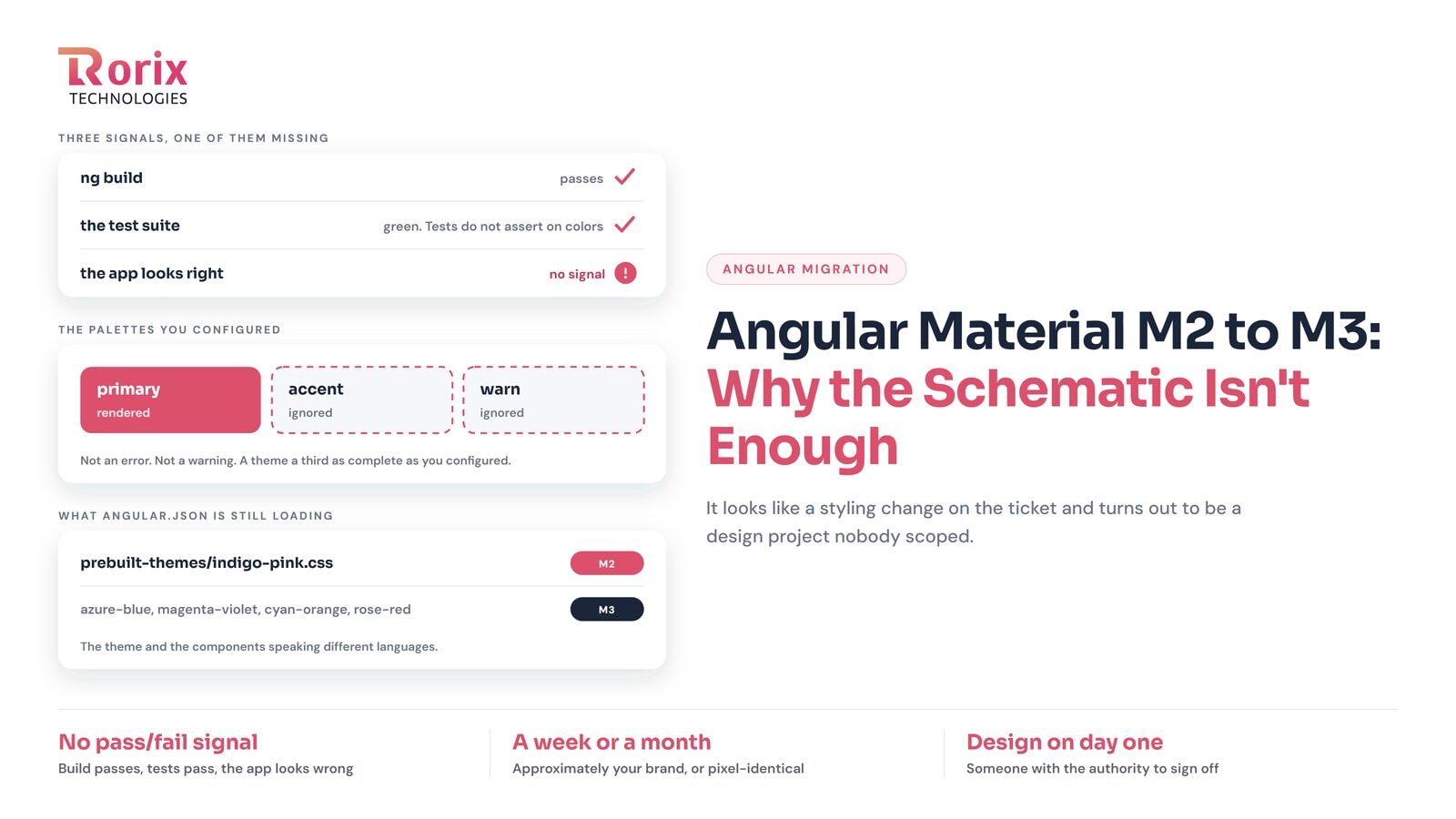
Theming has no such signal. The build succeeds. The tests pass, because your tests do not assert on colours. And the app looks subtly, pervasively wrong in a way that takes a designer to articulate and a sprint to fix.
M2 and M3 are not two versions of the same theming system. M3 is a different model built on design tokens, with different assumptions about colour roles, typography scales, and density. The schematic translates what it can and leaves the rest.
What the community actually reported
I want to be specific here, because "the migration is hard" is a claim anyone can make.
The OWASP Juice Shop maintainers tried and gave up twice. In issue #3271 on their own repo, they document two attempts to let AI agents perform the M2 to M3 migration. Both failed, and both ended with completely broken fonts and colours in the default theme. This is a well-maintained open-source project with a real test suite, not somebody's weekend app.
Prebuilt themes silently do not apply M3. angular/components#29152 covers a case where mat-chip kept its M2 styling after the migration. The cause was that angular.json still referenced indigo-pink.css, an M2 prebuilt theme. The component was doing exactly what it was told. Nothing warned that the theme and the components were now speaking different languages.
The documentation contradicted itself. #30141 and #30266 are developers reporting that custom SCSS theming under M3 was, in their words, a nightmare - and pointing out that the M2-to-M3 migration guide told you to use define-theme while the from-scratch theming guide used mat.theme. Two official documents, two different APIs, no explanation of which applied when.
Accent and warn palettes silently do nothing. #29160 documents a custom M3 theme where only the primary colour rendered. The accent and warn palettes were configured and ignored.
That last one is characteristic of the whole migration. Not an error. Not a warning. Just a theme that is a third as complete as you configured it to be.
Diagnosing a broken theme
If you have run the migration and things look wrong, work through these in order.
1. Check what angular.json is loading
The most common cause of "some components look M3 and some look M2" is a prebuilt M2 theme still referenced in your build config.
"styles": [
  "@angular/material/prebuilt-themes/indigo-pink.css",  // M2 - this is the problem
  "src/styles.scss"
]
M3 prebuilt themes use different names (azure-blue, magenta-violet, cyan-orange, rose-red). If you are on a prebuilt theme, swapping the reference is often the entire fix.
2. Check which theming API your SCSS uses
This is where the documentation conflict bites. There are two ways to define an M3 theme, and mixing them produces confusing results.
mat.define-theme() is what the migration guide steers you toward when converting an existing M2 theme. mat.theme() is the newer, simpler API the from-scratch guide uses.
Pick one and use it consistently across every file that defines theme values. If you have partials that were written at different times against different guides, they will fight each other.
3. Check whether your palettes are actually applied
Given issue #29160, do not assume that configuring accent and warn means they took effect. Render a component that uses each one - a warn-coloured button, an accent-coloured slider - and look at it. If only primary is coming through, you have hit the same problem.
4. Check your custom component themes
If you wrote SCSS that consumed M2 theme maps directly - pulling map.get($theme, primary) or similar - none of that survives. M3's structure is different. Every custom component theme needs rewriting against tokens rather than palette maps.
This is usually the largest single chunk of work, and the one most likely to have been written years ago by someone who has left.
I have worked on large scale project where we have wrapper for each material component still need 3-4 weeks to migrate all this m2 to m3.
5. Check typography and density separately
They migrate independently of colour and they fail independently of colour. An app can have correct colours and wrong type scales. Check both explicitly rather than assuming a visual pass covers everything.
The advice nobody wants to hear
Here is the position I have landed on, and it is the same conclusion the Juice Shop thread reached: do not try to reproduce your M2 look exactly in M3.
You can get close. Getting to pixel-identical requires hand-authoring custom tokens to override M3's defaults back toward M2's values, component by component. It is genuinely possible. It will also consume a sprint, produce a theme file nobody else on your team can maintain, and deliver a result that only you can tell apart from the simpler version.
Accept a theme that is recognisably your brand and structurally M3. Take the small visual differences. Ship it.
The version of this conversation you need to have with a stakeholder goes something like: the framework changed its theming system, we can match the old design approximately for a week of work or exactly for a month, and the exact version will be harder to maintain forever. Most people pick the week once it is framed that way. Almost nobody picks it if you present the migration as purely technical and then surprise them with visual changes at the end.
Have that conversation before you start, not after.
How to scope and run it
Treat it as a separate project from the version upgrade. Do not bundle theming into a version-bump PR. The version bump has a clean pass/fail signal and theming does not, and combining them means the PR sits open for a fortnight while someone argues about a shade of blue.
Get design involved on day one. This is the part teams skip, and it is why the work overruns. You need someone who can look at a screen and say "that is fine" or "that is not," with the authority to make it stick.
Set up visual regression testing first, if you do not have it. Percy, Chromatic, Playwright screenshots, whatever fits. Without it you are relying on people clicking through the app and noticing things, which does not scale past about twenty screens.
Do the highest-traffic screens first and get sign-off on them before touching the rest. If the design direction is wrong, you want to find out on five screens rather than a hundred.
Budget realistically. For an app with a custom theme and custom component themes, I would not scope this at less than a sprint, and I would not be surprised by two.
Is it optional?
Partly, and it is worth being precise about which part.
Keeping @angular/material on a version compatible with your Angular core version is mandatory. Peer dependencies are pinned, and ng update will refuse to proceed otherwise.
Migrating your theme from M2 to M3 is the part with timing flexibility. M2 theming APIs remained available for a considerable stretch after M3 arrived in v18, so you can stay on M2 while moving through several Angular majors.
What you cannot do is stay on M2 forever. And every version you defer it, you are deferring it on a larger codebase with more custom component themes written against an API that is going away.
My recommendation: get to a supported Angular version first, ship that, then do theming as its own scheduled project with design involved. Do not let it block the security work.
The uncomfortable summary
Angular's official documentation presents this migration as a schematic you run. The issue tracker contains developers describing the same migration as a nightmare, maintained open-source projects abandoning it after two attempts, and complaints that the documentation itself contradicted other documentation.
Both things are true. The schematic does real work. It just does not do the work you are actually being asked to deliver, which is an application that looks right.
Plan for the gap.
If you have a themed Material app that has fallen behind and you want a realistic scope, contact us.
Sitting on a system nobody wants to touch?
We rebuild running software without stopping the business that depends on it. Send us the stack and the failure mode you are living with.