
HRMS Cost Breakdown: Complete Pricing Guide (2026)
What does an HRMS really cost in 2026? SaaS vs custom pricing, implementation fees, hidden expenses, and how to judge the ROI before you commit.
On this page41 sections
Key Takeaways: SaaS Per Employee vs a One-Time Custom Build
HRMS pricing depends on deployment model: SaaS runs about $7K-$20K/year for budget tools, $30K-$60K for mid-tier, and $80K-$200K for enterprise at 100 employees, while custom HRMS is a one-time build that pays off over time. Costs scale with features, employee count, and customization.
- SaaS HRMS is priced per employee per month, from roughly $6 (BambooHR) up to $100-$200 (Workday) at enterprise scale.
- For 100+ employees, a custom HRMS typically pays for itself in 12-18 months versus SaaS subscription costs.
- Watch for hidden costs beyond the subscription: implementation, integration, and ongoing fees.
- Compare options on 5-year Total Cost of Ownership and ROI, not just the monthly sticker price.
Why There Is No Single Answer to HRMS Cost
"How much does an HRMS cost?" is the first question every business asks when considering HR automation.
The answer isn't simple: HRMS pricing varies dramatically based on deployment model, features, employee count, and customization needs.
In this guide:
- SaaS vs. Custom HRMS cost comparison
- Implementation and hidden costs
- Per-employee pricing models
- ROI calculations and break-even analysis
- Total Cost of Ownership (TCO) over 5 years
Bottom line: For 100+ employees, custom HRMS typically pays for itself in 12-18 months vs. SaaS subscription costs.
HRMS Pricing Models
1. SaaS HRMS (Subscription Model)
How it works: Monthly/annual subscription per employee
Popular SaaS HRMS:
- BambooHR: $6-$12 per employee/month
- Gusto: $40/month + $6 per employee
- Rippling: $8 per employee/month (minimum $35/month)
- Zenefits: $8-$27 per employee/month
- ADP Workforce Now: $40-$150 per employee/month
- SAP SuccessFactors: $50-$150 per employee/month (enterprise)
- Workday: Custom pricing (typically $100-$200/employee/month for enterprise)
Pricing Structure:
Base Cost + Per-Employee Fee × Number of Employees
Example: 100 Employees
- BambooHR: $6 × 100 = $600/month = $7,200/year
- ADP Workforce Now: $100 × 100 = $10,000/month = $120,000/year
- SAP SuccessFactors: $100 × 100 = $10,000/month = $120,000/year
Year 1 Total Cost (100 employees):
- Budget HRMS: $7K-$20K
- Mid-tier HRMS: $30K-$60K
- Enterprise HRMS: $80K-$200K
2. Custom HRMS (One-Time + Maintenance)
How it works: One-time development cost + annual maintenance
Cost Components:
Development (One-Time):
- Basic HRMS (Core HR + Payroll): $40K-$80K
- Standard HRMS (+ Leave, Attendance, Performance): $80K-$120K
- Advanced HRMS (+ Recruitment, LMS, Analytics): $120K-$200K
- Enterprise HRMS (Full suite + Advanced integrations): $200K-$350K
Annual Maintenance:
- $10K-$20K/year for basic systems
- $20K-$40K/year for enterprise systems
Year 1 Total Cost:
- Basic: $50K-$100K
- Standard: $100K-$140K
- Advanced: $140K-$240K
Ongoing Annual Cost:
- $10K-$40K (vs. $60K-$200K for SaaS)
Detailed Cost Breakdown
SaaS HRMS Total Cost of Ownership (5 Years)
Scenario: 100 Employees, Mid-Tier HRMS at $50/employee/month
Annual Costs:
- Subscription: $50 × 100 × 12 = $60,000
- Implementation (Year 1 only): $15,000
- Training (Year 1 only): $5,000
- Data migration (Year 1 only): $3,000
- Ongoing training: $2,000/year
5-Year Total:
- Year 1: $60K + $15K + $5K + $3K + $2K = $85,000
- Years 2-5: $60K + $2K = $62,000/year × 4 = $248,000
- Total: $333,000
Custom HRMS Total Cost of Ownership (5 Years)
Scenario: 100 Employees, Standard Custom HRMS
One-Time Costs:
- Development: $100,000
- Customization: $20,000
- Data migration: $5,000
- Training: $7,000
- Total Upfront: $132,000
Annual Costs:
- Maintenance & Support: $15,000
- Hosting (cloud): $3,000
- Ongoing training: $2,000
- Annual: $20,000
5-Year Total:
- Year 1: $132,000 + $20,000 = $152,000
- Years 2-5: $20,000/year × 4 = $80,000
- Total: $232,000
Savings vs. SaaS: $101,000 over 5 years
Cost Comparison by Employee Count
50 Employees
SaaS ($50/employee/month):
- Year 1: $30K subscription + $15K implementation = $45K
- Annual ongoing: $30K
- 5-Year Total: $165K
Custom HRMS:
- Year 1: $80K development + $15K maintenance = $95K
- Annual ongoing: $15K
- 5-Year Total: $155K
Break-Even: 20 months
100 Employees
SaaS:
- 5-Year Total: $333K
Custom:
- 5-Year Total: $232K
Savings: $101K
Break-Even: 18 months
250 Employees
SaaS:
- Year 1: $150K subscription + $25K implementation = $175K
- 5-Year Total: $807K
Custom:
- Year 1: $140K development + $25K maintenance = $165K
- 5-Year Total: $365K
Savings: $442K
Break-Even: 14 months
500 Employees
SaaS:
- Year 1: $300K subscription + $40K implementation = $340K
- 5-Year Total: $1.56M
Custom:
- Year 1: $200K development + $35K maintenance = $235K
- 5-Year Total: $575K
Savings: $985K
Break-Even: 10 months
Implementation Costs
SaaS HRMS Implementation
Services Included:
- System configuration: $5K-$15K
- Data migration: $2K-$8K
- Integration setup: $3K-$10K
- Training: $3K-$10K
- Go-live support: $2K-$5K
Total: $15K-$48K (typically 15-30% of annual subscription)
Timeline: 4-8 weeks
Custom HRMS Implementation
Included in Development Cost:
- Requirements gathering
- System design
- Development and customization
- Data migration
- Integration development
- Testing
- Training
- Go-live support
Additional Costs (if needed):
- Custom reports: $2K-$8K
- Advanced integrations: $5K-$15K
- Mobile app: $15K-$40K
Timeline: 12-16 weeks
Hidden Costs to Consider
SaaS HRMS Hidden Costs
1. Per-Feature Pricing: Many SaaS HRMS charge extra for:
- Advanced reporting: +$5-$10/employee/month
- Performance management: +$3-$8/employee/month
- Recruitment module: +$5-$15/employee/month
- Learning management: +$5-$10/employee/month
- Advanced analytics: +$10-$20/employee/month
Impact: Can double your subscription cost
Example:
- Base: $50/employee/month
- Add performance, recruitment, LMS: +$20/employee/month
- Total: $70/employee/month (40% increase)
2. User Overage Fees:
- You pay for 100 employees
- Hire 10 more mid-year
- Get charged $600-$1,200 extra for partial year
3. Data Export Fees:
- Want to switch vendors?
- Some charge $5K-$20K for data export
- Others limit export formats
4. Integration Costs:
- API access: +$100-$500/month
- Pre-built integrations: $50-$200/month each
- Custom integrations: $5K-$20K one-time
5. Support Tiers:
- Basic support: Email only (24-48 hour response)
- Standard support: +$500-$2,000/month (phone support)
- Premium support: +$2,000-$5,000/month (dedicated account manager)
6. Annual Price Increases:
- SaaS vendors typically increase prices 5-10% annually
- No control over pricing
- Year 5 cost can be 50% higher than Year 1
Custom HRMS Hidden Costs
1. Server/Hosting (if on-premise):
- Server hardware: $5K-$20K one-time
- Backup systems: $2K-$8K
- Ongoing maintenance: $3K-$8K/year
Alternative: Cloud hosting (AWS, Azure) at $200-$500/month
2. In-House IT Support (if needed):
- Dedicated IT person: $50K-$80K/year salary
- Or outsourced support: $10K-$20K/year
Note: Most custom HRMS include vendor support in maintenance fee
3. Future Enhancements:
- New features: $5K-$20K per major feature
- Compliance updates: Usually included in maintenance
- Scaling for growth: Minimal (already built for scalability)
ROI Calculation
Direct Cost Savings
Payroll Processing:
- Manual time: 40 hours/month
- Hourly rate: $30
- Annual cost: $14,400
- HRMS reduction: 80%
- Annual saving: $11,520
Leave Management:
- Manual time: 10 hours/week
- Hourly rate: $25
- Annual cost: $13,000
- HRMS reduction: 90%
- Annual saving: $11,700
Reporting:
- Manual time: 20 hours/month
- Hourly rate: $30
- Annual cost: $7,200
- HRMS reduction: 95%
- Annual saving: $6,840
Total Direct Savings: $30,060/year
Indirect Cost Savings
Compliance Penalties Avoided:
- Average penalties: $10K-$50K/year
- HRMS prevention: 90%
- Saving: $9K-$45K/year
Turnover Reduction:
- Current turnover: 20%
- 100 employees × 20% = 20 replacements
- Cost per replacement: $20K
- Total turnover cost: $400K/year
- HRMS improves engagement, reduces turnover to 12%
- New turnover cost: $240K/year
- Saving: $160K/year
Error Correction:
- Payroll errors: 5% of paychecks
- 100 employees × 12 months = 1,200 paychecks
- Errors: 60 paychecks
- Time to fix: 2 hours per error
- Cost: 60 × 2 × $30 = $3,600/year
- HRMS reduction: 95%
- Saving: $3,420/year
Total Annual ROI
Scenario: 100 Employees, Custom HRMS
Annual Savings:
- Direct savings: $30,060
- Compliance: $27,000 (conservative)
- Turnover reduction: $160,000
- Error correction: $3,420
- Total: $220,480
Annual Cost:
- Custom HRMS maintenance: $15,000
- Net Benefit: $205,480
One-Time Investment: $100,000
Payback Period: 100K / 205K = 5.8 months
5-Year ROI: ($1,027,400 savings - $232,000 cost) / $232,000 = 343%
When to Choose SaaS vs. Custom
Choose SaaS HRMS If:
Less than 50 employees
- Per-employee cost is reasonable
- Implementation is faster
Standard HR processes
- No unique workflows
- Industry-standard practices work
Limited IT resources
- No internal IT team
- Don't want to manage infrastructure
Need quick deployment
- Go-live in 4-8 weeks
- Proven features out-of-box
Minimal customization needed
- Happy with standard features
- Don't need industry-specific rules
Choose Custom HRMS If:
100+ employees
- Break-even in 12-18 months
- Long-term cost savings
Unique requirements
- Industry-specific compliance
- Custom workflows
- Complex salary structures
Want to own the software
- No per-user fees forever
- Complete control over features
- No vendor lock-in
Long-term cost optimization
- Willing to invest upfront for ongoing savings
- Planning for 5+ years
Integration requirements
- Custom ERP/accounting systems
- Legacy systems integration
- Unique biometric devices
Cost Optimization Strategies
For SaaS HRMS:
1. Negotiate Multi-Year Contracts:
- Get 10-20% discount for 3-year commitment
- Lock in pricing (avoid annual increases)
2. Only Buy What You Need:
- Start with core modules
- Add features as you grow
- Don't pay for unused features
3. Optimize User Count:
- Manager self-service vs. admin licenses
- Remove inactive users promptly
4. Annual vs. Monthly Billing:
- Save 10-15% by paying annually
For Custom HRMS:
1. Phased Implementation:
- Start with core modules (HR + Payroll)
- Add recruitment, performance later
- Spread cost over time
2. Cloud Hosting:
- Avoid server capital expense
- Pay-as-you-go model
- $200-$500/month
3. Open Source Components:
- Use proven frameworks
- Reduce development time and cost
4. In-House Maintenance (if capable):
- Train internal IT team
- Reduce ongoing vendor dependence
Real Pricing Examples (2026)
Small Business (50 employees)
BambooHR:
- $6/employee/month = $300/month
- Year 1 (with setup): $3,600 + $5,000 = $8,600
- Year 2+: $3,600/year
Custom Basic HRMS:
- Development: $50,000
- Annual maintenance: $10,000
- Year 1: $60,000
- Year 2+: $10,000/year
Break-even: 32 months
Mid-Size Company (200 employees)
ADP Workforce Now:
- $100/employee/month = $20,000/month
- Year 1: $240,000 + $30,000 setup = $270,000
- Year 2+: $240,000/year
Custom Standard HRMS:
- Development: $120,000
- Annual maintenance: $20,000
- Year 1: $140,000
- Year 2+: $20,000/year
Savings Year 1: $130,000
Annual Savings (Year 2+): $220,000
Break-even: 7 months
Enterprise (1,000 employees)
SAP SuccessFactors:
- $120/employee/month = $120,000/month
- Year 1: $1.44M + $150K setup = $1.59M
- Year 2+: $1.44M/year
Custom Enterprise HRMS:
- Development: $250,000
- Annual maintenance: $40,000
- Year 1: $290,000
- Year 2+: $40,000/year
Savings Year 1: $1.3M
Annual Savings (Year 2+): $1.4M
Break-even: 3 months
Conclusion: Making the Right Choice
Quick Decision Matrix:
Choose SaaS if:
- < 50 employees
- Need deployment in < 2 months
- Standard processes
- Limited budget ($5K-$20K available)
Choose Custom if:
- 100+ employees
- Unique requirements
- Long-term mindset (5+ years)
- Budget for upfront investment ($50K-$200K)
Next Steps:
-
Calculate Your Specific Costs: Use our HRMS ROI Calculator
-
Get Custom Quote: Schedule Free Consultation
-
See Pricing Comparison: Request detailed pricing breakdown for your employee count
-
See How We Build: What an HR technology engineering engagement covers, and where the cost sits in each phase
We'll provide:
- Exact pricing for your employee count
- Feature-by-feature cost breakdown
- ROI calculation specific to your business
- 5-year TCO comparison (SaaS vs. Custom)
No obligation. Free consultation.
About Rorix: We build custom HRMS platforms and run our own 12-module HRMS in production at app.rorixtech.com, so we can show you what a build costs before you commit. A dedicated team of senior engineers with a named technical lead scopes every engagement against our published build bands.
Frequently Asked Questions
How much does an HRMS cost in 2026?
HRMS pricing depends on the deployment model. SaaS HRMS runs on a per-employee subscription, ranging from roughly $6/employee/month for budget tools like BambooHR up to $100-$200/employee/month for enterprise platforms like Workday or SAP SuccessFactors. Custom HRMS is a one-time development cost ($40K-$350K depending on scope) plus annual maintenance of $10K-$40K.
Is a custom HRMS cheaper than a SaaS subscription?
For larger organizations, yes. A custom HRMS typically pays for itself in 12-18 months for companies with 100+ employees. Over five years, a 100-employee company can save around $101,000 with a custom system versus SaaS, and the savings grow with headcount: roughly $442K at 250 employees and $985K at 500 employees.
When should I choose SaaS HRMS over a custom build?
SaaS HRMS makes sense for companies with fewer than 50 employees, standard HR processes, limited internal IT resources, minimal customization needs, and a need for quick deployment in 4-8 weeks. The per-employee cost stays reasonable at smaller scale and the proven out-of-box features deploy faster.
What hidden costs should I watch for with SaaS HRMS?
Common SaaS surprises include per-feature add-on charges (advanced reporting, performance, recruitment, LMS, and analytics modules), user overage fees when you add employees mid-year, data export fees of $5K-$20K when switching vendors, integration and API charges, tiered support pricing, and annual price increases of 5-10% that you cannot control.
How quickly does a custom HRMS pay for itself?
In the guide's example of a 100-employee company with a standard custom HRMS, the net annual benefit reaches about $205,480 against a one-time investment of roughly $100,000, giving a payback period of about 5.8 months. The five-year ROI in that scenario works out to 343%.
Can a custom HRMS be built in phases to spread out the cost?
Yes. A recommended cost-optimization strategy is phased implementation: start with core modules such as HR and payroll, then add recruitment, performance, and other modules later. Pairing this with cloud hosting at $200-$500/month avoids upfront server capital expense and spreads the cost over time.
Building or replacing an HRMS?
We engineer HR products, from applicant tracking to payroll integration. Tell us your headcount and what your current stack cannot do.
Continue learning
Written by
Parth MTeam Lead, Mobile & HRMS Development, Rorix Technologies
Parth leads mobile development at Rorix, specializing in HRMS solutions, from employee onboarding and leave management to payroll and performance workflows. He owns end-to-end project delivery, ensuring HRMS products ship on time, meet quality standards, and scale reliably with clients’ workforce needs.
View full profileRelated articles
HRMS Implementation: Complete Step-by-Step Guide (2026)
Complete HRMS implementation guide covering planning, data migration, training, and go-live. Avoid common pitfalls and ensure successful deployment.
Read article
AI in HRMS: Where It Pays Back and What the Law Now Expects
AI in HRMS splits in two. Automating paperwork is ordinary software work. Scoring or ranking people is a regulated employment decision, with rules attached.
Read article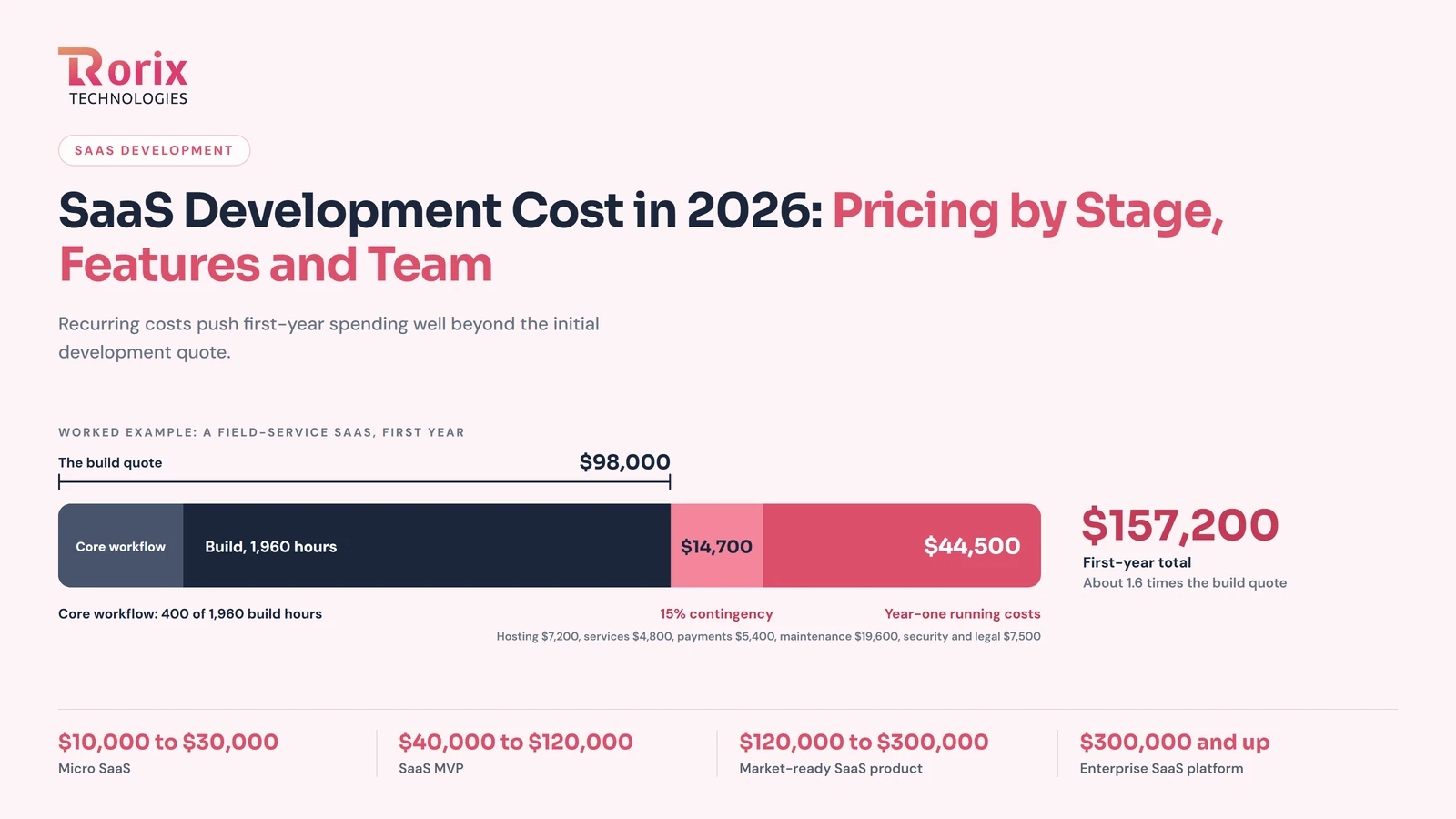
SaaS Development Cost in 2026: Pricing by Stage, Features and Team
Explore SaaS development cost in 2026, with pricing by product stage, features, team, and timeline, plus hidden expenses and ways to save money.
Read article