
.NET 8 and .NET 9 End of Support: What to Do Before 10 November 2026
Microsoft ends support for .NET 8 and .NET 9 on 10 November 2026. What stops, who is affected, your four options, a phased plan, and what a move costs.
On this page20 sections
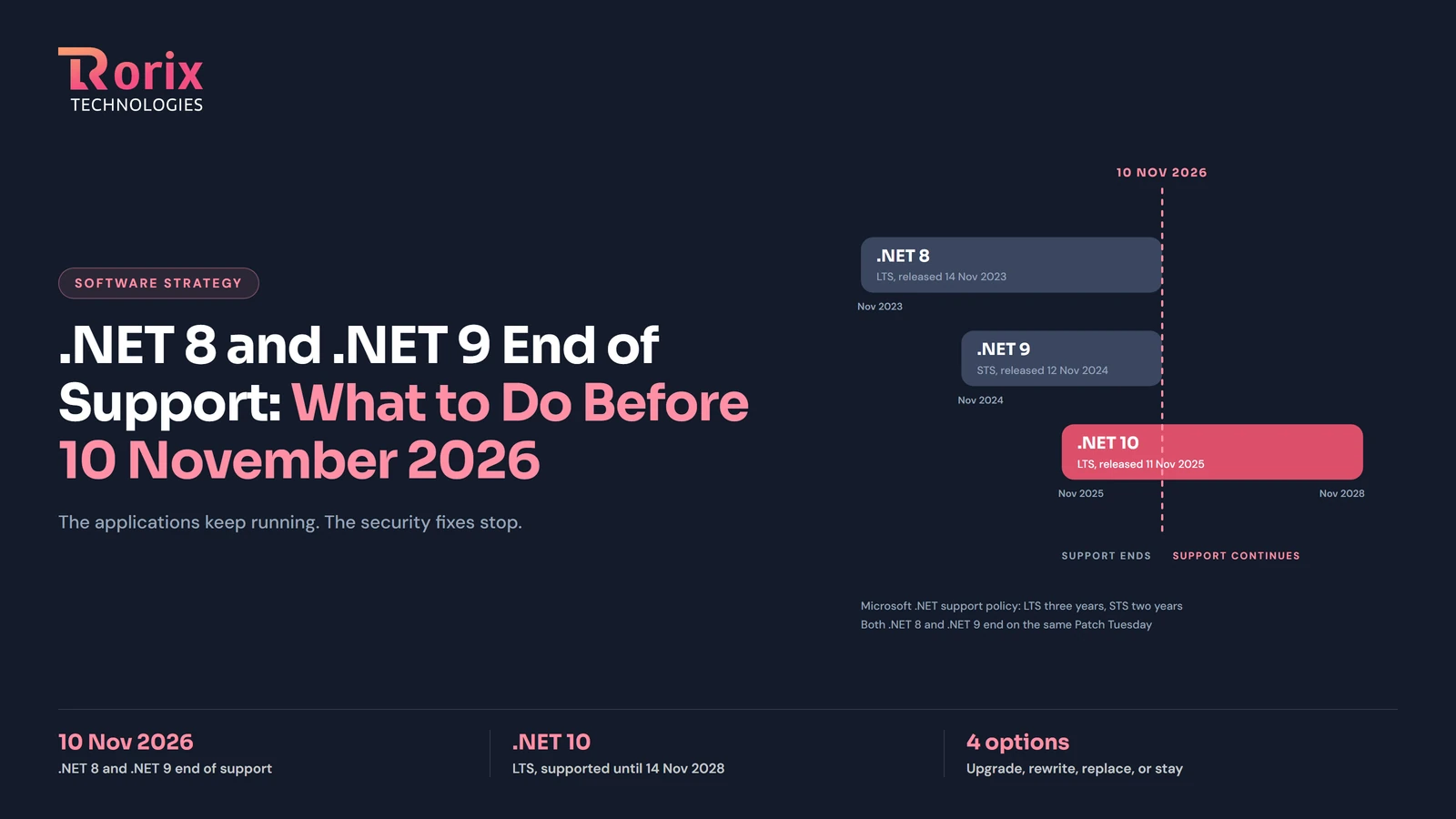
On 10 November 2026, Microsoft ends support for .NET 8 and .NET 9 on the same day. If your business runs an application on either version, nothing stops working that morning. What stops is the stream of security fixes, servicing updates and technical support, and from that day every new vulnerability found in those runtimes stays open on your system until you move.
This guide is for the owner or CTO who has to decide what to do about that: what the date changes, who is affected, the four options, a phased plan with the durations the industry publishes, the checks before go-live, and what a move costs by the published market ranges. Where Rorix comes in, it is through our .NET migration service, which has moved two live production systems across major .NET versions.
Key Takeaways: What the 10 November Date Changes
- Microsoft ends support for .NET 8 (LTS, released 14 November 2023) and .NET 9 (STS, released 12 November 2024) on 10 November 2026. Applications on either version keep running; security fixes, servicing updates and technical support stop.
- .NET 10 is the current long-term support release, released 11 November 2025 and supported until 14 November 2028. It is the version to land on; .NET 9 loses support on the same day as .NET 8, so stopping there buys nothing.
- .NET Framework 4.8 and 4.8.1 are not on the November list. They are supported as a Windows component for as long as the Windows version they run on is supported, and 4.8.1 is the latest version of .NET Framework.
- A .NET 8 or .NET 9 application with current packages is a small job, measured in weeks. A .NET Framework 4.x application is a real migration, measured in months, because Web Forms, WCF and Entity Framework 6 have no direct equivalent in modern .NET.
- Published cost figures for the same size of application disagree by an order of magnitude between sources, so the only reliable number comes from an assessment of your own codebase.
What ends on 10 November 2026, and what does not
Microsoft's own wording is the clearest statement of what changes. From the .NET 8 and .NET 9 end of support announcement: "After that date, Microsoft will no longer provide servicing updates, security fixes, or technical support for these versions." And in the same post: "Applications built on .NET 8 or .NET 9 will continue to run." The .NET support policy puts the consequence plainly: "Your use of out-of-support .NET versions may put your applications, application data, and computing environment at risk."
The date was set in advance by that policy: "Even numbered releases are LTS releases that get free support and patches for three years" and "Odd numbered releases are STS releases that get free support and patches for two years." .NET 8 was released on 14 November 2023 and gets three years. .NET 9 was released on 12 November 2024 and, under the change the announcement describes ("STS releases now get 24 months of support instead of 18"), gets two. Both windows close on 10 November 2026, a Patch Tuesday.
Who is affected: .NET 8, .NET 9 and .NET Framework 4.x
Applications on .NET 8 or .NET 9. The largest group, because .NET 8 was the LTS release most teams standardized on in 2024 and 2025; .NET 9 teams usually took the STS release for a specific feature. Support ends on the same day for both, the destination is the same, and with reasonably current packages the move to .NET 10 is the smallest job in this guide.
Applications on .NET Framework 4.x. Not on the November list, which is where the confusion starts. Per Microsoft's .NET Framework support policy, 4.8 and 4.8.1 stay supported as a component of Windows, so a 4.8 application is not losing support on 10 November. What it lacks is a future: modern .NET is a separate line, and every new capability lands only there. The November date is a reasonable prompt to put a date on that migration too.
Your four options: upgrade, rewrite, replace, or stay
Upgrade in place to .NET 10. For .NET 8 and .NET 9 this is the default and usually the only sensible choice; the announcement says it directly: "We strongly recommend upgrading to .NET 10, which is an LTS release supported through November 2028." For .NET Framework 4.x it is also the usual path, but as a port rather than a retarget, and it is the path the rest of this guide plans for.
Rewrite. A rebuild on a fresh codebase, kept to the same business behaviour. Worth considering only when the application is small, poorly understood, or so dependent on retired technology that porting would touch nearly every file anyway. Rewrites risk losing the undocumented rules the old system quietly enforces, the argument for the incremental approach in our legacy application modernization guide.
Replace. Retire the application in favour of a packaged product, which is wrong when the application encodes how your business actually operates. Our build vs buy tool scores the two paths against your constraints.
Stay and accept the risk. Legitimate for an application being decommissioned within months, or an internal tool with no network exposure and no sensitive data. It should be a decision taken in writing with a date attached.
A migration plan with phases and typical durations
The plan has the same shape whether you are retargeting .NET 8 or porting .NET Framework 4.x; what changes is how long each phase takes. The durations below are the ones the industry publishes, attributed to their sources.
Phase 1: Assessment and dependency audit
Inventory every project, NuGet package, API and runtime feature the application depends on, then list the breaking changes between your version and .NET 10 against the code that hits them. For .NET Framework this is also where you find the parts with no direct equivalent in modern .NET: ASP.NET Web Forms, WCF server hosting, Workflow Foundation, AppDomain-dependent code and Entity Framework 6. Tech-Stack's migration guide recommends starting with a two to four week dependency audit, and that matches our experience: the audit is short, and everything after it is more predictable because of it.
Phase 2: Version hops in reversible stages
A .NET 8 or .NET 9 application moves in one hop: retarget, update packages, fix what the compiler and the test suite surface. Bacancy's .NET 8 to .NET 10 guide puts it at "a small, tidy application can move in one to two weeks", with the dependency work the variable that "takes two weeks or two months".
A .NET Framework application, or an old .NET Core one, moves through the supported versions where the breaking changes concentrate, with the test suite run at each hop so a problem is found at the version that introduced it. Infomaze's guide to what actually happens in a .NET Framework migration gives durations by application shape: a clean MVC and Web API application in 6 to 12 weeks, an MVC application with Web Forms sections in 16 to 24 weeks, a heavy WCF service layer in 12 to 20 weeks, and a large legacy monolith in 6 to 18 months using the strangler-fig pattern. Tech-Stack agrees on the two ends: "small apps with clean architecture and good test coverage can migrate in weeks", and large monoliths run "12 to 24+ months as a phased effort".
Phase 3: Parallel run and cutover
The old and new builds run side by side behind the same tests until the new one is proven, then traffic moves. On a system that cannot go down, this phase decides whether the migration was invisible to customers; it is the discipline in our guide to zero-downtime deployment.
Risks and the checks before go-live
The failures in a .NET migration are rarely in the runtime itself.
- A package with no supported version. Found in the audit, or found in week six, which is what turns a six-week plan into a six-month one.
- Behaviour that was never written down. A date format a customer relies on, a rounding rule in an invoice. Characterization tests, written against the old system first, are the only protection.
- Windows-only dependencies. System.Drawing, registry access, COM interop and Windows authentication behave differently or not at all on Linux. Decide early whether the application stays on Windows hosting.
- Entity Framework 6 to EF Core. Query translation and lazy-loading defaults differ, so a query that returned the right rows under EF6 can return different rows under EF Core. Every query in the ledger path gets a test.
- Authentication and session. Identity, cookie formats and claims handling changed between .NET Framework and ASP.NET Core. Users logged in during cutover notice first.
The go-live checklist: the full test suite green on the new build, a parallel run against production traffic or a replay of it, a rollback that has actually been rehearsed, monitoring on the new build before the cutover rather than after, and one named person on each side who can say no on the day.
What a .NET migration costs, according to the published ranges
Rorix does not publish a fixed price for a .NET migration, because the price depends on the assessment, and the published market ranges show why a figure quoted before it is worth little. Three sources, three different bases.
Technijian (March 2026) prices by lines of code: under 50K LOC, 2 to 4 weeks and $15K to $40K; 50K to 150K LOC, 4 to 8 weeks and $40K to $90K; 150K to 500K LOC, 8 to 16 weeks and $90K to $200K; and 500K+ LOC, 16 to 32 weeks and $200K to $500K+. The figures assume AI-assisted tooling and state no data basis.
Cleveroad (July 2026) prices .NET Framework to .NET Core migrations by size: a small lift-and-shift at $100,000 to $200,000+ over about 3 months, a mid-size migration at $200,000 to $500,000+ over 4 to 6 months, and a large 200K+ LOC migration at $500,000 to $1,000,000+ over 6 to 9 months, described by the firm as "order-of-magnitude estimates, not fixed pricing".
FullStack (updated October 2026) prices legacy modernization in general rather than .NET specifically: small at $50K to $150K over 3 to 6 months, medium at $180K to $270K over 6 to 12 months, and enterprise at $500K+ over 12 to 18 months, from the firm's own internal estimates.
Read together: for a small application, the published figures run from about $15,000 to over $100,000 depending on the source and its assumptions. That spread is why the assessment comes first. Rorix quotes a migration after it, on the engagement models published on our pricing page: a dedicated team on a monthly retainer, or hourly billing for a short, well-defined move.
Two .NET migrations we have run on live systems
An AgTech platform for a Pacific Northwest company, .NET Core 2.1 to .NET 8. A farm management platform serving fruit growers, with six business modules from field scouting to spray recommendations, moved from .NET Core 2.1 to .NET 8 while its frontend went from Angular 7 to Angular 17, over a two-year engagement by a team of ten, with production stable throughout.
Lorecs, .NET Core 2.1 to .NET 9, now being moved to .NET 10. Our founders took over Lorecs' supply chain platform in 2018 and rebuilt it from scratch on .NET, work that predates Rorix and has continued under it. The migration from .NET Core 2.1 to .NET 9 crossed seven major versions on a platform that runs the order lifecycle from client request to invoice, with zero invoice rejections after launch. With .NET 9 on the same November list, the platform is now being moved to .NET 10. The engagement is written up in our product distributor case study, and the stack behind it on our .NET technology page.
Both moves ran the same way: audit first, version hops in reversible stages, old and new builds side by side until the cutover was proven. It is the approach our legacy application modernization service applies to any stack, and the reasons we reach for .NET on long-lived, transactional systems are in our Node.js vs .NET comparison.
FAQ
Can I still run .NET 8 after November 10, 2026?
Yes. Microsoft states that applications built on .NET 8 or .NET 9 will continue to run. What ends is servicing: no further security fixes, servicing updates or technical support for those versions.
Is .NET Framework 4.8 still supported?
Yes. .NET Framework 4.8 and 4.8.1 are supported as a component of Windows for as long as the Windows version they run on is supported, and 4.8.1 is the latest version of .NET Framework. The 10 November 2026 date applies to .NET 8 and .NET 9, not to .NET Framework.
Should I go straight to .NET 10?
Yes. .NET 10 is the current LTS release, supported until 14 November 2028, and .NET 9 loses support on the same day as .NET 8. Release candidates of .NET 11 are already shipping, as Microsoft's support policy page shows, and it is expected in November as the next STS release, but an STS release gets two years of support against an LTS release's three.
How long does a .NET Framework to .NET 8 or 10 migration take?
By the published figures: a clean MVC and Web API application 6 to 12 weeks, one with Web Forms sections 16 to 24 weeks, a heavy WCF service layer 12 to 20 weeks, and a large legacy monolith 6 to 18 months as a phased effort (Infomaze). Small applications with good test coverage move in weeks; large monoliths run 12 to 24+ months (Tech-Stack).
How much does a .NET migration cost?
The published ranges disagree by an order of magnitude: Technijian's lines-of-code bands start at $15K to $40K, Cleveroad's small lift-and-shift starts at $100,000 to $200,000+, and FullStack's small modernization figure is $50K to $150K. Rorix does not publish a price for the move; we quote after the assessment.
Can I migrate incrementally or do I need to rewrite everything?
Incrementally, in almost every case: the old and new applications run side by side, and a large system moves one slice at a time. A full rewrite is only the right call when the application is small, nobody understands it, or a port would touch every file anyway.
What happens to my WCF services and Web Forms?
They are replaced, not ported. ASP.NET Web Forms has no equivalent in modern .NET; pages move to Razor Pages, MVC or Blazor. WCF server hosting is not part of modern .NET either; services move to ASP.NET Core Web API, gRPC, or the community CoreWCF project where a contract must be preserved.
Will my application run on Linux after migration?
It can, and it does not have to. Modern .NET runs on Linux, but Windows-only dependencies (System.Drawing, registry access, COM interop, Windows authentication) have to be replaced first. Staying on Windows hosting after the move to .NET 10 is a valid outcome.
Running on .NET 8, .NET 9 or .NET Framework?
We move live .NET applications to .NET 10 in supported version hops, with the old and new builds side by side until the cutover is proven. Send us the version you are on and what runs on it.
Continue learning
Written by
Ankur AkvaliyaFounder & Director, Rorix Technologies
Ankur co-founded Rorix Technologies with a mission to deliver enterprise-grade software that growing businesses can actually afford. He drives technical project delivery and client success end-to-end, overseeing product strategy, client partnerships, and the company's long-term vision to ensure every engagement delivers measurable business outcomes across WMS, HRMS, and custom software verticals.
View full profileRelated articles
Legacy Application Modernization: How to Upgrade a System You Cannot Turn Off
Legacy is a date, not a feeling. Your framework's support window is already published. How to modernize a system you cannot switch off, and which approach fits.
Read article
Node.js vs .NET for Enterprise Backends: A 2026 Comparison from Engineers Who've Used Both
An honest, project-grounded comparison of Node.js and .NET for enterprise backends in 2026, from an engineering team that runs both in production daily.
Read article
Legacy WMS Migration Guide: How to Upgrade Without Disrupting Operations
How to migrate from a legacy WMS without disrupting operations: migration strategy, data conversion, risk mitigation, and zero-downtime cutover techniques.
Read article