
Legacy Application Modernization: How to Upgrade a System You Cannot Turn Off
Legacy is a date, not a feeling. Your framework's support window is already published. How to modernize a system you cannot switch off, and which approach fits.
On this page32 sections
Legacy is a date, not a feeling. Your framework, runtime, and database each have a published end-of-support date, and modernization is either planned against those dates or forced by them after something breaks. The work is to pick an approach, sequence it so the business keeps running, and start before the date rather than after it.
That reframing matters because "the code is old" is not a business case, and nobody funds a rewrite on the strength of engineers finding a codebase unpleasant. A support deadline is different. It has a date, an owner, and a consequence, which is what turns modernization from a wish into a plan.
We have run this three times on systems that could not be switched off, which is where most of what follows comes from. You can see the wider set in our project portfolio.
In this guide, you will learn:
- What actually makes an application legacy, in terms you can put in a plan
- Why support windows set the timing, and why an expired one becomes an audit problem
- The five modernization approaches, and why rehosting to the cloud is not modernization
- What actually drives the cost, and which factor swings it most
- A 6-step sequence for modernizing without stopping the business
- Where AI genuinely helps this work and where it adds risk
- The mistakes that turn a modernization into an accidental rewrite
- The questions that separate a real modernization partner from a hopeful one
What Makes an Application "Legacy"?
An application is legacy when the cost of changing it safely has risen above the cost of the change itself. That shows up long before anyone says the word, usually as small requests that take weeks, or as a release nobody wants to be on call for.
Four signals are worth more than a general sense of decay:
- Your runtime or framework is out of support, so security fixes have stopped arriving
- A routine dependency upgrade cascades, because one bump forces five others
- Only one person can safely change a given area, which makes that person a dependency
- Testing is manual, so the cost of verifying a change scales with the size of the change
Notice that none of those are about how the code looks. A tidy codebase on an unsupported runtime is legacy. A messy one under active support, with tests and engineers who know it, usually is not. This is also the honest dividing line between modernizing a system you own and replacing a vendor product, which is a different exercise covered in our guide to migrating off a legacy WMS.
Key Takeaways: Legacy Is a Date, Not a Feeling
- An application is legacy when the cost of changing it safely has risen above the cost of the change itself, and the clearest signal is a runtime or framework past its published end-of-support date.
- Angular supports each major release for 24 months and .NET gives LTS releases 3 years, and both .NET 8 and .NET 9 reach end of support on 10 November 2026.
- The US Government Accountability Office finds that federal agencies typically spend about 80 percent of their IT budgets on operations and maintenance of existing systems.
- In the 2025 Stack Overflow Developer Survey, the most-cited frustration with AI tools is solutions that are "almost right, but not quite" at 66%, with 45.2% reporting that debugging AI-generated code takes longer than writing it would have.
- Rorix carried Kragworks from Angular 7 to Angular 17 and Lorecs from .NET Core 2.1 to .NET 9 as sequences of supported version hops, on systems that stayed live throughout.
Why Modernization Is Scheduled, Not Optional
The date is already set, and it was not set by you. Framework and runtime vendors publish support windows, and once a version passes its end of support, security patches stop. At that point every new vulnerability in your stack is permanently unfixed unless you move.
The windows are shorter than most roadmaps assume. Angular supports each major release for 24 months, split into 12 months of active support and 12 months of long-term support carrying only critical fixes and security patches. .NET gives LTS releases 3 years and STS releases 2 years, where the final 6 months of either is maintenance support carrying security fixes alone.
Put those side by side with a normal product roadmap and the implication is uncomfortable. A team that upgrades Angular once every three years is, by definition, spending part of every cycle on an unsupported version. On .NET the current dates are sharper still: both .NET 8 and .NET 9 reach end of support on 10 November 2026, which makes this a live planning question rather than a future one.
The practical move is to put those dates on the same roadmap as your features, not on a separate technical wishlist. A version that falls out of support is a scheduled event, and scheduled events can be resourced. Surprises cannot.
Deferring has a compounding price, and the clearest public evidence sits in government reporting. The US Government Accountability Office finds that federal agencies typically spend about 80 percent of their IT budgets on operations and maintenance of existing systems, which leaves roughly a fifth for everything new. That ratio is the real cost of postponement. Every year a system is carried rather than modernized, a larger share of the budget goes to keeping it alive, and the share available to build anything shrinks.
Why an Unsupported Runtime Becomes an Audit Problem
Once a version is out of support, newly disclosed vulnerabilities in it are never patched. Not patched late: never. Your remediation options narrow to backporting a fix yourself, isolating the component behind something else, or accepting the risk in writing, and all three are worse than upgrading would have been.
This is where modernization stops being an engineering preference and becomes someone else's problem too. Security questionnaires from enterprise customers routinely ask which framework and runtime versions you run and whether they are supported. A SOC 2 or ISO 27001 auditor treats an unpatchable component as a finding against your vulnerability management controls, not as technical debt. Cyber-insurance renewals increasingly ask the same question, and the answer affects terms.
That reframing is the practical reason to raise this outside engineering. A request to "upgrade Angular" competes with features and loses. A finding that blocks an enterprise deal, an audit, or an insurance renewal has an owner outside the engineering team and a date attached, which is exactly the leverage the support-window argument was missing.
The pattern is well documented at scale. In its review of the most critical federal legacy systems, the GAO found that eight of eleven still run outdated languages, four depend on unsupported hardware or software, and seven are operating with known cybersecurity vulnerabilities. Those systems are between roughly two and six decades old, with the oldest at sixty years. Nobody planned that. Each one was a system that worked, on a version that was fine, until deferring became the default.
Two things follow. Inventory what you run and check each component against its support date, because most teams discover at least one item already past it. Then treat anything already expired as a security backlog item rather than a modernization one, since it is not a question of whether the work is worth doing.
The Five Modernization Approaches and What Each One Demands
Most modernizations are described as a rewrite because that is the only option people can picture. In practice there are five, and they differ mainly in how much of the existing system's behavior you agree to keep.
| Approach | What changes | What it demands | Best when |
|---|---|---|---|
| Encapsulate | Nothing inside; you wrap it in an API | Clear boundaries and a place to put the wrapper | The system works but cannot integrate |
| Rehost | Where it runs, not what it is | Environment parity and a rollback path | Infrastructure is the binding constraint |
| Refactor | Internal structure, same behavior | Real test coverage before you start | The architecture holds but the code fights you |
| Rearchitect | How the parts are divided | Domain knowledge and sustained effort | Scale or team structure has outgrown the design |
| Rebuild | Everything, behavior included | Full requirements, rediscovered | The domain has genuinely changed |
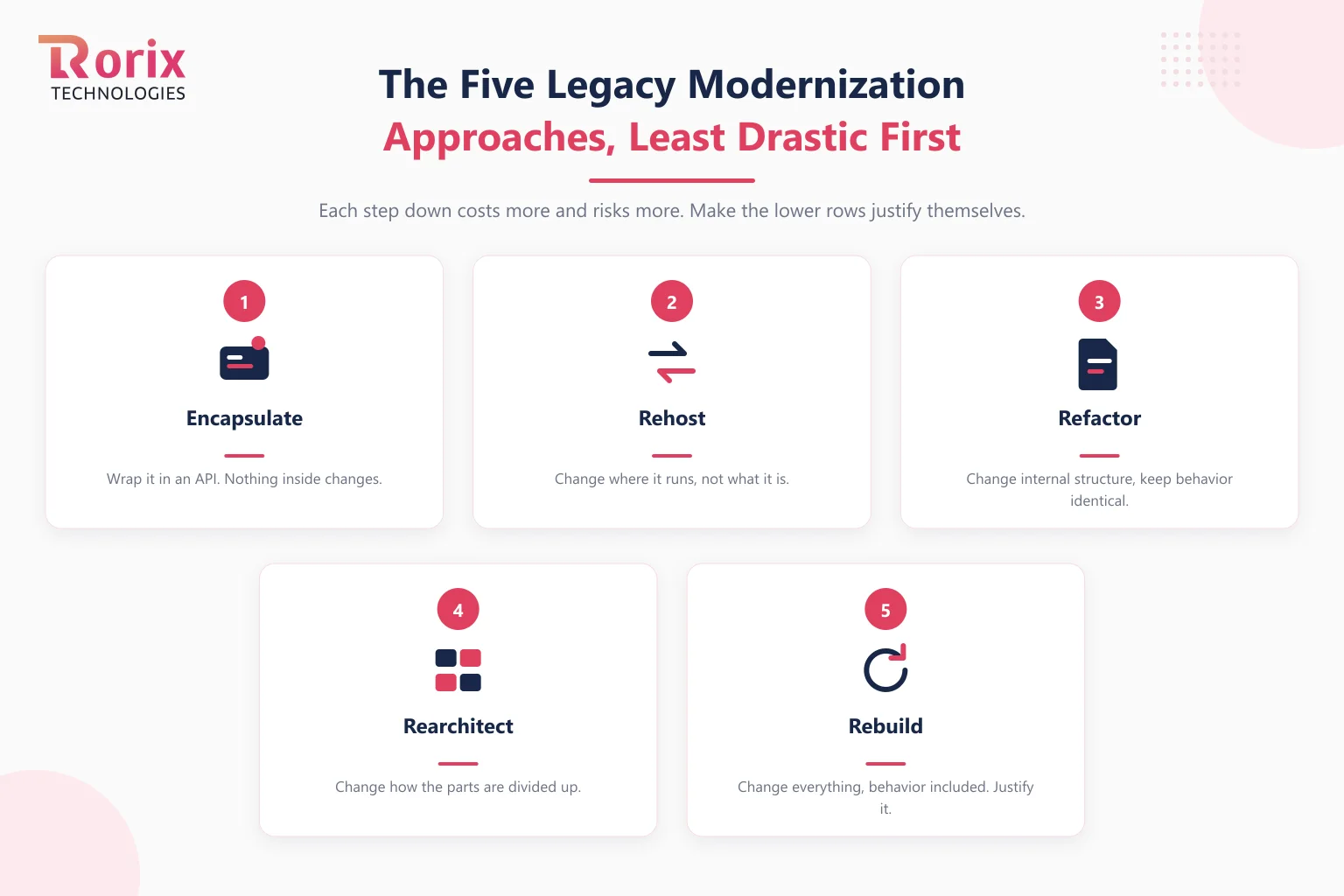
The ordering is deliberate. Each step down the table costs more, carries more risk, and takes longer, so the discipline is to justify moving down rather than assuming the bottom row.
Rebuild deserves particular suspicion. A rebuild restarts the clock on every undocumented behavior the old system accumulated, and those behaviors are usually load-bearing for someone. Most systems that "need a rewrite" need a rearchitecture of one subsystem plus a serious investment in tests.
How to Choose Without Defaulting to a Rewrite
Start from the constraint rather than the solution. Write down what specifically is blocking you, then check which row of that table actually addresses it, because the mismatch is where budgets die.
Three questions usually settle it. Does the system still do the right thing, or the wrong thing? If the behavior is right and only the implementation hurts, you are refactoring or rearchitecting, not rebuilding. Is the problem inside one module or spread across the design? A localized problem almost never justifies a global answer. And can you describe the current behavior well enough to rebuild it? If not, that is the strongest possible argument against trying.
The honest test is whether you can name what you will keep. A modernization plan that keeps nothing is a new product with an old deadline, and it should be funded and scoped as one.
Rehosting to the Cloud Is a Move, Not a Modernization
Rehosting changes where the system runs and nothing about what it is. The morning after a lift and shift, your framework version is the same, your test coverage is the same, and every support date on your inventory is unchanged. That is worth saying plainly, because cloud migration is the work most often sold as modernization and the work least likely to deliver it.
It solves a real and specific set of problems. Hardware reaching end of life, a datacenter contract you want out of, capacity that cannot flex with demand, disaster recovery that only exists on paper, and data residency commitments you cannot meet where you are. If your binding constraint is on that list, rehost, and do not let anyone talk you into a rewrite on the way.
What it does not solve is everything this guide has been about. An out-of-support runtime is still out of support in a managed container. Undocumented behavior is still undocumented. The engineer who is the only person who can safely change the billing module is still the only person, now with a different hostname.
There is also a cost trap worth naming. Applications built for fixed capacity often cost more to run on elastic infrastructure than they did in the datacenter, because they were designed on the assumption that the hardware was already paid for. Nothing about that is elastic, so you inherit a usage-based bill for a system with steady, indifferent consumption.
Rehost first and improve after is still a legitimate sequence, and sometimes the best one, since better environments and observability make the later work faster. It only works when the second step is named, dated, and funded at the same time as the first. When it is not, the budget is spent, the migration is declared complete, and the actual modernization is quietly rescheduled to never.
What Drives the Cost of a Modernization
The approach you pick sets the ceiling, but it is rarely what moves the final number most. Six factors do, and all of them are knowable before you start, which is what makes a modernization estimable in a way a rewrite is not.
| Driver | Why it moves the number | Where it usually lands |
|---|---|---|
| Number of supported version hops | Each hop has its own breaking changes to read and absorb | Predictable once counted, and countable in an afternoon |
| Starting test coverage | Coverage you lack has to be written before anything is safe to change | The most commonly underestimated line |
| Whether the team knows the system | Rediscovering undocumented behavior is slow and cannot be parallelized | The single largest swing factor |
| Schema coupling | Data changes are the hardest to reverse and the slowest to verify | Grows sharply with how many consumers read the same tables |
| Parallel running time | The old and new paths both need supporting during a strangle | Scales with how long you take, so speed pays twice |
| Integration surface | Every external system is a contract that has to keep working | Set by your system, not your plan |
Read the middle row twice. Domain knowledge is the factor that most changes the cost of the same nominal work, and it is also the one most often destroyed by moving the work to whoever is available. A team that already knows why an odd branch exists does not spend a week discovering it is load-bearing.
The corollary is that most of your cost control happens before the migration starts. Counting the hops, writing characterization tests, and keeping the people who know the system are all cheaper than any decision you make later, and our custom software development cost guide works through the same logic across project types.
How to Modernize Without Stopping the Business
The constraint that shapes everything is that the system stays live throughout. Nobody gets to pause order processing while the platform is rebuilt, which rules out the approach most teams instinctively reach for.
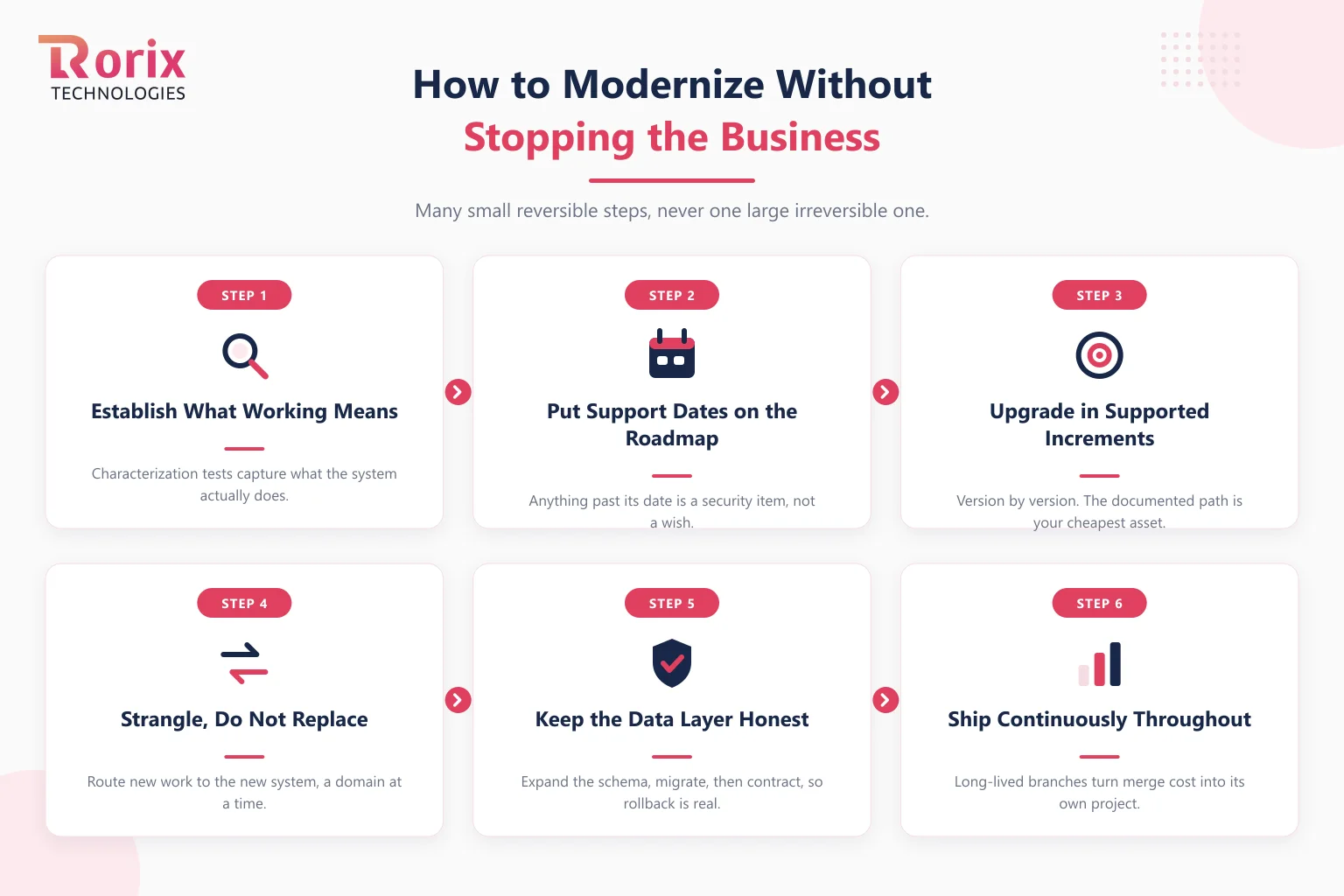
Step 1: Establish What "Working" Means Today
Before changing anything, write down the behavior you are obliged to preserve, and get it into tests. Characterization tests around current behavior are worth more than aspirational ones, because they capture what the system actually does rather than what the documentation claims.
This step is the one most often skipped and most often regretted. Without it, you cannot tell a migration bug from a pre-existing one, and you will spend the project arguing about which is which.
Step 2: Put the Support Dates on the Roadmap
Collect the end-of-support date for every framework, runtime, and database in the stack, and place them on the same roadmap as your features. Anything already past its date is not a modernization item, it is a security item.
Sequence the rest backward from those dates. A dependency that falls out of support first sets your earliest deadline, regardless of which part of the system is most annoying to work in.
Step 3: Upgrade in Supported Increments
Move version by version rather than jumping to the newest release in one leap. Frameworks provide migration paths between adjacent majors, and each hop has documented breaking changes you can actually read.
The multi-version jumps are the ones that turn into rewrites. Our own Angular work went 7 to 17 and 14 to 21 as sequences of supported steps, and the .NET side went from .NET Core 2.1 all the way to .NET 9 the same way, which is exactly what made a very long migration plannable instead of speculative.
Step 4: Strangle, Do Not Replace
Route new work through the new implementation while the old one keeps serving everything else, and move functionality across a slice at a time. Each slice ships independently and can be reverted independently, which is what keeps the risk proportional.
Pick slices by business domain rather than by technical layer. Migrating "all the controllers" leaves you with a system that is half-migrated everywhere and finished nowhere.
Step 5: Keep the Data Layer Honest
Schema changes are the hardest part to reverse, so treat every migration as explicit, reviewed, and separately deployable from the code that needs it. Expand the schema first, migrate the code, then contract, so that both versions can run against the same database during the transition.
That expand-and-contract discipline is what makes rollback real. If a deploy can only go forward because the schema already changed underneath it, you do not have a rollback plan.
Step 6: Ship Continuously Through the Migration
Keep releasing normally throughout. A modernization that runs on a long-lived branch accumulates conflict with the mainline until merging becomes its own project, which is how a six-month plan becomes an eighteen-month one.
Feature flags do most of the work here, letting migrated paths go live for a subset of traffic before they carry all of it. The goal is a migration made of many small reversible steps, not one large irreversible one.
Where AI Helps a Modernization and Where It Hurts
AI is genuinely useful at the comprehension end of this work and genuinely dangerous at the conversion end. Use it to understand the system and to build the test coverage you are missing. Do not use it to perform the migration.
The comprehension case is strong because it targets the exact bottleneck in Step 1. Modernization is slow largely because nobody remembers what an unfamiliar module does, and a model reading that module and explaining it, tracing a call path, or proposing the cases a characterization test should cover is fast at precisely the thing humans are slow at. That work is also cheap to verify, since you check the explanation against the running system rather than against anyone's memory.
The conversion case is where it turns. Migration is defined by preserving exact existing behavior, and "almost right" is the specific failure a migration cannot absorb. That is also the dominant failure mode in practice: in the 2025 Stack Overflow Developer Survey, the single most-cited frustration with AI tools is solutions that are "almost right, but not quite" at 66%, with 45.2% reporting that debugging AI-generated code takes longer than writing it would have. Only 3.1% of developers say they highly trust the accuracy of AI output.
On greenfield work, almost right shows up as a bug you find. On a migration, almost right shows up as a subtly different rounding rule in an invoice total that nobody notices for two quarters. The same tool carries meaningfully more risk here than it does on new code, and the difference is that you have no specification to check against, only the old system's behavior.
One trap deserves its own warning. An AI-generated characterization test that encodes a misunderstanding is worse than having no test, because it promotes a wrong assumption into the contract you are migrating toward, and every later step will faithfully preserve it. Characterization tests must be generated against observed behavior and then run against the old system to confirm they pass before they are trusted.
The working rule is that AI proposes and the test suite decides. Anything a model asserts about behavior gets validated against the running system before it informs a decision, which keeps the speed on the understanding side of the work and the authority on the verification side.
What Real Modernizations Look Like
Three of ours, all on systems that stayed live throughout.
Kragworks, Angular 7 to Angular 17. An AgTech platform for a Pacific Northwest company, carried across ten major versions as a sequence of supported upgrades by a team of ten over roughly two years, alongside continued feature delivery. The backend runs .NET with Entity Framework Core, where degraded query performance against large harvest and quality-control datasets was resolved with query optimization and targeted indexing rather than replacement. The Angular and .NET work ran in parallel rather than as separate projects.
Lorecs, .NET Core 2.1 to .NET 9. A supply chain platform automating the order lifecycle from client request through vendor quote, order, and invoice, with multi-currency billing and a QuickBooks sync. The migration crossed many major versions without disrupting live operations, which was only possible because .NET's long-term support cadence turned it into a planned path rather than a gamble. The full engagement, including the platform architecture assessment that preceded it, is written up in our product distributor case study.
A B2B sales-intelligence SaaS, Angular 14 to Angular 21. The same incremental pattern on a product where the same engineers have stayed for over five years, which is what made the accumulated context cheap to apply.
A fourth is worth reading if your problem is an aging internal tool rather than a customer-facing platform: our Driven admin portal rebuild and new mobile app case study covers that shape end to end.
The common thread is not the frameworks. It is that all four were sequences of supported steps rather than a single jump, and that the people doing them already knew the system. If your stack decision is still open rather than inherited, our comparisons of React and Angular and of Node.js and .NET cover that ground.
Mistakes That Turn a Modernization Into a Rewrite
- Starting without characterization tests: You lose the ability to distinguish a migration bug from a behavior the system always had
- Jumping several major versions at once: The documented upgrade path between adjacent releases is the cheapest asset you have, and skipping it forfeits it
- Migrating by technical layer: Slicing by domain ships value early; slicing by layer finishes nothing until it finishes everything
- Running it on a long-lived branch: Merge cost compounds silently until it exceeds the migration itself
- Treating it as a technical project: Without a business owner, it loses every prioritization argument to a feature request
- Rebuilding to escape undocumented behavior: Those behaviors do not disappear, they reappear as production incidents after launch
- Rotating the team mid-migration: System knowledge is most of the work here, and it does not transfer through a handover document
What to Ask a Modernization Partner
Modernization proposals are unusually hard to compare, because every vendor agrees with your goal and the differences hide in how they sequence the work. These questions surface the differences.
- How will you sequence the version hops, and why that order? A partner who has done this names the constraint that sets the order. One who has not describes the destination.
- What happens to the behavior nobody documented? The answer you want involves characterization tests. The answer that should worry you is that they will "clean it up as they go".
- Which engineers will be on this in month nine? System knowledge is most of the cost here, so continuity is not a nice-to-have. Ask for named people and a notice period before replacements.
- What ships at the end of the first month? A modernization with no visible output for a quarter is a rewrite that has not admitted it yet.
- How do we roll back a single slice? If the answer only works at the level of the whole project, the plan is one large irreversible step wearing a strangler costume.
- Who owns the data migrations, and are they deployable separately from the code? Expand-and-contract should be their idea before it is yours.
- What will you tell us to not do? A partner who agrees the whole scope is worth doing has not read it closely enough.
The related question is engagement shape rather than vendor. Modernization rewards a team that stays, which is the argument for a dedicated development team over rotating capacity on work where the context is the asset.
How Rorix Approaches Modernization
Modernization is the work where continuity matters most, because most of the cost is knowing what the system already does. A partner who rotates engineers through it is charging you to relearn your own platform.
Rorix Technologies has delivered 27 software projects for operators in the US, UK, Canada, Australia, and New Zealand. We hold a 5.0 rating on Clutch across 4 verified reviews, and we work on retainer rather than project handoff.
- The same engineers stay: A dedicated team of senior engineers rather than a rotating bench, so system knowledge compounds across a multi-year migration
- Named technical leads: Every engagement has a lead who owns the architecture and answers for the sequence
- Real migration track record: Angular 7 to 17, Angular 14 to 21, and .NET Core 2.1 to .NET 9, all on live systems
- Two-week sprints with full visibility: Modernization runs alongside feature delivery, with priorities set each sprint
- Accountable past go-live: We stay embedded after the migration and keep proposing improvements
Our legacy application modernization service page sets out how engagements are structured, and the architecture decisions involved are the same ones our custom software development process settles early rather than mid-build.
Sitting on a version that is close to its date? Book a free consultation and we will map your stack against its support windows.
Put the Dates on the Roadmap
The reason modernization gets deferred is that it competes with features on a roadmap where only features have dates. Support windows fix that, because they supply the one thing a technical argument usually lacks, which is a deadline somebody else set.
So start there. List every framework, runtime, and database with its end-of-support date, and mark anything already past it. That list takes an afternoon and it converts an unfundable feeling about code quality into a schedule your finance team can read.
Then pick the smallest approach that addresses the actual constraint. Most systems described as needing a rewrite need one subsystem rearchitected and a real test suite, and the teams that work that out early are the ones still shipping features while they modernize. If you would rather work through it against your own stack, talk to our engineers.
Frequently Asked Questions
What is legacy application modernization?
It is updating an existing application so it stays supportable, secure, and changeable, without discarding the behavior the business depends on. It spans everything from wrapping a system in an API through to rearchitecting it, and a full rebuild is only the most extreme option rather than the definition.
How do you know when a system needs modernizing?
The clearest signal is a runtime or framework that has passed its end-of-support date, because security fixes have stopped arriving. The softer signals are dependency upgrades that cascade, areas only one person can safely change, and manual testing that makes every change expensive to verify.
Should you modernize or rebuild from scratch?
Default to modernizing, and make rebuild justify itself. A rebuild restarts the clock on every undocumented behavior the current system accumulated, and those are usually load-bearing for someone. Rebuild when the domain itself has genuinely changed, not when the code is unpleasant.
How do you upgrade without stopping the business?
Move version by version rather than jumping to the newest release, route new work through the new implementation while the old one keeps serving, and migrate a business domain at a time. Keep schema changes expand-then-contract so both versions can run against the same database, which is what makes rollback real.
What is the strangler pattern?
It is migrating a system incrementally by routing new and migrated functionality to a new implementation while the old one continues serving everything else, until the old system has nothing left to do. It replaces one large irreversible cutover with many small reversible ones.
How long does a legacy modernization take?
It tracks the number of supported version hops, the test coverage you start with, and whether the team already knows the system, so any single figure is worth treating with caution. Our Angular 7 to 17 work ran roughly two years alongside continued feature delivery, and the .NET Core 2.1 to .NET 9 path spanned many majors, both as sequences of planned steps.
Can you modernize while still shipping features?
Yes, and you generally have to, because a modernization that pauses delivery loses the next prioritization argument. Ship continuously, keep the migration off long-lived branches, and use feature flags so migrated paths can carry a subset of traffic before they carry all of it.
Is moving to the cloud the same as modernizing?
No. Rehosting changes where the system runs and nothing about what it is, so your framework version, test coverage, and support dates are identical the day after. It solves infrastructure problems such as hardware end of life, capacity, and data residency. Move first and improve after is a legitimate sequence only when the second step is funded at the same time as the first.
Can AI modernize legacy code for you?
Not the migration itself, but it is genuinely useful for the part that makes migrations slow. Use it to explain unfamiliar modules, trace call paths, and propose the cases a characterization test should cover, then validate everything it asserts against the running system. Preserving exact behavior is the whole job here, and "almost right" is the failure mode a migration cannot absorb.
Who should own a modernization project?
A business owner, not only an engineering one. Without someone accountable for the outcome in business terms, modernization competes against features on a roadmap where only features have a deadline, and support-window dates are the most effective way to give it one.
Sitting on a system nobody wants to touch?
We rebuild running software without stopping the business that depends on it. Send us the stack and the failure mode you are living with.
Continue learning
Written by
Renish DadhaniyaFounder & Director, Rorix Technologies
Renish co-founded Rorix Technologies and drives the engineering and delivery culture across the organization. Beyond engineering, he leads the company's sales, finance, and HR operations, building the infrastructure that lets the team focus on shipping quality software. With deep hands-on expertise in architecture and team building, he ensures every project lands on time to the quality standards clients demand.
View full profileRelated articles
How to Add AI to Existing Software: What Your System Will Let You Do
How to add AI to existing software: the four insertion points, whether your system can emit what a model needs, shadow mode, and when to modernize first.
Read article
Legacy WMS Migration Guide: How to Upgrade Without Disrupting Operations
How to migrate from a legacy WMS without disrupting operations: migration strategy, data conversion, risk mitigation, and zero-downtime cutover techniques.
Read article
API Integration Strategy: How to Connect Systems Without Building Debt
An API integration strategy decides where coupling lives and who owns the contract. Here are the three topologies, six failure modes, and a six-step plan.
Read article