
Custom Software Development Cost in 2026: Pricing by Project Type, Team & Region
See what custom software development costs in 2026 by project type, team size, and region, plus hidden fees, pricing models, and ROI to budget accurately.
On this page70 sections
You ask three software companies for a quote, expecting similar numbers. Instead, one estimates $60,000, another $180,000, and the third more than $400,000. Same idea, completely different prices.
It leaves most business leaders wondering whether someone is overcharging or something important is missing.
The reality is that custom software development costs are never determined by a single number. They depend on what you're building, how complex it is, who builds it, the technology involved, and the long-term goals of the project.
A customer portal, a warehouse management system, and an AI-powered SaaS platform may all be called "custom software," but they require very different levels of engineering, security, integrations, and ongoing support. That is why budgeting for custom software often feels difficult.
This guide gives operators a clear, honest breakdown of what custom software development really costs, and how to read any quote with confidence.
In this guide, you will learn:
- Custom software development costs by project type
- The key factors that influence development costs
- Developer hourly rates across different regions
- Common software development pricing models
- Hidden costs to budget for after launch
- How to estimate ROI before investing
- Practical ways to reduce development costs
By the end, you'll know what your project is likely to cost, what questions to ask before signing a contract, and how to confidently compare software development proposals without relying on guesswork.
Quick Answer: Custom Software Development Cost at a Glance
Here is the short version. Custom software development costs typically run from about $10,000 for a lean MVP to $500,000 or more for a complex enterprise platform. Most business systems land somewhere in the middle.
| Project type | Typical cost (USD) | Timeline | Team size |
|---|---|---|---|
| MVP or proof of concept | $10,000-$25,000 | 6-10 weeks | 1-3 |
| Simple business application | $20,000-$90,000 | 3-6 months | 3-4 |
| Mid-complexity platform | $90,000-$250,000 | 5-9 months | 4-7 |
| Complex enterprise system | $250,000-$500,000+ | 9-18+ months | 6-12 |
| Compliance-grade system | $500,000-$1,500,000+ | 12-24 months | 8-15 |
These tiers track published industry data: the average project reported on Clutch runs about $132,000, and GoodFirms' cost survey finds most small and mid-sized builds landing between $30,000 and $100,000, squarely inside the first three tiers.
Key Takeaways: What Custom Software Really Costs in 2026
- Custom software development costs run from about $10,000 for a lean MVP to $500,000 or more for a complex enterprise platform, and compliance-grade systems handling health, financial, or regulated data run $500,000 to $1,500,000 or more.
- The average project reported on Clutch runs about $132,000, and GoodFirms' cost survey finds most small and mid-sized builds landing between $30,000 and $100,000.
- Clutch's published rates show most US and Canadian firms charging $100 to $149 an hour against $25 to $49 in India, and Accelerance's 2026 rate trends report puts senior outsourced engineers at roughly $60 to $76 an hour across Latin America and Eastern Europe.
- Budget 15% to 25% of the build cost every year for maintenance, so a $200,000 build carries roughly $30,000 to $50,000 in annual upkeep that is almost always missing from the first quote.
- A quote that puts less than 10% into QA is a red flag, and a contingency buffer of 15% to 25% for scope changes and integration surprises should be treated as standard rather than padding.
Custom Software Development Cost by Project Type
The fastest way to place your own project is to match it to a complexity tier. The ranges below assume a competent mid-tier partner, not the lowest bidder and not a global consultancy.
1. MVP or Proof of Concept
An MVP ships only the core workflow you need to test the idea, and it usually costs $10,000 to $25,000. You trade breadth for speed, validate demand, and avoid betting a full budget on unproven assumptions. It suits most startups and lean internal tools.
2. Simple Business Application
A single-platform tool with basic auth and a few integrations typically runs $50,000 to $150,000. Think admin dashboards, workflow automation, or a customer-facing app with a clear, contained feature set. The cost climbs mainly as screens, roles, and edge cases multiply.
3. Mid-Complexity Platform
This is where most serious business systems sit, at roughly $150,000 to $350,000. You get custom UX, a modular backend, five to ten integrations, and a real security baseline. A custom CRM, a booking platform, or a customer portal usually lives in this band.
4. Complex, Multi-Module Enterprise System
Enterprise platforms with deep logic, many roles, and heavy integrations start near $250,000 and climb past $500,000. The cost driver is rarely the features themselves. It is the architecture, real-time processing, and testing needed to keep a mission-critical system stable at scale.
5. Compliance-Grade or Mission-Critical System
When a system handles health, financial, or regulated data, budgets run $500,000 to $1,500,000 or more. Standards like HIPAA, SOC 2, and PCI DSS reshape the whole build, adding secure architecture, audits, and documentation from day one. Retrofitting that later always costs far more.
Custom Software Development Cost by Software Category
Project size is one axis. The kind of system you are building is another, and it carries its own cost patterns. The table below maps common categories to indicative cost ranges, so you can compare your idea against a realistic baseline.
| Software category | Typical cost (USD) | What drives the price |
|---|---|---|
| Warehouse management system (WMS) | $50,000-$300,000+ | Real-time inventory, barcode and RFID, multi-site, integrations |
| HRMS or HRIS platform | $50,000-$250,000+ | Payroll rules, compliance, self-service, system integrations |
| SaaS product (MVP to scale) | $50,000-$300,000+ | Multi-tenancy, subscription billing, API-first design |
| CRM or customer portal | $30,000-$200,000+ | Roles, pipelines, email and telephony sync |
| ERP or order-management system | $120,000-$500,000+ | Multi-module workflows, finance, inventory, automation |
| eCommerce or retail platform | $30,000-$150,000 | Catalog, payments, POS, omnichannel sync |
| Web or mobile app | $40,000-$200,000 | Platforms supported, offline mode, device features |
| AI or data-driven platform | $75,000-$500,000+ | Model training, data pipelines, inference hosting |
Also Read: WMS Implementation Checklist: 50 Steps to Successful Deployment
12 Factors That Drive Your Custom Software Development Costs
Two projects with the same feature list can differ in price by a factor of three. The difference lives in these twelve levers, and each one is something you can actually influence during planning.
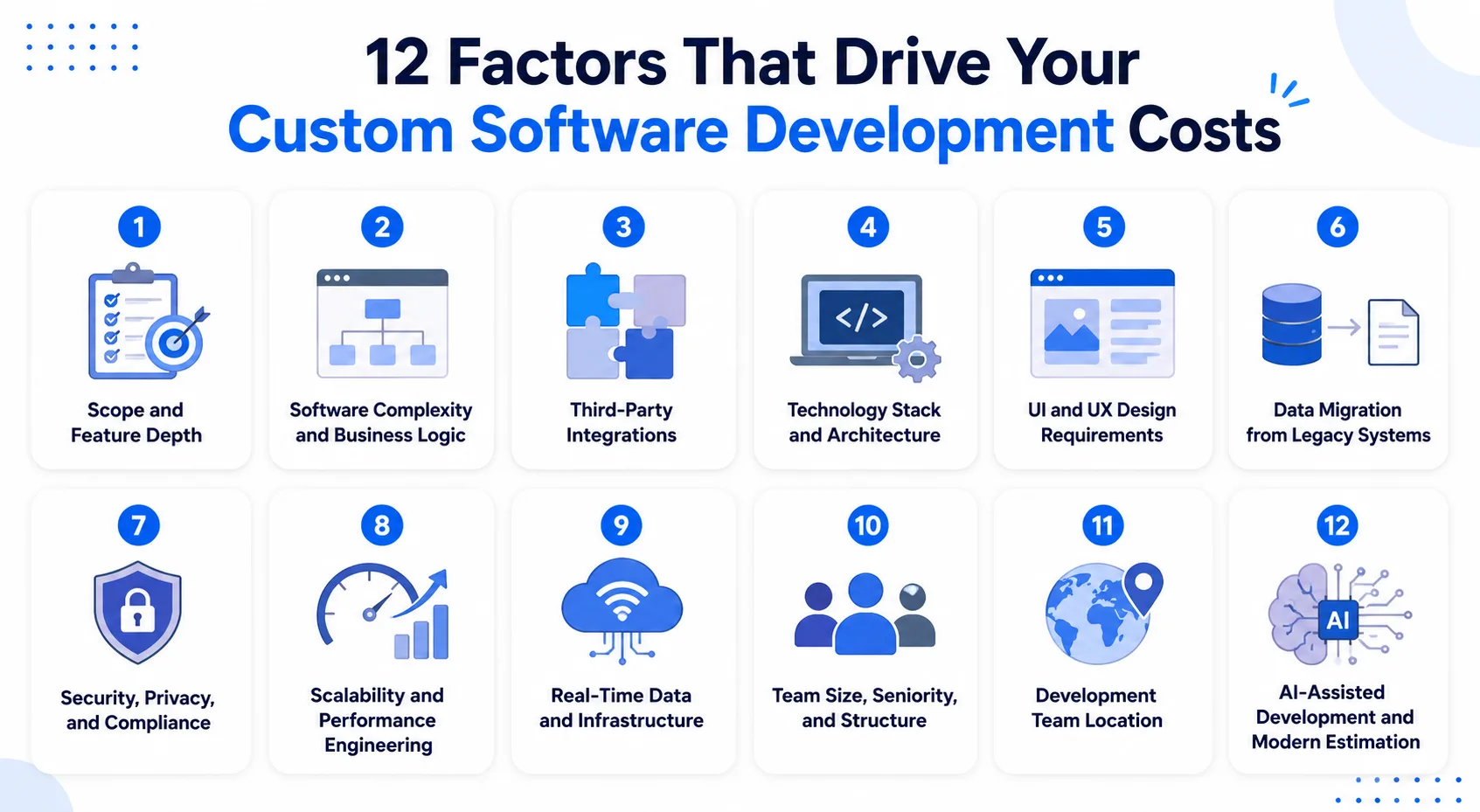
1. Scope and Feature Depth
Scope is the single biggest cost driver, and the one most often underestimated. Every screen, rule, and edge case adds engineering and testing hours. Tightening scope early is the fastest way to bring a quote down without hurting quality.
2. Software Complexity and Business Logic
Heavy logic means more coding, more testing, and more ways things can break. A basic CRUD app is low-cost. A system running scoring, real-time calculations, or intricate approval chains is not, because that depth touches many parts of the codebase at once.
3. Third-Party Integrations
Integrations are where estimates quietly blow up. Each external system adds authentication, data mapping, error handling, and testing against a service you do not control. Simple, modern APIs add a few thousand each, while legacy enterprise connectors can add tens of thousands.
4. Technology Stack and Architecture
Mainstream stacks like React, Node, and PostgreSQL keep costs efficient because talent is abundant and tooling is mature. Niche or unproven choices can raise costs meaningfully through smaller talent pools and more custom work. Staying current matters too, as our Angular v21 breakdown shows.
5. UI and UX Design Requirements
A functional interface built on a component library ships quickly. A custom, brand-led experience with research, prototyping, and accessibility takes real design investment. For internal tools, keep it lean. For customer-facing products, good design pays for itself in adoption.
6. Data Migration from Legacy Systems
Moving records out of an old system, cleaning them, and reshaping them for a new one is routinely underestimated. When the source data is messy or undocumented, migration turns into a project of its own, adding time, scripts, and careful testing to the total.
7. Security, Privacy, and Compliance
Meeting GDPR, HIPAA, SOC 2, or PCI DSS is a major, non-negotiable line item for regulated industries. It adds secure architecture, encryption, audit trails, and formal testing. Building it in from the start always costs less than bolting it on after a breach or a failed audit.
8. Scalability and Performance Engineering
Building for a hundred users is easy. Building for a hundred thousand concurrent users is a different financial commitment. Load balancing, caching, and database design add cost up front, but they prevent the expensive rebuild that hits eighteen months after a shortcut.
9. Real-Time Data and Infrastructure
Real-time features are far more complex than static ones, and buyers underestimate them constantly. Data consistency, offline tolerance, and conflict resolution are each distinct engineering problems. Our guide to real-time inventory architecture shows how much sits under a "simple" live view.
10. Team Size, Seniority, and Structure
Bigger, more senior teams cost more per hour but often less in total. A senior engineer who needs no oversight can outdeliver a junior who requires daily review. The most cost-effective setup blends senior architects with mid-level builders and focused junior support.
11. Development Team Location
Geography moves the invoice more than almost any other factor. A US-led team runs several times the rate of an equivalent India-based team for the same functional scope. The right call weighs the total cost of delivery, not just the headline hourly rate.
12. AI-Assisted Development and Modern Estimation
AI tooling now scaffolds code, writes tests, and speeds reviews, trimming hours on routine work. The savings are real but uneven, since complex logic, architecture, and security still lean on experienced engineers. Modern estimates account for both the build and how much AI can genuinely accelerate it.
Developer Rates by Region: What You Pay Where
Geography is one of the strongest predictors of your final cost. The table below shows indicative hourly rates by region and seniority, so you can sanity-check any proposal against the market.
| Region | Junior | Mid-level | Senior |
|---|---|---|---|
| North America (US, Canada) | $55-$120 | $90-$180 | $125-$250+ |
| United Kingdom | $50-$100 | $90-$155 | $140-$220 |
| Western Europe | $50-$100 | $85-$150 | $120-$200 |
| Eastern Europe | $30-$55 | $50-$85 | $80-$130 |
| Latin America | $30-$55 | $45-$85 | $70-$130 |
| India and South Asia | $20-$40 | $35-$60 | $55-$85 |
| Southeast Asia | $25-$45 | $40-$70 | $65-$100 |
As a market reference, Clutch's published rates by location show most US and Canadian firms charging $100 to $149 an hour against $25 to $49 in India, and Accelerance's 2026 rate trends report puts senior outsourced engineers at roughly $60 to $76 an hour across Latin America and Eastern Europe, at or just below the floor of the senior bands above, which also cover onshore and premium agencies.
Knowing the rate is one thing. Knowing where those hours actually land is what lets you challenge a quote line by line. Let's open up the build.
Where Your Budget Actually Goes: Cost Breakdown by Development Phase
A quick way to test any proposal is to see how the cost splits across the work. The ranges below reflect a typical full-cycle build, and they are a strong signal of whether a quote is realistic.
| Phase | Share of budget | What it covers |
|---|---|---|
| Discovery and planning | 5-10% | Requirements, architecture, data modeling, roadmap |
| UX and UI design | 10-20% | Wireframes, prototypes, design system, usability |
| Development (backend and frontend) | 40-50% | APIs, database, integrations, business logic |
| QA and testing | 15-25% | Functional, regression, performance, security, UAT |
| Deployment and DevOps | 5-10% | Cloud setup, CI/CD, monitoring, hardening |
| Maintenance (per year, post-launch) | 15-25% | Fixes, patches, updates, small enhancements |
Here is the red flag to watch. If a quote puts less than 10% into QA, be cautious. The team is either planning to skip testing or to bill you for bug fixes after launch.
Proper testing is not where you save money; it is where you avoid spending far more later.
Pricing Models Compared: Fixed Price vs Time and Materials vs Dedicated Team
How you pay changes what you pay. The model you choose shifts risk, flexibility, and control, and picking the wrong one is a quiet source of overspend.
| Model | Best for | Cost certainty | Flexibility | Who carries scope risk |
|---|---|---|---|---|
| Fixed price | Small, well-defined scope | High | Low | Vendor |
| Time and materials | Evolving scope, iteration | Medium | High | Shared |
| Milestone-based | Phased mid-size projects | Medium-high | Medium | Shared |
| Dedicated team | Long-term, evolving products | Medium | Very high | Client |
| BOT and hybrid models | Budget ceiling or team transfer | Medium-high | Medium-high | Shared |
In short,
-
Fixed-Price Model: Best for projects with clear requirements and a fixed scope. You agree on the total project cost up front, making budgeting simple and predictable.
-
Time and Materials Model: Ideal for projects where requirements may change. You pay only for the actual time and resources used during development.
-
Milestone-Based Model: A good choice for medium-sized projects. Payments are made after completing agreed project milestones, giving you better control over progress.
-
Dedicated Development Team Model: Best for long-term projects that need continuous development. You hire a dedicated team that works exclusively on your product for a fixed monthly cost.
-
BOT and Hybrid Models: Suitable for businesses that want a budget ceiling or plan to build an in-house team later. A development partner builds and manages the project before transferring it to you, while hybrid models like capped time and materials offer flexible pricing options.
The Hidden and Ongoing Costs Most Teams Miss
The build quote is the down payment, not the full price. The costs that surprise operators show up after launch, and leaving them out of the plan is how projects run over.
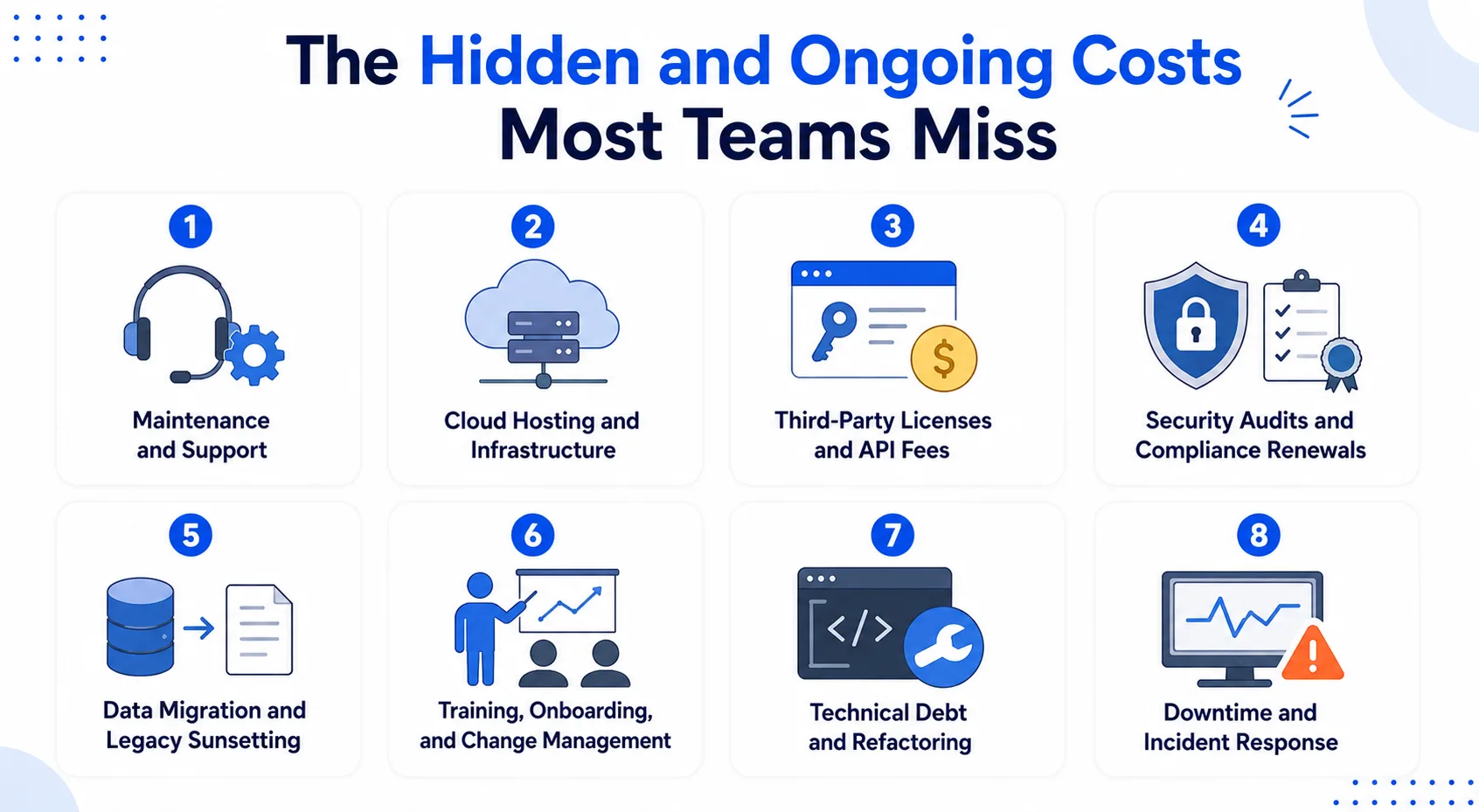
1. Maintenance and Support
Software is never truly finished. Budget 15% to 25% of the build cost every year for fixes, security patches, dependency updates, and small improvements. A $200,000 build carries roughly $30,000 to $50,000 in annual upkeep, and it is almost always missing from the first quote.
2. Cloud Hosting and Infrastructure
Cloud costs scale with usage, which means your hosting bill grows as the product succeeds. A small app may cost a few hundred a month, while a busy platform with a managed database and CDN can run into the thousands. Good architecture keeps that curve under control.
3. Third-Party Licenses and API Fees
Modern systems lean on paid services, from payment processing to email, mapping, and analytics. Many bill per transaction or per seat, so the cost climbs with your volume. A mid-size platform can quietly accumulate $500 to $3,000 a month in service fees.
4. Security Audits and Compliance Renewals
Regulated products need periodic penetration tests and audits to stay compliant, and these are recurring, not one-off. A pen test, a SOC 2 renewal, or a HIPAA assessment each carries real annual cost. Skipping them is a risk no operator handling sensitive data should take.
5. Data Migration and Legacy Sunsetting
Extracting, cleaning, and mapping years of legacy data into a new system is a heavy, billable effort. Shutting the old system down safely, without corrupting active records, takes careful planning. Both routinely cost more than teams expect at the start.
6. Training, Onboarding, and Change Management
A system only pays back when people actually use it. Documentation, onboarding sessions, and support during the first months of adoption all take a budget. Underinvest here and adoption stalls, which can quietly erase the return you built the software to capture.
7. Technical Debt and Refactoring
Rushing to launch means borrowing against future stability. Shortcuts taken to hit a date turn into rework later, and unmanaged debt inflates every future estimate. Clean architecture and test coverage cost a little more now and save far more over the life of the system.
8. Downtime and Incident Response
Unplanned outages carry real cost in lost productivity and revenue. Monitoring, alerting, and disaster recovery testing reduce that risk, and they belong in the budget from day one. For a system your operation depends on, resilience is not optional; it is insurance.
Also Read: Real-Time Inventory: WebSocket and Pub-Sub Architecture
How Long Does Custom Software Take? Timeline by Project Size
Cost and timeline move together, so a realistic schedule is part of a realistic budget. The table below shows typical durations by phase and project size.
| Phase | Simple project | Medium project | Complex project |
|---|---|---|---|
| Discovery and planning | 1-2 weeks | 2-4 weeks | 4-8 weeks |
| Design | 2-3 weeks | 3-5 weeks | 6-10 weeks |
| Development | 6-10 weeks | 12-20 weeks | 24-52+ weeks |
| QA and testing | 2-3 weeks | 4-6 weeks | 6-12 weeks |
| Deployment and training | 1 week | 1-2 weeks | 2-4 weeks |
| Total | 3-6 months | 5-9 months | 9-18+ months |
Custom Software vs Off-the-Shelf: The Real Cost Comparison
The honest comparison is not sticker price. It is the total cost and total value over three to five years. The table below lays the two options side by side.
| Factor | Custom software | Off-the-shelf software |
|---|---|---|
| Upfront cost | Higher | Lower, subscription-based |
| Cost at scale | Flat, you own the asset | Grows with per-seat fees |
| Fit to your workflow | Built around it | You adapt to the tool |
| Ownership | You own the code and IP | Vendor owns the roadmap |
| Integrations | Built to your systems | Limited to what the vendor supports |
| Best when | Your process is a differentiator | Your process is standard |
Off-the-shelf software is the better choice when your business needs are simple and a ready-made solution already does the job. It costs less up front, is quicker to implement, and works well for standard functions like CRM, HR, or eCommerce.
Custom software is a better investment when your business has unique workflows or specific requirements that off-the-shelf tools cannot support. Although it costs more initially, you own the software, avoid growing subscription fees, and gain the flexibility to scale as your business grows.
Once you have decided custom is worth it, every CFO asks the same question: what does it pay back? Here is how to put a number on the return.
How to Calculate ROI on Your Custom Software Investment
Before investing in custom software, it is important to understand the return you can expect. ROI (Return on Investment) compares the money your software helps you earn or save with the total amount you spend to build and maintain it.
ROI (%) = [ (Total Benefits − Total Costs) ÷ Total Costs ] × 100
Your total benefits can include increased revenue, lower operating costs, time saved through automation, and higher employee productivity. Your total costs should include software development, maintenance, hosting, licenses, training, and ongoing support.
For example, if you spend $200,000 to build a custom CRM and another $60,000 on maintenance, hosting, and training during the first year, your total investment is $260,000. If the software helps your business generate more revenue and save more than $260,000, your ROI is positive.
Some benefits are harder to measure but still valuable. Better customer experience, faster decision-making, improved efficiency, and software built specifically for your business can create long-term value.
The biggest factor behind a successful ROI is user adoption. Even the best software will not deliver results if your team does not use it effectively.
How to Estimate Your Project Cost Before You Request Quotes
Operators who arrive at vendor conversations with clear documentation get better estimates and build better software. These five steps turn cost guesswork into a number you can defend.
1. Define Scope, User Roles, and Data Flows
Start by writing down what the system does and who uses it. Map the core workflows, list the user roles, and sketch how data moves through the system. This clarity is the foundation of every accurate estimate, and it is the lowest-cost work you will do.
2. Choose an Estimation Method (Rough vs Detailed vs WBS)
A rough estimate, based on a similar past project, gives a fast ballpark for early planning. A detailed estimate breaks the system into tasks, usually with a work breakdown structure, and prices each one. Use the rough number to decide if the idea is viable, then the detailed number to budget.
3. Price the Phases and Add a Contingency Buffer
Once you have tasks, apply the phase split from earlier to sanity-check the total. Then add a contingency buffer of 15% to 25% for the scope changes and integration surprises that hit almost every project. Any experienced partner will tell you the same, so treat it as standard, not padding.
4. Prepare Your Requirements Before You Talk to a Vendor
Bring your workflows, roles, integration list, MVP priorities, compliance needs, and a rough budget range to the first call. Even a loose range helps a team calibrate a proposal to reality. The better prepared you are, the tighter and more honest the estimate you get back.
5. Compare Itemized Proposals, Not Just Totals
When one firm quotes $80,000 and another $300,000 for the "same" project, the difference is almost always what each included. Always ask for proposals broken down by phase, not a single number. An itemized quote shows you what is missing, which is exactly where low bids grow later.
Also Read: How Much Does a Warehouse Management System Cost? (2026 Pricing Breakdown)
8 Ways to Reduce Custom Software Development Cost Without Cutting Corners
Cutting costs is about smart trade-offs, not corner-cutting. These eight moves consistently deliver the best value, and none of them means shipping something fragile.
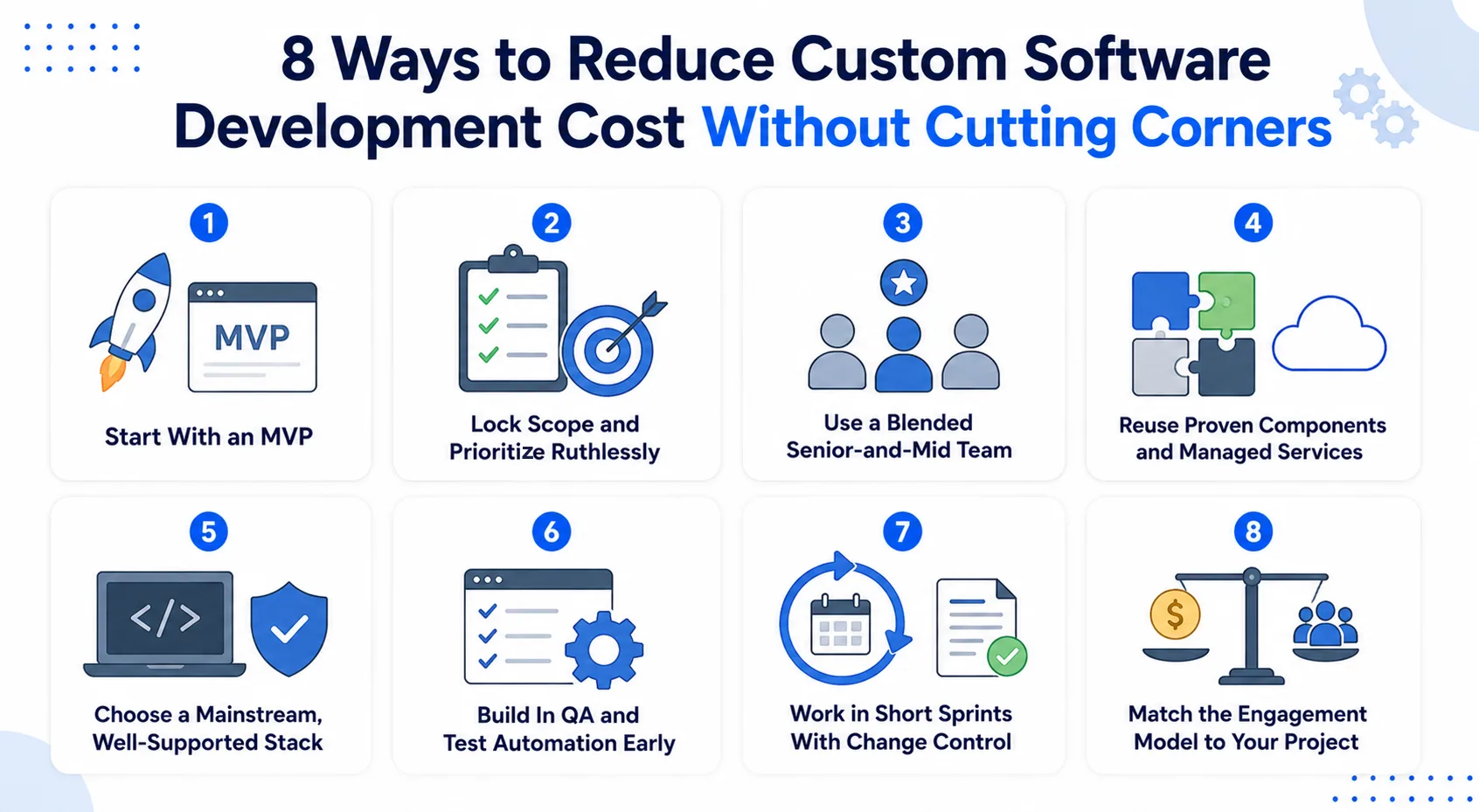
1. Start With an MVP
Build the core 20% that delivers 80% of the value, launch it, then invest based on real usage. An MVP validates your biggest assumptions before you commit the full budget. We have seen a focused first release reshape a much larger product vision, saving a fortune in wasted work.
2. Lock Scope and Prioritize Ruthlessly
Scope creep is the quiet killer of budgets. Agree on the requirements up front, and make every new request swap out an existing one to hold the baseline. Ruthless prioritization is a budgeting tool as much as a product one, and it keeps costs predictable.
3. Use a Blended Senior-and-Mid Team
An all-senior team maxes out velocity at the highest rate, while an all-junior team looks inexpensive but moves slowly and reworks often. A blend, with seniors owning architecture and mid-level engineers doing the build, controls rate without sacrificing the decisions that matter.
4. Reuse Proven Components and Managed Services
Custom does not mean building everything from scratch. Auth, payments, storage, and search are better handled by mature services than by custom code you have to maintain. Reuse cuts build time, improves reliability, and often costs less than the hours a bespoke version would need.
5. Choose a Mainstream, Well-Supported Stack
A widely used stack means abundant talent, mature tooling, and fewer problems that need custom fixes. Chasing an exotic framework for novelty adds technical debt and hiring risk. Modern, well-supported technology keeps your build and maintenance efficient.
6. Build In QA and Test Automation Early
Fixing a bug in production costs far more than catching it in design. Embedding automated tests into your pipeline early keeps defects, and their cost, low as the system grows. Treat QA as a cost-reduction tool, because that is exactly what it is.
7. Work in Short Sprints With Change Control
Two-week sprints with demos keep progress visible and let you correct course before small issues grow expensive. Log and approve every change deliberately rather than absorbing it silently. This rhythm is how disciplined teams hold cost and timeline variance close to plan.
8. Match the Engagement Model to Your Project
The wrong pricing model quietly inflates cost. Fixed price suits stable, well-defined scope, while time and materials or a dedicated team suits products that will evolve. Choosing the model that fits your reality is one of the easiest ways to avoid overspending.
How to Choose a Custom Software Development Partner
The team you hire affects both your costs and the final outcome more than any other decision. Low-cost work that has to be rebuilt is the most expensive work there is, so weigh these seven criteria. For the full evaluation framework, see our guide to choosing a custom software development company.
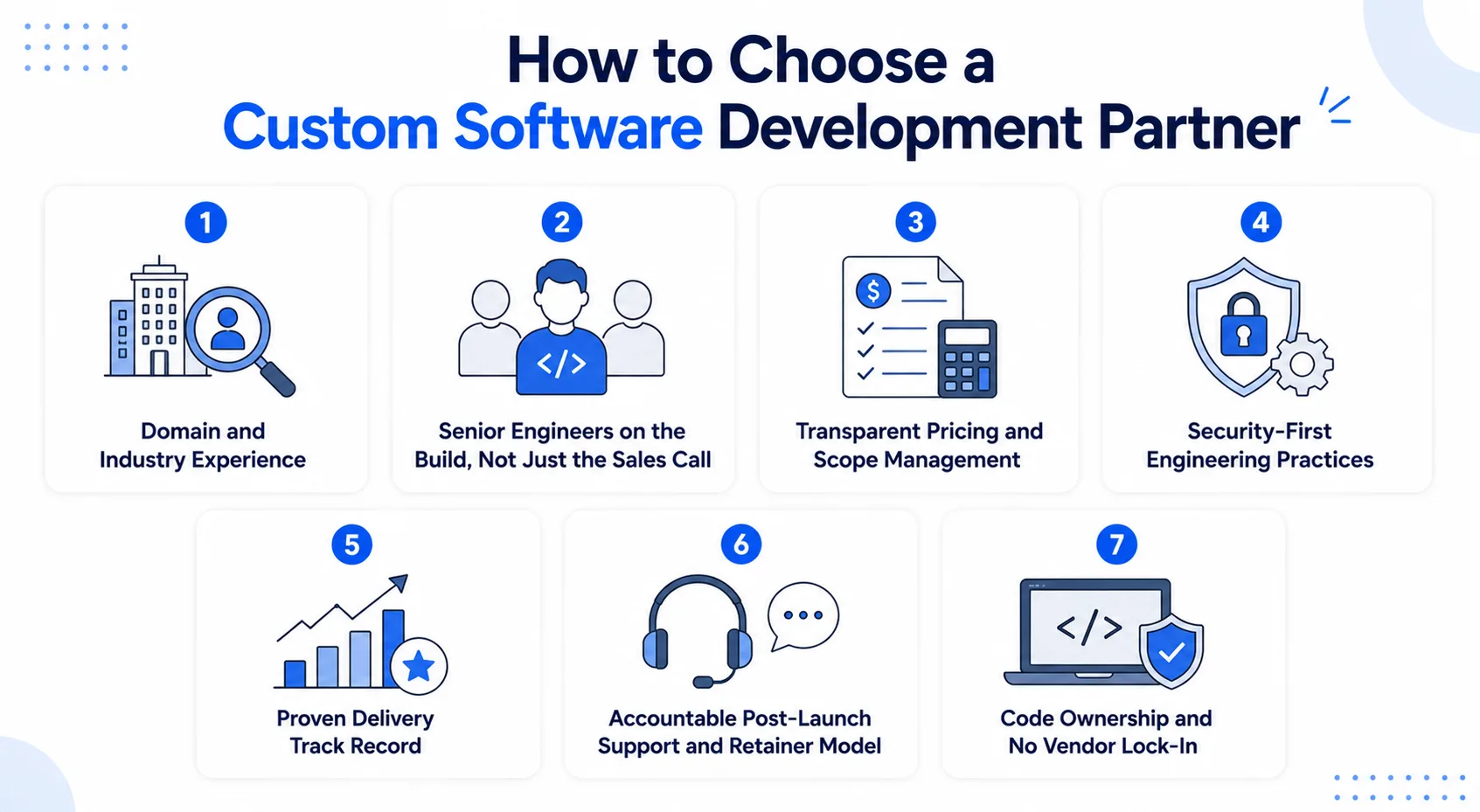
1. Domain and Industry Experience
A partner who has shipped in your space anticipates the compliance, integration, and workflow issues before they become invoices. Domain knowledge shortens discovery and reduces rework. Ask directly whether they have shipped systems like yours, from a WMS build to a SaaS platform, and ask to see the results.
2. Senior Engineers on the Build, Not Just the Sales Call
The hard, expensive-to-reverse decisions, like architecture and data models, need senior judgment. Confirm that experienced engineers own those calls rather than leaving them to junior hands. Senior involvement early is what keeps a system healthy and affordable years after launch.
3. Transparent Pricing and Scope Management
A serious partner explains its pricing model, shows what each phase includes, and flags risks up front. Look for clear sprints, honest estimates, and a written scope. You should always know what you are paying for, with no surprise change orders for work that should have been in scope.
4. Security-First Engineering Practices
Security has to be built in, not bolted on. A capable team tests against recognized standards and bakes protection into the architecture from the start. For any system handling sensitive data, this discipline prevents costs that dwarf the price of doing it right.
5. Proven Delivery Track Record
Portfolios and references show whether a team actually delivers on budget and on time. Ask about how they manage cost and schedule variance, and ask to speak with past clients. Consistent delivery is a stronger signal of reliability than any pitch.
6. Accountable Post-Launch Support and Retainer Model
Software needs support and evolution after go-live, not a vendor who disappears at handover. A retainer or ongoing partnership keeps the team accountable well past launch. That continuity protects your investment as the product grows and requirements shift.
7. Code Ownership and No Vendor Lock-In
You should own the code and infrastructure, with everything documented so another team could maintain it if needed. Lock-in turns a supplier relationship into a dependency. Insist on full ownership so your leverage, and your options, stay with you.
Why Rorix Technologies for Your Custom Software Build
Rorix Technologies builds custom software for complex operations, from WMS and HRMS to SaaS platforms. We have delivered 27 projects and hold a 5.0 rating across 4 verified reviews on Clutch. Clients describe working with us as having an in-house team.
- Domain-built, not generic: we engineer for the warehouse floor, HR operations, and SaaS launch, so the software fits how you actually work.
- A dedicated team of senior engineers on retainer: we stay accountable well past go-live, working in two-week sprints with full visibility into every task.
- Proof, not adjectives: an 80% picking-error reduction on a WMS build, 40+ integrations on Driven's field-service performance platform, and a 12-week path to your first paying SaaS customer.
- You own everything: your code, your infrastructure, your roadmap, with clients across the US, UK, Canada, Australia, and New Zealand.
The Rorix Partner Maintenance Plan. Maintenance is the line most quotes leave out, so we build it into every engagement instead of shipping and disappearing:
- Bug fixing through UAT: dedicated support to resolve every issue found during the User Acceptance Testing period, before go-live sign-off.
- A free support window after launch: bug fixes and minor UI and logic adjustments at no cost, with the window sized to your project.
- Pre-priced future growth: major new features get a fresh scoped estimate with a 5% to 15% discount based on project size, so scaling never starts from a blank sheet.
It is a risk-free way to own custom software. Book a free consultation with our experts, and we will give you a realistic estimate.
Custom Software Cost Comes Down to Scope, Quality, and Team
The cost of a custom build comes down to scope, quality, and the team you trust to build it. Size your project honestly, budget for maintenance and the hidden costs, and choose the pricing model that fits.
Do that, and the number on the quote becomes a decision you can defend, not a gamble.
The ranges in this guide are your baseline; your actual number will come from your specific scope and the partner you pick. Map your workflows, size your project against the tiers above, and insist on an itemized estimate broken down by phase. When you are ready, connect with our experts to scope and price your build.
Frequently Asked Questions
How much does custom software development cost?
Custom software development costs typically range from about $10,000 for a lean MVP to $500,000 or more for a complex enterprise platform. Most business systems fall in between, driven by scope, integrations, team seniority, and location.
How much does it cost to build software for a small business?
A small business automating one core workflow usually spends $10,000 to $25,000 for a focused first build. Starting narrow keeps the initial investment low while leaving room to expand as usage and requirements grow.
How much does enterprise-level custom software cost?
Enterprise platforms generally start near $250,000 and can exceed $500,000, and compliance-heavy systems run higher still. The cost reflects complex architecture, many integrations, strict security, and the testing needed to keep a mission-critical system stable.
Is custom software more cost-effective than off-the-shelf over time?
Off-the-shelf has a lower upfront cost, but custom often wins over three to five years. Custom software avoids escalating per-seat fees at scale, fits your exact workflow, and becomes an asset you own rather than a subscription you rent.
How much does custom software cost to maintain per year?
Annual maintenance typically runs 15% to 25% of the original build cost. A $200,000 system therefore carries roughly $30,000 to $50,000 a year for fixes, patches, updates, and small enhancements. This is often left out of quotes.
Does offshore development actually reduce the total cost?
Offshore delivers real savings when it is run with discipline: senior engineers owning the architecture, structured sprints, documented decisions, and working hours that overlap with yours. The risk is junior-heavy teams working without senior oversight, not geography. Judge a team by how it works, not by where it sits.
How long does it take to build custom software?
A simple build takes three to six months, and a mid-size platform five to nine months. A complex enterprise system takes nine to eighteen months or more. Clear requirements are the single best way to keep a project on schedule.
Costing a custom build?
A dedicated team of senior engineers with a named technical lead on every engagement. Send us the problem and you get back a scope and a price.
Continue learning
Written by
Renish DadhaniyaFounder & Director, Rorix Technologies
Renish co-founded Rorix Technologies and drives the engineering and delivery culture across the organization. Beyond engineering, he leads the company's sales, finance, and HR operations, building the infrastructure that lets the team focus on shipping quality software. With deep hands-on expertise in architecture and team building, he ensures every project lands on time to the quality standards clients demand.
View full profileRelated articles
Custom CRM Development Cost in 2026: Pricing by Features, Team & Timeline
How much does custom CRM development cost in 2026? See pricing by build tier, features, team size, timeline, data migration, and ongoing maintenance.
Read article
How to Choose a Custom Software Development Company in 2026
How to choose a custom software development company: a vetting checklist, red flags, key questions to ask, and how to compare proposals with confidence.
Read article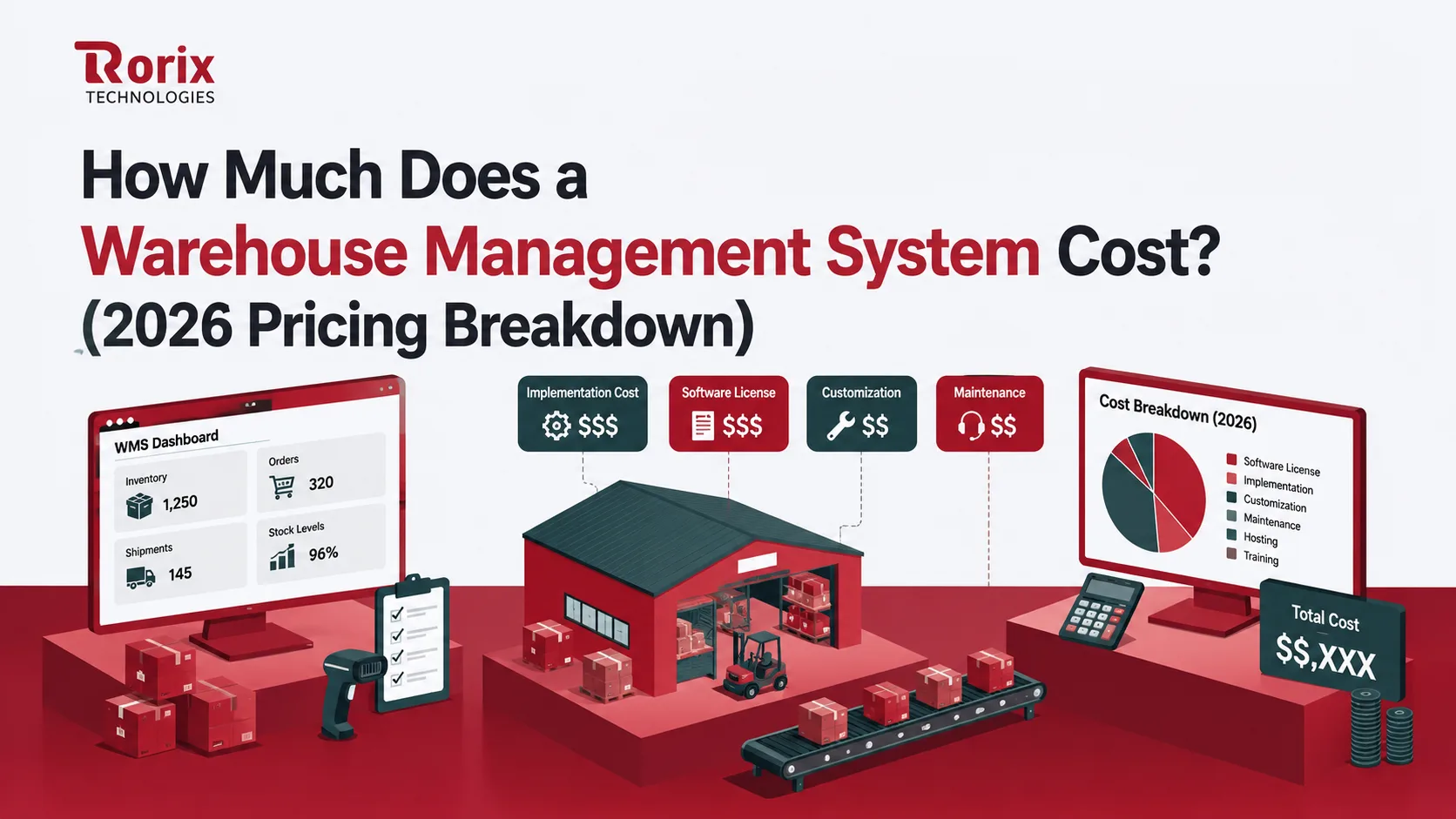
How Much Does a Warehouse Management System Cost? (2026 Pricing Breakdown)
How much does a warehouse management system cost? WMS pricing by deployment, size and features, with five-year TCO tables and vendor rates compared.
Read article