
How Much Does a Warehouse Management System Cost? (2026 Pricing Breakdown)
How much does a warehouse management system cost? WMS pricing by deployment, size and features, with five-year TCO tables and vendor rates compared.
On this page82 sections
Running a warehouse without the right system gets expensive fast. Inventory errors, delayed shipments, slow picking, and manual processes quietly reduce productivity and increase operating costs.
That is why many businesses start asking the same question: How much does a warehouse management system cost?
The answer depends on your warehouse size, deployment model, required features, integrations, and whether you choose an off-the-shelf or custom-built solution.
The challenge is that the custom WMS software price is only part of the investment. Implementation, integrations, hardware, training, support, and ongoing maintenance can significantly increase the total cost if they are not included in your budget from the beginning.
This guide breaks down every cost involved in buying or building a warehouse management system.
In this guide, you'll learn:
- What affects warehouse management system pricing
- Cloud vs. on-premise vs. hybrid vs. custom WMS costs
- WMS pricing by business size and deployment model
- Implementation, hardware, and hidden costs to budget for
- How features impact the overall price
- How to calculate total cost of ownership (TCO) and ROI
- Practical ways to reduce WMS costs without compromising quality
By the end, you'll know what a warehouse management system should realistically cost for your business and how to evaluate vendor quotes with confidence.
How Much Does a Warehouse Management System Cost?
A warehouse management system cost usually lands between roughly $25,000 in year one for a small cloud deployment and several million for an enterprise rollout. Where you fall depends on how you buy it and how complex your floor is.
The snapshot below sets the range, and the rest of this guide explains each line.
| What you are buying | Typical cost |
|---|---|
| Cloud / SaaS WMS | $150 to $500 per user per month; roughly $1,250 to $10,000+ monthly in total |
| On-premise WMS | $2,500 to $200,000+ one-time license, plus 15% to 20% yearly maintenance |
| Implementation | $10,000 to $300,000+, scaling with size and integrations |
| Custom-built WMS | $30,000 to $180,000+, depending on scope and workflows |
Treat these as planning brackets, not fixed quotes. Your real warehouse management system cost depends on the choices we break down next.
Key Takeaways: What a WMS Really Costs in 2026
- A warehouse management system costs from roughly $25,000 in year one for a small cloud deployment to several million for an enterprise rollout.
- Cloud WMS platforms run $150 to $500 per user per month, an on-premise license runs $2,500 to $200,000+ plus 15% to 20% yearly maintenance, and a custom build runs $30,000 to $180,000+.
- Implementation runs $10,000 to $300,000+ and often costs as much as a year of licenses, sometimes more.
- In the worked five-year TCO for a 30,000 sq ft warehouse, cloud totals $275,000 against $623,000 on-premise, about $348,000 lower.
- Rorix builds a single-site custom WMS with ERP integration for $30,000 to $64,000, with go-live in 8 to 12 weeks and 100% ownership of the source code.
What Actually Goes Into the Cost of a Warehouse Management System
Once you look at the whole project, the WMS software cost splits into seven buckets that every buyer should plan for.
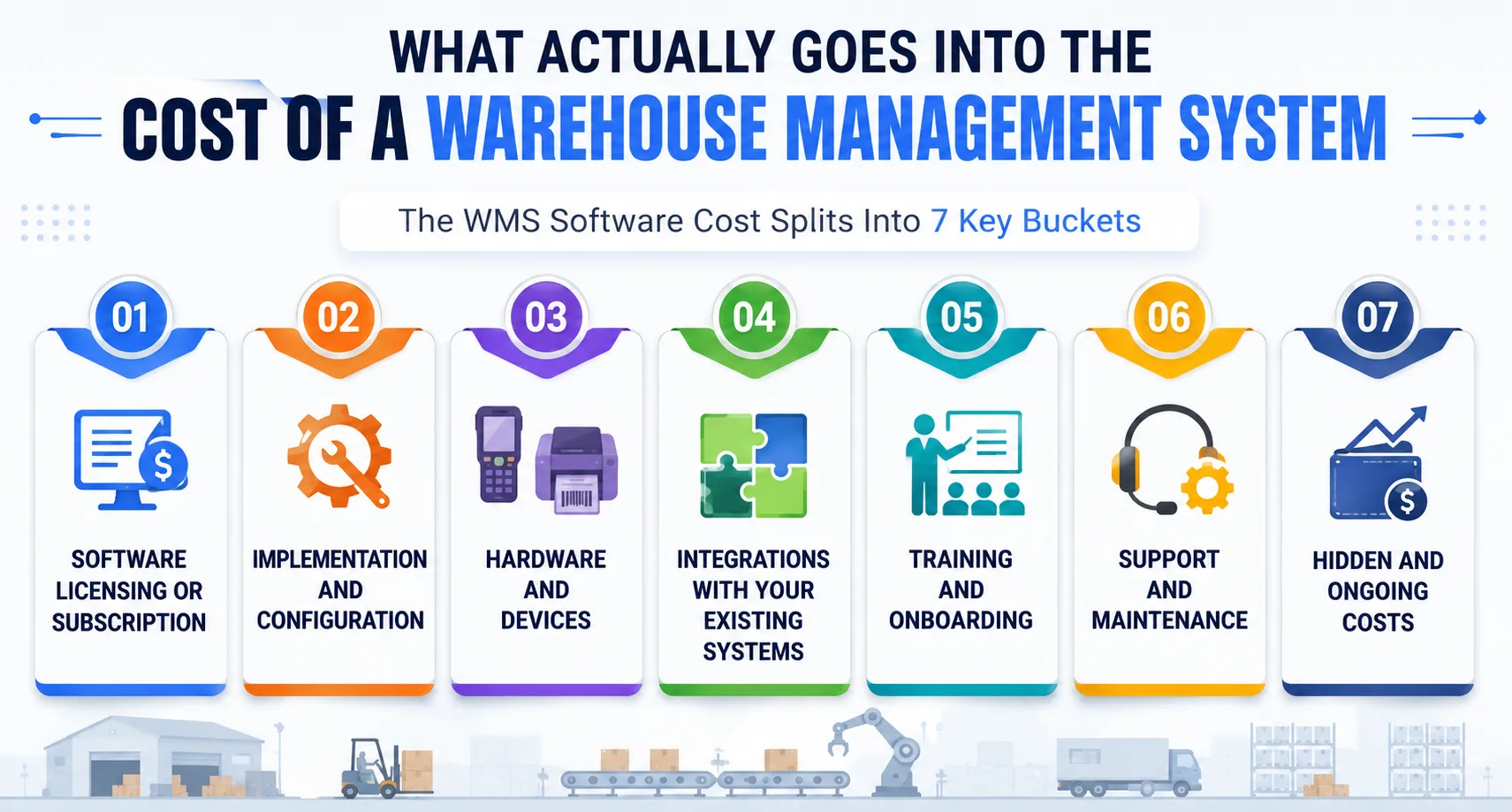
1. Software licensing or subscription
This is the price to use the platform, billed either as a monthly subscription per user or as a one-time perpetual license. It is the number most vendors lead with, and it is rarely the biggest one. Read it as your starting point, not your total.
2. Implementation and configuration
Getting the system live means configuring workflows, setting up locations, and testing every process against your floor. This work often costs as much as a year of licenses, sometimes more. Skipping it is how good software still fails on go-live day.
3. Hardware and devices
Scanners, mobile terminals, label printers, and networking gear turn the software into something your team can actually use. If you run on-premise, servers get added here too. Many quotes ignore this line, and it can run into five figures.
4. Integrations with your existing systems
Your WMS has to talk to your ERP, your e-commerce platform, and your shipping carriers. Each connection is real engineering, not a checkbox. The more systems you link, the more the warehouse management system cost climbs.
5. Training and onboarding
Pickers, supervisors, and admins all need to learn the system before it earns its keep. Good training protects your investment, because adoption is what turns a purchase into a payback. Budget for it as a real cost, not an afterthought.
6. Support and maintenance
Software needs updates, fixes, and a support line you can call when a scan fails at 6 a.m. On-premise systems usually charge 15% to 20% of the license every year for this. Cloud plans fold it into the subscription.
7. Hidden and ongoing costs
Extra users, new modules, IT staff time, and downtime during transitions all add up after launch. These rarely appear in a first quote, yet they shape your true spend. We cover them in full later in this guide.
WMS Deployment Models and How They Affect Cost
How you host the system changes the whole cost curve. The same features can be cheap monthly or expensive upfront, so the deployment choice is really a budgeting choice. It is also the single biggest swing in the warehouse management system cost.
| Deployment model | Upfront cost | Ongoing cost | Control and customization | Best fit |
|---|---|---|---|---|
| Cloud / SaaS | Low | Subscription per user, per month | Moderate | Fast rollout, multi-site, growing ops |
| On-premise | High (perpetual license) | Maintenance 15% to 20% yearly | Full | Heavy compliance, deep customization |
| Hybrid | Medium | Mixed | High | Phased migration, mixed needs |
| Custom-built | Higher initial build | Support or retainer, no per-user fees | Complete | Non-standard workflows, long-term scale |
1. Cloud-based WMS (SaaS)
A cloud-based WMS is hosted by the vendor and billed per user each month. You avoid servers and heavy upfront spend, which makes it the fastest path to go-live for most growing operations. The trade-off is that fees keep running as long as you use it.
2. On-premise WMS
An on-premise system lives on your own servers under a one-time perpetual license. You gain full control and deep customization, which suits heavy compliance and unusual workflows. In return, you carry the hardware, the IT staff, and yearly maintenance.
3. Hybrid WMS
A hybrid setup keeps some parts in the cloud and some on local infrastructure. It fits teams migrating in phases or running mixed requirements across sites. The cost sits between the two models, and so does the complexity.
4. Multi-tenant vs single-tenant
Multi-tenant cloud shares infrastructure across customers, which keeps the price low and updates automatically. Single-tenant gives you an isolated environment with more control and a higher fee. Your data, compliance, and customization needs decide which is worth it.
5. Custom-built WMS
A custom-built WMS is engineered around your exact operation rather than a vendor template. The initial build costs more, but there are no per-user license fees eating your margin every month. For non-standard floors, it often wins on total cost over time.
Also Read: WMS Implementation Checklist: 50 Steps to Successful Deployment
WMS Pricing Models Explained
Vendors package the same software in different ways, and the pricing model you pick shapes your cash flow. Knowing the WMS pricing models helps you compare quotes that look nothing alike on paper.
| WMS Pricing Model | Description |
|---|---|
| SaaS Subscription | Pay a recurring monthly or annual fee per user. Low upfront cost with vendor-managed hosting and updates. |
| Perpetual License | Pay a one-time license fee, plus annual maintenance and support costs. |
| Usage-Based | Pay based on usage, such as orders or transactions. Costs increase as usage grows. |
| Tiered Plans | Choose from different plans based on features and users. Upgrade as your business grows. |
| Custom Development | Pay a one-time cost to build a WMS around your own workflows. No recurring per-user license fees. |
Warehouse Management System Cost by Business Size
Scale changes everything about the price. A single-site operation and a multi-warehouse network are not shopping in the same aisle. So it helps to price the warehouse management system cost by the size of the operation.
| Operation size | Cloud, year one | On-premise or one-time | Annual recurring |
|---|---|---|---|
| Small (10K-30K sq ft, under 200 orders/day) | $25,000 to $75,000 | $100,000 to $250,000 | $15,000 to $35,000 |
| Mid-size (30K-100K sq ft, 200-1,000 orders/day) | $75,000 to $200,000 | $250,000 to $500,000 | $35,000 to $80,000 |
| Large (100K-300K sq ft, 1,000-5,000 orders/day) | $200,000 to $500,000 | $500,000 to $1,500,000 | $80,000 to $200,000 |
| Enterprise (300K+ sq ft, 5,000+ orders/day) | $500,000 to $1,000,000+ | $1,500,000 to $5,000,000+ | $200,000 to $500,000+ |
| High-end named systems | Custom quote | $500,000 to several million | Often exceeds the license |
Not sure where your operation lands, or what a build for your workflows would run? Get a Project Cost Estimate, and we will scope the real number with you.
WMS Implementation Costs and Timeline
Implementation is where budgets quietly blow up. The WMS implementation cost covers everything between signing and running live, so treat each item below as a planned line, not a surprise.
| Implementation component | Indicative range |
|---|---|
| Setup and configuration | $3,000 to $50,000+ |
| System integrations | $10,000 to $80,000 |
| Data migration | $10,000 to $30,000 |
| Automation and robotics | $30,000 to $150,000 |
| Customization | $2,000 to $15,000 (light) to $100,000+ (deep) |
| Training and go-live | $1,000 to $50,000 |
Let's understand each in detail.
1. Setup and configuration
This is the work of shaping the software to your floor, from locations and zones to picking and packing rules. It is hands-on and varies in complexity, which is why the range is wide. Underfund it, and you inherit a system that fights your team.
2. System integrations (ERP, e-commerce, shipping)
Connecting your WMS to your ERP, sales channels, and carriers is real development work. Each integration needs building, testing, and ongoing care. The more connections you need, the larger this line grows.
3. Data migration
Moving SKUs, locations, and history into the new system has to be clean, or launch day gets ugly. Dirty data is one of the most common reasons a rollout slips. Budget for the cleanup, not just the transfer.
4. Automation and robotics integration
If conveyors, sorters, or robots are in play, wiring them into the WMS adds a meaningful cost. This is specialized engineering that ties software to moving hardware. Only operations chasing that automation need to carry it.
5. Customization
Standard platforms flex only so far, and custom work fills the gap between the software and your process. Light tweaks are inexpensive, while big changes climb quickly. This is often where off-the-shelf costs start to rival a custom build.
6. Training and go-live support
Your team needs guided training and a safety net during the first live weeks. Strong support here protects everything you spent to get this far. Rushing it is how good systems get blamed for bad launches.
7. Typical implementation timeline
Small cloud rollouts can go live in a few weeks, while large or automated projects run for several months. A focused, well-scoped build shortens that window a lot. On our own projects, a custom WMS commonly reaches go-live in 8 to 12 weeks.
Also Read: Real-Time Inventory: WebSocket and Pub-Sub Architecture
Hidden and Ongoing WMS Costs to Budget For
The first quote almost never tells the whole story. These recurring items shape your true warehouse management system cost long after launch, so plan for them now instead of flinching later.
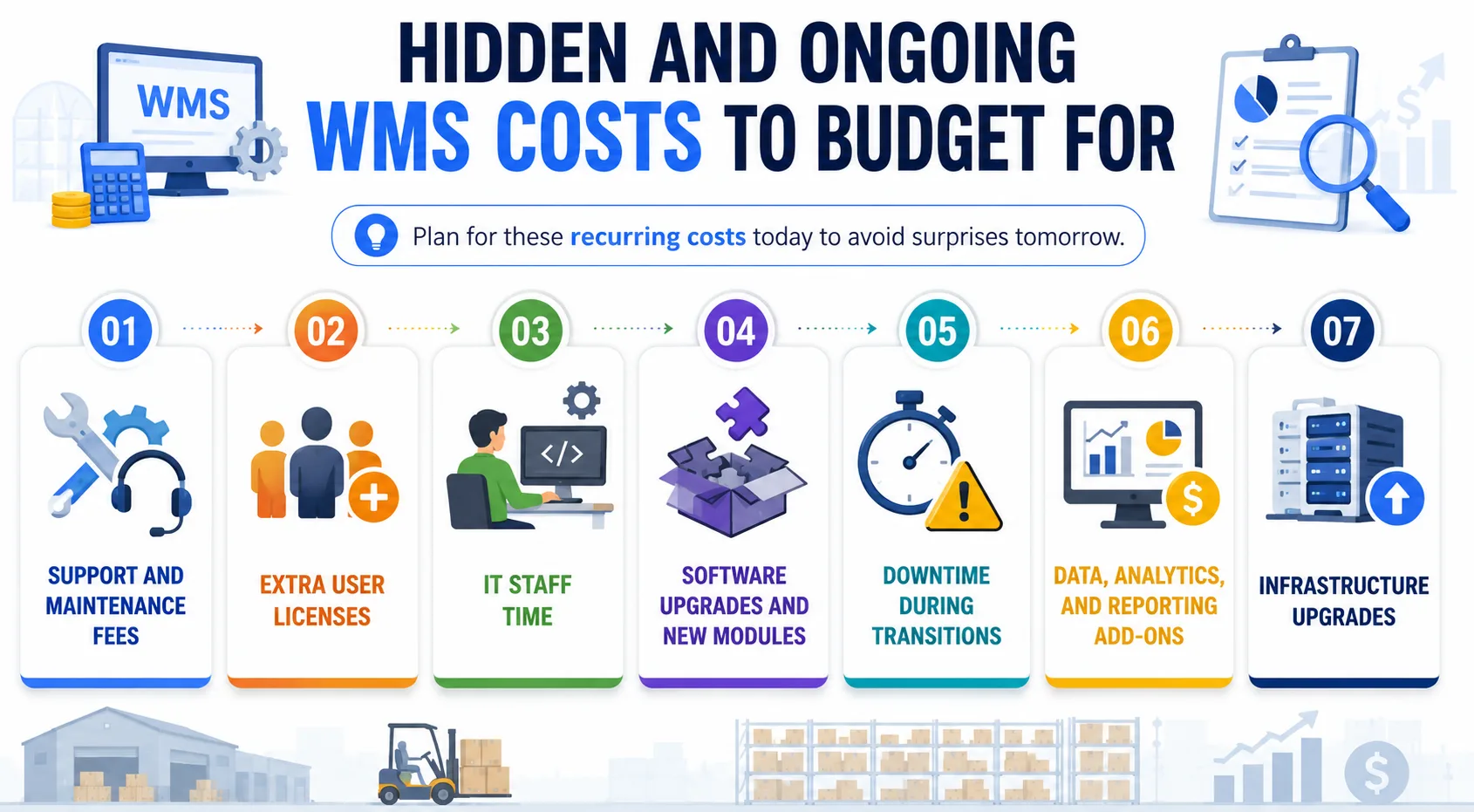
1. Support and maintenance fees
On-premise systems typically charge 15% to 20% of the license every year for updates and support. Cloud plans wrap this into the subscription. Either way, you are paying to keep the system healthy, so account for it.
2. Extra user licenses
Adding seats as you grow raises the monthly bill, often at a per-user rate. It feels small per person and adds up fast across a growing team. Model your headcount before you sign, not after.
3. IT staff time
Someone has to manage servers, integrations, and updates, whether in-house or outsourced. On-premise setups demand more of this than cloud does. That labor is a real cost even when it hides inside existing salaries.
4. Software upgrades and new modules
As needs grow, you bolt on features like labor management or advanced analytics. Each addition improves the system and lifts the price. Treat the platform as something that expands with you over time.
5. Downtime during transitions
Switching systems can slow or pause operations for a spell, and lost throughput is a genuine cost. Good planning shrinks the disruption sharply. Ignore it in the budget, and it shows up on the P&L anyway.
6. Data, analytics, and reporting add-ons
Deeper dashboards and reporting tools often sit outside the base plan. They pay back in better decisions, but they carry a fee. Decide which insights you truly need before buying every add-on.
7. Infrastructure upgrades
Growth can outpace your servers, network, or devices, forcing upgrades down the line. This is easy to miss in year one and hard to ignore in year three. Build a little headroom into the plan.
Now you know where every dollar goes; let us look at how specific features move that number up or down.
How WMS Features Change the Price
Features are the biggest lever on the WMS software cost after deployment. A basic system and a fully loaded one can differ by a wide margin, purely on what you switch on. This is where your warehouse management system cost climbs fastest.
Core Features (Included in Base Pricing)
Most WMS platforms include these standard features:
- Receiving
- Put-away management
- Picking
- Inventory tracking
- Basic reporting
These features are enough for many small and mid-sized warehouses with standard operations.
Advanced Features (Increase the Cost)
Advanced features are usually available as add-ons, such as:
- Warehouse Control System (WCS) / Warehouse Execution System (WES)
- Labor management
- Slotting optimization
- Yard management
- Last-mile delivery management
- Omnichannel fulfillment
- 3PL and multi-client billing
- Kitting and cross-docking
Choose only the features your business needs to avoid unnecessary costs.
What Determines Your Final WMS Cost
Two operations can get very different quotes for what looks like the same system. These are the factors that decide where your warehouse management system pricing actually lands.
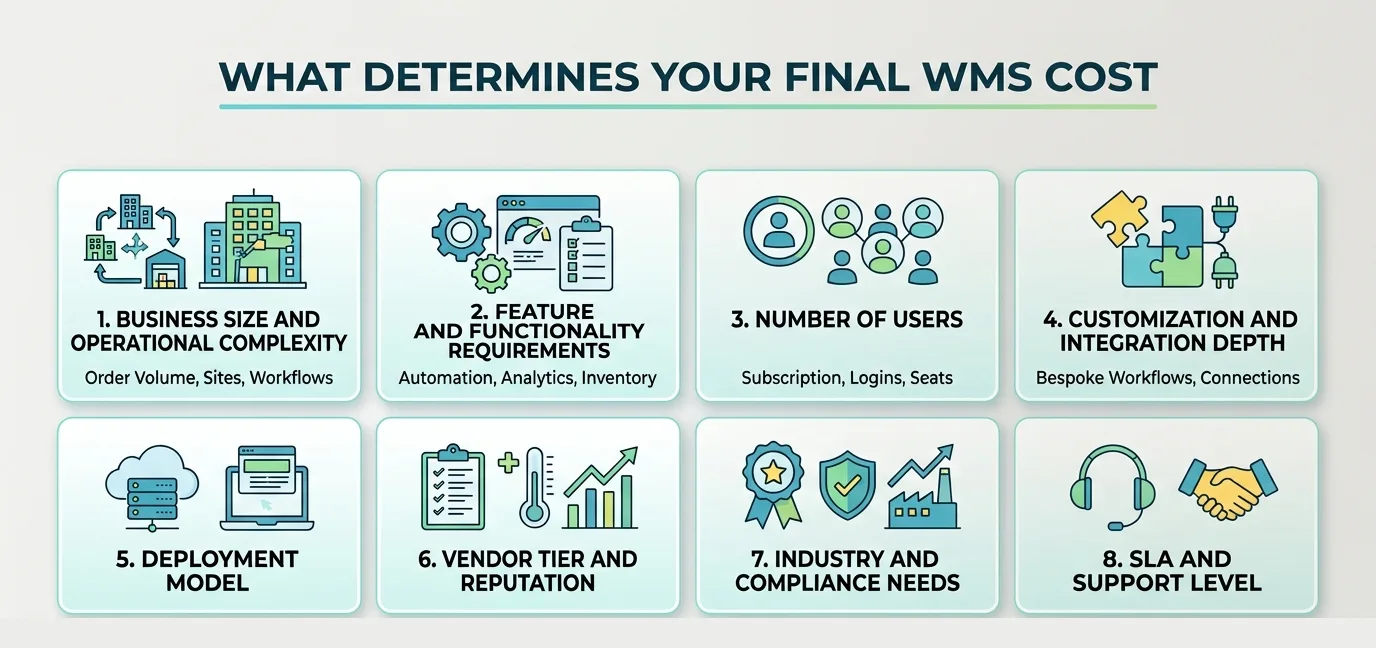
1. Business size and operational complexity
Order volume, site count, and workflow depth all push the price. A single simple warehouse costs far less than a complex multi-site network. Complexity, more than headcount, is the real driver.
2. Feature and functionality requirements
The capabilities you need shape the tier and the tag. Basic inventory control is cheap, while automation and analytics are not. Match features to real needs and the cost stays sane.
3. Number of users
Per-user pricing means every seat adds to a subscription. A large floor with many logins costs more each month. Count concurrent and named users before comparing plans.
4. Customization and integration depth
Bespoke workflows and many system connections raise the cost quickly. Each custom change and integration is real engineering. This is often the line that separates a cheap quote from a realistic one.
5. Deployment model
Cloud, on-premise, hybrid, and custom each carry a different cost shape. One spreads spend monthly, another concentrates it upfront. Your choice here sets the whole budget curve.
6. Vendor tier and reputation
Established enterprise vendors command premium pricing for scale and support. Smaller specialists can deliver strong value for the right fit. Pay for the capability you need, not the logo.
7. Industry and compliance needs
Regulated sectors like food, pharma, and cold chain demand extra features and controls. That compliance work adds cost but keeps you audit-ready. Skipping it is a risk no budget should take.
8. SLA and support level
Faster response times and higher guarantees cost more on the contract. Mission-critical operations need the stronger tier. Match the SLA to how much a system outage would actually hurt.
Custom WMS vs Off-the-Shelf: Which Costs Less Over Time
This is the decision that shapes your long-term spend. An off-the-shelf platform and a custom WMS price out very differently once you look past the first invoice.
| Factor | Off-the-shelf WMS | Custom WMS |
|---|---|---|
| Upfront cost | Lower (subscription or entry license) | Higher initial build |
| Long-term cost | Recurring per-user or license fees compound | No per-user fees, support or retainer only |
| Workflow fit | You adapt your process to the software | Software is built around your process |
| Scalability | Capped by the vendor roadmap and tiers | Scales on your terms |
| Ownership | The vendor owns the platform | You own the code and the data |
Let's look in detail.
1. When an Off-the-Shelf WMS Makes Sense
Choose an off-the-shelf WMS if:
- Your warehouse has standard workflows.
- You want to go live quickly.
- You have a limited upfront budget.
- You prefer the vendor to handle maintenance and updates.
- You don't need extensive customization.
- You can upgrade to higher plans as your business grows.
2. When a Custom WMS Is the Better Choice
A custom WMS is worth considering if:
- Your warehouse has unique or complex workflows.
- Existing WMS platforms don't meet your requirements.
- You want software built around your processes.
- You want to avoid recurring per-user license fees.
- You expect your operations to grow significantly over time.
- You want complete ownership of the software and your data.
3. What Does a Custom WMS Cost?
A custom warehouse management system typically costs $30,000 to $180,000+, depending on:
- Project scope
- Required features
- System integrations
- Automation requirements
- Custom workflows
Although the upfront investment is higher, you own the software and typically pay only for ongoing support and maintenance instead of recurring license fees.
How to Calculate the Total Cost of Ownership (TCO)
The sticker price is not spent. To compare options fairly, you need the WMS total cost of ownership, which adds up everything over the life of the system. It is the truest read on your warehouse management system cost.
1. What TCO includes
TCO combines your upfront costs, your ongoing costs, and the hidden ones we covered earlier. That means license or build, implementation, hardware, support, upgrades, and staff time. Only the full picture lets you compare a cloud plan against a custom build honestly.
2. The TCO formula
The simple version is upfront cost plus ongoing cost plus hidden cost, measured over a set period. Most buyers use a three-year or five-year window for a fair view. This turns a confusing pile of quotes into one comparable number.
3. Five-year TCO, worked two ways
The formula only becomes useful with numbers in it. Below are two operations priced end to end over five years, cloud against on-premise. Treat every line as a planning placeholder and replace it with your own quotes as they arrive.
Small warehouse, 30,000 sq ft, 300 orders a day
| Line | Cloud | On-premise |
|---|---|---|
| Software, year 1 | $30,000 (10 users at $250 a month) | $120,000 license |
| Implementation | $45,000 | $185,000 |
| Hardware | $40,000 | $75,000 (servers and devices) |
| Training | $8,000 | $15,000 |
| Year 1 total | $123,000 | $395,000 |
| Annual thereafter | $38,000 (subscription, light training, minor changes) | $57,000 average (maintenance at 18%, part-time IT, an upgrade in year 3, hardware refresh in year 4) |
| Five-year TCO | $275,000 | $623,000 |
Cloud lands about $348,000 lower, a little under half the on-premise total.
Mid-size warehouse, 75,000 sq ft, 1,200 orders a day
| Line | Cloud | On-premise |
|---|---|---|
| Software, year 1 | $90,000 (25 users at $300 a month) | $350,000 license |
| Implementation | $125,000 | $325,000 |
| Hardware or infrastructure | $65,000 | $125,000 |
| Training | $18,000 | $30,000 |
| Year 1 total | $298,000 | $830,000 |
| Annual thereafter | $112,000 (subscription, user growth, enhancements) | $178,000 (maintenance at 18%, full-time IT, amortized upgrades, infrastructure) |
| Five-year TCO | $746,000 | $1,542,000 |
The gap widens with size, because the on-premise lines that scale hardest are the ones you keep paying: IT headcount, infrastructure, and the upgrade cycle. If your horizon is genuinely ten years across many sites, run the same table over ten years before you decide, since the on-premise curve flattens once the license is paid for.
What the Market Charges: Vendor Pricing at a Glance
Vendor list prices move and most vendors publish nothing, so treat the figures below as the indicative starting points seen in quotes and public pricing pages during 2026. They are for sanity-checking a quote, not for replacing one. Product names are trademarks of their respective owners, and Rorix neither resells nor is affiliated with any of them.
Cloud and SaaS platforms
| Platform | Pricing model | Indicative starting point | Typical buyer |
|---|---|---|---|
| Manhattan Active WMS | Per transaction | $0.50 a line plus a base fee | Enterprise |
| Blue Yonder Luminate | Per user | $450 per user a month | Enterprise |
| SAP EWM Cloud | Per user | $350 per user a month | Large enterprise |
| Oracle WMS Cloud | Per user | $300 per user a month | Mid-market to large |
| Deposco | Tiered packages | $5,000 to $15,000 a month | 3PL and e-commerce |
| ShipHero | Tiered packages | $2,000 to $8,000 a month | E-commerce SMB |
| Fishbowl Warehouse | Per user | $200 per user a month | Small business |
| Logiwa | Per transaction | $0.35 an order plus a $2,000 base | SMB and 3PL |
On-premise platforms
| Platform | License | Implementation | Typical buyer |
|---|---|---|---|
| Körber (HighJump) | $150,000 to $750,000 | $100,000 to $400,000 | Mid-market to enterprise |
| Infor WMS | $200,000 to $1,000,000 | $150,000 to $600,000 | Enterprise |
| JDA WMS (legacy) | $300,000 to $2,000,000 | $200,000 to $800,000 | Large enterprise |
| Custom build at US agency rates | No license | $300,000 to $1,500,000 | Operations with genuinely unusual workflows |
Two things in those tables matter more than the individual numbers. Per-user pricing compounds every time you hire and per-transaction pricing compounds every time you grow, so the model shapes your five-year total as much as the headline rate does. And the custom row covers multi-site enterprise builds quoted at US agency rates, which is one way to price a build and not the only one. What a comparable single-site build costs from us is set out below, and the arithmetic behind it is published rather than quoted on request.
How to Reduce Your WMS Cost Without Cutting Corners
Cheaper is not the goal. Cost-effective is, and these moves lower the warehouse management system cost while protecting what you actually need.
1. Start with a phased rollout
Launch core functions first, then add features as you prove value. It spreads the spend and lowers the risk of a big-bang failure. You learn on a smaller footprint before committing more.
2. Choose cloud / SaaS where it fits
For standard operations, cloud avoids servers and high upfront cost. It gets you to live faster with less IT burden. Reserve on-premises or custom for when the workflow truly demands it.
3. Right-size the tier to your operation
Buy the plan that matches your floor, not the flashiest package. Paying for unused enterprise features is a quiet waste. Map your real needs first, then pick the tier.
4. Negotiate on users, term, and support
Vendors have room to move on seat counts, contract length, and service levels. A longer term or bundled support can lower the effective rate. Always ask, because the first quote is rarely the last word.
5. Avoid over-customization
Every custom tweak on a packaged platform adds cost and future upkeep. Stick to changes that clearly earn their keep. When customization piles up, a purpose-built system may cost less overall.
6. Reuse and integrate what you already run
Connect to your existing ERP, devices, and tools instead of replacing them. Smart integration protects earlier investments. It also shrinks the hardware and licensing you need to buy new.
7. Plan for scale from day one
Choose an approach that grows without a costly rebuild later. Designing for scale upfront avoids paying twice. This is where a well-architected build quietly saves money over the years.
8. Time the negotiation, and ask for concessions rather than discounts
Vendors carry quota cycles, and quotes soften near the end of a fiscal quarter or during the slow buying months early in the year. If the license price genuinely will not move, move the conversation to everything around it: extra training hours, a wider support window, waived customization fees, or free seats for the first year. Bundling helps too, whether that means grouping several sites into one agreement or committing upfront to the modules you know you need in year two. Three quotes in hand is what makes any of this work, because the alternative to a concession has to be real.
Build Your Year One Budget
Work through these lines before you take anything to procurement. Every line you cannot fill in is a question for the vendor, which is the point of the exercise.
| Group | Lines to price |
|---|---|
| Software | Cloud subscription (users times monthly rate times 12), or the on-premise license |
| Implementation | Configuration, integration development, data migration, training, project management |
| Hardware | RF scanners, label printers, network and WiFi coverage, servers if on-premise |
| Everything else | Vendor travel and on-site time, external consulting, contingency at 10 to 15% |
Then price the recurring years: subscription or maintenance, IT support time, refresher training, and enhancements. Your five-year total is year one plus four times that recurring figure. The cost estimator does the arithmetic if you would rather not build the spreadsheet, and the WMS ROI calculator puts the expected return beside it.
Getting the Budget Approved
How you buy changes who signs it off. An on-premise license is capital expenditure, which usually means a capital budget round, depreciation across five to seven years, and one large cash outlay. A cloud subscription is operating expenditure, normally an easier approval and a predictable monthly line. Neither is automatically cheaper, but the second is easier to get through.
If a capital purchase is the right answer and the cash outlay is the obstacle, software leasing spreads a license across three to five years at rates typically in the mid single digits. A $300,000 license financed over four years at 6% runs roughly $7,050 a month and about $338,000 in total, so you pay around $38,000 to keep $300,000 available for something else. Whether that trade is worth taking depends entirely on what the cash would otherwise do.
Seven Questions to Ask a Vendor About Price
Ask these before you get attached to a shortlist, and get the answers in writing.
- What exactly sits inside the base price, in modules, user or transaction allowances, and level of support?
- What costs extra? Additional modules, customization, premium support, and training beyond the included hours are the usual four.
- What is implementation likely to cost for a warehouse of our size? Ask for a range and a reference customer at similar scale, not a reassurance.
- What happens when we pass our user or transaction limits? Look for overage rates, forced tier upgrades, and whether you can flex back down in a quiet season.
- What has your price increase history looked like, and can we lock pricing for three to five years?
- What does ongoing support actually include? Response times, hours of cover, and whether version upgrades sit inside the fee or outside it.
- Can you put a five-year total cost of ownership in writing, including the add-ons you would expect us to buy?
What Rorix Charges for a Custom WMS
A single-site custom WMS with ERP integration from Rorix runs $30,000 to $64,000. Multi-site operations, RFID hardware, and heavy integration push the range to $80,000 to $180,000 or more. Go-live lands in 8 to 12 weeks inside a 3 to 4 month engagement, and you own 100% of the source code with no per-seat license fees.
The arithmetic behind those bands is open, not a quote-request black box. They derive from our published retainer ladder: a 3 to 5 developer team at $10,000 to $16,000 per month over the engagement, so a fixed quote and a retainer comparison give the same answer. The full rate card is public, the WMS solutions page breaks down what each band includes, and the WMS ROI calculator turns your order volume and error rate into a payback estimate against these numbers.
Why Rorix for Your Custom WMS Build
If your floor has outgrown off-the-shelf, a custom WMS build should lower your long-term cost, not add risk.
Rorix has delivered 27 projects with a 5.0 rating on Clutch. We work on retainer, so we stay accountable well past go-live rather than disappearing after launch.
- Domain-built software: We engineer WMS for your operation, not adapted from a template.
- Proven outcomes: Real-time inventory and barcode scanning that have cut picking errors by up to 80%.
- In-house-team model: 2-week sprints with full visibility, so it feels like your team, not a vendor.
- Fast to value: Custom WMS builds that commonly reach go-live in 8 to 12 weeks.
- Integration depth: ERP, e-commerce, and device integrations built to fit what you already run.
Ready to own a system that scales on your terms instead of the vendor's? Book a Free Consultation, and we will plan the first sprint.
Budget for the Total Cost of Ownership, Not the Sticker Price
So how much does a warehouse management system cost? The final number is shaped by deployment, size, features, and how much of the work you fund properly.
The number that matters is total cost against real return, not the sticker price on a license. Price the whole project, plan for the hidden lines, and weigh a packaged platform against a build that fits your floor.
The number on a WMS quote matters less than which line items it contains. A quote that omits integration, data migration, or training is not cheaper, it is incomplete.
Price your own operation with clear eyes. When you are ready, connect with our experts to scope your WMS and get a real estimate for your workflows.
Frequently Asked Questions
How much does a warehouse management system cost on average?
Most operations spend between $150 and $500 per user monthly for cloud, or $2,500 to $200,000+ upfront for on-premise. Custom builds usually run $30,000 to $180,000+. Your final cost depends on size, features, and deployment.
Is cloud-based WMS cheaper than on-premise?
Cloud is cheaper upfront because you skip servers and pay a monthly fee. On-premise costs more at the start but avoids recurring subscriptions. Over several years, the total cost of each can be closer than it looks.
How much does WMS implementation cost?
Implementation ranges from a few thousand dollars for small cloud rollouts to $300,000+ for large, integrated projects. It covers setup, integrations, data migration, and training. This line often equals a year or more of license fees.
How long does a WMS take to pay for itself?
Many operations recover the cost within 12 to 36 months, and cloud plans often pay back sooner. Savings come from fewer errors, less wasted labor, and tighter inventory. The bigger your current waste, the faster the return.
Is a free or open-source WMS worth it?
Free tools can suit very small operations with simple needs. As you scale, they often lack support, integrations, and depth, and the hidden effort adds up. For growing floors, a paid or custom system usually costs less overall.
How much does a custom WMS cost to build?
A custom warehouse management system typically costs $30,000 to $180,000+, based on scope, integrations, and automation. You fund the build once and avoid per-user license fees. For complex operations, that flat long-term cost is the main advantage.
What hidden costs should I budget for?
Plan for support and maintenance, extra user seats, IT staff time, upgrades, and downtime during the switch. These rarely sit in a first quote yet shape your real spend. Budgeting for them upfront prevents surprises later.
How do I choose a WMS that fits my budget?
Start by mapping your real workflows, volume, and must-have features. Match those to the right deployment and tier, then compare total cost, not just the license. A scoped estimate for your operation removes the guesswork.
What share of the cost is implementation rather than software?
Across five years, cloud deployments tend to split roughly 40% implementation to 60% software, while on-premise runs closer to 60% implementation and infrastructure against 40% software. Implementation is the larger share on-premise, which is why an implementation quote tells you more than a license quote there.
What does an annual maintenance fee actually cover?
Maintenance typically runs 18% to 22% of the license and covers updates, patches, bug fixes, business-hours support, and minor version upgrades. It usually excludes the major version upgrades that land every three or four years, customization changes, extra training, round-the-clock support, and new modules. Ask which side of that line each item falls on before you sign.
Can we do this on a small budget?
Yes, with trade-offs you choose deliberately. An entry-level cloud platform can land in the $25,000 to $50,000 range in year one, a phased rollout spreads the remainder, and handling data cleansing internally commonly saves $15,000 to $30,000. What does not work is cutting a feature your floor depends on, because a system nobody uses is the most expensive outcome available.
Costing a WMS build?
Send us your SKU count and daily order volume. You get back a scope and a number you can take to your CFO.
Continue learning
Written by
Renish DadhaniyaFounder & Director, Rorix Technologies
Renish co-founded Rorix Technologies and drives the engineering and delivery culture across the organization. Beyond engineering, he leads the company's sales, finance, and HR operations, building the infrastructure that lets the team focus on shipping quality software. With deep hands-on expertise in architecture and team building, he ensures every project lands on time to the quality standards clients demand.
View full profileRelated articles
Cost of Warehouse Management Software in Pharma: Complete Pricing Breakdown 2026
What does a pharma WMS really cost? Year-one bands by operator profile, what validation and DSCSA add, and the three-year total hiding behind the quote.
Read article
How to Calculate WMS ROI: Complete Guide for 2026
Learn how to calculate warehouse management system (WMS) ROI with our step-by-step guide. Includes formulas, real examples, and a free ROI calculator tool.
Read article
Custom CRM Development Cost in 2026: Pricing by Features, Team & Timeline
How much does custom CRM development cost in 2026? See pricing by build tier, features, team size, timeline, data migration, and ongoing maintenance.
Read article