
AngularJS to Angular Migration: Cost, Risk and a Plan
AngularJS support ended on 31 December 2021. What staying costs, your five options, published cost and time ranges, the main risks and a phased plan to move.
On this page28 sections
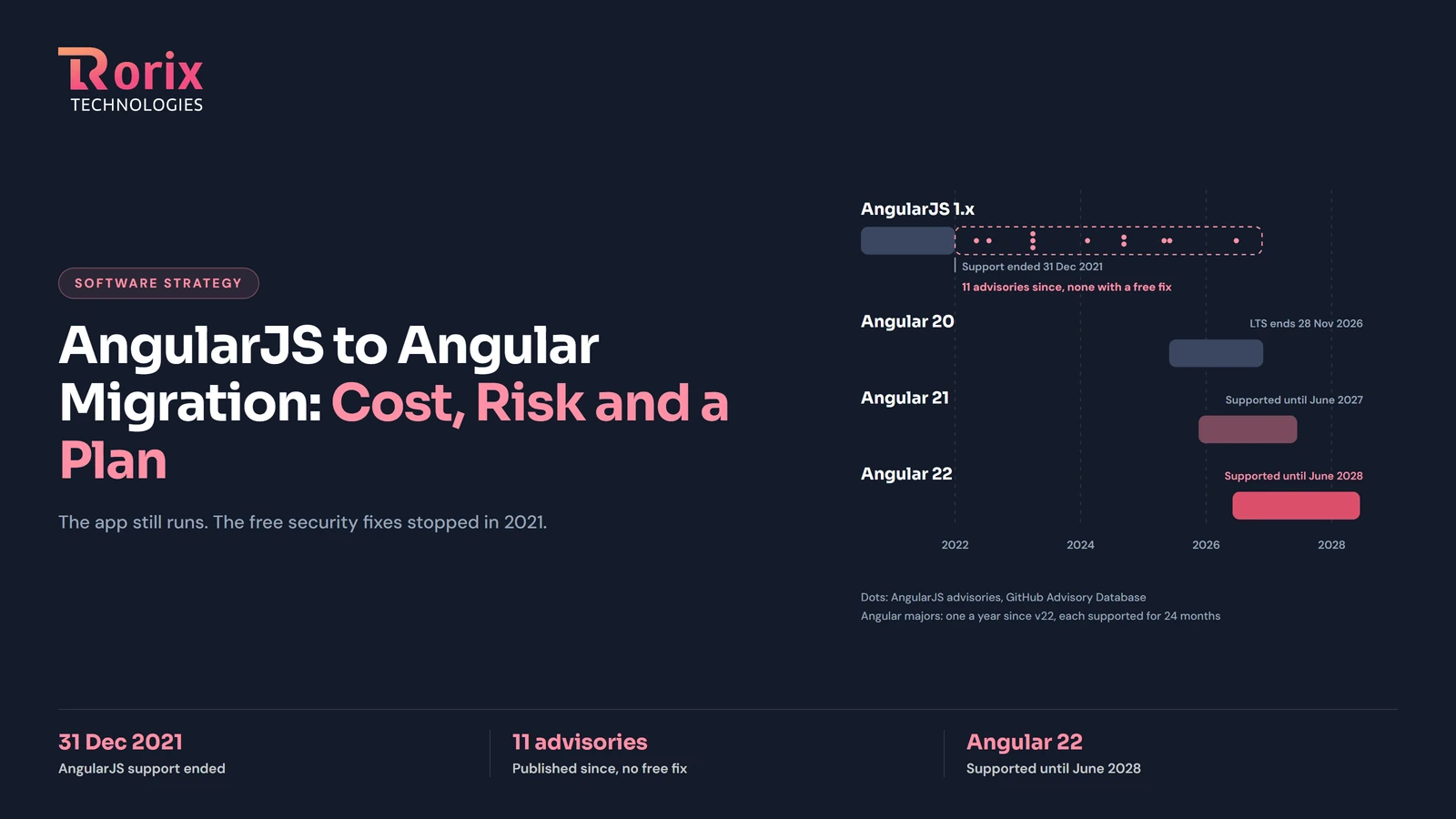
Google ended long-term support for AngularJS on 31 December 2021. If your business still runs an AngularJS 1.x application, it works today exactly as it did then. What it lost is the stream of security fixes: every flaw found since stays open unless your team or a paid vendor patches it. An AngularJS to Angular migration closes that gap, and it is a rewrite of the frontend rather than an upgrade.
This guide is for the owner or CTO who has to decide what to do: what staying costs, the five options, published cost and time ranges, the risks and a phased plan to move. Where Rorix comes in, it is through our legacy application modernization service.
Key Takeaways: What AngularJS End of Life Means for Your App
- Google ended long-term support for AngularJS on 31 December 2021, and the last release, 1.8.3, shipped on 7 April 2022. The code still runs; free security patches and browser fixes stopped.
- The GitHub Advisory Database lists 11 AngularJS security advisories published since support ended, two of them rated high, and none has a fix in the free packages on npm.
- Moving from AngularJS to Angular is a rewrite of the frontend, not a version upgrade. Google's official hybrid route runs both frameworks in one app while screens move across one at a time.
- Paid extended support from HeroDevs or OpenLogic keeps patches coming, but neither publishes a price, and it buys time rather than a way forward.
- Published ranges for an AngularJS to Angular migration run from about $5,000 to $300,000+; FullStack's $500,000+ is for large legacy modernization in general. For a mid-size app one source's ceiling is five times another's, so the real number comes from an assessment of your own code.
- The version to land on is Angular 22, released on 3 June 2026 and supported until June 2028.
Is AngularJS still supported in 2026?
No. Google ended long-term support for AngularJS on 31 December 2021, after extending it once for the pandemic, and the last release, version 1.8.3, shipped on 7 April 2022. The code still runs and the files stay downloadable, but Google publishes no further security patches or browser fixes for it.
What AngularJS end of life changed, and what it did not
Google's announcement, Discontinued Long Term Support for AngularJS (Mark Thompson, Angular blog, 11 January 2022), set out what stays: CDN links remain active, AngularJS.org stays online, the GitHub repository is archived read-only, and the npm and bower packages stay published, "marked as deprecated". The AngularJS documentation opens with one line: "AngularJS support has officially ended as of January 2022." The last version on npm is 1.8.3, published on 7 April 2022.
What stopped is everything that keeps an application safe to run. InfoQ's report (19 January 2022) put it plainly: the repository "will receive no more additional updates, including security patches", while updates "could be required to fix incompatibilities with new browser versions or with other frameworks."
Who still runs AngularJS
More teams than the date suggests. In the 2025 Stack Overflow Developer Survey, 7.2% of all respondents and 7.5% of professional developers said they had done extensive development work in AngularJS over the past year. The angular package on npm, which is AngularJS, was downloaded 642,994 times in the week of 13 to 19 November 2026, against 8,492,071 for @angular/core, the core package of modern Angular. If one of those downloads is yours, the rest of this guide is the decision in front of you.
Is it safe to keep running an AngularJS app?
An AngularJS app runs, but it is not getting safer. The GitHub Advisory Database lists 11 security advisories for AngularJS published since support ended, two of them rated high, and none has a fix in the free packages. Each one stays open until your team or a paid vendor patches it, or you move off the framework.
The table lists every advisory in the GitHub Advisory Database for the npm angular and angular-sanitize packages published after 31 December 2021, as read on 20 November 2026. The severity is GitHub's own rating.
| Advisory | Published | Severity | What it allows | Free fix |
|---|---|---|---|---|
| CVE-2022-25844 | 3 May 2022 | Medium | Denial of service through a slow regular expression (ReDoS) | None |
| CVE-2022-25869 | 16 July 2022 | Medium | Cross-site scripting | None |
| CVE-2023-26116 | 30 March 2023 | Medium | ReDoS through angular.copy() | None |
| CVE-2023-26117 | 30 March 2023 | Medium | ReDoS through the $resource service | None |
| CVE-2023-26118 | 30 March 2023 | Medium | ReDoS through the URL input field | None |
| CVE-2024-21490 | 10 February 2024 | High (7.5) | ReDoS through super-linear backtracking | None |
| CVE-2024-8372 | 9 September 2024 | Low | Bypass of image source restrictions | None |
| CVE-2024-8373 | 9 September 2024 | Low | Bypass of image source restrictions | None |
| CVE-2025-0716 | 29 April 2025 | Low | Improper sanitizing of SVG elements | None |
| CVE-2025-2336 | 4 June 2025 | Medium | Incomplete filtering in angular-sanitize | None |
| CVE-2026-11998 | 24 June 2026 | High (7.6) | A bypass of Strict Contextual Escaping that "can lead to arbitrary JavaScript execution" in the user's browser | None |
The newest is the most serious, and GitHub's entry for it says so directly: "The AngularJS project was already End-of-Life when this CVE was published and will not receive any updates to address this issue." Whether each advisory can be exploited depends on how your code uses the affected feature, so an internal tool behind a login is less exposed than a public form. Working that out for your app is part of the audit, not a guess.
The ground moves around it, too
Security is not the only thing that stopped. AngularJS uses jQuery when a page loads it (AngularJS documentation), and jQuery 4.0.0, released on 17 January 2026, "removed some previously-deprecated APIs". XLTS.dev, the extended support vendor now part of HeroDevs, warned in April 2023 that jQuery 4.0 "will contain breaking changes to AngularJS applications" and added support for it to its paid releases. Browsers keep changing on the same terms, and every change that breaks an old screen lands on your team or on a vendor contract.
Can you upgrade AngularJS to Angular, or is it a rewrite?
AngularJS to Angular is a rewrite of the frontend. Google built Angular as a new framework, with a different architecture and in TypeScript, so no tool upgrades an AngularJS app in place. What Google does provide is a hybrid route, ngUpgrade, that runs both frameworks in one app while screens move across one at a time.
InfoQ's report sums up the gap: Google "re-engineered it completely going from version 1 to version 2", from the language (JavaScript for AngularJS, TypeScript for Angular) to the overall architecture.
| AngularJS (1.x) | Angular (version 2 onward) | |
|---|---|---|
| Language | JavaScript | TypeScript |
| Structure | Controllers and directives in the MVC pattern | Components |
| Support | Ended 31 December 2021 | Typically 24 months per major version since Angular 22 |
| Current version | 1.8.3, April 2022, the last | Angular 22, June 2026 |
| Moving between versions | No in-place path to Angular | Major versions upgrade one at a time |
The official upgrade guide was not carried over to the new documentation site: angular.io/guide/upgrade redirects to the archived Angular 17 guide (checked 20 November 2026). Its advice still stands: "Always consider the business case before moving to Angular. An important part of that case is the time and effort to get there." It recommends moving "incrementally, by running the two frameworks side by side in the same application, and porting AngularJS components to Angular one by one." The library behind that route, @angular/upgrade, is still published alongside Angular itself, at version 22.3.0 on npm when we checked on 20 November 2026.
For the budget, a rewrite means the cost follows the number of screens and components, not the age of the code. Business rules that live in AngularJS controllers and services have to be found and carried over, and unit tests written against AngularJS usually have to be rewritten as well. That is why test coverage of what the app does today decides how safe the move is.
Your five options and when each fits
You have five: pay a vendor for patched AngularJS releases, move to Angular in stages, rewrite the frontend in Angular in one go, switch to React or Vue, or replace the application with off-the-shelf software. Which fits depends on the app's size, its tests, how long it must live and whether it still matches how you work.
| Option | What it means | When it fits | What to watch |
|---|---|---|---|
| Pay for patches | A vendor ships patched AngularJS releases under contract | The app retires within a few years, or a migration is planned and needs cover | It buys time, not a future; the frontend still has to move |
| Move in stages | AngularJS and Angular run in one app; screens move one module at a time | A large app that must keep shipping features during the move | Two frameworks to run, test and staff until the last screen moves |
| Rewrite in Angular | Rebuild the frontend in Angular and cut over once | A small app, under about 50 components, or one too tangled to move piece by piece | Undocumented behavior is lost unless it is written down first |
| Switch to React or Vue | Rebuild the frontend in another framework | Your team or hiring plan is already React or Vue | The same rewrite, without a hybrid route from Google |
| Replace with off-the-shelf | Retire the app and buy a product | A packaged product now does what the app does | Wrong when the app encodes how your business actually runs |
Two questions settle most cases. How long must the application live? If it retires within two or three years, a patch contract may be the whole answer. And does it still match how the business works? If not, the decision may be a replacement rather than a migration, and our build vs buy tool scores rebuilding against replacing for your constraints.
Should you move AngularJS to React or Vue instead?
Only if your team or hiring plan already points there. In the 2025 Stack Overflow survey, 44.7% of all respondents had done extensive development work in React over the past year, against 18.2% for Angular and 17.6% for Vue.js, so React has the larger hiring pool. But a move to React or Vue is the same rewrite without Google's hybrid route, and Angular is the shorter step for an AngularJS team: arc.dev (updated 25 May 2026) notes that "dependency injection, service-based architecture, and modular code organization all carry over." Our React vs Angular comparison for enterprise applications sets out when each framework fits.
AngularJS extended support: what paying for patches buys
Extended support buys patched AngularJS releases, so security fixes and browser compatibility keep coming while you plan the move. HeroDevs and OpenLogic by Perforce both sell it, and neither publishes a price, so a quote is the only way to weigh it against the cost of migrating. Treat it as a dated bridge, not a destination.
| Vendor | Versions covered | What it includes | Term | Price |
|---|---|---|---|---|
| HeroDevs Never-Ending Support (formerly XLTS.dev) | 1.4.x, 1.5.x, 1.8.x | Drop-in replacement releases with security fixes, and compatibility fixes for current Chrome, Safari, Edge and Firefox | Open-ended | Not published; licensed by the number of people committing code |
| OpenLogic by Perforce, AngularJS LTS | 1.5.x, 1.6.x, 1.8.x | Patches for medium and high severity CVEs (CVSS 4 and above), fixes for breaking changes from browser or jQuery updates, patch delivery SLAs for CVSS 7 and above | Until December 2030 | Not published; quote on request |
Both pages were read on 20 November 2026, when HeroDevs' page led with remediation of CVE-2026-11998, which is the clearest picture of what a contract buys: when the next advisory lands, a patched release arrives without your team touching the framework.
What it does not buy is a future. The application gets no new framework features, the libraries around it keep moving on, as jQuery 4 did, and the engineers who know it are getting harder to hire: arc.dev notes that legacy AngularJS expertise "commands a niche premium precisely because so few practitioners remain active in it." A patch contract makes sense with an end date written into it: the date the migration finishes, or the date the application retires.
Staged migration or full rewrite?
Below about 50 components, or when a rebuild would take under six months, a rewrite is usually faster than a staged move, by arc.dev's published thresholds. Larger applications that must keep shipping features move in stages: AngularJS and Angular run side by side in one app, and the old framework is removed once the last screen has moved.
| Staged move (hybrid with ngUpgrade) | Full rewrite | |
|---|---|---|
| Best for | Mid-size and large apps that must keep shipping | Apps under about 50 components, or a rebuild under six months |
| Published duration | 6 to 18 months for a mid-size app; 18 to 36 months for a large monolith moved with the strangler fig pattern | 2 to 4 months for an app under 50 components |
| What users see | Screens change one release at a time | One cutover |
| Main risk | A larger download and two frameworks to maintain until the move is complete | Lost behavior and a single big go-live |
| Rollback | One module at a time | The whole application |
Durations and thresholds are from arc.dev (updated 25 May 2026), which also warns about the hybrid's main cost: "increased bundle size during the transition period and the overhead of training your team across both frameworks at once." Its advice is to plan the phases tightly "to minimize how long both frameworks coexist in production."
The staged route is the incremental approach our legacy application modernization guide argues for on any stack: strangle the old system rather than replace it, one business area at a time, so each slice ships and can be reverted on its own.
How much does an AngularJS to Angular migration cost?
Published ranges for an AngularJS to Angular migration run from about $5,000 to $300,000 or more. Unified Infotech puts a small app at $10,000 to $50,000 and an enterprise app at $150,000 to $300,000+; Shivlab puts a mid-size app at $5,000 to $30,000 by region. FullStack's $500,000+ figure is for large legacy modernization in general, not AngularJS alone.
| Source (date) | Basis | Small app | Mid-size app | Large or enterprise app |
|---|---|---|---|---|
| Unified Infotech (updated 17 February 2026) | AngularJS to Angular, by component count | $10K to $50K, 1 to 4 months (under 30 components) | $40K to $150K, 4 to 9 months (30 to 100 components) | $150K to $300K+, 9 to 12+ months (100+ components) |
| Shivlab (updated 24 November 2025) | AngularJS to Angular 20, mid-size app, by team region | Not given | India $5K to $10K; Eastern Europe $8K to $15K; Western Europe $12K to $25K; US and Canada $15K to $30K | Not given |
| FullStack (updated 9 November 2026) | Legacy modernization in general, from the firm's internal estimates | $50K to $150K, 3 to 6 months | $180K to $270K, 6 to 12 months | $500K+, 12 to 18 months |
Read the middle column twice. Unified Infotech's mid-size band tops out at $150,000; Shivlab's highest regional figure for a mid-size app is $30,000, five times lower. Neither publishes a method: Unified Infotech gives no basis for its bands, and Shivlab says only that its figures "reflect mid-sized apps with several modules, moderate refactors, and full regression testing timelines." All three sources are firms that sell this work, so treat them as a range to test a quote against, not as a price.
A rule of thumb you can run on your own code
The most useful estimate is the one built from your own team's pace. XLTS.dev's "The Math of Migrating from AngularJS" (16 January 2021, updated 5 March 2024) gives a formula: divide the lines of code in the app by the lines your team writes in a week, then multiply by 1.4, a 40% buffer for learning the new framework. Their example: 100,000 lines at 1,000 lines a week comes to 140 weeks, or about 2.7 years for that team.
What the hours cost
| Region | Hourly rate | Source |
|---|---|---|
| United States, mid-level freelance or contract Angular developer | $89 to $140 | Second Talent, 26 September 2026 |
| United States and Canada | $80 to $120 | Shivlab, November 2025 |
| Western Europe | $60 to $90 | Shivlab, November 2025 |
| Eastern Europe | $40 to $60 | Shivlab, November 2025 |
| India | $25 to $45 | Shivlab, November 2025 |
Rorix does not publish a price for an AngularJS migration, because the number depends on what the assessment finds: how many components, how much logic sits in the frontend, how many third-party AngularJS libraries need replacing, and whether the interface is redesigned at the same time. We quote after that assessment.
How long does an AngularJS migration take?
From about a month to three years. Unified Infotech puts a small app at 1 to 4 months; arc.dev puts a full rewrite under 50 components at 2 to 4 months, a mid-size staged move at 6 to 18 months and a large monolith at 18 to 36 months. The Frontend Company plans 4 to 8 weeks per module.
| Size or route | Published duration | Source |
|---|---|---|
| Small app, under 30 components | 1 to 4 months | Unified Infotech, February 2026 |
| Full rewrite, under 50 components | 2 to 4 months | arc.dev, May 2026 |
| One module | 4 to 8 weeks | The Frontend Company, November 2026 |
| Most enterprise migrations, end to end | 3 to 6 months | The Frontend Company, November 2026 |
| Mid-size app, 30 to 100 components | 4 to 9 months | Unified Infotech, February 2026 |
| Mid-size app, staged with ngUpgrade | 6 to 18 months | arc.dev, May 2026 |
| Enterprise app, 100+ components | 9 to 12+ months | Unified Infotech, February 2026 |
| Large monolith, strangler fig pattern | 18 to 36 months | arc.dev, May 2026 |
The sources disagree at the top end: The Frontend Company plans most enterprise moves in 3 to 6 months, while arc.dev allows up to three years for a large monolith. The difference is mostly scope and pace. A team that moves several modules in parallel, with the old behavior already covered by tests, finishes near the short end; one that discovers the rules as it goes finishes near the long one.
A phased migration plan
Seven phases: audit the app, decide the route, stabilize it behind tests and patches, set up the hybrid, move module by module, cut over, then retire AngularJS. Land on Angular 22, released on 3 June 2026 and supported until June 2028. Angular 20 loses support on 28 November 2026 and Angular 21 in June 2027.
| Phase | What happens | Published duration |
|---|---|---|
| 1. Audit | Count components, modules, routes and lines of code; list every third-party AngularJS library; find the business rules in controllers and services; measure test coverage | Sizes everything after it; XLTS.dev's formula turns it into weeks |
| 2. Decide | Choose the route from the options table, by size, lifespan and fit | Part of the audit |
| 3. Stabilize | Write tests around today's behavior; prepare the code as Google's guide advises (one component per file, a module loader, TypeScript); add a patch contract if the move will be long | No published figure |
| 4. Set up the hybrid | Run Angular 22 alongside AngularJS with ngUpgrade; train the team. On a rewrite, set up the new Angular 22 app beside the old one instead | 6 to 10 weeks for experienced AngularJS developers to reach productive Angular output (arc.dev) |
| 5. Move module by module | Port screens one business area at a time, release each one, keep both apps' tests green | 4 to 8 weeks per module (The Frontend Company) |
| 6. Cut over | Move the last screens; check routes, sign-in and monitoring; rehearse the rollback | Within the totals in the duration table |
| 7. Retire AngularJS | Remove AngularJS and ngUpgrade from the build, and end the patch contract | No published figure; plan it or it does not happen |
The audit should cover the backend too. An AngularJS frontend often sits on a backend of the same age, and if yours runs on .NET 8 or .NET 9, our .NET 8 and .NET 9 end-of-support guide covers the same decision for that half of the system.
Which Angular version to land on
Angular changed its release policy with version 22. The Angular releases page (read 20 November 2026) says "All major releases are typically supported for 24 months", 12 months of active support and 12 months of long-term support, and that "Until Angular v22, Angular had a 6-month major release cycle"; it now plans a major release every 12 months.
| Version | Released | Active support ends | Long-term support ends |
|---|---|---|---|
| Angular 20 | 28 May 2025 | 19 November 2025 | 28 November 2026 |
| Angular 21 | 19 November 2025 | 3 June 2026 | June 2027 |
| Angular 22 | 3 June 2026 | June 2027 | June 2028 |
The same page states that "Angular versions v2 to v19 are no longer supported." A rewrite or a hybrid targets Angular 22 directly; there is no reason to start a migration in 2026 on a version whose support ends on 28 November 2026 or in June 2027.
Risks and the checks before go-live
The risks sit around the framework, not in it: business rules nobody wrote down, regressions in screens people use every day, broken links and bookmarks, sign-in and session changes, third-party widgets with no Angular version, and two frameworks running at once. Each one is contained by a check you can plan before the work starts.
| Risk | What happens | How it is contained |
|---|---|---|
| Rules hidden in the old code | A validation or a calculation in a controller is not carried over, and nobody notices for weeks | Characterization tests written against the old app before anything moves |
| Regressions | A screen behaves slightly differently, and the people who use it lose trust | The same tests run against old and new; release one module at a time |
| Broken links and bookmarks | Old addresses, saved links and indexed pages stop working | Map every old route to its new one, with redirects in place before cutover; AngularJS addresses after #! never reach the server, so those redirects live in the new app's router |
| Sign-in and sessions | Users signed in during the cutover lose their session, or token handling changes | Test sign-in, sign-out, password reset and session expiry on the new build; cut over in a quiet hour |
| Third-party AngularJS libraries | A grid, chart or date picker has no Angular version | List them in the audit and budget each replacement |
| Two frameworks at once | A larger download and two skill sets, for longer than planned | A dated end for the hybrid phase, and AngularJS removed as a planned phase |
The go-live checklist: every characterization test green on the new build; every old route redirecting or resolving; sign-in, sign-out and session expiry tested; the main screens timed against the old app; monitoring and error reporting live before the cutover rather than after; a rollback that has actually been rehearsed; and one named person on each side who can say no on the day.
How Rorix runs an Angular migration
We have moved an AngularJS 1.x application to modern Angular for a client whose work we do not publish, so it is not named here. The migrations we can describe in detail are Angular version upgrades on live systems, and they show the method a staged move depends on: small reversible steps on a system that stays live.
An AgTech platform for a Pacific Northwest company, Angular 7 to Angular 17. Ten major versions over about two years with a team of ten, alongside .NET Core 2.1 to .NET 8, with production stable through harvest seasons. The AgTech platform's portfolio entry covers the six business modules built along the way.
DealSignal, Angular 14 to Angular 21. Completed with no disruption to ongoing feature work or the live Salesforce and HubSpot integrations, as the DealSignal portfolio entry describes.
LetYouKnow, a car-bidding marketplace. Upgraded to the latest Angular with the whole interface rebuilt, written up in our LetYouKnow web redevelopment case study.
Our modernization work follows one method: a codebase audit first, then a roadmap that moves the system in reversible stages behind test coverage, with the old and new versions side by side until the cutover is proven.
For your developers, three of our engineering guides go deeper on modern Angular once you are on it: the Angular v17 to v22 migration guide that includes the breakages, upgrading from Angular 20 to Angular 22 in two sprints, and why the Angular Material M2 to M3 schematic is not enough.
FAQ
Can AI or a tool convert AngularJS to Angular automatically?
Not reliably. No tool from Google converts an AngularJS app, and the official route is ngUpgrade, which moves components by hand inside a hybrid app. AI helps read old code and draft tests, but a migration has to preserve exact behavior, so every converted screen still needs tests that prove it matches the old one.
Can we go straight to the latest Angular?
Yes. A rewrite or a hybrid targets the current version directly, so there are no intermediate Angular versions to step through. In November 2026 that is Angular 22, supported until June 2028. @angular/upgrade, the library behind the hybrid route, is still published alongside Angular, at version 22.3.0 on npm.
Can AngularJS and Angular run in the same app while we move?
Yes. Google's ngUpgrade library bootstraps both frameworks in one application, so AngularJS and Angular components work together while screens move across one at a time. The trade-off, as arc.dev puts it, is a larger download and the added complexity of maintaining two frameworks until the migration is complete.
Will our users notice the migration?
On a staged move, mostly as a gradual refresh: screens change one release at a time, and the risky moments are the cutovers of sign-in and of the most-used screens. On a rewrite there is one switch day, which is why the rehearsed rollback and the old-route redirects matter more there.
Should we move to React instead of Angular?
Only if your team or hiring plan is already React. React has the larger pool, 44.7% of Stack Overflow's 2025 respondents against 18.2% for Angular, but leaving for React is the same rewrite without the hybrid route, and Angular keeps the dependency injection and structure an AngularJS team already knows.
What does AngularJS extended support cost?
Neither vendor publishes a price. HeroDevs licenses its Never-Ending Support by the number of people committing code to the project, and OpenLogic by Perforce quotes on request for cover until December 2030. Ask for the quote with a migration end date in mind, so the contract has a finish line.
How do we know the migration worked?
The characterization tests written against the old app pass on the new one, every old route resolves or redirects, sign-in and sessions behave as before, the main screens are at least as fast, and error monitoring shows no new failures in the weeks after cutover. Then AngularJS is removed from the build.
Where do we start?
With two numbers your team can pull from the codebase: how many components and lines of code the app has, and how much of its behavior is covered by tests. Those size every option above. If you are still weighing whether to move the app or replace it, our build vs buy tool scores both paths against your constraints. For an assessment of your own codebase and a migration plan, talk to our legacy application modernization team.
Sitting on a system nobody wants to touch?
We rebuild running software without stopping the business that depends on it. Send us the stack and the failure mode you are living with.
Continue learning
Written by
Parth MTeam Lead, Mobile & HRMS Development, Rorix Technologies
Parth leads mobile development at Rorix, specializing in HRMS solutions, from employee onboarding and leave management to payroll and performance workflows. He owns end-to-end project delivery, ensuring HRMS products ship on time, meet quality standards, and scale reliably with clients’ workforce needs.
View full profileRelated articles
Legacy Application Modernization: How to Upgrade a System You Cannot Turn Off
Legacy is a date, not a feeling. Your framework's support window is already published. How to modernize a system you cannot switch off, and which approach fits.
Read article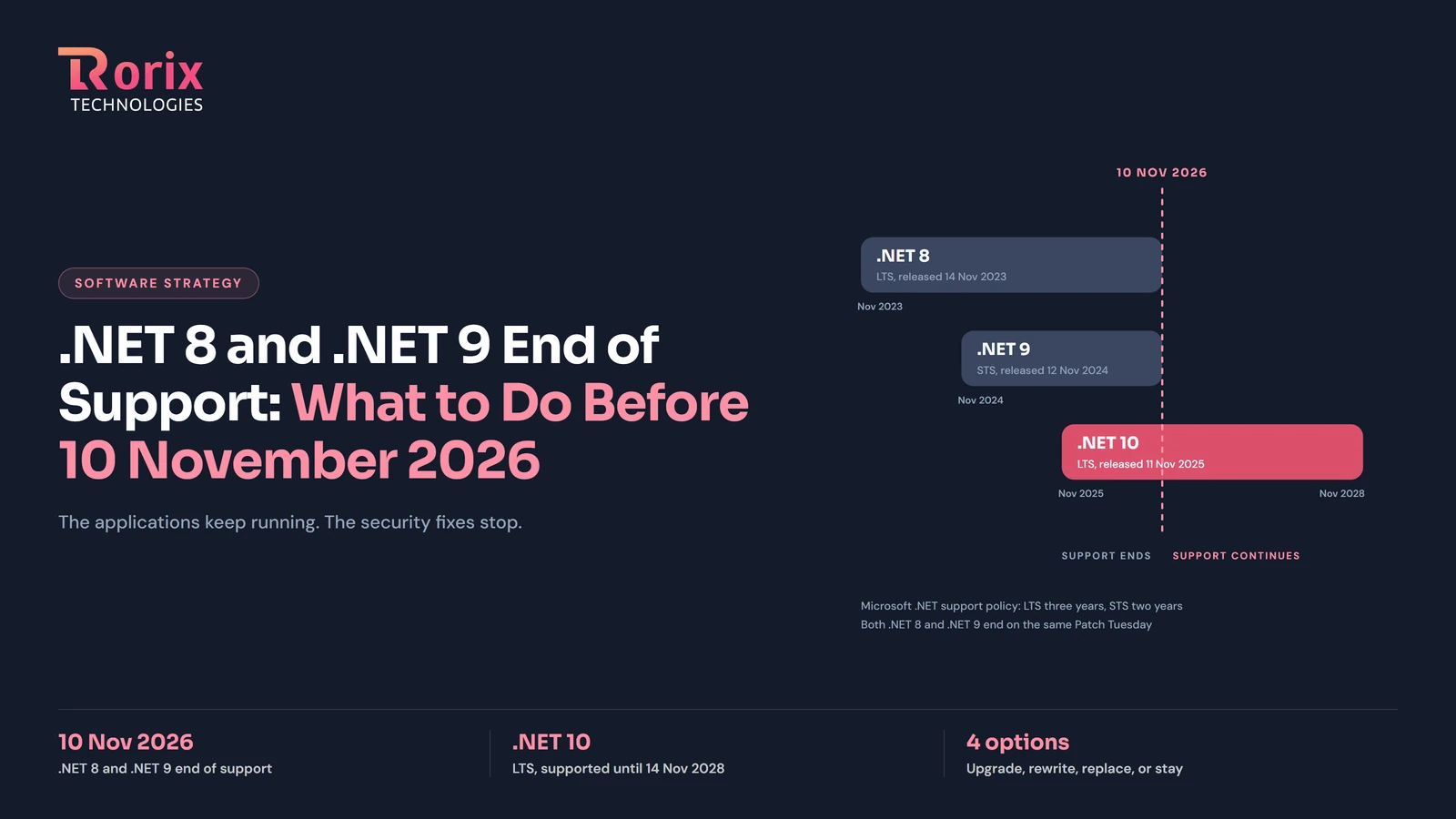
.NET 8 and .NET 9 End of Support: What to Do Before 10 November 2026
Microsoft ends support for .NET 8 and .NET 9 on 10 November 2026. What stops, who is affected, your four options, a phased plan, and what a move costs.
Read article
Legacy WMS Migration Guide: How to Upgrade Without Disrupting Operations
How to migrate from a legacy WMS without disrupting operations: migration strategy, data conversion, risk mitigation, and zero-downtime cutover techniques.
Read article