
ERP vs WMS: What's the Key Difference?
Confused about ERP vs WMS? Discover the real differences, when to use each, how they integrate, what each costs, and whether your operation needs both systems.
On this page53 sections
Your ERP says you have 240 units in stock. But when your warehouse team checks the shelves, there are only 190. Meanwhile, customers have already placed orders for products that aren't actually available.
Problems like these become more common as your business grows.
Many companies start with an ERP because it manages orders, finance, purchasing, and inventory in one place. But as warehouse operations become more complex, they begin to wonder:
Is our ERP enough, or do we need a Warehouse Management System (WMS)? The answer depends on your business.
An ERP and a WMS solve different problems. One helps run your business. The other helps run your warehouse. Understanding the difference can help you reduce inventory errors, speed up order fulfillment, and prepare your operations for future growth.
In this guide, you'll learn:
- What an ERP and WMS actually do
- The key differences between ERP vs WMS
- Signs your ERP is no longer enough for warehouse operations
- The pros, cons, and costs of each system
- When you need an ERP, a WMS, or both
- How ERP and WMS work together
- Whether a custom or off-the-shelf WMS is the better choice
By the end of this guide, you'll know which solution best fits your business and how to choose the right system as your operations grow.
ERP vs WMS: The Quick Answer
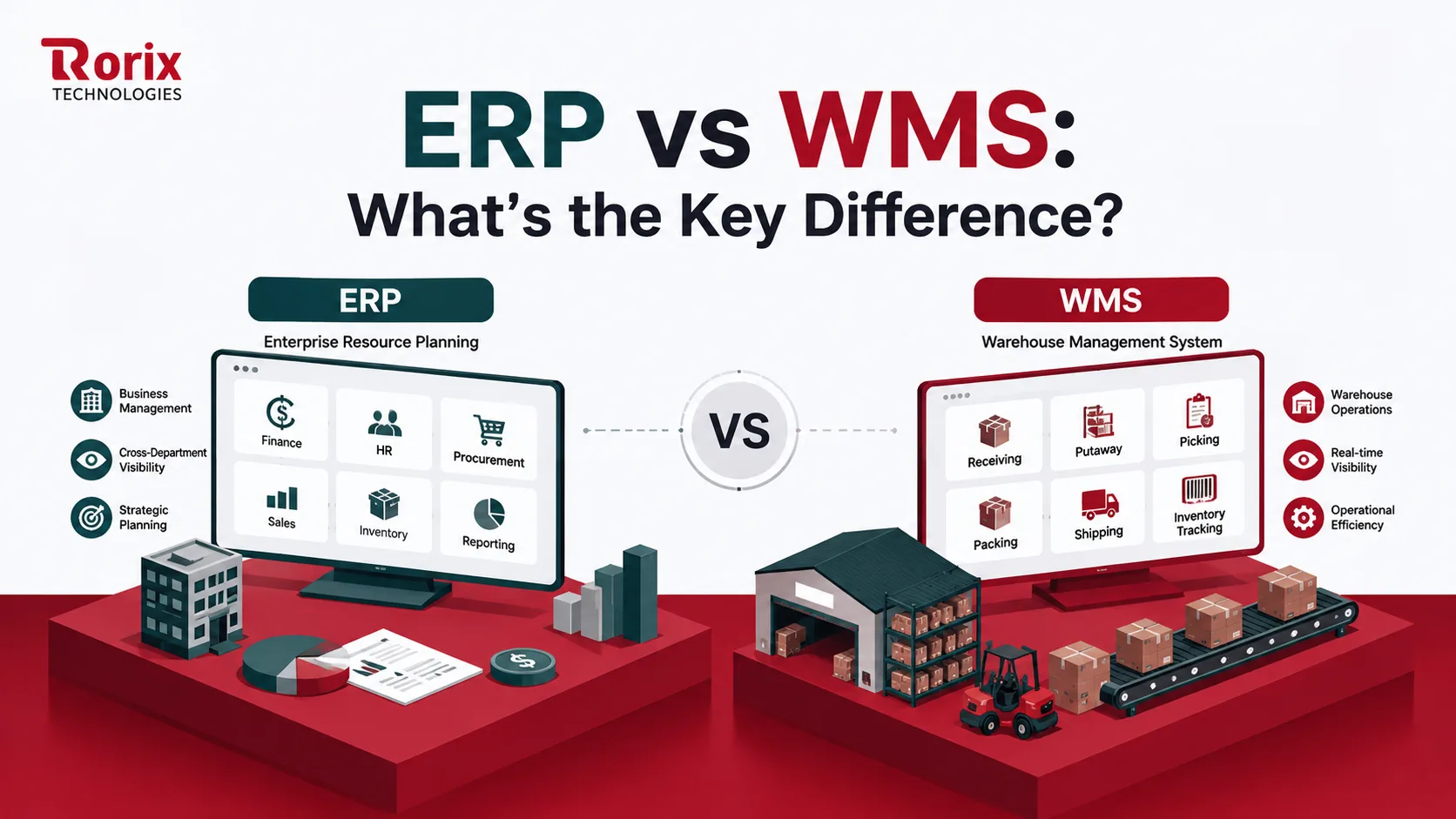
An ERP runs your whole business. A WMS runs your warehouse floor. They solve different problems, and for many growing operations, the honest answer to "which one" is "both, connected properly."
Here is the quick overview before the detail:
| Aspect | ERP | WMS |
|---|---|---|
| Main job | Runs the whole business | Runs the warehouse floor |
| Scope | Finance, sales, HR, inventory records | Receiving through to shipping |
| Who runs it daily | Finance and management | Warehouse and operations teams |
| You need it when | You want one system of record | You need accuracy and speed on the floor |
In short,
- An ERP records what happened to your money and your stock.
- A WMS decides and directs what actually happens in the building.
Key Takeaways: How ERP and WMS Differ
- An ERP runs the whole business and records what happened to your money and your stock, while a WMS runs the warehouse floor and directs what actually happens in the building, down to the bin, lot, and pallet.
- An ERP inventory module records SKU and quantity at transaction points, while a WMS tracks SKU, bin, lot, serial, and pallet in real time with every barcode scan, so the count stays matched to the shelf.
- Seven signs an ERP alone is not enough: stock counts that never match the shelves, rising picking errors, pickers walking too far, no visibility across multiple warehouses, peak seasons that overwhelm the floor, barcode scanning that feels like an add-on, and multiple sales channels that create inventory mismatches.
- Simple, low-volume operations often run fine on an ERP alone, but as SKUs, channels, and sites grow a dedicated WMS becomes essential, and most growing operations run both systems connected together at the inventory boundary.
- Rorix Technologies engineers WMS builds that cut picking errors by up to 80% with real-time inventory, barcode scanning, and automated workflows, with 27 projects delivered and a 5.0 rating on Clutch across 4 verified reviews.
What Is an ERP System?
An ERP, or Enterprise Resource Planning system, is one platform that ties your whole business together. Finance, sales, procurement, HR, and inventory all read from and write to the same central database. Every department works from one shared source of truth.
Think of it as the financial and operational backbone of the company. It records transactions, manages orders and invoices, tracks stock value, and gives leadership one view of the numbers. It is built for breadth, not depth inside any single warehouse.
Core modules of an ERP
Most ERP systems let you choose only the modules your business needs. The most common ones include:
- Finance & Accounting: Manage budgets, invoices, payments, taxes, and financial reports.
- Sales & Order Management: Track customer orders, quotes, invoices, and order fulfillment.
- Procurement: Manage suppliers, purchase orders, and purchasing activities.
- HR & Payroll: Handle employee records, attendance, payroll, and leave management.
- Inventory Management: Monitor stock levels, product availability, and inventory value.
All these modules share the same database, so when one department updates information, it stays synchronized across the entire business.
What Is a WMS (Warehouse Management System)?
A WMS, or warehouse management system, is software built to control the physical movement of goods inside a warehouse. It goes several layers deeper than an ERP inventory module. Rather than only recording transactions, it directs real-time execution on the floor.
A modern warehouse management software platform guides receiving, putaway, picking, packing, shipping, and returns. It knows the exact location of every item, suggests the best storage slot, and routes pickers on efficient paths. Where an ERP sees a number, a WMS sees a bin, a lot, and a pallet.
Core features of a WMS
A Warehouse Management System (WMS) includes features designed to improve inventory accuracy and make warehouse operations faster and more efficient.
- Real-Time Inventory Tracking: See the exact quantity and location of every item as stock moves.
- Directed Putaway: Automatically recommend the best storage location for incoming inventory.
- Picking, Packing & Shipping: Guide warehouse staff through each step to fulfill orders quickly and accurately.
- Barcode Scanning: Reduce manual entry errors and update inventory instantly with every scan.
- Cycle Counting: Perform regular stock checks without stopping daily warehouse operations.
- Wave & Zone Picking: Group orders and assign picking tasks to improve speed and productivity.
- Slotting Optimization: Store products in the most efficient locations to reduce travel time.
- Labor Tracking: Monitor employee productivity and optimize warehouse workforce planning.
Together, these features reduce picking errors, improve inventory accuracy, and help warehouses process more orders with less effort.
ERP vs WMS: Key Differences at a Glance
The clearest way to see the difference between ERP vs WMS is side by side. One system manages the business at a macro level. The other manages the warehouse at a micro level, down to individual moves.
| Criterion | ERP | WMS |
|---|---|---|
| Primary focus | Whole-business management | Warehouse execution |
| Scope | Finance, sales, HR, procurement | Receiving, putaway, picking, shipping |
| Inventory view | Quantity and value on record | Real-time location, bin, and status |
| Real-time role | Records transactions | Directs live floor tasks |
| Primary users | Finance, management, procurement | Pickers, packers, floor supervisors |
| Warehouse depth | Basic stock and bin control | Deep picking, slotting, labor, waves |
| Data granularity | SKU and quantity | SKU, bin, lot, serial, pallet |
| Implementation | Longer and broader | Faster and more focused |
| Best at | Financial integrity and planning | Accuracy, speed, and throughput |
Let's understand more in detail.
1. Primary focus and scope
An ERP is built to manage your entire business from a single platform. It connects departments like finance, sales, purchasing, HR, and inventory so everyone works with the same data. Its goal is to streamline business operations, improve reporting, and provide leadership with a complete view of the company.
A Warehouse Management System (WMS) focuses only on warehouse operations. It manages everything from receiving goods and storing inventory to picking, packing, shipping, and returns. Instead of running the whole business, its job is to make warehouse processes faster, more accurate, and more efficient.
2. Depth of warehouse functionality
Most ERP systems include basic inventory management features, such as tracking stock quantities, purchase orders, and simple warehouse locations. These capabilities work well for businesses with straightforward storage and fulfillment processes but become limiting as warehouse operations grow more complex.
A WMS is designed specifically for warehouse execution. It supports advanced features like directed putaway, multiple picking methods, barcode scanning, slotting optimization, labor management, and real-time inventory tracking. These capabilities help warehouses handle high order volumes with greater speed and accuracy.
3. Real-time execution on the floor
An ERP records inventory transactions after they happen. While this works well for accounting and business reporting, it doesn't actively guide warehouse staff during daily operations. As a result, inventory updates may lag behind what's actually happening on the warehouse floor.
A WMS operates in real time. Every barcode scan instantly updates inventory and assigns the next warehouse task. Employees receive step-by-step instructions for receiving, picking, packing, and shipping, allowing operations to run smoothly while maintaining accurate inventory records.
4. Who uses it day to day
An ERP is mainly used by finance, accounting, procurement, sales, customer service, and senior management teams. They use it to manage business processes, monitor company performance, generate reports, and make strategic decisions.
A WMS is primarily used by warehouse staff, including receivers, pickers, packers, forklift operators, and warehouse supervisors. It helps them locate products, complete tasks efficiently, process shipments, and monitor warehouse operations throughout the day.
5. Inventory accuracy and visibility
An ERP provides a company-wide view of inventory levels and stock value. However, inventory accuracy depends on timely updates after transactions are completed. This can create differences between recorded inventory and the actual stock available on warehouse shelves.
A WMS continuously tracks inventory as products move through the warehouse. Every barcode scan updates stock quantities, locations, lot numbers, and serial numbers instantly. This real-time visibility reduces inventory discrepancies, prevents overselling, and improves order accuracy.
6. Implementation effort and time to value
Implementing an ERP is usually a large business-wide project. It involves configuring multiple departments, migrating data, integrating existing systems, and training employees across the organization. Because of its broad scope, implementation often takes several months.
A WMS implementation is typically more focused because it only affects warehouse operations. With fewer departments involved, businesses can deploy the system faster and start improving inventory accuracy, warehouse efficiency, and order fulfillment much sooner.
7. Cost and total cost of ownership
An ERP usually requires a larger investment because it supports multiple business functions. Costs often include software licenses, implementation, customization, integrations, employee training, and ongoing maintenance. In return, it helps improve efficiency across the entire organization.
A WMS is a more focused investment designed to improve warehouse performance. Costs depend on factors such as the number of users, warehouse locations, required features, hardware, and integrations. Many businesses recover this investment through fewer picking errors, lower labor costs, and faster order fulfillment.
7 Signs Your ERP Alone Is Not Enough for the Warehouse
An ERP works well for basic inventory management, but growing warehouse operations often need more control. If you're experiencing any of these problems, it may be time to invest in a dedicated WMS.
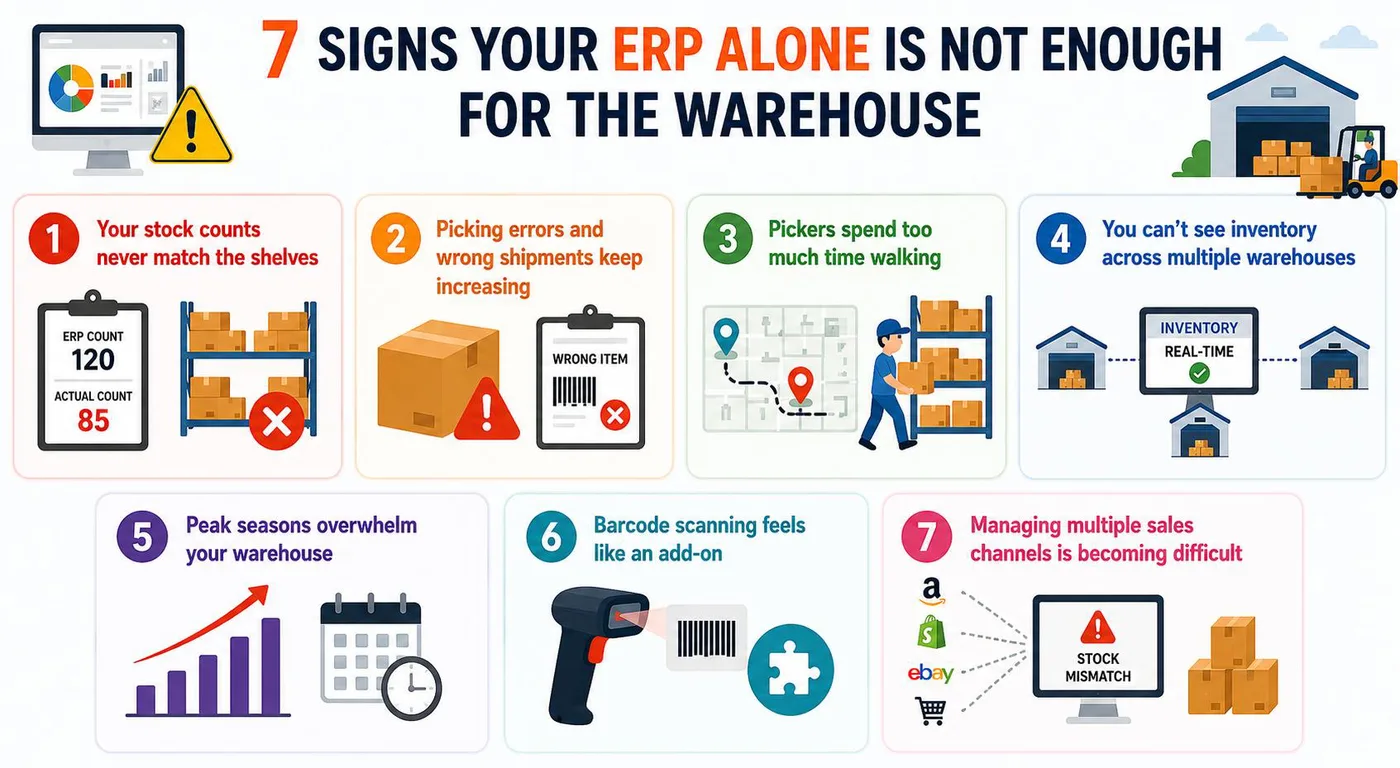
Sign 1. Your stock counts never match the shelves
If inventory records don't match what's actually on the shelves, your ERP isn't tracking inventory accurately enough. A WMS updates stock in real time with every warehouse movement.
Sign 2. Picking errors and wrong shipments keep increasing
Frequent picking mistakes and mis-shipments often happen because an ERP doesn't guide warehouse staff through the picking process. A WMS uses barcode scanning and guided workflows to improve accuracy.
Sign 3. Pickers spend too much time walking
If employees waste time searching for products or taking inefficient routes, productivity suffers. A WMS optimizes picking paths so orders are completed faster.
Sign 4. You can't see inventory across multiple warehouses
Managing inventory across multiple locations is difficult with basic ERP inventory modules. A WMS provides real-time visibility across all warehouses, making transfers and stock allocation much easier.
Sign 5. Peak seasons overwhelm your warehouse
If busy periods lead to delays, overtime, and missed shipments, your warehouse has outgrown your ERP. A WMS helps balance workloads and maintain efficiency during demand spikes.
Sign 6. Barcode scanning feels like an add-on
When scanning requires extra steps or manual work, your processes become slower and more error-prone. A WMS is built around barcode scanning and mobile workflows from the start.
Sign 7. Managing multiple sales channels is becoming difficult
If adding new marketplaces or sales channels creates inventory mismatches and manual updates, your ERP is reaching its limits. A WMS synchronizes inventory in real time to help prevent overselling and stock discrepancies.
ERP vs WMS: Pros and Cons
No system is all upside. Weighing the trade-offs of each is how you land on the right ERP vs WMS decision for your operation.
ERP Pros and Cons
Pros
- One source of truth: Every department reads from the same data, so records stay consistent and duplication drops.
- Financial integrity: Orders, costs, and margins live in one place, which makes reporting and audits far cleaner.
- Scales across the business: New teams, entities, and regions plug into the same core system over time.
- Fewer disconnected tools: Broad coverage reduces the patchwork of separate apps that need constant syncing.
Cons
- Shallow warehouse depth: The inventory module rarely handles complex picking, slotting, or labor logic.
- Slower to change: Adjusting workflows can mean a wider, more careful configuration effort.
- Not real-time on the floor: Stock updates at transaction points, which lags fast-moving operations.
- Higher total cost: A broad rollout across departments carries a larger overall investment.
WMS Pros and Cons
Pros
- Real-time accuracy: Live scans keep the count matched to the shelf and stop oversells.
- Faster, smarter fulfillment: Optimized picking, slotting, and waves move more orders with the same team.
- Deep floor control: Bin, lot, serial, and pallet tracking give visibility an ERP cannot match.
- Quick, focused rollout: A tightly scoped warehouse build gets to value faster than a broad platform.
Cons
- Narrow scope: It runs the warehouse, not finance, HR, or company-wide planning.
- Needs integration: To share data with the business, it must connect cleanly to your ERP.
- Depends on good process: Poor warehouse discipline limits the gains any system can deliver.
- Another system to run: It adds a platform your team has to learn and maintain.
ERP vs WMS Cost Breakdown
Cost is where the ERP vs WMS choice gets real. The figures depend on scope, users, sites, integrations, and how much of the build is custom, so treat the ranges below as directional.
| Option | What you pay for | Indicative investment |
|---|---|---|
| Off-the-shelf / SaaS WMS | Subscription by users and sites | Lower entry, ongoing monthly cost |
| ERP (mid-market) | Licenses, modules, integration, migration | Higher, broad company-wide rollout |
| ERP warehouse module | An add-on to your existing ERP | Moderate, with limited floor depth |
| Custom-built WMS | A build scoped to your workflows | Depends on scope and integrations |
What drives the cost of an ERP?
ERP pricing depends on several factors, including:
- Number of modules (Finance, HR, Sales, etc.)
- Number of users
- Customization requirements
- Third-party integrations
- Data migration from existing systems
- Employee training and implementation
Because an ERP supports the entire business, it usually requires a higher overall investment.
What affects WMS cost?
WMS pricing mainly depends on your warehouse requirements, such as:
- Number of warehouse users
- Number of warehouse locations
- Features required
- Third-party integrations
- Barcode scanners and other hardware
- Customization needs
The more complex your warehouse operations, the higher the implementation cost. For a full line-item breakdown of WMS pricing by deployment model and business size, see our warehouse management system cost guide.
Now that you have a feel for what each system costs, let's tackle the build-versus-buy decision that follows.
Custom WMS vs Off-the-Shelf: The Build-vs-Buy Decision
Once you know you need a WMS, the next question is whether to buy a ready-made platform or build one around your operation. It is the last big ERP vs WMS decision, and it shapes what you actually build.
When an off-the-shelf WMS is the right choice
An off-the-shelf WMS is a good option if:
- Your warehouse processes are standard
- You want a faster implementation
- You have a limited budget
- You don't need extensive customization
- You prefer a ready-to-use solution with ongoing support
When a custom WMS is the better choice
A custom WMS is worth considering if:
- Your warehouse has unique workflows
- Standard software cannot meet your requirements
- You need custom integrations with existing systems
- You expect your operations to grow and evolve
- You want complete control over features and future updates
Also Read: Custom WMS Development
We keep a fuller version of this decision, with the published build bands beside each line, on the custom WMS vs off-the-shelf WMS page.
WMS vs ERP vs TMS vs Inventory Software: Clearing Up the Confusion
These systems serve different purposes. Understanding what each one does helps you choose the right solution for your business.
| System | Primary Purpose | Best For |
|---|---|---|
| ERP (Enterprise Resource Planning) | Manages the entire business, including finance, sales, HR, procurement, and inventory. | Running overall business operations from a single platform. |
| WMS (Warehouse Management System) | Controls warehouse operations, including receiving, putaway, picking, packing, shipping, and returns. | Improving warehouse accuracy, efficiency, and order fulfillment. |
| TMS (Transportation Management System) | Plans and manages transportation, carriers, freight, and deliveries after orders leave the warehouse. | Optimizes shipping costs and delivery operations. |
| Inventory Management Software | Tracks inventory levels, stock availability, and product value. | Basic inventory tracking for small or less complex businesses. |
| OMS (Order Management System) | Captures, manages, and routes customer orders from multiple sales channels. | Managing orders before they are fulfilled by the warehouse. |
Do You Need an ERP, a WMS, or Both?
This is the decision the whole guide builds toward, and the heart of the ERP vs WMS question. The right answer depends on how complex your operation is and where your pain actually lives.
When an ERP alone is enough
An ERP is usually enough if you:
- Have a small or simple warehouse
- Manage a limited number of products (SKUs)
- Process a low volume of orders
- Don't need advanced warehouse workflows
- Want basic inventory tracking and business management
When you need a dedicated WMS
A WMS is the better choice if you:
- Handle high order volumes
- Manage thousands of SKUs
- Operate multiple warehouses
- Sell through multiple sales channels
- Need real-time inventory tracking
- Want to reduce picking errors and improve warehouse efficiency
When you need both
Using both an ERP and a WMS is the best option if you:
- Need complete business and warehouse management
- Want finance, sales, and inventory data in one place
- Require advanced warehouse operations and automation
- Plan to scale your business in the future
- Need accurate inventory and faster order fulfillment across multiple locations
Also Read: Real-Time Inventory: WebSocket and Pub-Sub Architecture
How to Choose the Right System for Your Operation
Choosing well is less about features and more about sequence. Work through these five steps in order, and the right answer to the ERP vs WMS question tends to reveal itself.
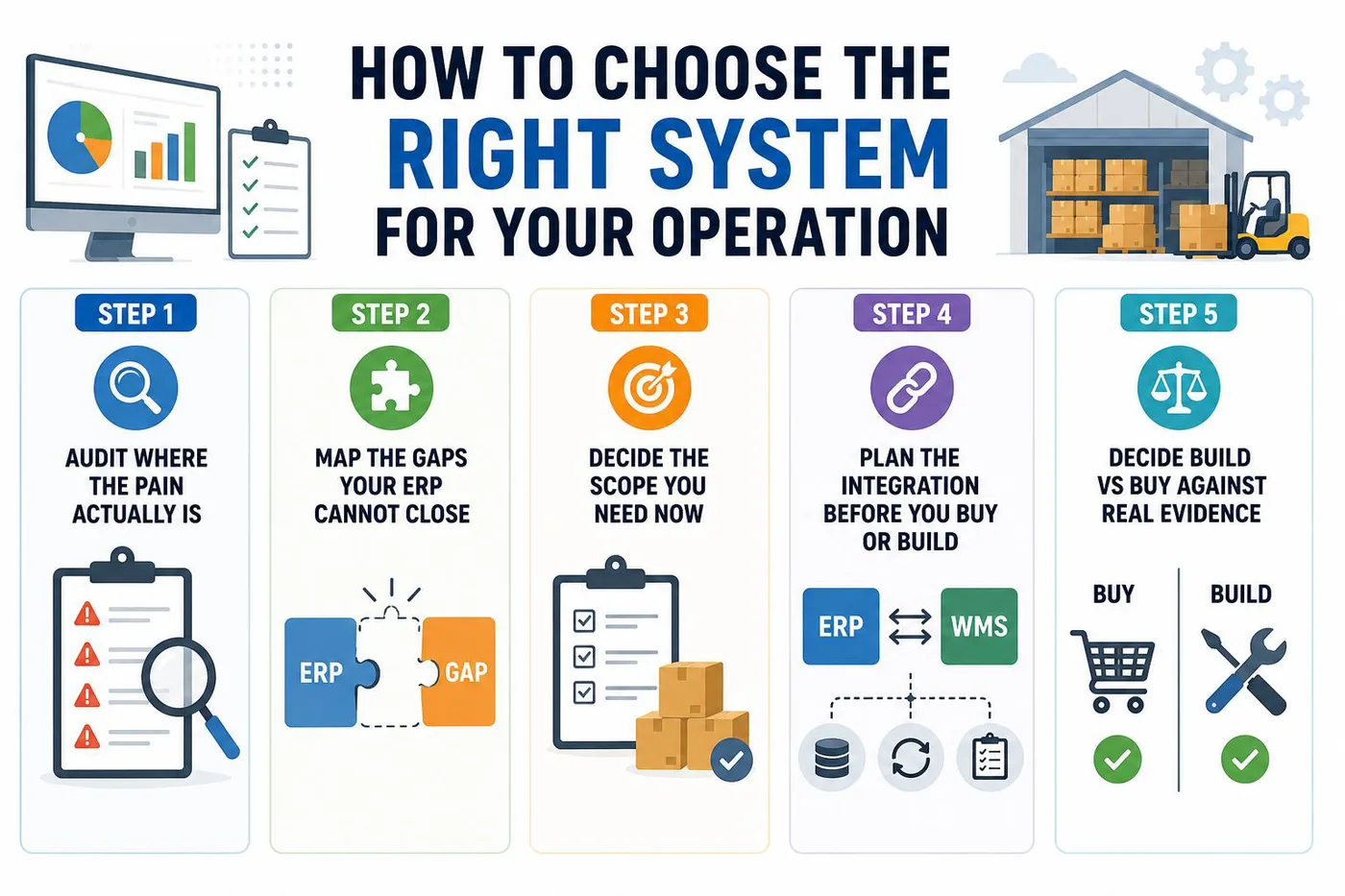
Step 1. Audit where the pain actually is
Start by finding where your operation actually hurts, not where you assume it does. Walk the floor and the finance function, and write down the real problems: drifting counts, mis-ships, slow closes, blind spots across sites. A clear symptom list points straight at the system you need.
Talk to the people living the problem every day, from pickers to controllers. Their friction is your evidence, and it keeps the decision grounded in reality rather than a demo.
Step 2. Map the gaps your ERP cannot close
Next, line up your pain points against what your ERP can genuinely do. Some gaps, like reporting or order records, may already be covered. Others, like real-time picking accuracy or multi-site stock, sit beyond an ERP module by design.
Mark those clearly, because they are the gaps a WMS exists to close. This step stops you from paying twice for something you already own.
Step 3. Decide the scope you need now
Now decide how much system you actually need today. If your warehouse is simple, the ERP module may be enough for a while. If the floor is complex or growing fast, scope a dedicated WMS around the workflows that matter most.
Focus on the capabilities that solve your top problems, not a wish list of every feature. You can always extend once the core is live and proven.
Step 4. Plan the integration before you buy or build
Plan how the systems will talk before you commit to either. Decide which system owns which data, how orders and stock will sync, and how you will handle errors. A clear ERP and WMS integration plan is worth more than any single feature. Our guide to WMS integration with ERP covers field ownership, sync speeds, and failure handling in detail.
A structured WMS implementation checklist prevents the status drift and duplicate records that wreck poorly connected stacks. Treat integration as a first-class decision, not an afterthought.
Step 5. Decide build vs buy against real evidence
Finally, choose build or buy based on how far your workflows sit from standard. If a proven platform fits, buy it and move fast. If your operation needs logic and integrations no vendor offers, a custom build fits your floor exactly.
Judge the options against your audit and your integration plan, not a polished sales pitch. That is how you avoid an expensive rebuild later.
Why Trust Rorix for Your WMS or Custom Software Build
Choosing the right system matters, but so does the partner who builds and connects it.
Rorix Technologies builds custom software engineered for the domain, from warehouse floors to SaaS platforms. We stay accountable well past go-live on a retainer model that feels like an in-house team.
Here is why operations leaders trust us:
- Proven delivery: 27 projects delivered, a 5.0 rating on Clutch across 4 verified reviews, and clients across the US, UK, Canada, Australia, and New Zealand.
- Domain-specialized WMS builds: We engineer warehouse systems for real floors, cutting picking errors by up to 80% with real-time inventory, barcode scanning, and automated workflows.
- Deep integration experience: We connect WMS and ERP cleanly, and have shipped builds with 40+ integrations on a single platform.
- An in-house team, not a vendor: We work in 2-week sprints with full visibility, and stay embedded to improve your system each sprint.
Want to know the WMS development cost before you commit?
Book a free consultation with our experts and get your project estimate.
An ERP Runs the Business, a WMS Runs the Warehouse
ERP vs WMS are not competing systems. They solve different business challenges. An ERP helps you manage your entire business, while a WMS gives you complete control over your warehouse operations.
If your warehouse is simple, an ERP may be all you need. But as order volumes, inventory, and fulfillment complexity grow, a dedicated WMS becomes essential for improving accuracy, reducing errors, and increasing efficiency. Many growing businesses get the best results by using both systems together.
The distinction holds up under pressure: an ERP records what the business owns and owes, a WMS directs what happens to it inside four walls. Most operations eventually need both, wired together at the inventory boundary.
Look at your floor, your finance function, and your growth plans, then choose the system that fits the operation you actually run.
When you are ready to build or integrate, connect with our experts to scope your WMS and custom software build.
Frequently Asked Questions
What is the main difference between ERP and WMS?
The ERP vs WMS difference comes down to scope and timing. An ERP manages the whole business, including finance, sales, HR, and stock records. A WMS manages warehouse execution and directs what happens on the floor in real time.
Do I need both an ERP and a WMS?
It depends on complexity. Simple, low-volume operations often run fine on an ERP alone. As SKUs, channels, and sites grow, a dedicated WMS becomes essential, and most growing operations run both systems connected together.
Can an ERP replace a WMS?
Usually not for complex warehouses. An ERP inventory module handles basic stock counts, but it lacks the directed picking, slotting, and real-time floor control a WMS provides. For high accuracy and throughput, a dedicated WMS does what an ERP module cannot.
Is SAP an ERP or a WMS?
SAP is an ERP. It offers a warehouse module, such as SAP EWM, but that module sits inside the ERP. Many operations still add a dedicated WMS for deeper, real-time warehouse control.
How do ERP and WMS integrate?
They connect through APIs or middleware in a two-way loop. The ERP sends orders and product data down, and the WMS sends stock movements and confirmations back up. Deciding which system owns which data first is the key to clean ERP and WMS integration.
Which should I implement first, ERP or WMS?
There is no single rule. If financial and order chaos is your biggest pain, start with the ERP. If accuracy and fulfillment on the floor are failing, prioritize the WMS. Base the order on where the cost and risk sit today.
How much does a WMS cost compared to an ERP?
An ERP is usually a larger, company-wide investment, while a WMS is a more focused warehouse spend. Off-the-shelf WMS platforms bill by subscription, and a custom build is scoped to your operation. Use a project estimate to get a real figure.
Should I build a custom WMS or buy it off-the-shelf?
Buy off-the-shelf when your workflows are fairly standard and speed matters most. Build custom when your operation needs logic or integrations no vendor offers. A custom WMS fits your floor instead of forcing your team around a rigid platform.
Costing a WMS build?
Send us your SKU count and daily order volume. You get back a scope and a number you can take to your CFO.
Continue learning
Written by
Renish DadhaniyaFounder & Director, Rorix Technologies
Renish co-founded Rorix Technologies and drives the engineering and delivery culture across the organization. Beyond engineering, he leads the company's sales, finance, and HR operations, building the infrastructure that lets the team focus on shipping quality software. With deep hands-on expertise in architecture and team building, he ensures every project lands on time to the quality standards clients demand.
View full profileRelated articles
WMS vs TMS: Key Differences and Which One You Need In 2026
Confused about WMS vs TMS? Learn how they differ, how they work together, which one to roll out first, and how to choose the right system in 2026.
Read article
WES vs WMS: Key Differences and Which One Your Warehouse Needs
WES vs WMS explained: what each system does, how they differ in scope, timing, and automation, and how to tell when your warehouse needs a WES.
Read article
15 Top SaaS Development Companies in 2026
Compare 15 top SaaS development companies in 2026, including pricing, services, timelines, strengths, and tips to choose the right SaaS partner.
Read article