
WES vs WMS: Key Differences and Which One Your Warehouse Needs
WES vs WMS explained: what each system does, how they differ in scope, timing, and automation, and how to tell when your warehouse needs a WES.
On this page48 sections
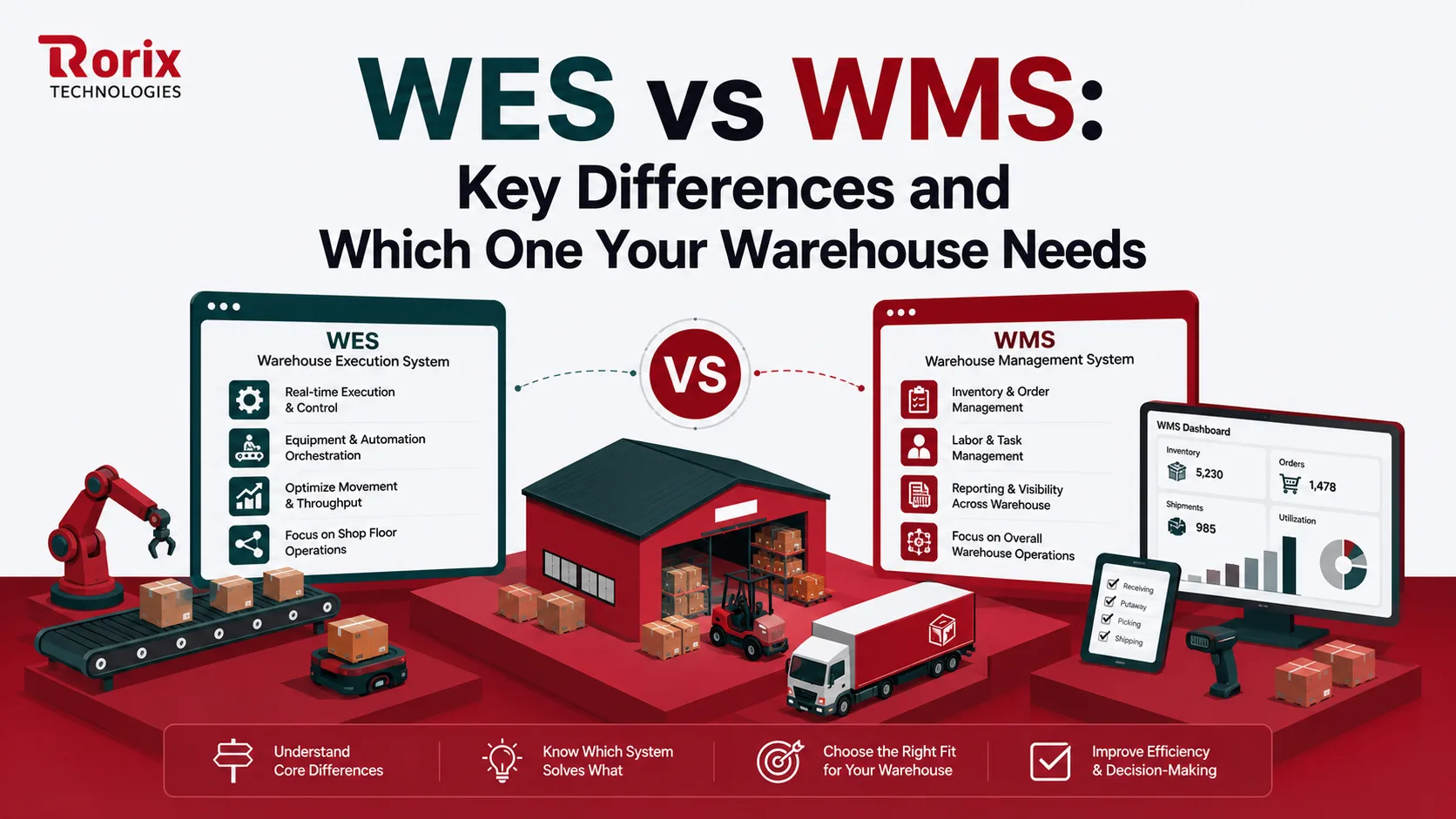
WES vs WMS comes down to planning versus execution. A warehouse management system (WMS) plans and manages inventory, orders, and locations over hours or days. A warehouse execution system (WES) orchestrates that work in real time, deciding who or which machine does each task next, and in what order.
Your warehouse has inventory, workers are picking orders, and shipments are ready to go. Yet deliveries still miss their deadlines.
In many cases, the problem is not inventory management. It is execution. This is where the WES vs WMS comparison becomes important.
Get this wrong, and you'll either spend money on a system you don't need or keep relying on supervisors to do work that software could handle.
Understanding the difference helps you avoid investing in the wrong solution.
Quick Overview: WES vs WMS
Here's a quick overview of WES vs WMS:
| Criteria | WMS | WES |
|---|---|---|
| Primary job | Manages inventory, orders, and locations as the system of record | Orchestrates live work across people, equipment, and priorities |
| Decides | What must happen and where stock lives | Who does it, in what order, right now |
| Time horizon | Hours to days | Seconds to minutes |
| Main users | Warehouse managers, supervisors, and inventory teams | Operations leads, shift supervisors, and automation engineers |
| Automation role | Passes instructions down and controls no machines | Coordinates conveyors, sorters, and robots through the WCS |
| Typical data | Orders, SKUs, locations, and stock levels | Task states, movement events, and equipment status |
| You need it if | You are still running the floor on spreadsheets | Your plan breaks the moment conditions change |
| You can skip it if | Never; it is the foundation | Volume, automation, or data quality are not there yet |
| Spend profile | Lower, usually priced per user | Higher, priced on throughput, plus hardware work |
| Deployment | Rolls out in weeks to a few months | Rolls out with the automation hardware over several months, sometimes longer |
Three important things to remember:
- A WES does not replace a WMS: It works alongside a WMS and relies on accurate inventory data.
- Most warehouses should start with a WMS: If your inventory records are inaccurate, adding a WES won't solve the problem.
- It's not about choosing one over the other: The real question is whether it's time to add a WES after your WMS is already in place.
Key Takeaways: When a WES Earns Its Place Beside a WMS
- A WMS decides what must happen and where stock lives on a horizon of hours to days, while a WES decides who does it, in what order, right now, on a horizon of seconds to minutes.
- A WES does not replace a WMS and relies on its inventory data, so start with the WMS and evaluate a WES only when three or more of the 10 signs of an outgrown WMS, such as missed courier cut-offs with stock and staff available, sound familiar.
- Industry planning ranges put a WMS for a small to mid operation at $25,000 to $200,000 over 2 to 4 months and a packaged single-site WES at $100,000 to $1,000,000+ over 6 to 12 months, the same brackets Descartes Finale's WES vs WMS guide publishes.
- Armstrong's warehouse software cost comparison puts implementation at 1.5 to 2.5 times the license alone, before hardware connectors are counted, which is the most underestimated line item in a WES budget.
What Is a Warehouse Management System (WMS)?
A warehouse management system is the system of record for everything physical inside your four walls. It knows what arrived, where you put it, what is reserved, what is on its way out, and who touched it. Think of it as the honest map of your building.
Your ERP handles the money and the customer. Your WMS handles the pallet. When a sales order lands, the WMS turns it into real instructions tied to real bin locations. It then keeps the count straight while people move things around.
That mapping job sounds modest until you lose it. Warehouses without one run on tribal knowledge, and tribal knowledge does not survive peak season or staff turnover.
The WMS stops at the dock door, where a transportation system takes over, as our WMS vs TMS guide explains. Most teams also choose early between a cloud or on-premise WMS, which our cloud vs on-premise WMS comparison covers.
What a WMS Runs on Your Floor
The same core functions appear in every serious WMS. These are the ones that matter:
- Inventory tracking: Live stock levels by SKU, lot, serial, and bin location, updated as scans happen rather than at the end of shift.
- Receiving and putaway: Checks goods against the purchase order, then directs the item to a storage location that suits its size, velocity, and rules.
- Order allocation: Reserves specific stock against specific orders so two pickers never chase the same unit.
- Picking and packing: Builds pick lists, guides staff to locations, and validates each pick with a barcode scan.
- Replenishment: Watches forward pick faces and triggers a top-up before a picker finds an empty shelf.
- Shipping and documentation: Consolidates, labels, produces paperwork, and hands off to the carrier.
- Labor management: Assigns tasks, tracks productivity, and shows you who is actually moving units.
- Reporting and cycle counting: Keeps the count auditable without shutting the building for a full stocktake.
What Is a Warehouse Execution System (WES)?
A warehouse execution system is the layer that decides what happens next, right now, using conditions as they actually are. Where the WMS is the map, the WES is the air traffic controller watching every aircraft at once and resequencing landings on the fly.
It takes the work the WMS has defined and answers a different question entirely. Not what needs picking. Which of these four hundred open tasks should this specific person do, in this aisle, in the next ninety seconds?
That distinction only starts paying for itself once your floor has enough moving parts. At that point no human supervisor can hold the whole picture in their head.
What a WES Runs on Your Floor
Vendor feature lists vary plenty, but they converge tightly on these capabilities:
- Dynamic order release: Pushes work out continuously based on courier cut-offs and priority, instead of dropping it in fixed waves.
- Task sequencing and prioritization: Decides the order of work in real time and bumps urgent orders forward without anyone rebuilding a wave.
- Workload balancing: Watches every zone and moves work away from the queue that is backing up toward the team that is idle.
- Human and machine coordination: Keeps people, conveyors, sorters, and robots working in step so nobody waits on anybody.
- Equipment utilization: Spreads work across available machines so one sorter is not saturated while another sits cold.
- Exception handling: Detects a blocked path or a stalled machine and reroutes the affected work automatically.
- Live performance analytics: Shows throughput, bottlenecks, and resource use as they happen, not in tomorrow's report.
Where the WCS Fits: The Three-Layer Stack
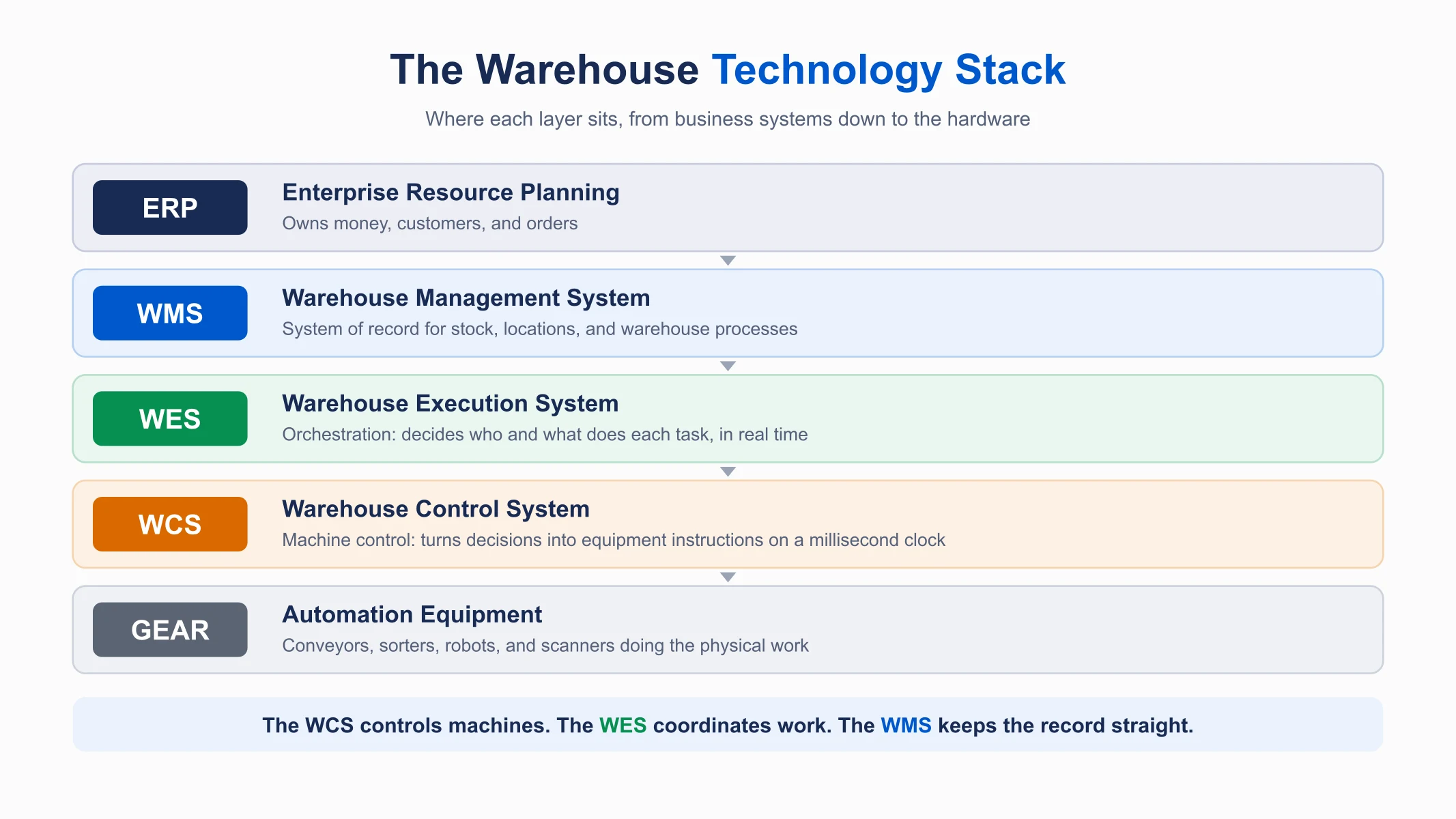
A warehouse control system (WCS) sits below the WES and turns its decisions into machine instructions for a specific conveyor, sorter, or robot. The rule of thumb: the WCS controls machines, the WES coordinates work, and the WMS keeps the record straight. Our WCS vs WMS guide covers the control layer in full.
WES vs WMS: The Complete Comparison Table
This table is the reference you will come back to. It covers the split across every axis that changes a real buying decision.
| Criterion | WMS (Warehouse Management System) | WES (Warehouse Execution System) |
|---|---|---|
| Core job | Manages inventory, orders, and warehouse processes | Orchestrates work across people, equipment, and time |
| Question it answers | What do we have, where is it, what must ship | Who picks it next, on which machine, in what order |
| Decision horizon | Hours to days, planned in batches | Seconds to minutes, adjusted continuously |
| Order release | Fixed waves and templates | Dynamic, waveless, priority-driven |
| Data granularity | Orders, SKUs, locations, stock levels | Individual movements, task states, equipment status |
| Reaction to change | Replans on the next cycle | Reallocates while work is in flight |
| Exception handling | Flags it and waits for a supervisor | Reroutes around it automatically |
| Validation method | Scan confirmation after the action | Sensor telemetry before the problem lands |
| People | Assigns tasks and tracks productivity | Balances live workload across zones and shifts |
| Machines | Passes instructions down, controls nothing | Coordinates equipment through the WCS |
| Position in stack | ERP above, WES or WCS below | WMS above, WCS and automation below |
| Integration load | Software connections only | Software plus sensors, controllers, and hardware |
| Typical failure mode | Shows a number that is already wrong | Stalls flow when its logic misjudges the floor |
| Right for | Every warehouse, at any size | High-volume, multi-zone, or automated operations |
WES vs WMS: 8 Differences That Change How Your Floor Runs
Here are the key differences you need to know:
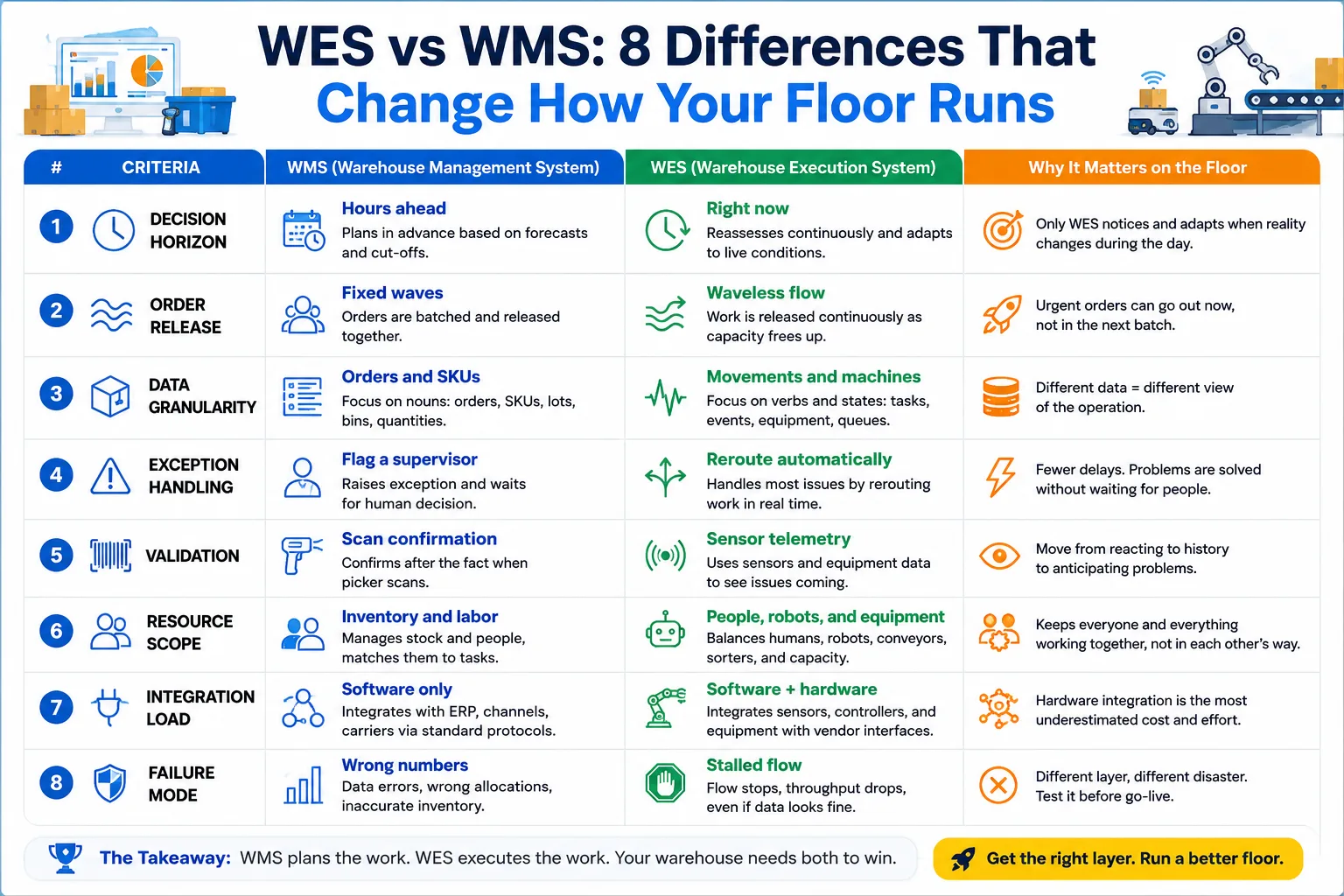
1. Decision Horizon: Hours Ahead vs Right Now
A WMS works on a planning clock. It looks at open orders, available stock, and carrier cut-offs, then builds a block of work that makes sense for the next few hours. That plan is genuinely good, and it is genuinely a forecast.
A WES lives entirely in the present tense. It reassesses continuously and treats every plan as provisional, because it assumes the floor will disagree within minutes. Both are right about their own job. Only one of them notices when reality diverges.
2. Order Release: Fixed Waves vs Waveless Flow
Wave picking is how a WMS gets efficiency, and it works by grouping orders into batches that share travel paths. Release the wave and the batch runs to completion. It is predictable, easy to staff, and easy to explain to a new supervisor.
Waveless release throws that structure away on purpose. A WES pushes work out as capacity frees up, so an order arriving at 3:15 pm can be picked at 3:16 pm. You trade batch predictability for the cut-off you would otherwise miss.
3. Data Granularity: Orders and SKUs vs Movements and Machines
Your WMS thinks in nouns. It holds orders, SKUs, lots, bins, and quantities, and every question it answers is a question about one of those objects. That is the right shape for inventory accuracy and audit trails.
A WES thinks in verbs and states, holding task states, movement events, machine availability, and queue depths. It barely cares what the SKU is called. Bolting one onto the other takes more work than the demo suggests, because the two systems do not describe the same things.
4. Exception Handling: Flag a Supervisor vs Reroute Automatically
When something goes wrong, a WMS does the responsible thing. It raises the exception, marks the task, and waits for a human to decide. That is appropriate when the exception is a damaged carton, and someone needs to look at it.
A WES treats most exceptions as routing problems rather than decisions. Aisle blocked, so send the work to the pick face on the other side. Sorter down, so redistribute to the remaining lanes. Nobody gets a notification because nothing needs a person.
5. Validation: Scan Confirmation vs Sensor Telemetry
A WMS confirms after the fact. The picker scans, the system records, and you learn the pick was correct one moment after it happened. That is a reliable, cheap, and well-understood control.
Execution systems lean on telemetry instead, reading sensors and equipment status to see a problem forming before it lands. A backing-up queue, a slowing conveyor, or a station running hot all show up as signals rather than incidents. You move from confirming history to anticipating it.
6. Resource Scope: Inventory and Labor vs People, Robots, and Equipment
A WMS manages two resources well: your stock and your staff. It knows what you have, it knows who is working, and it matches them together into tasks. For a manual warehouse, that is the complete picture.
A WES is built for a floor where those two are no longer the only actors. It balances humans against robots against conveyors against sortation capacity, keeping them out of each other's way. Add robots to a WMS-only stack, and you have not added capacity; you have added traffic.
7. Integration Load: Software Only vs Software Plus Hardware
Connecting a WMS is a software exercise. You map data to your ERP, your ecommerce channels, and your carriers. Every one of those endpoints speaks a documented protocol over an ordinary network.
Connecting a WES pulls hardware into scope. You are now integrating sensors, controllers, and vendor-specific equipment interfaces, none of which can be fixed with a retry. This is the most underestimated line item in the budget conversation, and we will price it properly later.
8. Failure Mode: Wrong Numbers vs Stalled Flow
When a WMS fails, you get bad data. Counts drift, allocations go wrong, and someone picks stock that was already promised elsewhere. It is painful, but you can see it, count it, and correct it.
When a WES fails, the floor stops moving. The logic misjudges capacity, work piles into one zone, and throughput collapses while every number on every screen still looks healthy. Different layers, different disasters, and different things worth testing before go-live.
Also Read: Real-Time Inventory: WebSocket and Pub-Sub Architecture
10 Signs Your Warehouse Has Outgrown Its WMS
If you notice these signs, your warehouse may be ready for a Warehouse Execution System (WES):
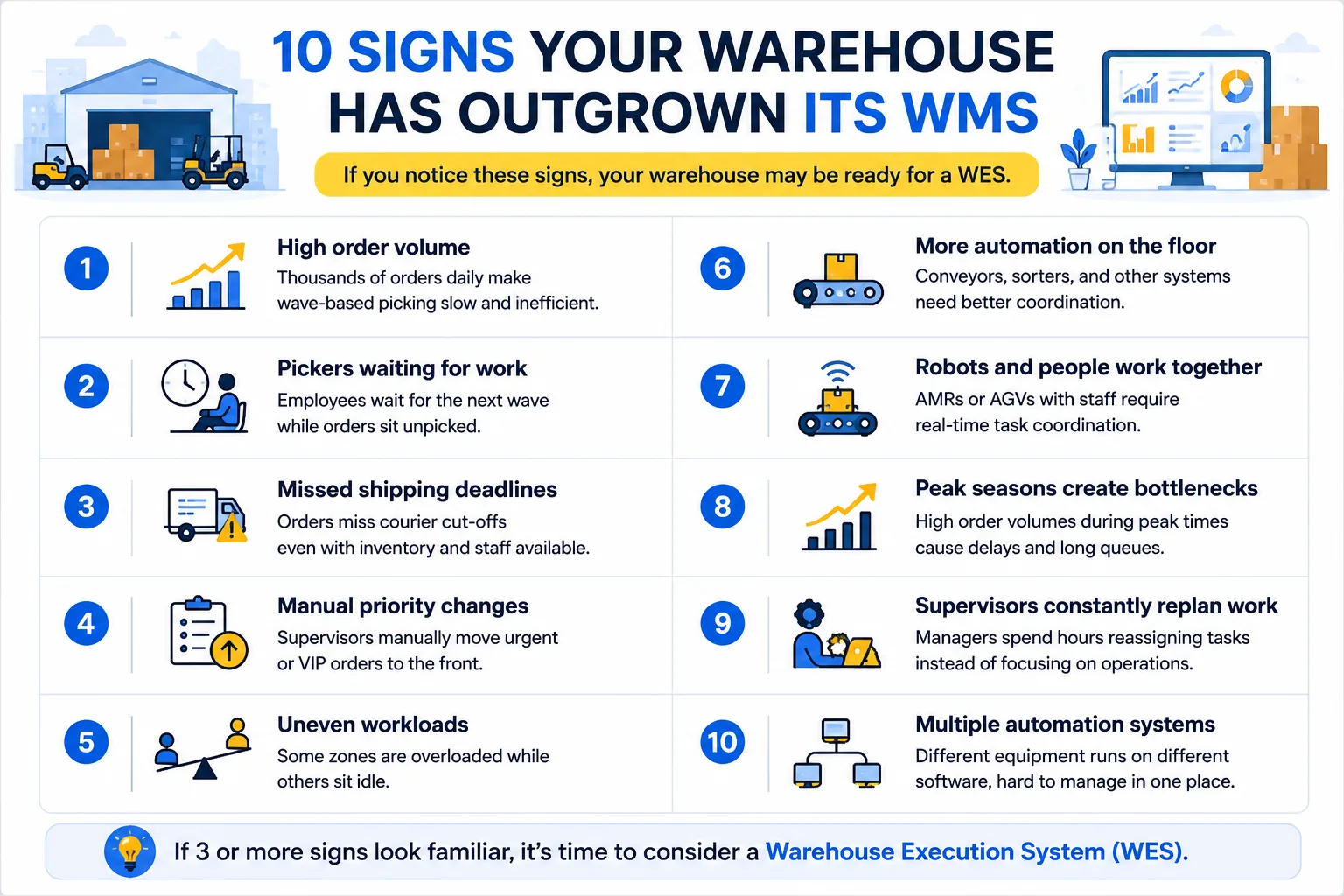
- High order volume: Your warehouse processes thousands of orders daily, making wave-based picking slow and inefficient.
- Pickers waiting for work: Employees spend time waiting for the next wave of tasks while orders are still waiting to be picked.
- Missed shipping deadlines: Orders miss courier cut-offs even though the inventory and staff are available.
- Manual priority changes: Supervisors have to manually move urgent or VIP orders to the front of the queue.
- Uneven workloads: Some warehouse zones are overloaded while other teams or areas sit idle.
- More automation on the floor: You have added conveyors, sorters, or other automated systems that need better coordination.
- Robots and people work together: AMRs or AGVs operate alongside warehouse staff, making real-time task coordination essential.
- Peak seasons create bottlenecks: Order volumes increase sharply during busy periods, causing delays and long queues.
- Supervisors constantly replan work: Managers spend hours reassigning tasks instead of focusing on operations.
- Multiple automation systems: Different equipment runs on different software, making it difficult to manage the entire warehouse from one place.
If three or more of these sound familiar, it is time to evaluate a WES.
WES vs WMS Cost and Complexity: What Each Layer Actually Costs
Cost is where the decision usually gets decided, and it is where most comparison articles go quiet. The two layers do not just cost different amounts. They cost in structurally different ways.
1. Licensing Models Compared
Warehouse management systems are typically priced per user. Add a supervisor, add a license, and your cost curve tracks headcount. That is easy to forecast and easy to explain to finance.
Execution systems are usually priced on throughput, so your cost tracks order volume. It climbs on exactly the days you are making the most money. Neither model is unfair, but they behave very differently across a peak season.
2. Hardware and Integration Costs
A WMS rollout needs scanners, mobile devices, printers, and a wireless network that works in a metal building. Those costs are real, and they are well understood.
A WES rollout needs the layer underneath it instrumented. Controllers, sensors, and equipment interfaces all enter scope, and each vendor's hardware brings its own integration work. Expect professional services on a WES project to run at a multiple of the software cost, not a fraction of it. Armstrong's warehouse software cost comparison puts implementation at 1.5 to 2.5 times the license alone, before hardware connectors are counted.
3. Indicative Cost and Timeline Ranges
These are industry ranges for planning conversations, not quotes. Your numbers move with scope, automation count, and how clean your existing data is.
| Layer | Indicative cost range | Typical timeline | What drives the number |
|---|---|---|---|
| WMS (small to mid operation) | $25,000 to $200,000 | 2 to 4 months | User count, integrations, data migration, site count |
| WES (packaged, single site) | $100,000 to $1,000,000+ | 6 to 12 months | Automation count, vendor mix, hardware interfaces |
| WCS (per automation system) | Usually bundled with equipment | Ships with the install | Equipment vendor, protocol, control complexity |
| Custom orchestration layer | Scoped to the build | 8 to 12 weeks for a focused WMS build with ERP integration | Workflow density, integration count, existing data quality |
The WMS and WES rows match the ranges published in Descartes Finale's WES vs WMS guide, which uses the same brackets and timelines. For the full WMS line-item breakdown, see our WMS cost guide.
Getting a real number for your operation takes a proper scoping conversation rather than a range from a blog. If you want a structured starting point, run the free digital transformation readiness assessment. Use the output as the agenda for your first vendor call.
4. The Costs Most Buyers Miss
Four line items sit outside the software quote and reliably surprise people.
- Skills you do not have yet: A WMS needs supervisors trained in inventory discipline. A WES needs people who understand software and machines together, and that person is harder to hire than the budget assumes.
- Multi-vendor coordination: Every additional vendor adds an integration surface, a support contract, and someone to blame when the seam fails. Deployment time climbs faster than vendor count.
- The data cleanup nobody scoped: Execution logic exposes every inaccuracy in your stock records within a week. That cleanup is not optional, and it is rarely in the plan.
- Ongoing tuning: Orchestration logic is not set-and-forget. Product mix shifts, seasons change, and the rules need someone who owns them.
Now that you have seen what each layer costs, let's look at the three routes to getting the capability you need.
Build, Buy, or Extend: The Execution Layer Decision
Once you know you need execution capability, you still have three ways to get it. Almost no comparison guide covers this, which is odd, because it is the decision that determines your total spend.
| Factor | Buy packaged WES | Extend your WMS | Build custom layer |
|---|---|---|---|
| Time to value | Fastest for standard operations | Fast if the foundation is close | Scoped to your build |
| Workflow fit | Good if you are conventional | Limited by original architecture | Fits exactly, by definition |
| Integration surface | New seam to your WMS | No new seam | Built around what you already run |
| Cost shape | License plus heavy services | Module plus configuration | Build cost, then ownership |
| Vendor dependency | High, roadmap is theirs | High, single vendor | Low, you own the code |
| Best for | Common workflows, one vendor's automation | WMS that is nearly there already | Dense, unusual, or multi-vendor floors |
So which option is best for you?
1. Buy a Packaged WES
Ideal for warehouses with standard workflows. It offers proven features, vendor support, and faster deployment, but may not fit unique business processes.
2. Extend Your Existing WMS
A cost-effective option if your current WMS already includes some WES capabilities. It reduces integration effort but may not provide full real-time orchestration.
3. Build a Custom Orchestration Layer
Best for complex warehouses with unique workflows or multiple automation vendors. It gives you complete flexibility and control, but requires a higher investment and ongoing maintenance. Our guide on how to build a custom WMS walks through the scope and steps.
Also Read: WMS Implementation Checklist: 50 Steps Plus a Plan Template
7 Mistakes Operations Teams Make When Choosing Between WES and WMS
We have watched every one of these play out. None of them come from teams being careless. They come from a market that describes two different products in identical language.
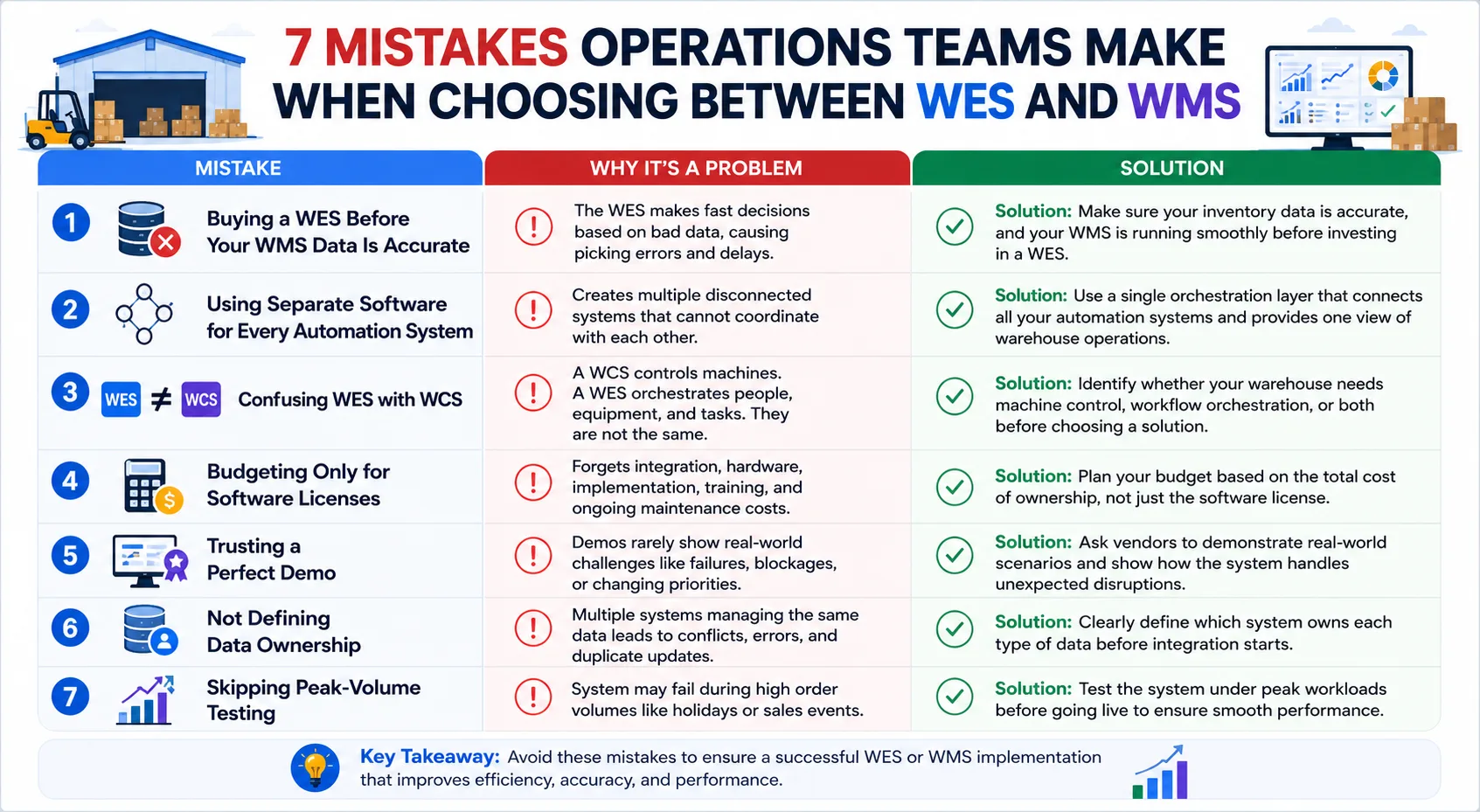
Mistake 1: Buying a WES Before Your WMS Data Is Accurate
A WES relies on your WMS for inventory data. If stock counts or locations are incorrect, the WES will make fast decisions based on bad data, leading to picking errors and delays.
Solution: Make sure your inventory data is accurate, and your WMS is running smoothly before investing in a WES.
Mistake 2: Using Separate Software for Every Automation System
Many automation vendors provide their own software. Over time, this creates multiple disconnected systems that cannot coordinate with each other.
Solution: Use a single orchestration layer that connects all your automation systems and provides one view of warehouse operations.
Mistake 3: Confusing WES with WCS
A WCS controls machines like conveyors and sorters, while a WES manages the overall workflow by coordinating people, equipment, and tasks. They are not the same.
Solution: Identify whether your warehouse needs machine control, workflow orchestration, or both before choosing a solution.
Mistake 4: Budgeting Only for Software Licenses
Many businesses focus only on the software price and forget about integration, hardware, implementation, training, and ongoing maintenance costs.
Solution: Plan your budget based on the total cost of ownership, not just the software license.
Mistake 5: Trusting a Perfect Demo
Vendor demos usually show ideal conditions. They rarely demonstrate how the system performs when equipment fails, aisles are blocked, or priorities suddenly change.
Solution: Ask vendors to demonstrate real-world scenarios and show how the system handles unexpected disruptions.
Mistake 6: Not Defining Data Ownership
When multiple systems manage the same inventory or order data, conflicts can occur, causing errors and duplicate updates.
Solution: Clearly define which system owns each type of data before integration starts.
Mistake 7: Skipping Peak-Volume Testing
A system that works well on a normal day may struggle during holiday seasons or major sales events when order volumes increase significantly.
Solution: Test the system under peak workloads before going live to ensure it can handle your busiest periods without slowing down.
Also Read: ERP vs WMS: What's the Key Difference?
8 Questions to Ask Any WES or WMS Vendor Before You Sign
Print this list before your next vendor call. Ask every question, and write down the answers, because the vague ones are the useful signal.
- Can the system release an urgent order immediately based on live warehouse conditions?
- What real-time data does the system use to assign and prioritize tasks?
- What is the actual API response time during peak warehouse operations?
- Which system owns inventory data, and how are data conflicts handled?
- How does the system respond to blocked aisles, equipment failures, or other disruptions?
- Can the system integrate with third-party software and different automation vendors?
- What is the total implementation cost, including software, integration, hardware, and support?
- What happens if the system or integration fails, and how will your team be notified?
Weighing a custom build instead? Our guide on how to evaluate a warehouse management software development company lists the questions for that route.
Why Choose Rorix for WMS & WES Development?
Choosing the right technology partner is just as important as choosing the right warehouse software. At Rorix Technologies, we build custom WMS, WES, and inventory solutions that solve real operational challenges, not just add more software.
Here's why businesses trust us:
- Warehouse specialists: We build WMS and WES systems around the workflow a floor already runs.
- Proven results: WorkCenter Central, the platform we built for distributor Lorecs, cut manual errors by 80% and sped up order processing by 50%.
- Deep integration expertise: 40+ third-party integrations connected for Driven, a US performance platform for pest control and field service teams.
- Experienced team: Delivered 27 projects for clients across the US, UK, Canada, Australia, and New Zealand, backed by a 5.0 Clutch rating.
- Long-term partnership: We work in agile 2-week sprints and continue supporting your solution long after launch.
Not sure if you need a WMS, WES, or both?
Get a free consultation with our experts and let us assess your warehouse and recommend the most cost-effective solution for your business.
The WES vs WMS Choice Is About Decisions, Not Products
This is not a contest between two products. It is a question about which decision your warehouse is failing to make.
A WMS tells you what you have and what must ship. A WES decides who does it, in what order, and what changes when the floor does not behave.
Get the sequence right, and the choice stops being difficult. Build the honest inventory ledger first. Write down the rules your supervisors carry in their heads, then check whether the system you already own can act on them.
Add orchestration only when live decisions outnumber what a good floor lead can hold. Add it only once the data underneath will bear the weight.
Walk your floor at the busiest hour of the week. Count how many decisions a person is making that software should be making, and you have your answer.
When you are ready, connect with our experts to map your stack and find the missing layer. We build only what your operation genuinely needs.
Frequently Asked Questions
What is the difference between WES and WMS?
A WMS manages inventory, orders, and warehouse processes on a horizon of hours, deciding what needs to happen and where stock lives. A WES orchestrates execution in real time, deciding who does each task, in what order, and what to change when conditions shift.
Is a WES a replacement for a WMS?
No. A WES sits on top of a WMS and depends on its inventory, order, and location data. Without a WMS, the WES has nothing reliable to act on, so the WMS always comes first.
Can a WMS do WES functions?
Some can, up to a point. Many WMS platforms offer wave planning and basic priority rules. Once robots, conveyors, and people share the floor, a WMS alone usually cannot rebalance work in real time.
Do small warehouses need a WES?
Usually not. A small, mostly manual warehouse gets most of its gains from an accurate WMS with barcode scanning. A WES starts to pay off when volume, automation, and missed cut-offs outgrow your supervisors.
Is a WES the same thing as a WCS?
No, and the difference matters. A WCS controls individual machines on a millisecond clock and executes exactly what it is told. A WES makes judgment calls across multiple machines, zones, and people, deciding what should happen next rather than driving hardware itself.
How is a WES priced?
Packaged WES software is usually priced on throughput, while a WMS is usually priced per user. As a market range, a packaged single-site WES runs $100,000 to $1,000,000+, before hardware integration work.
When should a company invest in a WES instead of upgrading its WMS?
Invest in a WES once your inventory data is reliable, your WMS is tuned, and your bottleneck is still timing rather than accuracy. If supervisors spend their day replanning by hand or you miss cut-offs with stock on the shelf, that is the trigger.
How long does a WES implementation take compared to a WMS?
A WMS deployment typically runs a few months, covering configuration, integration, labeling, and training. A packaged WES usually takes considerably longer, because hardware interfaces, sensors, and multi-vendor equipment all enter scope alongside the software.
Can a custom WMS include WES features?
Yes, and for dense or unusual workflows it often should. Building dynamic release, condition-aware task assignment, and equipment-aware balancing into one system removes an integration seam entirely. That is a strong option for 3PLs and multi-vendor floors.
Costing a WMS build?
Send us your SKU count and daily order volume. You get back a scope and a number you can take to your CFO.
Continue learning
Written by
Renish DadhaniyaFounder & Director, Rorix Technologies
Renish co-founded Rorix Technologies and drives the engineering and delivery culture across the organization. Beyond engineering, he leads the company's sales, finance, and HR operations, building the infrastructure that lets the team focus on shipping quality software. With deep hands-on expertise in architecture and team building, he ensures every project lands on time to the quality standards clients demand.
View full profileRelated articles
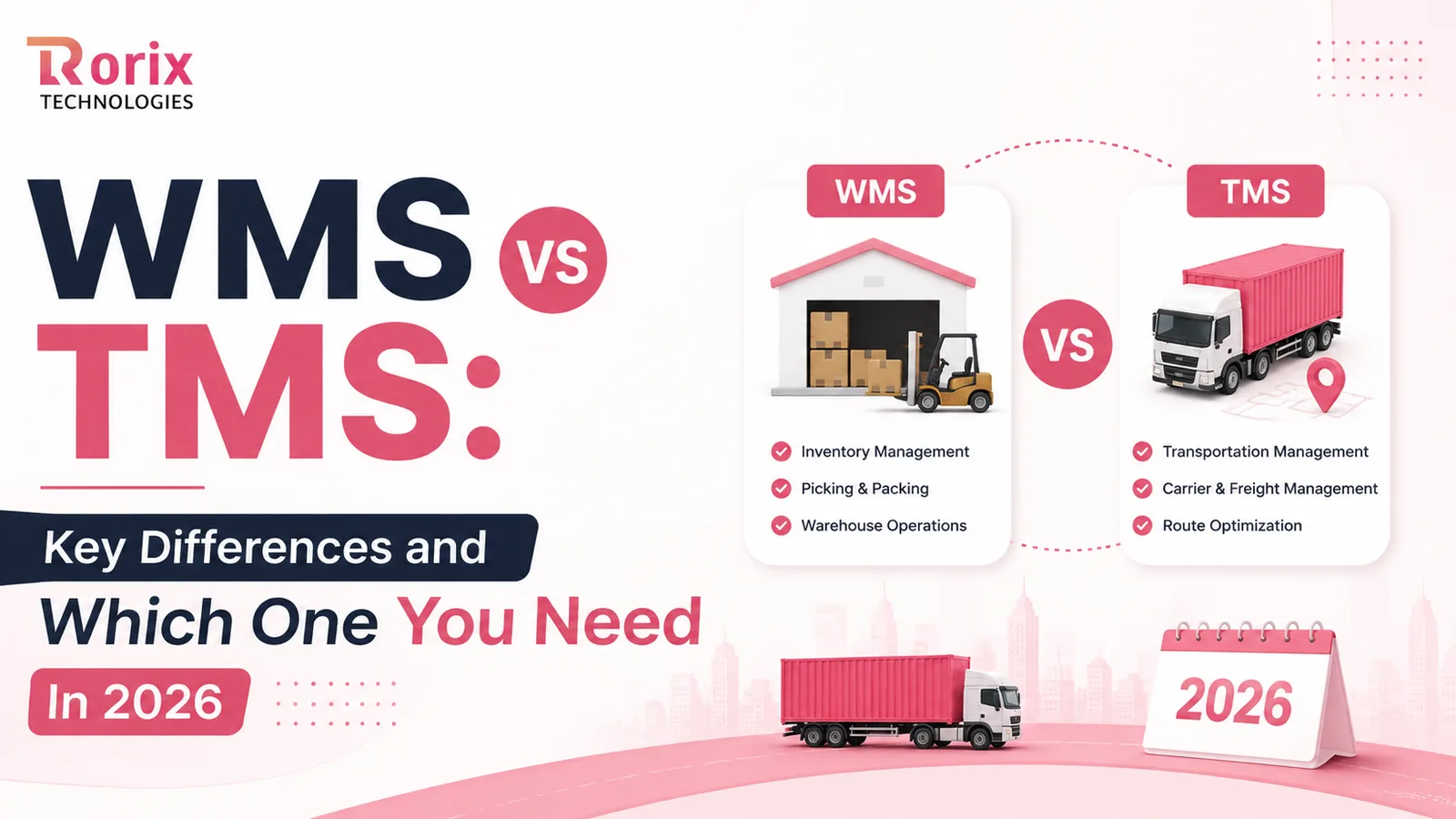
WMS vs TMS: Key Differences and Which One You Need In 2026
Confused about WMS vs TMS? Learn how they differ, how they work together, which one to roll out first, and how to choose the right system in 2026.
Read article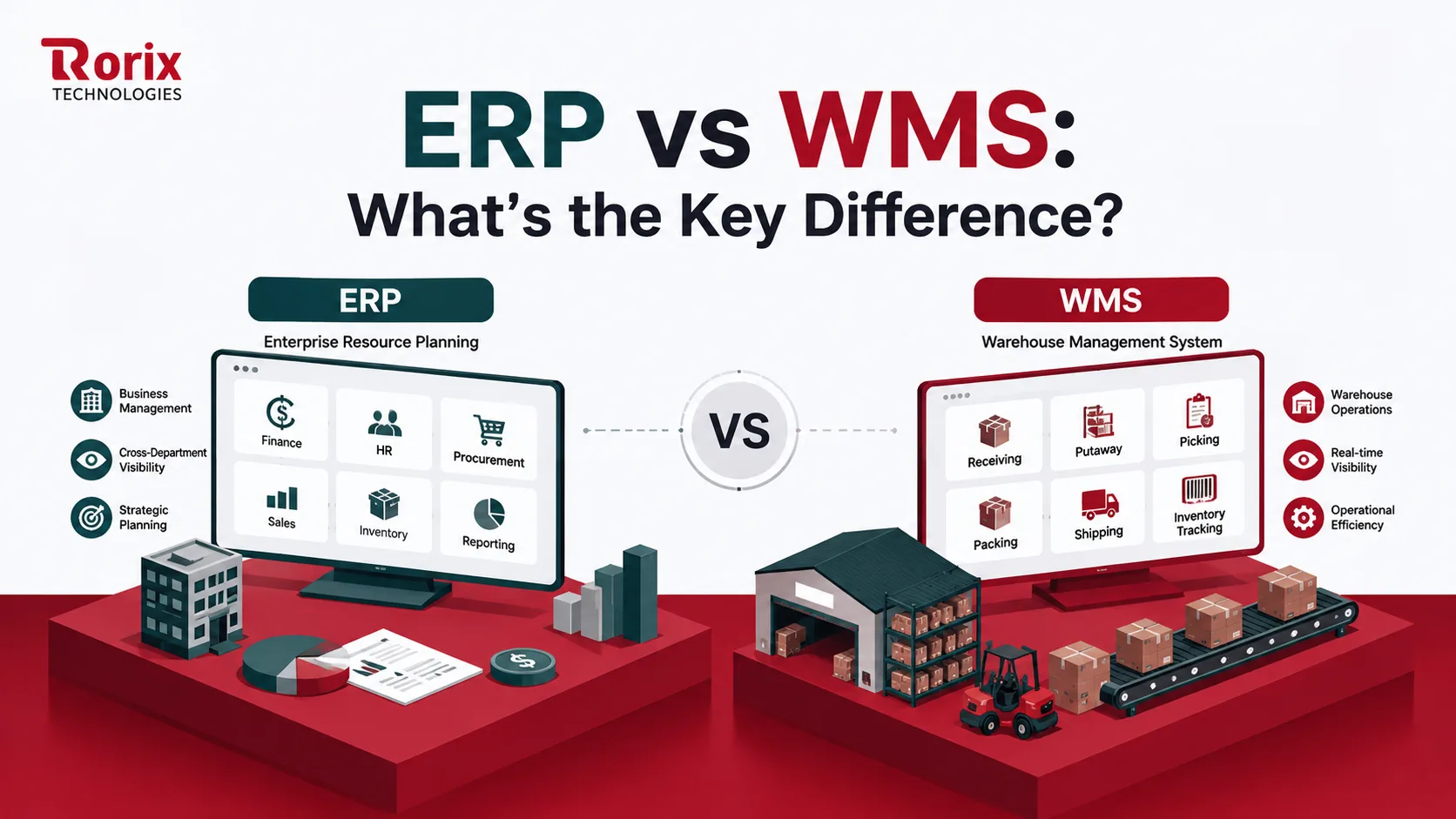
ERP vs WMS: What's the Key Difference?
Confused about ERP vs WMS? Discover the real differences, when to use each, how they integrate, what each costs, and whether your operation needs both systems.
Read article
PostgreSQL vs MongoDB for Warehouse Management: A 2026 Comparison from Engineers Who've Used Both
An honest, project-grounded comparison of PostgreSQL and MongoDB for warehouse management systems, from a team that runs both in production.
Read article