
10 Clear Signs You Need a Warehouse Management System (WMS)
Inventory counts that never match, missed orders, overtime creep: 10 clear signs your warehouse has outgrown spreadsheets and needs a real WMS.
On this page33 sections
Key Takeaways: When It Is Time to Move Up to a WMS
If your warehouse shows persistent signs like inventory accuracy below 95%, reliance on spreadsheets, and difficulty scaling with order volume, it's time to invest in a Warehouse Management System (WMS). This guide outlines the 10 most common warning signs and how to assess your readiness.
- A WMS gives real-time inventory visibility, automated picking/packing, barcode/RFID scanning, and ERP/e-commerce/shipping integration.
- Inventory accuracy consistently below 95% is a key indicator you've outgrown manual processes.
- Drowning in spreadsheets and struggling to keep up with order volume signal it's time to upgrade.
- Use the free 5-minute Readiness Assessment to get a personalized recommendation before you commit.
How to Tell Your Warehouse Has Outgrown Manual Processes
Is your warehouse drowning in spreadsheets? Dealing with constant inventory discrepancies? Struggling to keep up with order volume?
These are telltale signs you've outgrown manual warehouse processes and need a Warehouse Management System (WMS), whether that is a packaged platform or custom WMS development shaped around your workflows.
In this guide, we'll reveal the 10 most common warning signs that indicate it's time to invest in WMS software, plus how to assess your readiness for implementation.
Not sure if you're ready? Take our free 5-minute Readiness Assessment to get a personalized recommendation.
What is a Warehouse Management System?
A Warehouse Management System (WMS) is software that optimizes warehouse operations from receiving to shipping. It provides:
- Real-time inventory visibility
- Automated picking/packing workflows
- Barcode/RFID scanning
- Integration with ERP, e-commerce, and shipping systems
- Analytics and reporting
Think of it as the "operating system" for your warehouse, coordinating people, processes, and technology to maximize efficiency and accuracy.
Estimate Your WMS ROI
Get a preliminary estimate of potential savings with a modern warehouse management system. Estimates based on industry averages; individual results vary.
The 10 Warning Signs You Need a WMS
1. Inventory Accuracy Below 95%
The Problem:
You conduct cycle counts and discover:
- Physical inventory doesn't match system records
- Products you "should have" are missing
- Excess stock appears that wasn't ordered
- Inventory accuracy consistently below 95%
Why It Happens:
Manual data entry, no real-time updates, no barcode scanning, reliance on paper pick lists, and human error accumulation.
Real-World Impact:
A 250,000 sq ft distribution center had 87% inventory accuracy:
• Lost $450K annually to stockouts (items showed in-stock but weren't)
• Carried $320K in excess safety stock to compensate
• Spent 40 hours/week on manual inventory reconciliation
• Customer satisfaction score: 3.2/5

After WMS implementation:
Inventory accuracy: 99.3%
Stockouts reduced by 85%
Safety stock reduced by $240K
Cycle count time: 40 hours → 8 hours/week
Customer satisfaction: 4.7/5
What to Do:
If your inventory accuracy is consistently below 95%, a modern warehouse management system with barcode scanning and real-time updates will:
- Eliminate manual data entry errors
- Provide real-time inventory visibility through advanced inventory management
- Automate cycle counting
- Alert you to discrepancies immediately
Calculate the cost of your inventory inaccuracy with our free ROI Calculator
2. Rapid Growth (20%+ Annual)
The Problem:
Your business is growing fast:
- Order volume up 20-50% year-over-year
- Adding new product lines quarterly
- Expanding to multiple warehouse locations
- Current processes don't scale
Why It Matters:
Manual processes that work at 500 orders/day collapse at 1,000 orders/day. You face:
- Need to hire staff at unsustainable rates
- Error rates increase with volume
- Can't onboard new employees fast enough
- Customer service complaints rising
Real-World Impact:
E-commerce retailer grew from 800 to 2,100 orders/day in 18 months:

Without WMS (trying to scale manually):
• Needed to hire 12 additional warehouse staff
• Labor costs: +$540K/year
• Picking errors increased from 1.5% to 3.8%
• Average fulfillment time: 24 hours → 48 hours
• Missed Prime/next-day shipping windows: 18%

With WMS:
Handled 2,100 orders/day with only 4 additional hires
Labor costs: +$180K (saved $360K)
Picking accuracy: 99.5%
Average fulfillment time: 12 hours
Missed shipping windows: <2%
What to Do:
If you're growing 20%+ annually, implement WMS now before:
- You hire too many people doing inefficient work
- Error rates spiral out of control
- You lose customers to fulfillment delays
3. Order Fulfillment Takes 24-48+ Hours
The Problem:
Your current order-to-ship time is:
- 24-48 hours for standard orders
- Missing same-day or next-day shipping cutoffs
- Can't compete with Amazon/fast fulfillment expectations
- Customers complaining about slow delivery
Why It Happens:
Manual processes create bottlenecks:
- Paper pick lists take 2-3 hours to print/distribute
- Pickers spend 40% of time walking/searching
- No optimized pick paths
- Manual packing and label creation
- Inventory checks slow everything down
Industry Benchmarks:
| Warehouse Type | Without WMS | With WMS | Improvement |
|---|---|---|---|
| E-commerce | 36-48 hours | 6-12 hours | 75% faster |
| 3PL | 24-36 hours | 4-8 hours | 80% faster |
| B2B Distribution | 48-72 hours | 12-24 hours | 67% faster |
| Retail Replenishment | 2-3 days | 8-16 hours | 70% faster |
Real-World Impact:
Regional distributor processed 1,200 orders/day with 32-hour avg fulfillment:

Bottlenecks identified:
• Pick list printing/distribution: 3 hours delay
• Walking time: 35% of picker productivity
• Verification & packing: 45 minutes/order
• Shipping label creation: Manual, 3 min/order

After WMS implementation:
Real-time digital pick lists (0 printing delay)
Optimized pick paths (walking reduced 60%)
Integrated pack stations (15 min/order)
Auto-generated shipping labels (15 seconds/order)
Average fulfillment time: 8 hours (75% faster)
What to Do:
If you can't fulfill orders within 12-24 hours, a WMS will:
- Eliminate paper-based workflows
- Optimize pick paths (shortest distance)
- Batch pick similar orders
- Automate packing/shipping label creation
- Enable same-day/next-day fulfillment
4. Still Using Spreadsheets or Paper
The Problem:
You're managing warehouse operations with:
- Excel spreadsheets for inventory tracking
- Paper pick lists and packing slips
- Manual data entry into multiple systems
- No real-time visibility
- Emailing spreadsheets between departments
Why It's Dangerous:
Spreadsheet-based warehouses face:
- No single source of truth (everyone has different versions)
- No audit trail (who changed what, when?)
- Formula errors (one wrong cell = disaster)
- Scalability limits (crashes with 50K+ SKUs)
- Security risks (anyone can edit/delete)
Real-World Impact:
Manufacturer tracked 8,500 SKUs across 3 warehouses in Excel:

Issues discovered:
• 6 different versions of "master" inventory file
• Formula error caused $127K overstock of slow-moving items
• No way to track lot numbers for recalls
• Took 8 hours to generate inventory report
• Lost $85K to inventory shrinkage (no audit trail)

After WMS:
Single real-time inventory database
Automated lot/serial number tracking
Full audit trail (every transaction logged)
Real-time reports (<30 seconds)
Inventory shrinkage reduced 80%
What to Do:
If spreadsheets are your primary tool, you need a WMS to:
- Centralize data in a single system
- Eliminate manual data entry
- Provide real-time accuracy
- Create automatic audit trails
- Scale beyond spreadsheet limits
See how much manual processes cost you with our WMS Cost Estimator
5. High Picking/Shipping Error Rates (>2%)
The Problem:
You're experiencing:
- Frequent wrong item picks (>2% of orders)
- Incorrect quantities shipped
- Wrong address labels
- Constant customer returns/complaints
- Reshipping costs eating profits
Why It Happens:
Manual picking without verification:
- Pickers rely on memory/eyesight
- Similar SKUs get confused (ABC123 vs ABC133)
- No scan verification
- Rushed during peak times
- Fatigue leads to mistakes
Cost of Errors:
Average cost per picking/shipping error:
• Inbound shipping return: $8-15
• Restocking labor: $5-12
• Re-ship correct item: $8-15
• Customer service time: $3-8
• Lost customer lifetime value: $50-500
• TOTAL COST: $74-550 per error

For a warehouse shipping 1,000 orders/day at 3% error rate:
• 30 errors/day × $150 avg cost = $4,500/day
• Annual error cost: $1,164,000
• After WMS (0.3% error rate): $116,400
• SAVINGS: $1,047,600/year
Real-World Impact:
3PL fulfillment center had 4.2% error rate on 2,500 orders/day:

Root causes:
• No barcode scanning (pickers "eyeballed" SKUs)
• Similar packaging on different products
• Multi-line orders increased error probability
• No quality checks before shipping

After WMS with RF scanning:
Every pick validated by barcode scan
System alerts if wrong item scanned
Error rate: 4.2% → 0.4% (90% reduction)
Customer complaints: -85%
Reshipping costs saved: $850K/year
What to Do:
If your error rate exceeds 2%, a WMS will:
- Require barcode scan verification on every pick
- Alert pickers to wrong items immediately
- Validate quantities before packing
- Auto-generate correct shipping labels
- Track error sources for continuous improvement
6. Multiple Warehouse Locations
The Problem:
You operate 2+ warehouse locations and struggle with:
- No centralized visibility into inventory across sites
- Can't transfer stock efficiently between locations
- Stock imbalances (one site overstocked, another out)
- Manual coordination between warehouses
- Customer orders shipped from wrong (farther) location
Why It's Critical:
Multi-location operations without WMS face:
- Inventory silos (each warehouse is blind to others)
- Suboptimal fulfillment (ship from LA when customer is near NYC warehouse)
- Lost sales (item out of stock in one location but available 50 miles away)
- Excess inventory costs (can't balance stock effectively)
Real-World Impact:
Retail chain with 5 regional distribution centers:

Before centralized WMS:
• Each warehouse tracked inventory in separate spreadsheet
• Regional manager emailed daily stock reports
• Stock transfers took 3-5 days to coordinate
• Shipped 40% of orders from suboptimal location
• Carried $1.2M in excess safety stock (couldn't see availability elsewhere)

After enterprise WMS:
Real-time visibility across all 5 locations
Automated stock balancing recommendations
Stock transfers: 3-5 days → 4 hours to initiate
Orders route to nearest fulfillment center (saved $240K/year in shipping)
Safety stock reduced by $720K (62%)
What to Do:
If you have multiple locations, you need an enterprise WMS that:
- Provides real-time visibility across all sites
- Intelligently routes orders to optimal warehouse
- Automates inter-warehouse transfers
- Balances inventory to minimize carrying costs
- Treats all locations as one virtual warehouse
Multi-location and multi-tenant design is covered in depth in our scalable WMS architecture guide.
7. Poor Integration Between Systems
The Problem:
Your warehouse operates in silos:
- Inventory system doesn't talk to e-commerce platform
- Manual data export/import between ERP and warehouse
- Shipping labels created in separate system
- Accounting has different inventory values than warehouse
- Double/triple data entry required
Why It's a Problem:
Disconnected systems create:
- Data lag (inventory shows available online but sold out in warehouse)
- Errors (manual data transfer = mistakes)
- Wasted time (staff spending hours on data reconciliation)
- Poor decisions (executives working with outdated data)
Real-World Impact:
B2B distributor with fragmented systems:

System landscape:
• ERP (QuickBooks): Financial data, purchase orders
• Custom Access database: Warehouse inventory
• Shopify: E-commerce sales
• ShipStation: Shipping labels
• Manual Excel: Reconciliation between all systems

Pain points:
• Inventory sync: Manual, twice daily (4 hours/day)
• Oversold items: 8-12% (showed available online, actually out of stock)
• Order entry: Manual from Shopify → Access database
• Accounting close: 5 days (reconciling inventory values)

After integrated WMS:
Real-time ERP ↔ WMS ↔ E-commerce sync
Auto-generate shipping labels from WMS
Oversold items: <1%
Zero manual order entry
Accounting close: 1 day
Staff time saved: 20 hours/week
What to Do:
If you're manually moving data between systems, a WMS will:
- Integrate natively with your ERP, e-commerce, shipping systems
- Sync inventory in real-time (no lag)
- Eliminate manual data entry
- Provide single source of truth
- Auto-generate shipping docs
Check WMS compatibility with your tech stack using our Technology Stack Selector
8. Hiring More Staff Isn't Solving Problems
The Problem:
You keep hiring but productivity doesn't improve:
- Added 3 warehouse workers but still can't keep up
- Labor costs rising faster than revenue
- New employees take weeks to get productive
- High turnover (people overwhelmed by chaos)
- Overtime out of control
Why Adding Staff Doesn't Help:
If processes are inefficient, adding people just multiplies inefficiency:
- 10 people doing wasteful tasks = 10x waste
- No amount of labor fixes poor workflows
- Training time increases with complexity
- More people = more errors without systems
✓ Is Your Warehouse Ready for a WMS?
Take our 5-minute assessment to get a personalized readiness score and implementation roadmap.
✓ Get personalized recommendations in 60 seconds
Industry Labor Benchmarks:
| Metric | Manual Warehouse | WMS-Enabled | Improvement |
|---|---|---|---|
| Orders/labor hour | 8-12 | 20-35 | +150% |
| Onboarding time | 3-4 weeks | 3-5 days | 85% faster |
| Picking accuracy | 92-96% | 99%+ | +3-7% |
| Walking as % of time | 50-60% | 15-25% | 60% reduction |
Real-World Impact:
Wholesale distributor scaling from 600 to 1,200 orders/day:

Initial approach (hiring):
• Hired 8 additional pickers (doubled team)
• Labor costs increased: $360K/year
• Output only increased to 900 orders/day (not 1,200)
• Error rate got worse: 2.1% → 3.4%
• Conclusion: Chaos doesn't scale

WMS approach:
Implemented WMS before hiring
Hired only 2 additional staff (not 8)
Processed 1,400 orders/day (exceeded goal)
Labor costs increased: $90K (saved $270K)
Error rate: 3.4% → 0.6%
Labor cost per order: -45%
What to Do:
Before hiring more staff, implement a WMS to:
- Optimize existing workforce productivity
- Reduce walking/searching time by 60%
- Simplify jobs (easier onboarding)
- Handle 2-3x volume with minimal additional hires
- Reduce turnover (less chaos = happier employees)
9. No Lot/Serial Number Tracking
The Problem:
You can't track product batches:
- No way to identify which lot a product came from
- Can't execute recalls quickly
- Expiration dates not tracked (FEFO not possible)
- Compliance issues (FDA, pharma, food)
- No traceability for quality problems
Why It Matters:
Industries requiring lot tracking face severe consequences without it:
| Industry | Risk Without Lot Tracking |
|---|---|
| Food & Beverage | FDA violations, recall failures, expired product sold |
| Pharmaceuticals | DEA compliance violations, unable to track serialized items |
| Medical Devices | FDA 21 CFR Part 11 violations, recall disasters |
| Automotive | Can't trace defective parts, warranty claim issues |
| Aerospace | FAA compliance failures, safety risks |
Real-World Impact:
Food distributor managing 1,200 SKUs with expiration dates:

Before lot tracking WMS:
• Tracked expiration dates in Excel (manually updated)
• FIFO picking based on physical location (not accurate)
• Expired products shipped: 2-3 incidents/month ($25K/year in credits)
• FDA audit: 3 violations cited
• Recall required 8 days to identify affected customers
• Waste from expired inventory: $180K/year

After WMS with lot/expiration control:
Automatic lot tracking on receiving
FEFO picking (first-expired-first-out)
Expired products shipped: 0 incidents
FDA audit: Zero violations
Recall execution time: 4 hours
Expired waste reduced: $135K/year (75% improvement)
What to Do:
If you need lot/serial tracking, a WMS will:
- Automatically capture lot numbers on receiving
- Enforce FEFO picking rules
- Alert to near-expiration products
- Execute recalls in hours (not days/weeks)
- Maintain full traceability for compliance
10. Making Decisions Without Data
The Problem:
You lack real-time warehouse data:
- Can't answer "how much inventory do we have?" without a physical count
- No visibility into picker productivity
- Can't identify slow-moving vs fast-moving SKUs
- Don't know actual order fulfillment times
- Gut-feel decisions instead of data-driven
Why Data Matters:
Without warehouse analytics, you're blind to:
- Productivity trends (which shifts/employees are most efficient?)
- Inventory velocity (what's selling, what's dead stock?)
- Space utilization (are you using warehouse efficiently?)
- Cost per order (is profitability improving or declining?)
- Bottlenecks (where are the process breakdowns?)
Real-World Impact:
Mid-size distribution center had zero warehouse analytics:

Blind spots:
• Didn't realize 35% of inventory hadn't moved in 12+ months
• Couldn't identify top picker (for recognition) or worst (for training)
• Unknown which product categories were most profitable
• No idea why certain days had 2x processing time
• Warehouse manager spent 15 hours/week manually compiling reports

After WMS with built-in analytics:
Identified $420K in dead stock (now liquidated)
Picker performance dashboard (productivity +22% in 6 months)
Category profitability revealed (shifted sales focus, +$180K/year)
Discovered staffing gaps on Tuesdays (optimized scheduling)
Real-time dashboards (zero manual reporting time)
Data-driven decision-making across the organization
What to Do:
If you're making decisions without data, a WMS will provide:
- Real-time inventory analytics
- Productivity dashboards by employee/shift
- ABC analysis (identify top SKUs)
- Space utilization reporting
- Order cycle time tracking
- Custom KPI dashboards
Start with the most telling warehouse KPI: How to Calculate Inventory Turnover Ratio
How to Assess Your WMS Readiness
Use this scoring system to evaluate your need:
Score Each Warning Sign (0-10 points)
For each of the 10 signs above, rate severity:
- 0-3 points: Not an issue or minor problem
- 4-6 points: Moderate issue, manageable for now
- 7-10 points: Critical problem, costing money/customers
Add up your total score:
| Total Score | Recommendation | Timeline |
|---|---|---|
| 0-30 | Monitor, not urgent | Reevaluate in 12-18 months |
| 31-50 | Start planning WMS project | Implement within 12 months |
| 51-70 | High priority, budget now | Implement within 6 months |
| 71-100 | CRITICAL: Implement immediately | Start vendor evaluation this month |
Take Our Interactive Assessment
Rather do an interactive quiz? Our WMS Readiness Assessment provides:
20 targeted questions across all operations
Instant score (0-100) with recommendations
Personalized implementation roadmap
Vendor selection guidance
Cost/ROI projections
Complete in 5 minutes →
What Happens If You Wait Too Long?
Delaying WMS implementation has real costs:
Year 1 Without WMS (costs accumulate)
- Excess labor: $150K-$400K
- Inventory inaccuracy costs: $200K-$600K
- Error/reshipping costs: $75K-$300K
- Lost customers: $100K-$500K
- Total opportunity cost: $525K-$1.8M
Year 2-3 Without WMS (problems compound)
- Can't scale (lost revenue opportunities)
- Reputation damage from errors
- Competitor with WMS takes market share
- Staff burnout and turnover
- Recovery becomes much harder
Companies that wait "until we're bigger" often find implementation is 3x harder later due to entrenched bad processes and change resistance.
Get Expert Guidance (Free 30-Minute Call)
Talk to our WMS specialists about your specific challenges. No sales pressure, just actionable advice.
✓ Speak with the engineers who build these systems, not an account manager
What to Do Next: Your WMS Action Plan
Step 1: Take the Readiness Assessment (5 minutes)
Complete our free assessment to get:
- Your readiness score
- Recommended next steps
- Implementation timeline
- Budget estimates
Step 2: Calculate Your ROI (10 minutes)
Use our WMS ROI Calculator to:
- Estimate costs for your operation
- Quantify current pain point costs
- Project payback period
- Build executive business case
Step 3: Understand WMS Costs (15 minutes)
Our WMS Cost Estimator provides:
- Vendor pricing comparisons
- Hidden cost alerts
- Cloud vs on-premise analysis
- Total cost of ownership (TCO)
Step 4: Explore WMS Options (30 minutes)
Review our guides:
- How to Select a WMS Vendor: Evaluation criteria
- Cloud vs On-Premise WMS: Deployment options
- WMS Implementation Checklist: Success roadmap
Step 5: Talk to Experts (Free Consultation)
Not sure where to start? Schedule a free 30-minute consultation with our WMS experts:
Discuss your specific challenges
Get vendor recommendations
Review implementation approach
Answer technical questions
No sales pressure, just guidance
Conclusion: The Cost of Waiting
If you identified with 4+ of these warning signs, your warehouse has already outgrown manual processes. Every month you delay costs you:
- $10K-$50K in operational inefficiencies
- 2-5% of potential revenue growth
- Customer relationships from errors/delays
- Competitive advantage to WMS-enabled rivals
The good news? WMS implementations typically pay for themselves in 6-18 months, with many companies achieving first-year ROIs ranging from 150-350%, depending on warehouse size, current processes, and implementation quality.
Ready to take the next step?
Take the 5-Minute Readiness Assessment
Calculate Your WMS ROI
Schedule Expert Consultation
Frequently Asked Questions
How much does a WMS cost?
WMS pricing varies widely based on warehouse size and complexity:
- Small (10K-30K sq ft, under 200 orders/day): $25K-$75K in year one, then $15K-$35K a year
- Mid-size (30K-100K sq ft, 200-1,000 orders/day): $75K-$200K in year one, then $35K-$80K a year
- Large (100K-300K sq ft, 1,000-5,000 orders/day): $200K-$500K in year one, then $80K-$200K a year
- Enterprise (300K+ sq ft, 5,000+ orders/day): $500K-$1M+ in year one, then $200K-$500K+ a year
Use our Cost Estimator for a detailed quote.
How long does WMS implementation take?
Typical timelines:
- Cloud WMS: 3-6 months (faster deployment)
- On-premise WMS: 6-12 months (more customization)
- Enterprise multi-site: 12-24 months (phased rollout)
Can we implement a WMS ourselves or do we need consultants?
Depends on:
- Self-implementation works if: Standard processes, cloud WMS, small operation, dedicated internal PM
- Consultants recommended if: Custom workflows, complex integrations, legacy systems, first-time implementation
Most companies use a hybrid: vendor does core implementation, consultants handle integrations, internal team manages change.
What if our warehouse is too small for a WMS?
"Too small" is a myth. Modern cloud WMS solutions work for:
- Operations as small as 5,000 sq ft
- As few as 50 orders/day
- Startups to enterprises
If any of the 10 signs resonate, you're big enough. Take the assessment to confirm.
Will employees resist the change?
Change management is critical. Best practices:
- Involve warehouse staff in vendor selection
- Emphasize how WMS makes their jobs easier
- Provide 40+ hours training per role
- Implement in phases (not "big bang")
- Celebrate early wins
Our WMS Implementation Guide includes a full change management playbook.
Related Resources:
- How to Calculate WMS ROI: Complete Guide
- WMS Implementation Checklist: 50 Steps to Success
- Cloud vs On-Premise WMS: Complete Comparison
- How to Select the Right WMS Vendor in 2026
About Rorix Technologies
We build custom warehouse management systems for companies that have outgrown spreadsheets and entry-level tools. A dedicated team of senior engineers with a named technical lead on every engagement, working across e-commerce, 3PL, manufacturing, and distribution.
Ready to discuss your warehouse challenges? Talk to our team or explore our WMS development services.
Costing a WMS build?
Send us your SKU count and daily order volume. You get back a scope and a number you can take to your CFO.
Continue learning
Written by
Nirmal JTeam Lead, WMS & Inventory Systems, Rorix Technologies
Nirmal leads WMS and inventory software delivery at Rorix, from warehouse picking and stock control to real-time inventory tracking and fulfillment workflows. He manages project timelines, stakeholder alignment, and sprint execution, ensuring production-ready systems are delivered on time and keep operations running without disruption.
View full profileRelated articles
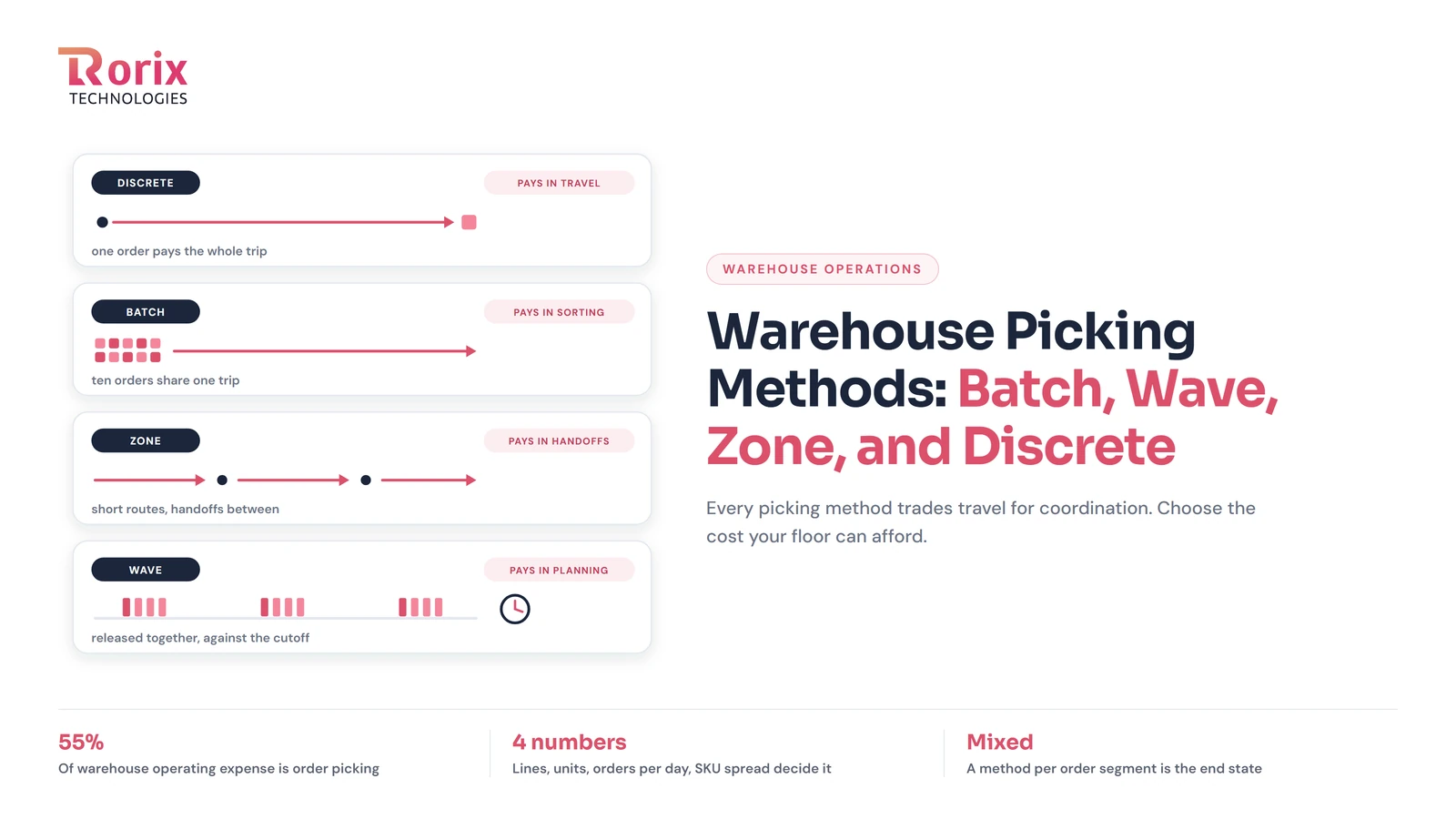
Warehouse Picking Methods: Batch, Wave, Zone, and Discrete, and How to Choose
Warehouse picking methods compared: discrete, batch, zone, wave, and cluster, what each trades for shorter travel, and how to choose by order profile.
Read article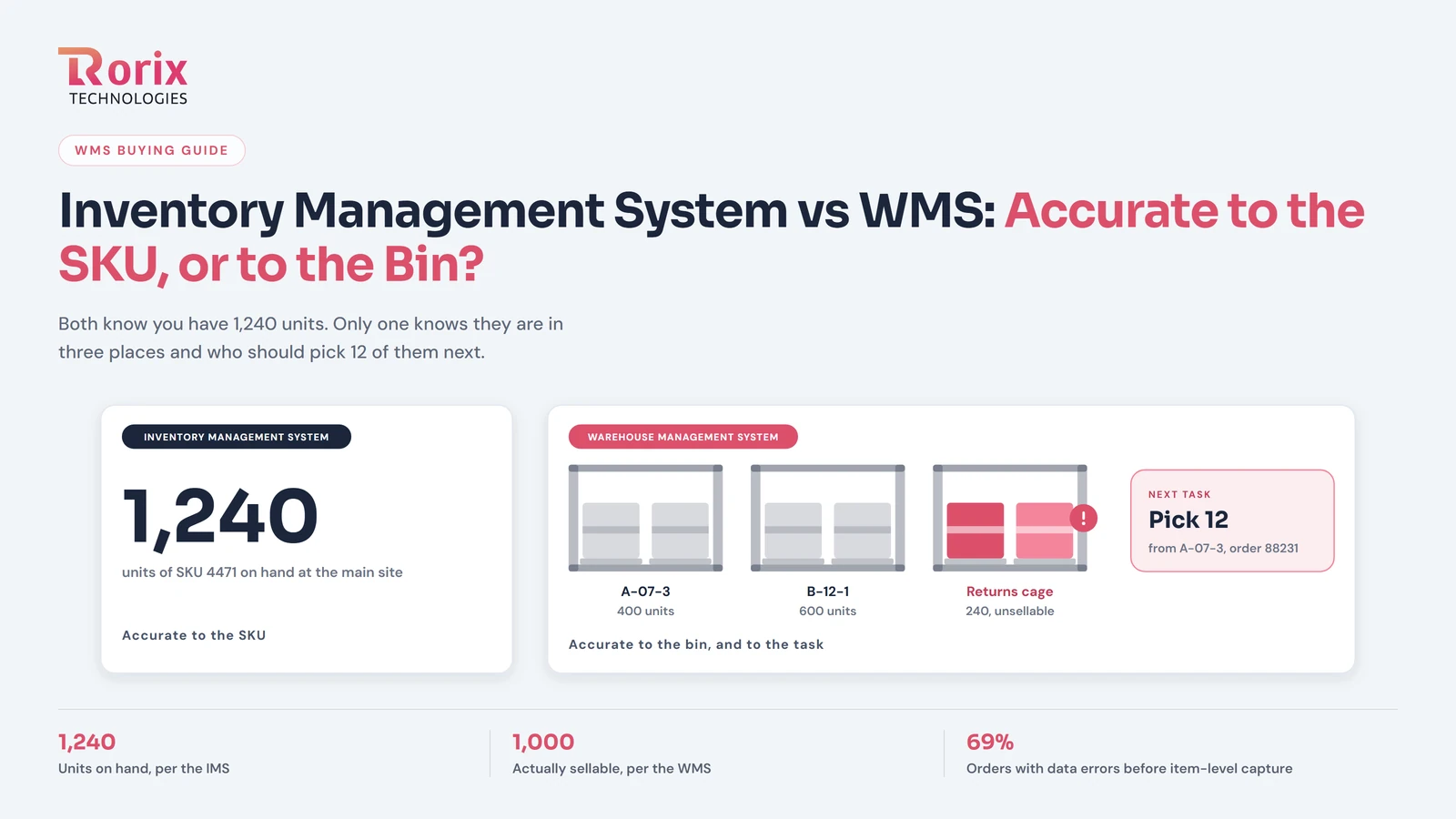
Inventory Management System vs WMS: Accurate to the SKU, or Accurate to the Bin?
Inventory management system vs WMS: an IMS knows how many you have by SKU, a WMS knows where each unit sits and who picks it next. How to tell which you need.
Read article
PostgreSQL vs MongoDB for Warehouse Management: A 2026 Comparison from Engineers Who've Used Both
An honest, project-grounded comparison of PostgreSQL and MongoDB for warehouse management systems, from a team that runs both in production.
Read article