
Inventory Management System vs WMS: Accurate to the SKU, or Accurate to the Bin?
Inventory management system vs WMS: an IMS knows how many you have by SKU, a WMS knows where each unit sits and who picks it next. How to tell which you need.
On this page26 sections
Ask an inventory management system how many units of a product you have and it answers instantly. Ask it where the twelve you need to ship this morning are sitting, and who should walk to get them, and it goes quiet. That silence is the entire difference between an inventory management system and a warehouse management system, and it is the difference most buyers discover after they have signed.
An IMS is accurate to the SKU. A WMS is accurate to the bin, and to the task. Settling which of the two an operation actually needs is the first thing we do in any custom WMS development engagement, because that answer sets the entire scope. Both systems track stock, both have dashboards, and vendors on each side sell features that sound like the other, which is why the comparison gets muddled. The distinction that survives the marketing is which question each system was built to answer: "how many do we have" or "where is it, and what happens to it next."
Getting this wrong is expensive in either direction. Buy a WMS for a stockroom that only needs counts and you have paid for a floor-execution engine nobody directs. Run a growing warehouse on an IMS and you join the long list of operations whose system says "in stock" while the picker stands in the aisle empty-handed. IHL Group puts the global cost of inventory distortion, meaning out-of-stocks and overstocks combined, at $1.77 trillion a year, with $1.2 trillion of it in out-of-stocks, and a large share of "out of stock" is really "in stock somewhere, unfindable."
In this guide, you'll learn:
- What an inventory management system actually tracks, and who it is built for
- What a WMS tracks that an IMS structurally cannot
- A worked example where the same stock produces two different true answers
- Why inventory accuracy comes from the touch, not the count
- The 6 signs an operation has outgrown its IMS
- How the two systems work together, what each costs, and a 4-step decision
Quick Answer: Inventory Management System vs WMS
- An inventory management system (IMS) tracks what you own and how much of it, by SKU and by site: quantities, reorder points, purchasing, valuation, and sales-channel sync. Its users are buyers, planners, and owners.
- A warehouse management system (WMS) tracks where every unit physically sits and directs the work that moves it: locations, putaway, picking, packing, shipping, and scan validation at each step. Its users are pickers, supervisors, and the floor.
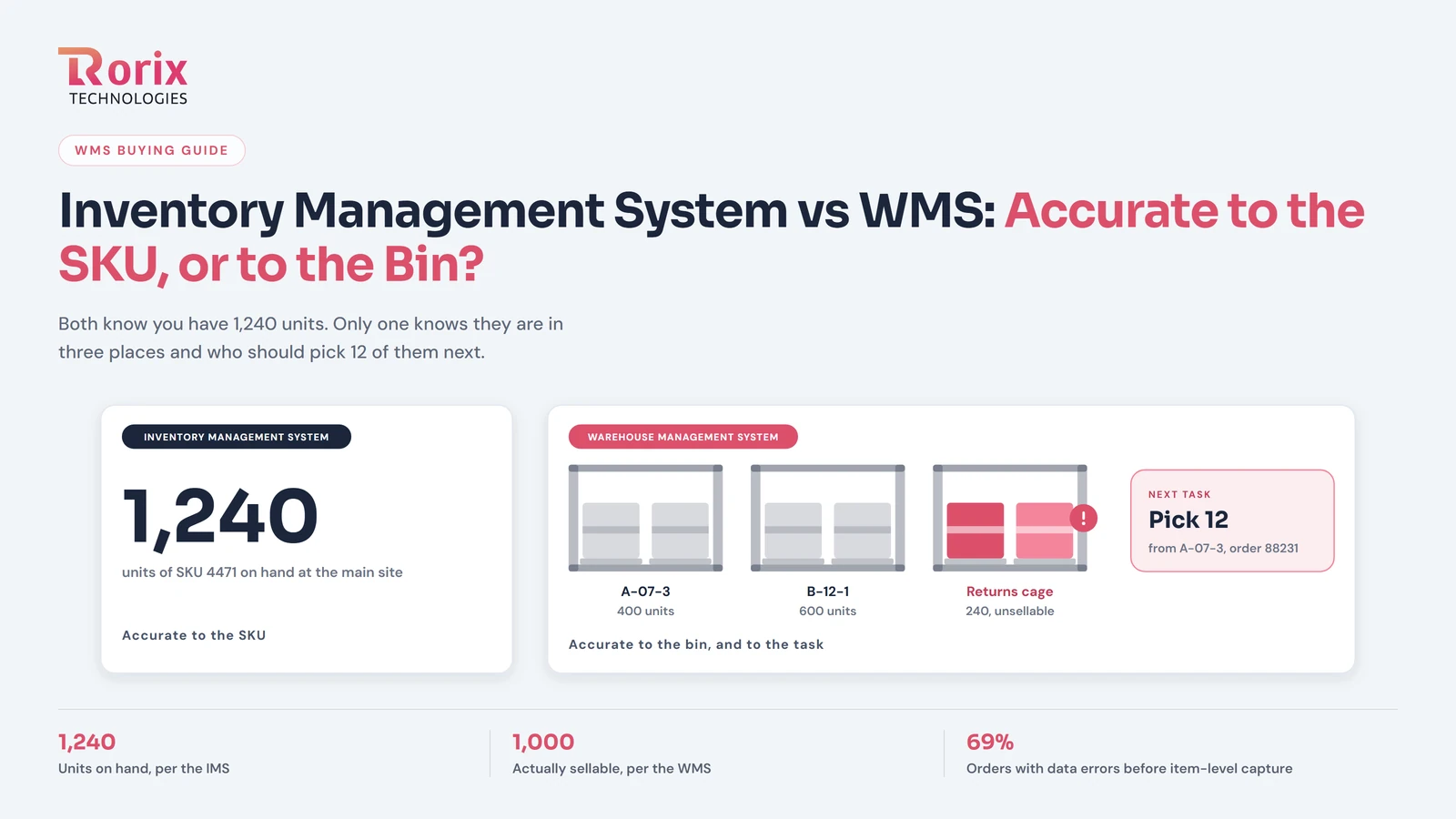
- The overlap is the number. Both know you have 1,240 units. Only one knows they are in three places, that 240 of them are unsellable until graded, and who should pick 12 of them next.
- You need an IMS when the question you ask most is how many and when to reorder. You need a WMS the day the question becomes where, and who, and in what order.
- Most growing operations end up with both, with the IMS or ERP as the planning system of record and the WMS as the execution system of record.
Key Takeaways: An IMS Counts the SKU, a WMS Directs the Bin
- An inventory management system is accurate to the SKU and answers how many you have and when to reorder, while a warehouse management system is accurate to the bin and answers where each unit sits, who picks it, and what happens next.
- IHL Group puts the global cost of inventory distortion at $1.77 trillion a year, with $1.2 trillion of it in out-of-stocks.
- When the Auburn University RFID Lab and GS1 US audited over a million items across eight brands and five retailers, 69% of orders contained data errors under conventional processes, and item-level capture at picking, shipping, and receiving raised order accuracy to 99.9%.
- Cloud WMS platforms generally run $150 to $500 per user per month, a small operation typically lands between $25,000 and $75,000 in year one, and a custom WMS runs $30,000 to $180,000+ to build.
- Two or more of the six outgrown-IMS signs on a typical day, such as in-stock items that cannot be found or a pick list living in a spreadsheet, is the threshold for moving to a WMS.
What an Inventory Management System Actually Tracks
An inventory management system is a ledger of quantities. For each SKU it holds how many units exist, at which site or channel, what they cost, when to reorder, and how fast they are selling. Its natural users sit at desks: the buyer deciding a purchase order, the planner setting safety stock, the owner watching cash tied up on shelves.
That makes the IMS strong at exactly the questions those people ask. Multi-channel stock sync keeps a marketplace, a storefront, and a wholesale account from overselling the same units, which is the coordination problem the multi-channel order management guide covers in depth. Reorder logic turns sales velocity into purchase orders. Valuation feeds the accountants. The inventory turnover ratio that tells you whether stock is working or sitting is an IMS metric through and through.
What an IMS does not do is direct anyone. It records that units arrived; it does not tell a receiver which bin to put them in. It records that units left; it does not sequence the pick, validate the scan, or notice that the picker took from the wrong shelf. It knows the site. It does not know the aisle.
What a Warehouse Management System Actually Tracks
A warehouse management system is a ledger of locations and movements, and an engine that generates work from them. Every unit has a bin. Every move between bins is a recorded event with a user and a timestamp. Every order becomes tasks, sequenced for the floor, and every task is closed by a scan that proves the right unit left the right location.
The users are on their feet: pickers following directed routes, receivers scanning inbound pallets to assigned locations, supervisors watching live task queues, packers whose station validates the carton before the label prints. The core features expected of a mid-market WMS are almost all execution features for this reason; the count is a byproduct of the movements, not the thing the system was built to hold.
That inversion is the point. An IMS stores the count and hopes the floor matches it. A WMS stores the movements and derives the count, which is why the WMS number is the one you can find with your hands.
The Same Stock, Two True Answers: A Worked Example
Take one SKU, product 4471, in a warehouse running both systems.
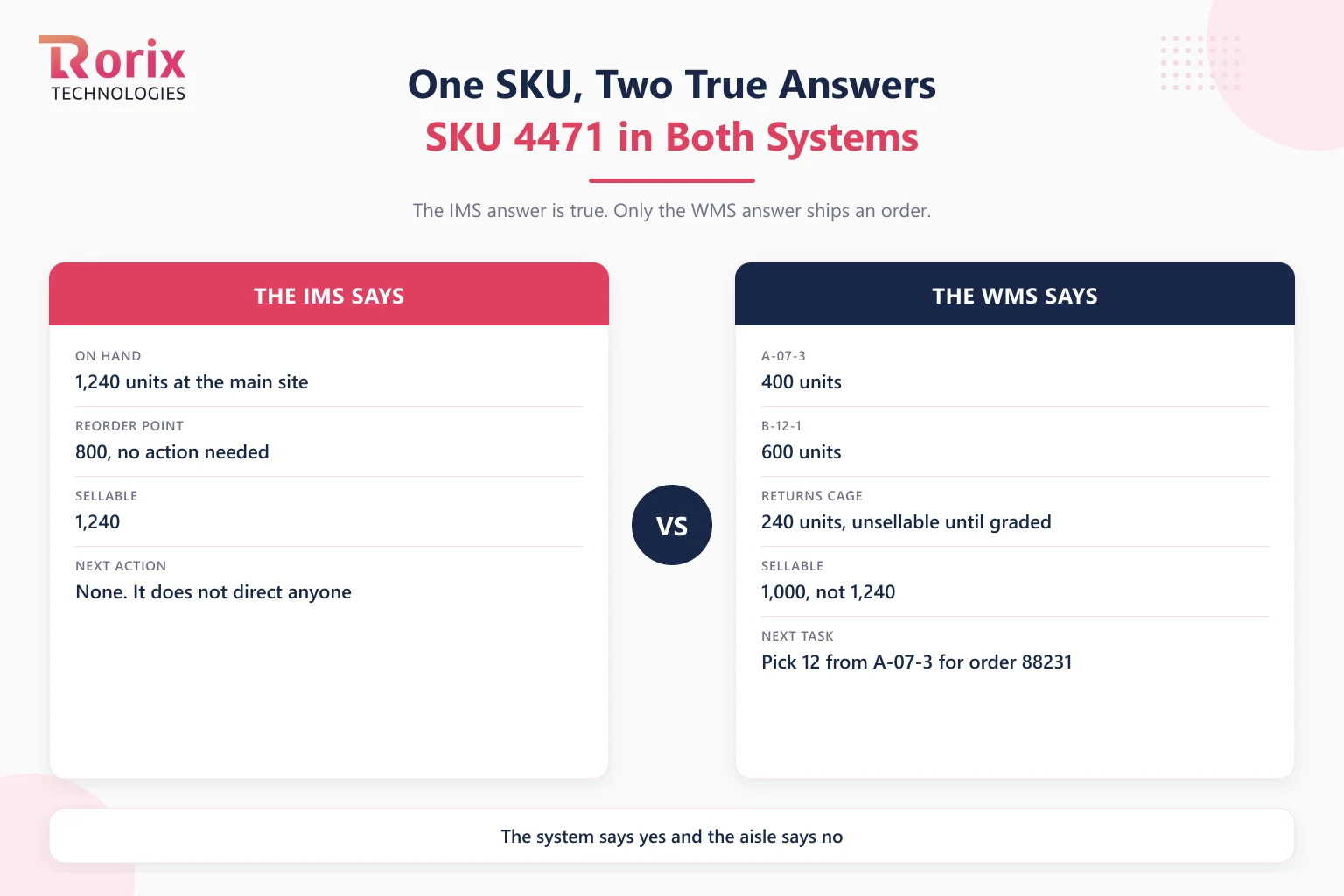
The IMS says: 1,240 units on hand at the main site, reorder point 800, no action needed. That answer is true, and it is exactly what the buyer needs.
The WMS says: 400 units in A-07-3, 600 units in B-12-1, and 240 units in the returns cage awaiting grading, which are not sellable until someone inspects them. Sellable stock is therefore 1,000, not 1,240. Order 88231 needs 12 units, and the next task in the queue sends a picker to A-07-3 because it is nearest the pack station and holds the oldest lot.
Both answers are correct. Only the second one ships an order. And if the IMS is the only system, the 240 returned units sit inside the 1,240 forever, the site-level count drifts from the shelves one unfound unit at a time, and the operation experiences the most common failure in warehousing: the system says yes and the aisle says no.
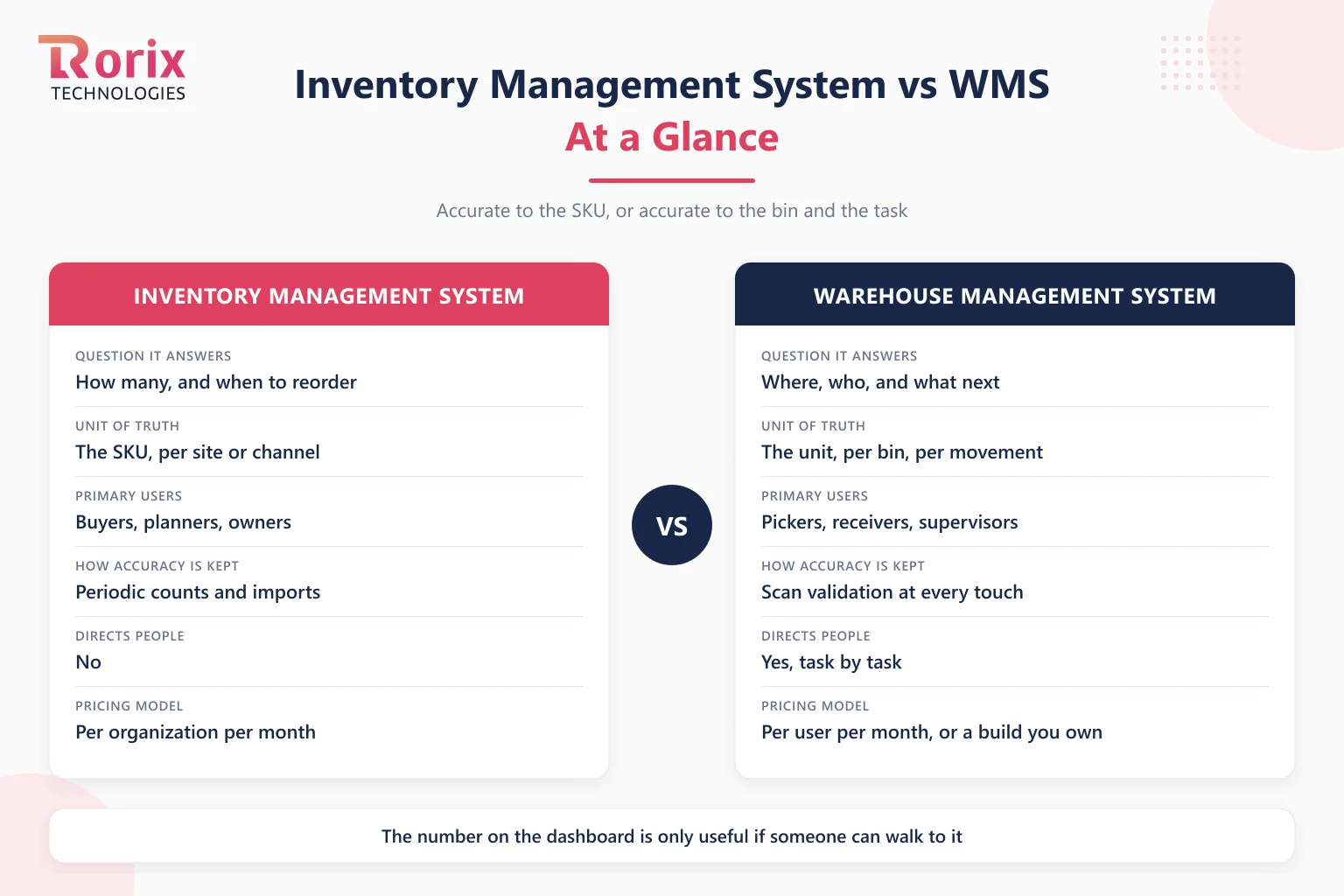
Inventory Management System vs WMS: Side-by-Side
| Dimension | Inventory management system | Warehouse management system |
|---|---|---|
| Question it answers | How many, and when to reorder | Where, who, and what next |
| Unit of truth | The SKU, per site or channel | The unit, per bin, per movement |
| Primary users | Buyers, planners, owners | Pickers, receivers, supervisors |
| Core workflows | Stock levels, reorder points, purchasing, valuation, channel sync | Receiving, putaway, directed picking, packing, shipping, returns grading |
| How accuracy is maintained | Periodic counts and imports | Scan validation at every touch |
| Directs people | No | Yes, task by task |
| Hardware | Optional scanner for counts | Handhelds on every worker, label printers, sometimes RFID |
| Typical pricing model | Per organization per month | Per user per month, or a build you own |
| Fits best | Stockrooms, single-location retail, wholesalers with simple flow | Any floor where finding and moving stock is the work |
| Outgrown when | Items "in stock" cannot be found | Rarely; it is the end state for execution |
Why Accuracy Comes From the Touch, Not the Count
The deepest difference between the two systems is where accuracy is manufactured. An IMS trusts a count taken at a point in time and adjusts it with transactions it is told about. A WMS refuses to let stock move without a scan, so the record and the shelf cannot drift apart between counts because every touch is itself a count.
The industry evidence for this is unusually clear. When the Auburn University RFID Lab and GS1 US audited over a million items moving between eight brands and five retailers, they found that 69% of orders shipped and received contained data errors under conventional processes, and that item-level capture at picking, shipping, and receiving raised order accuracy to 99.9%. The mechanism, not the tag, is the lesson: errors enter at the touch, so accuracy has to be captured at the touch. That is a WMS discipline, and it is why the inventory management best practices that actually hold accuracy above the high nineties all involve scanning and cycle counting rather than better spreadsheets.
Live counts are the other half. A floor scan should reach the sales channel and the client portal in under a second, which takes a real-time inventory architecture built on push updates rather than a sync interval. An IMS syncing every fifteen minutes is accurate fifteen minutes ago.
Why Vendors Blur the Line, and How to See Through It
Every IMS vendor with ambition adds a "warehouse" tab: bin locations, a barcode field, maybe a pick list export. Every WMS vendor has an "inventory" module. Feature names converge, and buyers reasonably conclude the products do too. Three questions separate them in a demo.
Does it generate tasks for people? A real WMS turns orders into sequenced work and hands it to a worker on a device. An IMS with bin locations still expects a person to decide what to do next.
Does it refuse a move without a scan? Ask to move stock between two locations without scanning. If the system lets you type it, accuracy still depends on memory, and the location field is decoration.
Does it know the difference between a site and a bin? Many IMS tools model "location" as a warehouse. A WMS models it as an addressable slot on a specific rack, because that is where the picker has to walk.
If a product passes all three, it is a WMS whatever the pricing page calls it. If it fails one, it is an IMS with a warehouse tab, which is fine to buy as long as you know which one you bought.
6 Signs You Have Outgrown an Inventory Management System
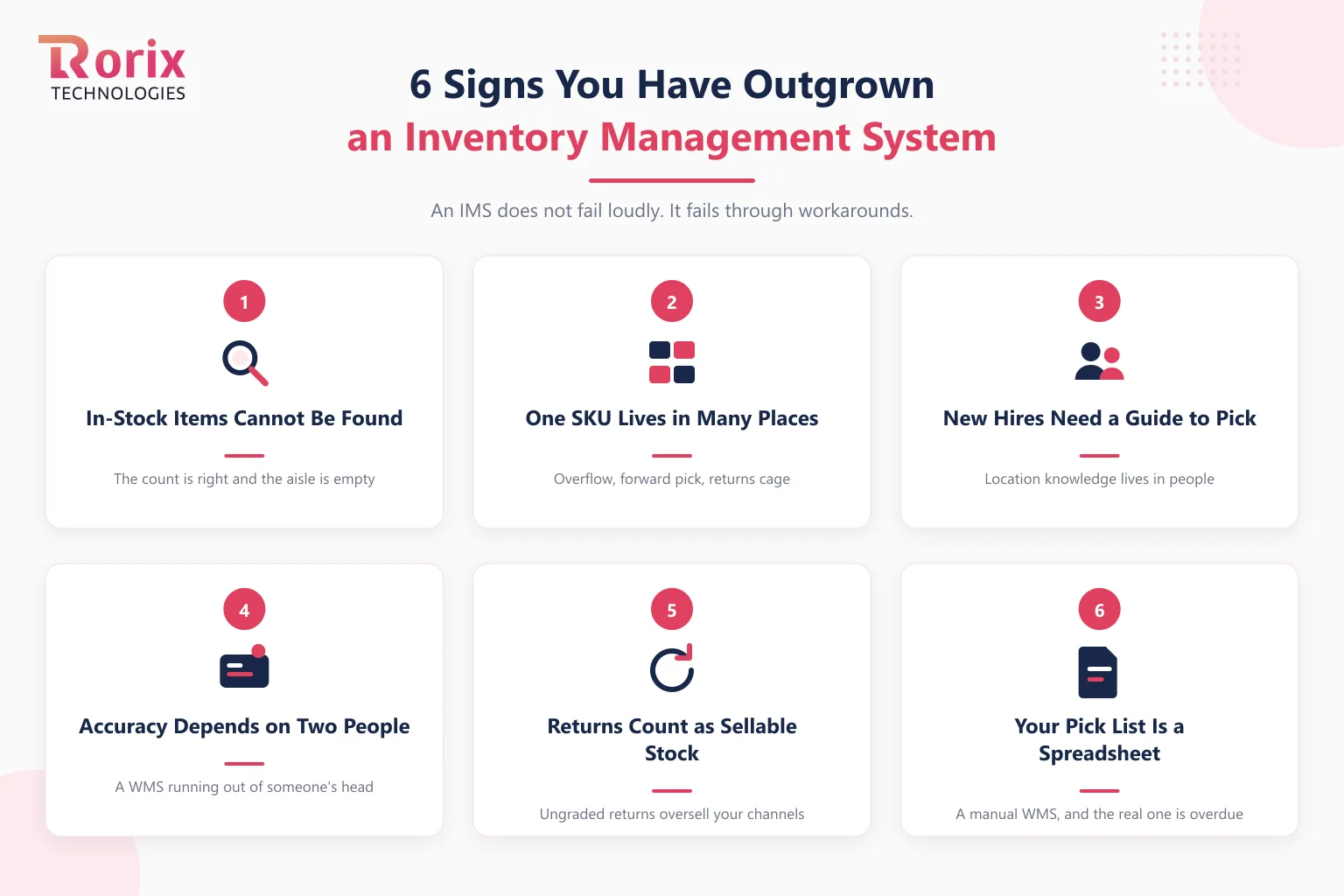
An IMS does not fail loudly. It fails through workarounds, and these six are the ones that mean the workaround era is over.
- "In stock" items cannot be found. The count is right and the aisle is empty, because the system knows the site and not the shelf.
- One SKU lives in more than one place. Overflow, forward pick, returns cage: the moment stock splits across locations, a single site-level number stops describing reality.
- New hires need a guide to pick. If an experienced worker has to walk the floor with every new starter, the location knowledge lives in people, not in the system.
- Accuracy depends on the same two people. When the count holds only while a particular supervisor is on shift, you are running a WMS out of someone's head.
- Returns count as sellable stock. Ungraded returns sitting inside the on-hand number oversell your channels one return at a time.
- Your pick list lives in a spreadsheet. Exporting orders, sorting them by aisle by hand, and printing the result is a manual WMS, and it is the clearest sign the real one is overdue.
Two or more of these on a typical day is the threshold. For the broader symptoms of a warehouse outgrowing any system, the signs you need a warehouse management system cover the full list.
If the answer is a WMS, the next question is whether to license one or build one. Our build-vs-buy breakdown for WMS walks through it factor by factor.
Can You Run an Inventory Management System and a WMS Together?
Yes, and past a certain size most operations should. The two systems answer different questions, so the healthy arrangement gives each one a clear domain of record: the IMS (or the ERP's inventory module) owns how much you have per site, purchasing, and valuation; the WMS owns where every unit sits and every movement that touches it. The WMS reports movements up, the planning system sends orders and receipts down, and neither pretends to be the other.
The integration boundary between them deserves design, not an afterthought. Receipts, adjustments, and shipments flow constantly, and the WMS integration practices that keep the two ledgers reconciled treat that flow as a queue of events rather than a nightly file. If your planning system is an ERP rather than a standalone IMS, the ERP vs WMS comparison covers that specific relationship, including who should be the system of record for what.
What Each System Costs
The pricing models tell you what each product thinks it is. Inventory management platforms are typically sold as a subscription per organization per month, with tiers keyed to order volume, users, and integrations; Zoho Inventory, for example, prices its plans per organization rather than per user. That model fits a desk tool used by a handful of planners.
A WMS is priced for the floor. Cloud WMS platforms generally run $150 to $500 per user per month, and because every picker is a user, the bill scales with headcount; a small operation typically lands between $25,000 and $75,000 in year one for a cloud deployment. A custom WMS runs $30,000 to $180,000+ to build, with 15% to 25% of the build cost per year in ongoing costs and no per-seat fees as the floor grows. The full picture by tier and deployment model is in our WMS cost guide, and the project cost estimator gives a figure scoped to your operation.
How to Decide in 4 Steps
Step 1. Write Down the Question You Ask the System Most
For a week, note every time someone asks the current system something. If the questions are how many, what to reorder, and what it is worth, an IMS is the right tool. If they are where is it, who is picking it, and why is it not there, you are already asking WMS questions of a system that cannot answer them.
Step 2. Measure Find Rate and Pick Accuracy
Count how often an item the system says is in stock cannot be found on the first attempt, and how often an order ships with the wrong item or quantity. Both numbers are invisible in an IMS and are the first metrics a WMS produces. If you cannot measure them today, that is itself a finding.
Step 3. Count Locations per SKU and Touches per Unit
Walk the floor and note how many places a typical SKU actually lives, and how many hands a unit passes through between the dock and the carton. One location and two touches is stockroom territory. Three locations and five touches is a warehouse, and a warehouse needs directed work.
Step 4. Decide the System of Record for Each Fact Before You Buy
Write down which system will own quantity per site, which will own location per unit, which will own purchasing, and which will own the movement history. Buying either product before answering this is how operations end up with two systems that disagree and a spreadsheet arbitrating between them.
How Rorix Builds Inventory and Warehouse Systems
Rorix Technologies builds custom warehouse management systems and the real-time inventory platforms that feed them: 27 projects delivered, a 5.0 rating on Clutch, and a dedicated team of senior engineers working on a retainer model with 2-week sprints. Our default architecture records movements rather than totals, so the count is always derived from what actually happened on the floor, and pushes every scan to every screen in real time. Clients own the code, the data, and the roadmap outright.
If you are deciding whether your operation has crossed from counting into directing, talk to our engineers and bring last month's find-rate, or your best guess at it.
Buy for the Question You Ask Most
An inventory management system and a warehouse management system are not a small and a large version of the same thing. One is accurate to the SKU and built for the desk; the other is accurate to the bin and built for the floor. Choose by the question your operation asks most often, expect to run both once stock starts living in more than one place, and decide which system owns which fact before either one goes live. The number on the dashboard is only useful if someone can walk to it.
Frequently Asked Questions
What is the main difference between an inventory management system and a WMS?
An inventory management system tracks how much of each SKU you have, per site or channel, along with reorder points, purchasing, and valuation. A WMS tracks where every unit physically sits, records every movement, and directs the floor task by task with scan validation. The IMS is accurate to the SKU; the WMS is accurate to the bin.
Is a WMS an inventory management system?
A WMS contains inventory management, but it is not the same product. It derives stock counts from recorded movements rather than storing counts directly, and it adds the execution layer an IMS lacks: directed putaway and picking, task queues, and scan enforcement. Most WMS platforms can replace a basic IMS; an IMS cannot replace a WMS.
Do I need both an inventory management system and a WMS?
Once stock lives in more than one location and several people handle it daily, usually yes. The IMS or ERP inventory module acts as the planning system of record for quantities, purchasing, and valuation, while the WMS acts as the execution system of record for locations and movements, connected through an integration layer that syncs receipts, adjustments, and shipments.
Can an inventory management system replace a WMS for a small warehouse?
For a stockroom or a single-location operation where each SKU lives in one place and a couple of people handle everything, an IMS is often enough. It stops being enough when items the system says are in stock cannot be found, when SKUs split across locations, or when new staff cannot pick without a guide. Those are execution problems, and only a WMS solves them.
What is the difference between an IMS and an ERP inventory module?
An ERP inventory module is an IMS that lives inside the finance system, so it shares data with purchasing, accounting, and sales. A standalone IMS does the same job with deeper channel sync and simpler setup. Neither directs warehouse work, which is why both are typically paired with a WMS once a floor grows.
How much does a WMS cost compared to inventory management software?
Inventory management platforms are usually priced per organization per month in tiers. Cloud WMS platforms generally run $150 to $500 per user per month, with a small operation landing between $25,000 and $75,000 in year one, and a custom WMS costs $30,000 to $180,000+ to build with 15% to 25% of that per year in ongoing costs and no per-user fees.
Which should a growing e-commerce business get first, an IMS or a WMS?
Start with an IMS while stock sits in one place and the main risk is overselling across channels. Move to a WMS, or add one, the day the main risk becomes not finding or mis-picking what you sell, which usually arrives with a second storage area, a returns backlog, or the first seasonal hiring wave.
Costing a WMS build?
Send us your SKU count and daily order volume. You get back a scope and a number you can take to your CFO.
Continue learning
Written by
Renish DadhaniyaFounder & Director, Rorix Technologies
Renish co-founded Rorix Technologies and drives the engineering and delivery culture across the organization. Beyond engineering, he leads the company's sales, finance, and HR operations, building the infrastructure that lets the team focus on shipping quality software. With deep hands-on expertise in architecture and team building, he ensures every project lands on time to the quality standards clients demand.
View full profileRelated articles
Best WMS for Ecommerce: Buyer's Guide (2026)
Choose the best WMS for ecommerce with a buyer's guide: a 10-step selection process, vendor questions, costs, timelines, and mistakes to avoid.
Read article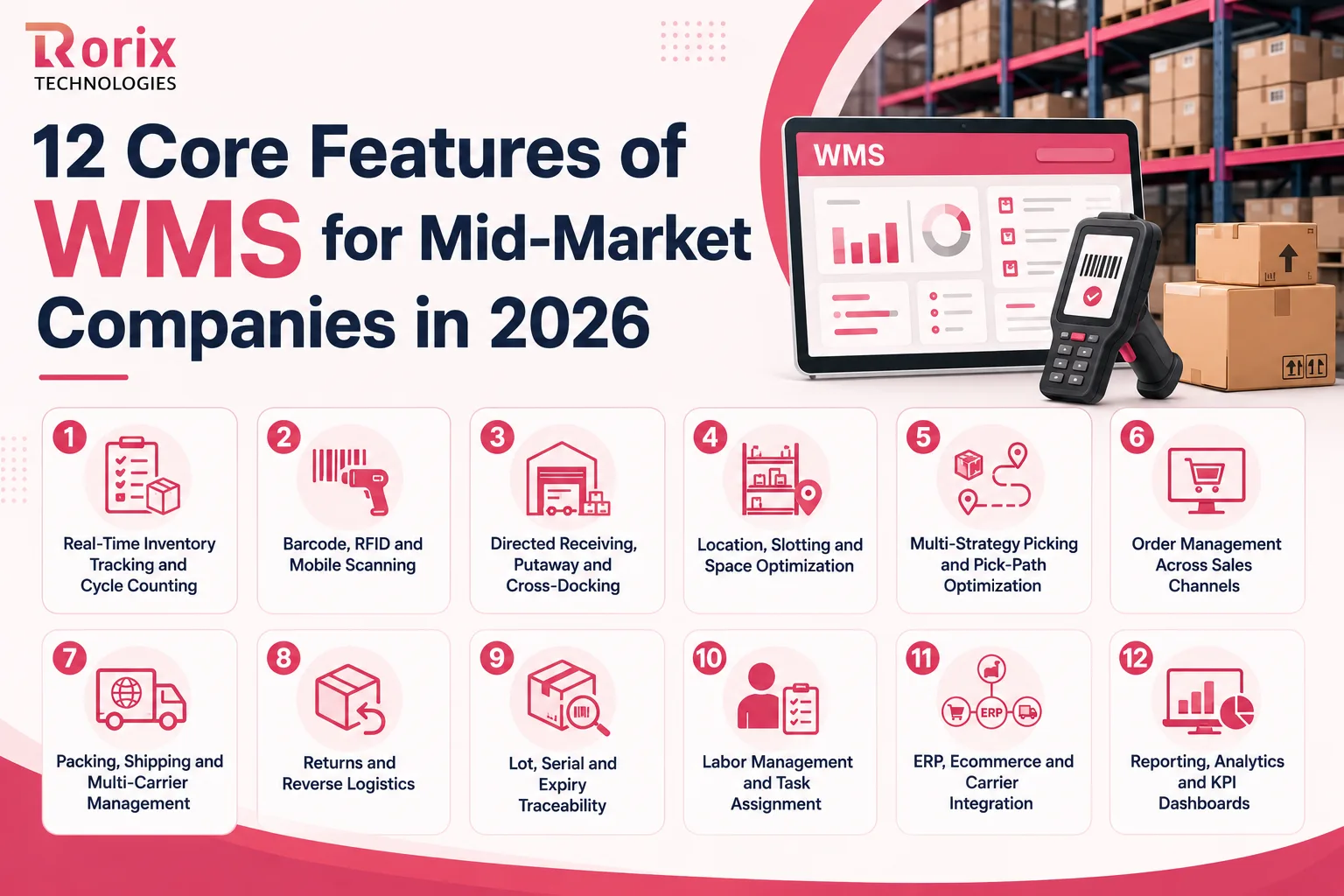
12 Core Features of WMS for Mid-Market Companies in 2026
Which WMS features does a mid-market warehouse need first? Compare all 12, see which seven belong on day one, and how to test each one in a demo.
Read article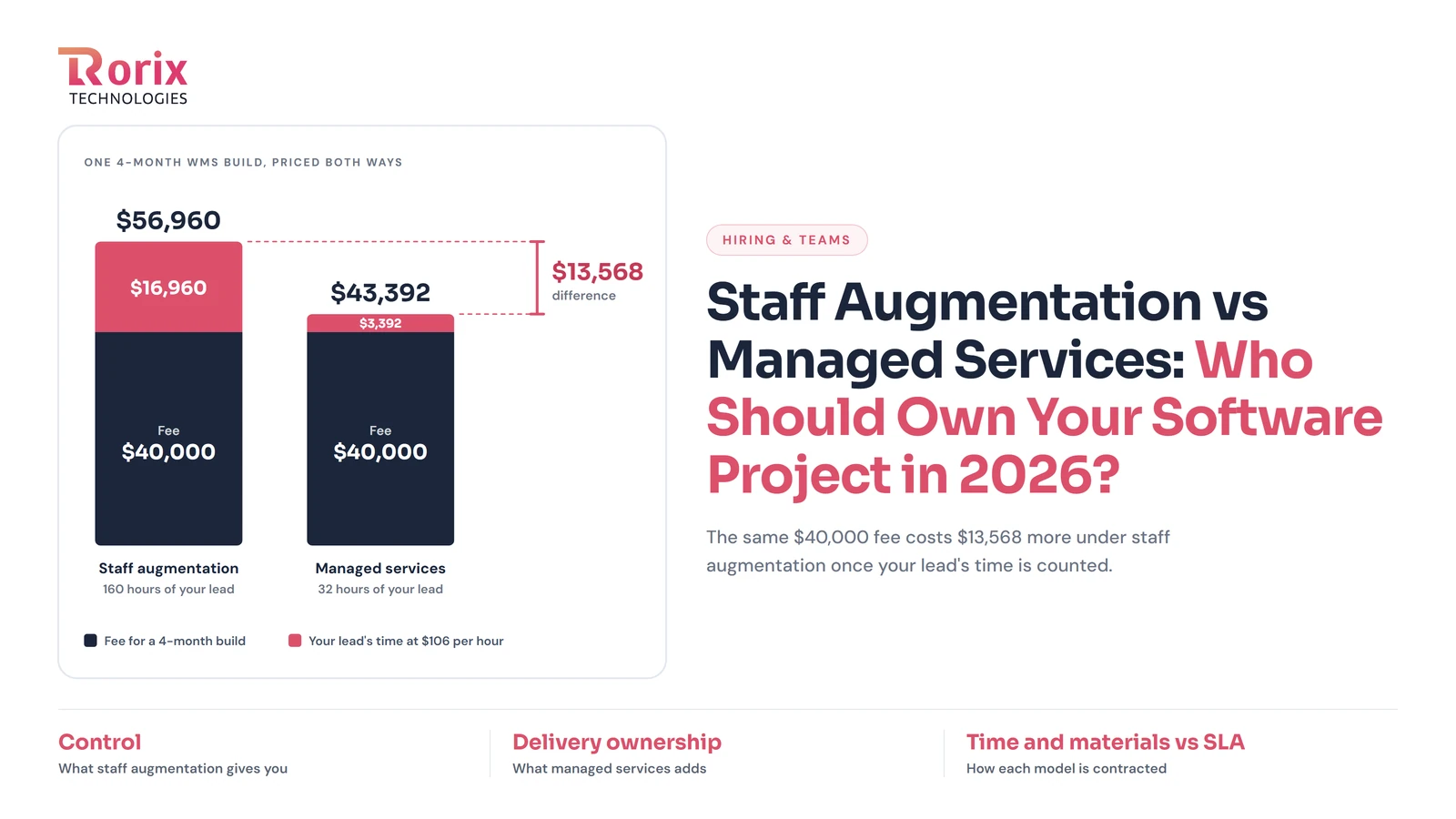
Staff Augmentation vs Managed Services: Who Should Own Your Software Project in 2026?
Compare staff augmentation vs managed services, including costs, key differences, pros and cons, and how to choose the right model for your project.
Read article