
Staff Augmentation vs Managed Services: Who Should Own Your Software Project in 2026?
Compare staff augmentation vs managed services, including costs, key differences, pros and cons, and how to choose the right model for your project.
On this page55 sections
Two senior engineers joined your sprint six weeks ago, but the release date still slipped. Your tech lead is answering questions all day, and nobody knows who owns the delay.
That is where staff augmentation vs managed services becomes an important decision. Staff augmentation adds skilled engineers your team manages, while managed services gives a provider responsibility for defined outcomes.
Key Takeaways: Match the Model to Your Project
- Accountability matters: Staff augmentation gives you control; managed services adds delivery ownership.
- Scope matters: Flexible builds suit augmentation, while defined work suits managed services.
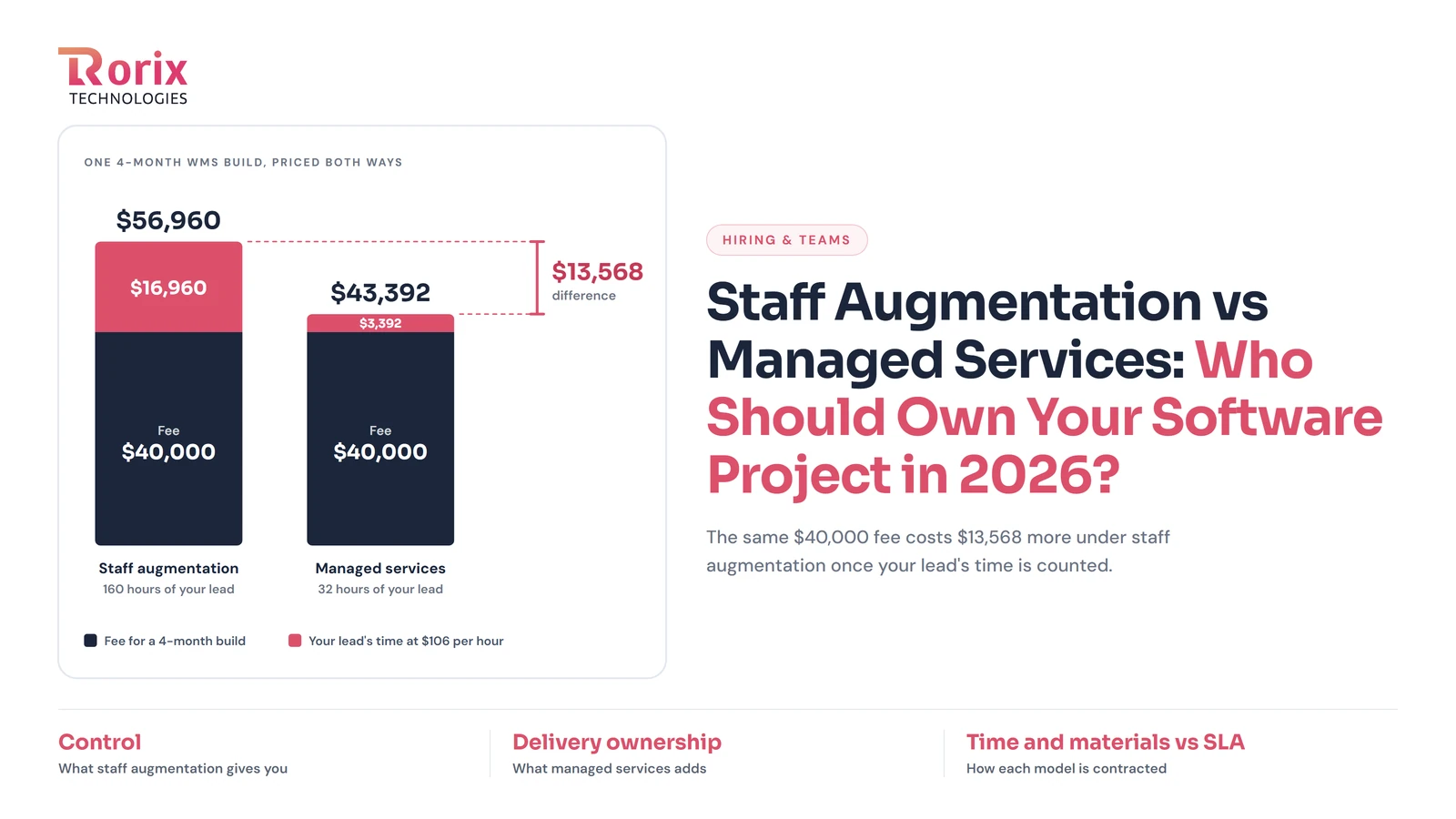
- Compare total costs: In our WMS example, internal management time made augmentation $13,568 more expensive than managed services on the same $40,000 fee.
- Adapt as you grow: Build with augmented or dedicated engineers, then move ongoing support to managed services.
The right choice depends on your project, budget, and internal team's capabilities. This guide covers a 15-point comparison, 8 key differences, WMS project costs, contract terms, and how to choose the right model.
In this guide, you'll learn:
- 8 key differences between both models
- WMS project costs and responsibilities
- Essential SLA and contract terms
- When to choose each model
- How to spot the wrong choice early
By the end of this guide, you'll know which model fits your project and how to protect your business with the right contract.
Quick Answer: Staff Augmentation vs Managed Services at a Glance
With staff augmentation, you add skilled engineers to your team and manage their work. With managed services, you hire a provider to deliver agreed outcomes and manage execution. The right choice depends on who can lead delivery and take responsibility for results.
| Question | Staff Augmentation | Managed Services |
|---|---|---|
| What you get | Engineers your team directs | Defined outcomes managed by a provider |
| Who owns delivery | Your internal team | The service provider |
| How you pay | Hourly or monthly rates | Fixed fees, milestones, or SLA-based pricing |
| Best for | Teams with strong technical leadership | Teams needing delivery ownership or ongoing support |
| Main risk | Lack of internal oversight | Unclear scope or changing requirements |
What Is Staff Augmentation?
Staff augmentation is a model where a partner supplies vetted engineers who join your existing team. They work on your tools, attend your standups, and take tickets from your backlog.
In any staff augmentation vs managed services comparison, this is the side where you stay in charge. You keep control of priorities, architecture, and release dates. The partner handles sourcing, payroll, and replacement, and bills you per engineer by the hour or month.
That makes IT staff augmentation a capacity purchase. It adds skills, but the partner doesn't own the final result. You do. Our guide on how IT staff augmentation works covers setup and trade-offs in full.
What Are Managed Services in Software Development?
Managed services means hiring a provider to own a defined function, workstream, or outcome. The provider manages its team and delivery process against agreed targets in a service level agreement (SLA).
You define the expected results, while the provider decides how to deliver them. Pricing usually follows a monthly fee, milestones, or agreed service levels.
Managed IT Services vs. Managed Software Delivery
Managed IT services cover helpdesk support, networks, cloud infrastructure, and security monitoring. Managed software delivery focuses on building features, integrating systems, or supporting live applications. When comparing vendors, check which service they actually offer.
What a Managed Services Engagement Includes
- Defined scope: Clear responsibility for a module, integration, or application support.
- Provider-managed team: Engineers, QA specialists, and a delivery lead managed by the provider.
- Service levels: Measurable targets for response times, resolution times, and availability.
- Commercial model: Monthly fees, milestone payments, or SLA-based pricing.
- Governance: Regular reviews to track results, approve changes, and adjust priorities.
Where a Dedicated Development Team Fits Between the Two
A dedicated development team offers a middle ground between staff augmentation and managed services. The partner manages delivery through its technical lead, while you set sprint priorities and product direction. For a deeper comparison, see staff augmentation vs dedicated team.
Also Read: What Is a Dedicated Development Team, and When Should You Hire One?
Staff Augmentation vs Managed Services: 15-Point Comparison Table
Both models provide software development support, but they differ in control, cost, and delivery responsibility. Use this table to compare the key differences and identify the right fit for your project.
| Point | Staff Augmentation | Managed Services |
|---|---|---|
| What you buy | Skilled engineers you direct | A defined outcome or service |
| Daily management | Your tech lead or project manager | Provider's delivery lead |
| Outcome ownership | Your team | Provider, against agreed targets |
| Pricing | Hourly or monthly per engineer | Fixed fee, milestones, or SLA tier |
| Budget predictability | Depends on hours and duration | Higher within the agreed scope |
| Contract | Time-and-materials agreement | Statement of work and SLA |
| Scope definition | Flexible, evolving backlog | Defined deliverables and targets |
| Time to start | Usually faster | Requires scoping and transition |
| Flexibility | Easier to change priorities | Changes may require approval or extra fees |
| Performance measurement | Sprint output and team reviews | KPIs and SLA targets |
| Delivery risk | Primarily yours | Shared, with defined provider responsibilities |
| Management effort | Higher internal involvement | Lower day-to-day involvement |
| Knowledge retention | Your team retains knowledge | May require a formal handover |
| Scaling | Add or release engineers | Adjust scope or service tier |
| Best fit | Evolving work with strong internal leadership | Defined outcomes or ongoing services needing external ownership |
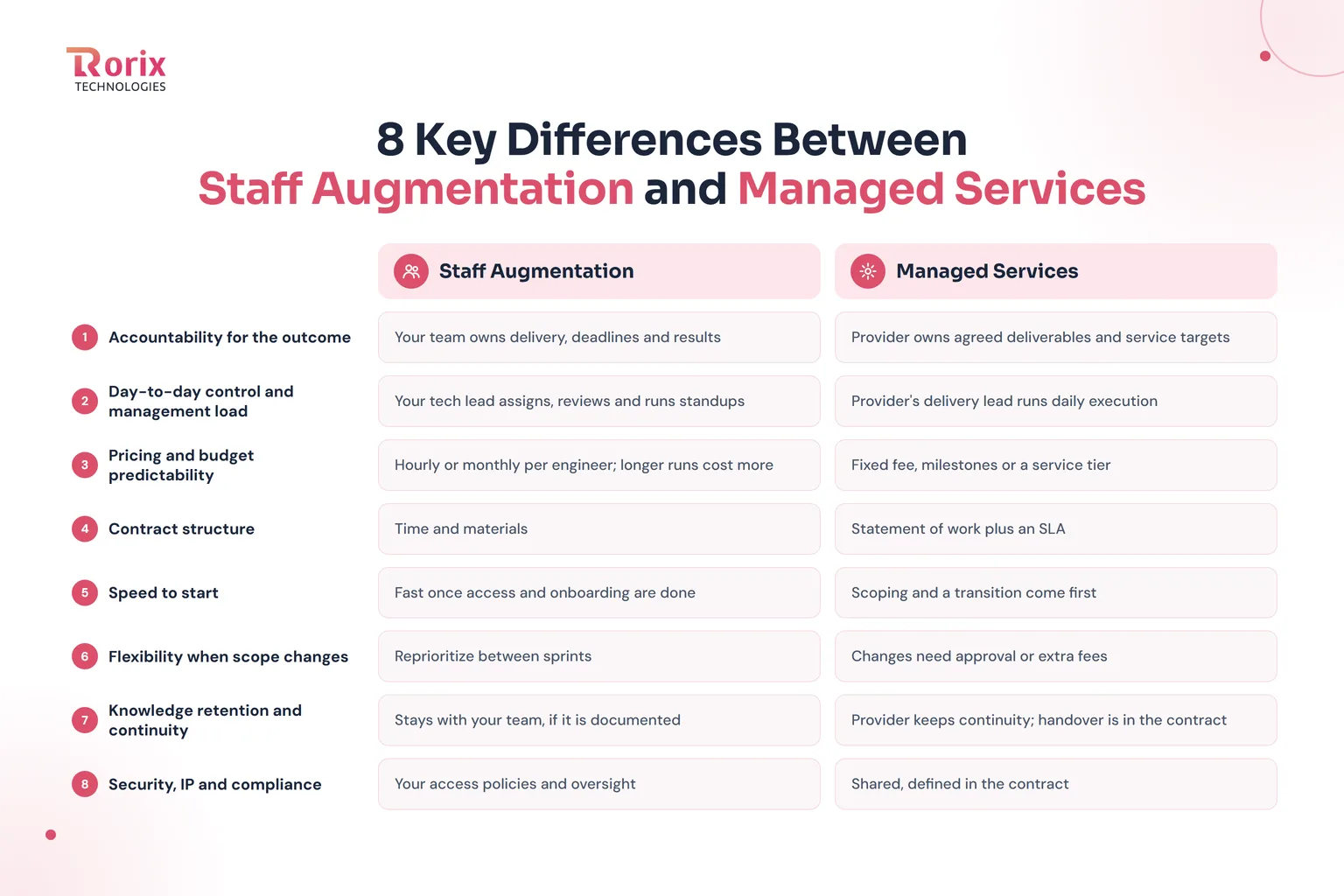
8 Key Differences Between Staff Augmentation and Managed Services
The main differences come down to ownership, control, cost, and flexibility. Here's how each model works once your software project begins.
1. Accountability for the Outcome
With staff augmentation, your team owns delivery, deadlines, and results. If a release slips, you must identify the problem and get the work back on track.
With managed services, the provider owns agreed deliverables and service targets. Your contract can include remedies or service credits if those targets are missed.
2. Day-to-Day Control and Management Load
With staff augmentation, your tech lead assigns tasks, runs standups, and reviews code. You retain control, but managing engineers takes time from your existing team.
With managed services, the provider's delivery lead manages daily execution. Your team focuses on priorities, progress reviews, and accepting results.
3. Pricing and Budget Predictability
Staff augmentation usually charges hourly or monthly per engineer, so costs rise when the engagement runs longer. If a three-month project takes five months, you pay for the extra two months.
Managed services usually charge fixed fees, milestones, or service-tier rates. Costs stay more predictable within the agreed scope, while additional requirements may incur extra fees.
4. Contract Structure: Time and Materials vs. SLA
Staff augmentation contracts cover engineer rates, working arrangements, notice periods, and code ownership. Most use time-and-materials terms, meaning you pay for the resources and time used.
Managed services contracts define deliverables in a statement of work and targets in a service level agreement (SLA). These terms can specify reporting requirements and remedies for missed commitments.
5. Speed to Start
Staff augmentation can start quickly when your team has a clear backlog and development process. Once access and onboarding are complete, engineers can begin assigned tasks.
Managed services need time to define scope, agree on service levels, and plan the transition. This takes longer initially but establishes clearer delivery responsibilities.
6. Flexibility When Scope Changes
Staff augmentation makes it easier to change priorities between sprints because your team directs the engineers. This suits evolving products where requirements change frequently.
Managed services follow an agreed scope, so major changes may require approval, revised timelines, or extra fees. This offers better control over defined work but can slow changing projects.
7. Knowledge Retention and Continuity
With staff augmentation, your team retains knowledge through documentation, code reviews, and shared repositories. Undocumented decisions and technical context may leave when an engineer rolls off.
Managed services providers must maintain continuity as their teams change. Your contract should require a handover of documentation, credentials, code, and technical knowledge when the engagement ends.
8. Security, IP, and Compliance Responsibility
With staff augmentation, engineers follow your access policies, while your organization oversees permissions and internal security controls. Contracts should define confidentiality, data handling, and intellectual property (IP) ownership.
Managed services providers may need broader access and own specific agreed security responsibilities. Define access limits, compliance obligations, incident reporting, and IP transfer terms before work begins.
Responsibility Matrix: Who Does What in Each Model
A staff augmentation vs managed services table describes the models. This matrix shows who does the actual work, task by task, so you can see what lands on your team.
| Responsibility | Staff augmentation | Managed services |
|---|---|---|
| Product roadmap and priorities | You | You |
| Sprint planning and task assignment | You | Provider |
| Architecture and technical direction | You | Provider proposes, you approve |
| Code review and quality gates | Your lead | Provider |
| QA and definition of done | You | Provider, against your acceptance criteria |
| Hiring, payroll, and HR | Partner | Provider |
| Replacing an engineer who leaves | Partner supplies, you onboard again | Provider, within agreed service levels |
| Delivery dates and overruns | You | Provider |
| Reporting and demos | Your process | Provider, on an agreed cadence |
| Production incidents after go-live | You | Provider, within SLA response times |
| Security patches and upgrades | You | Provider, when in scope |
| Documentation and handover | You | Provider, under the exit terms |
The first row never changes. No model takes product priorities off your plate, so plan to own them in both.
Also Read: How to Manage an Extended Development Team
Pros and Cons of Staff Augmentation and Managed Services
Both models work well in the right setting. The best choice depends on how much control, management time, and delivery responsibility your team can handle.
Staff Augmentation
Pros
- Direct control: You set priorities, assign tasks, and review quality.
- Fast onboarding: Engineers join your existing workflow and start contributing.
- Flexible scaling: Add or release engineers as project needs change.
- Specialized skills: Access specific expertise without permanent hiring.
- Knowledge retention: Code and technical decisions stay within your systems and processes.
Cons
- More management: Your team handles task assignments, reviews, and technical guidance.
- Delivery risk: You remain responsible for deadlines, quality, and project outcomes.
- Variable costs: Hourly or monthly fees increase when work takes longer.
- Process dependency: Weak planning and documentation can slow down augmented engineers.
Managed Services
Pros
- Clear accountability: The provider owns agreed deliverables and service levels.
- Predictable costs: Fixed fees for defined work make budgeting easier.
- Less daily management: Your team focuses on priorities and results rather than individual tasks.
- Service continuity: The provider manages staff changes and replacements.
- Measurable performance: SLAs and regular reports track service quality and delivery.
Cons
- Less direct control: The provider manages execution within the agreed scope.
- Extra change costs: New requirements may increase fees or extend timelines.
- Upfront planning: Clear deliverables and acceptance criteria are needed before work begins.
- Provider dependency: Poor documentation or weak handover terms can make switching providers difficult.
Staff Augmentation vs Managed Services Cost: One Software Project Priced Both Ways
Hourly rates don't show the full project cost. Compare the same scope under both models, including your team's management time, overruns, and ongoing support.
1. How Each Model Is Priced
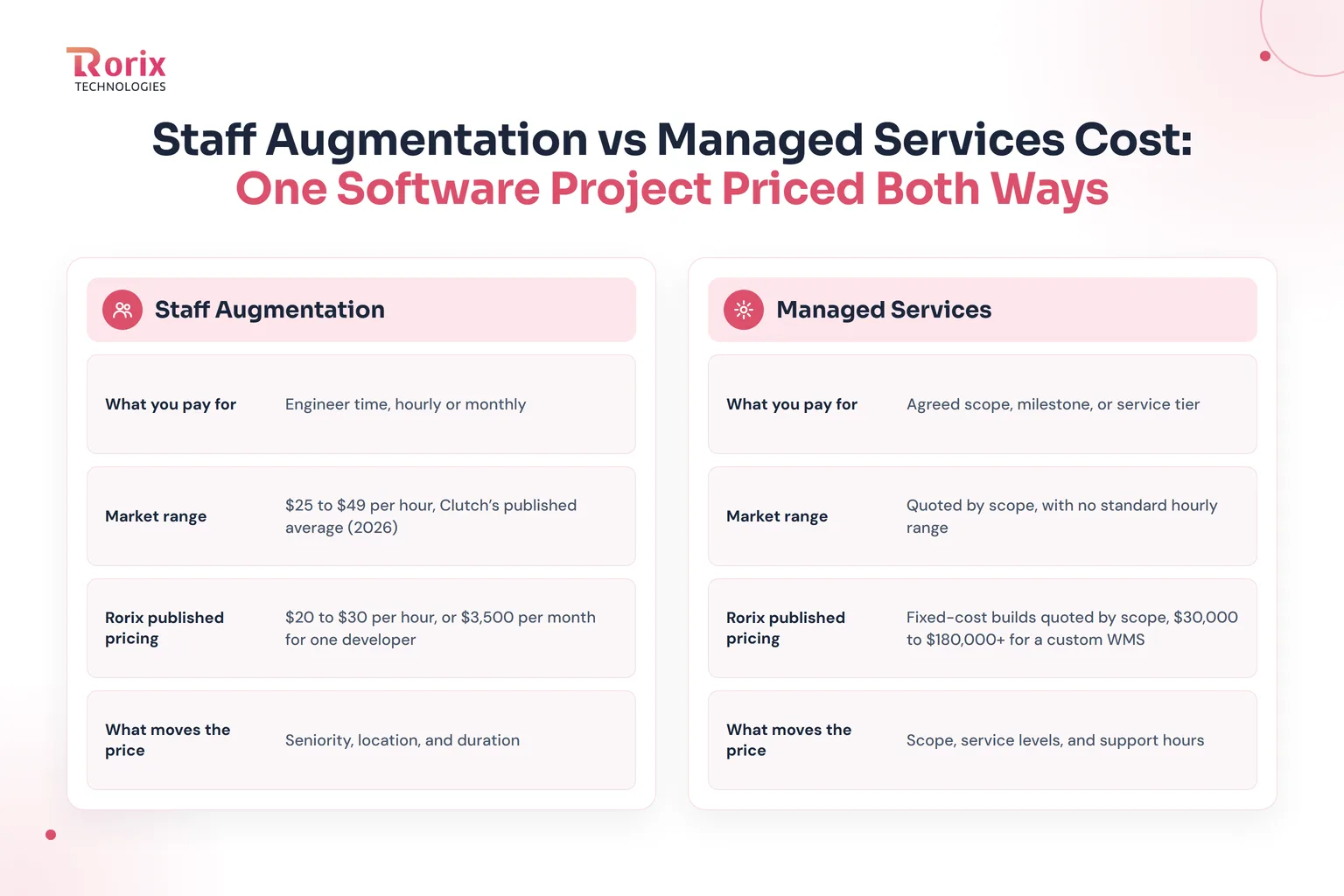
Staff augmentation is charged by the engineer's hourly or monthly rate, so costs depend on team size and project duration. Managed services price an agreed scope, milestone, or service tier, making costs more predictable when requirements stay within the contract.
| Pricing item | Staff augmentation | Managed services |
|---|---|---|
| What you pay for | Engineer time, hourly or monthly | Agreed scope, milestone, or service tier |
| Market range | $25 to $49 per hour, Clutch's published average | Quoted by scope, with no standard hourly range |
| Rorix published pricing | $20 to $30 per hour, or $3,500 per month for one developer | Fixed-cost builds quoted by scope, $30,000 to $180,000+ for a custom WMS |
| What moves the price | Seniority, location, and duration | Scope, service levels, and support hours |
The market figures come from Clutch's staff augmentation pricing guide (2026), not Rorix's rates. Rorix's figures come from our published pricing, with custom WMS pricing based on project scope.
Rorix team retainers cost $10,000 per month for 3 developers and a project manager, $16,000 for a team of 5, and $30,000 for a team of 10. See our IT staff augmentation cost guide for regional rates and other cost factors.
2. Worked Example: A Custom WMS Build Under Both Models
Consider a 3PL replacing spreadsheets at one warehouse with custom warehouse management software, barcode scanning, and one ERP integration. At Rorix's published rates, a single-site WMS costs $30,000 to $64,000 over 3 to 4 months, with go-live at 8 to 12 weeks.
A four-month build with 3 developers and a project manager costs $40,000 in this example. On the managed side, this is managed delivery of one project, a fixed scope under an SLA, which is distinct from ongoing managed services such as post-launch support, covered in the next section. Here's how the total changes when you include your internal lead's time.
| Cost line | Staff augmentation | Managed services (fixed scope) |
|---|---|---|
| Fee for a 4-month build | $40,000 | $40,000 |
| Your lead's time | 10 hours/week × 16 weeks = 160 hours | 2 hours/week × 16 weeks = 32 hours |
| Cost at $106 per hour | $16,960 | $3,392 |
| Effective project cost | $56,960 | $43,392 |
| If the build runs one month over | $10,000 extra in this example | No extra fee if the contract requires the provider to absorb the overrun |
The difference is $13,568, mainly from internal management time. The $106 hourly figure comes from our IT staff augmentation cost guide and is a US in-house developer's cost per productive hour before overhead; the weekly hours are assumptions you can adjust.
Multi-site WMS builds typically take 5 to 6+ months, with Rorix pricing from $80,000 to $180,000+. Estimate your own requirements with our project cost estimator.
3. The Year After Go-Live: What Each Model Costs to Run
After launch, maintenance becomes an ongoing cost. As a market estimate, software maintenance costs often run 15% to 25% of the build cost annually, or $6,000 to $10,000 for a $40,000 build.
| Run option | What you get | Rorix published price |
|---|---|---|
| Augmented developer | One developer working full-time on your backlog | $3,500/month or $42,000/year |
| Essential Care plan | 10 support hours monthly for fixes, patches, and monitoring | $200/month or $2,400/year |
| Growth Care plan | 20 support hours monthly, plus minor enhancements | $400/month or $4,800/year |
Extra care-plan hours cost $25 per hour, and hosting remains your responsibility. These plans cover defined support hours, so they are not a replacement for a full-time developer when your product needs regular feature development.
Choose a care plan for a stable application that needs routine upkeep. If your team ships features every sprint, retained development capacity may be the better fit.
4. Hidden Costs in Each Model
The quoted fee is only part of the budget. Management, onboarding, scope changes, tools, and exit requirements can change the real cost of either model.
| Hidden cost | Staff augmentation | Managed services |
|---|---|---|
| Management time | Your lead directs and reviews engineers | Governance and acceptance reviews |
| Onboarding | Your team trains each engineer | Provider trains its team |
| Overruns | Extra time increases your bill | Depends on contract scope and overrun terms |
| Change requests | Redirect engineers within available capacity | Scope changes may incur extra fees |
| Tools and licenses | Usually supplied by you | May be included in the fee |
| Exit | Easier when knowledge is documented internally | Handover needs clear contract terms |
Now that you've compared the costs, the next step is to check the contract terms that determine who is responsible when plans change or delivery falls behind.
SLA and Contract Terms to Get in Writing
A model is only as safe as the contract behind it. In staff augmentation vs managed services, the paperwork differs more than most buyers expect. Check these terms before you sign.
What a Software SLA Can and Cannot Guarantee
An SLA can commit to things a provider controls. Those include availability, response time by severity, time to a fix or workaround, support hours, and reporting.
It cannot fairly promise feature speed on a backlog that keeps changing. It also cannot promise uptime when hosting sits outside the provider's control. Read the availability figure with care, because 99.9% still allows about 8.8 hours of downtime a year.
| Severity | Example on a warehouse floor | What the SLA should state |
|---|---|---|
| Critical | Picking or shipping has stopped | Response time, workaround time, and update frequency |
| High | One workflow fails, with a manual workaround | Response time and target fix time |
| Medium | A report shows wrong totals | A fix within an agreed release |
| Low | A label or screen needs a cosmetic change | Handled in the normal backlog |
Ask for service credits when the provider misses a target. Then ask how the provider measures each number, because an unmeasured target protects nobody.
10 Contract Clauses to Check Before You Sign
| Clause | What to get in writing | Matters most in |
|---|---|---|
| 1. IP and code ownership | Full transfer to you, with code in your own repository | Both models |
| 2. Scope and acceptance | Deliverables, and the test that proves each one is done | Managed services |
| 3. Service levels | Targets by severity, the measurement method, and service credits | Managed services |
| 4. Change requests | How the provider prices, approves, and schedules changes | Managed services |
| 5. Named people | Who works on your account and how replacements happen | Staff augmentation |
| 6. Access and security | Least-privilege access, multi-factor login, and prompt offboarding | Both models |
| 7. Data and confidentiality | An NDA, data handling rules, and where data may live | Both models |
| 8. Notice and scale-down | The notice period to reduce or end the engagement | Staff augmentation |
| 9. Exit and handover | Documents, credentials, and transition support at the end | Managed services |
| 10. Reporting cadence | Weekly or monthly reports, and who attends each review | Both models |
Treat this list as a practical checklist and not as legal advice. Your own counsel should review the final contract before you sign it.
Which Model Fits Each Stage of Your Software Project?
The right delivery model can change as your project moves from development to ongoing support.
1. Discovery and MVP Build
Requirements change quickly during discovery and MVP development, so flexibility matters. If you have a technical lead, staff augmentation gives you control over daily work. Without one, a managed team can handle delivery while you set product priorities.
2. Scaling a Live Product
As your roadmap becomes clearer, you may need more development capacity. Add augmented engineers to strengthen the areas your team already manages well. For separate workstreams, such as a mobile app or integration layer, use a managed team to own delivery.
3. Go-Live on an Operations-Critical System
During go-live, delays can disrupt warehouse operations, including scanning and shipping. With staff augmentation, your team handles urgent incidents, while a managed provider responds within agreed service levels. Use our WMS Implementation Checklist: 50 Steps Plus a Plan Template to plan the cutover.
4. Steady-State Maintenance and Support
Stable systems need regular patches, bug fixes, security updates, and performance checks. Managed services suit this stage because support tasks and response times can be defined in advance. Keep augmented engineers when ongoing feature development still requires direct control.
Also Read: The Custom Software Development Process, Step by Step
When to Choose Each Model
Choose based on your team's capacity, project scope, and delivery responsibilities.
Choose Staff Augmentation When
- You have a technical lead: Your team can assign tasks, review code, and guide engineers.
- Your backlog is clear: Work is ready for the next few sprints.
- You need specific skills: A gap in React Native, DevOps, or another area is slowing progress.
- Priorities change often: You need to redirect work without renegotiating the contract.
- The product is core to your business: You want to retain technical knowledge and control.
Choose Managed Services When
- You lack delivery capacity: Your team cannot manage additional engineers.
- You can define outcomes: Deliverables and acceptance criteria are clear.
- Support is ongoing: Monitoring, maintenance, and updates have no fixed end date.
- Downtime is costly: You need agreed response times and service levels.
- You need predictable costs: Finance prefers an agreed fee over tracking engineer hours.
Choose a Dedicated Team When Neither Fits
- Requirements keep changing: You need delivery support without locking down every detail.
- You want shared control: A partner's technical lead manages execution while you set priorities.
- The product needs continuity: A consistent team can build long-term product knowledge.
Run Both Models Together When
- Build and support differ: Use augmented engineers for development and managed services for ongoing support.
- Workstreams are separate: Keep your core product in-house while a provider manages a separate module.
- Demand fluctuates: Maintain operations through managed services and add engineers for major releases.
A mixed setup works best when every task has one clear owner. Our guide to in-house vs outsourcing software development explains how to divide responsibilities between your team and a partner.
Use these criteria to narrow your options before making the final decision.
How to Choose: A 10-Question Decision Checklist
Answer each question with a yes or a no. Every yes points to one model, and the pattern settles the staff augmentation vs managed services question for your project.
| Question | If yes, lean toward |
|---|---|
| 1. Does a technical lead have about 10 free hours a week? | Staff augmentation |
| 2. Can you write clear tickets for the next six weeks? | Staff augmentation |
| 3. Will priorities change from sprint to sprint? | Staff augmentation |
| 4. Is this work central to how your product competes? | Staff augmentation |
| 5. Do you need one specific skill for a fixed period? | Staff augmentation |
| 6. Can you write acceptance criteria for the outcome today? | Managed services |
| 7. Is the work ongoing, with no natural end date? | Managed services |
| 8. Does downtime stop your operations? | Managed services |
| 9. Does finance need a fixed monthly cost? | Managed services |
| 10. Would you rather review results than direct people? | Managed services |
If one model collects most of your yes answers, start there. If the answers split evenly, look at a dedicated team or divide the work by workstream.
Signs You Picked the Wrong Model and How to Switch
A poor delivery model can waste budget, slow releases, and blur accountability. Deloitte's 2024 Global Outsourcing Survey found that 80% of executives planned to maintain or increase outsourcing investment, while 70% had selectively brought some outsourced work back in-house within five years.
Watch for these warning signs early, before missed deadlines and rising costs become harder to fix.
Warning Signs Under Staff Augmentation
- Engineers wait for work: Delayed tickets and decisions waste paid hours.
- Your lead stops shipping: Managing and reviewing engineers leaves little time for their own work.
- Accountability is unclear: Your team and the provider blame each other when deadlines slip.
- Code quality drops: Rushed reviews lead to more defects in later sprints.
Warning Signs Under Managed Services
- Change requests keep growing: Frequent scope changes increase costs and delay delivery.
- You manage every decision: You keep overriding decisions the provider should own.
- Reports don't match reality: SLA targets look healthy, but users still face problems.
- The setup feels oversized: You're paying for managed delivery when you only need a few specialized engineers.
How to Switch Models Mid-Project
Switching models works best when you treat the transition as a project of its own. Identify the gap first, then transfer responsibilities and update the contract.
- Identify the problem: Decide whether you lack engineering capacity, delivery ownership, or both.
- Document the current state: Gather code, environments, backlog items, and key technical decisions.
- Redefine responsibilities: Clarify who plans work, reviews code, manages incidents, and owns deadlines.
- Test the new setup: Run one sprint and track whether decisions and delivery responsibilities are clear.
- Update the contract: Align pricing, notice periods, service levels, and exit terms with the new model.
Why Rorix Technologies Offers Both Flexibility and Accountability
Choosing a software development partner is easier when its capabilities match your project needs, from adding engineering capacity to managing delivery.
Rorix Technologies builds custom software for operations-heavy businesses, combining senior engineering, clear delivery ownership, and support beyond launch.
- 27 projects: Delivered across custom software and operations-focused products.
- 5.0 Clutch rating: Based on 4 verified reviews.
- Flexible delivery models: Add senior engineers when your team leads, or work with a dedicated team of senior engineers and a named technical lead when you need delivery support.
- 80% fewer manual errors: WorkCenter Central, the platform we built for distributor Lorecs, cut manual errors by 80% and sped up order processing by 50%.
- 40+ integrations: Connected for Driven, a US performance platform for pest control and field service teams, including HubSpot, Twilio, RingCentral, and Google APIs.
- Ongoing support: Two-week development sprints and post-launch support for fixed-cost builds.
- Global delivery: Experience working with clients across the US, UK, Canada, Australia, and New Zealand.
- Clear ownership: You retain ownership of the code and intellectual property, supported by an NDA for every engagement.
Need help deciding which delivery model fits your project? Get a free consultation and project estimate, and discuss your requirements with the Rorix team.
Conclusion: Make the Right Call for Your Software Project
Choosing staff augmentation vs managed services comes down to who will manage the work and take responsibility for delivery. Staff augmentation adds capacity, managed services adds delivery accountability, and a dedicated team offers a middle ground.
We hope this guide helps you compare the costs, responsibilities, and contract terms to choose the right model for your project.
Now, use the checklist in this guide to assess your team's capacity, project scope, and delivery needs before making a decision.
If you're still unsure, connect with our experts to discuss your requirements, get a written estimate, and identify the right delivery model.
Frequently Asked Questions
What is the main difference between staff augmentation and managed services?
Staff augmentation adds engineers your team manages. Managed services puts a provider in charge of delivery and agreed service levels.
Does staff augmentation cost less than managed services?
Not always. In our WMS example, both models cost $40,000 in fees, but staff augmentation needed $16,960 of internal management time against $3,392 for managed services, a $13,568 difference.
Is staff augmentation the same as outsourcing?
Staff augmentation is a type of outsourcing where you manage the engineers. With managed services, the provider manages delivery and owns agreed outcomes.
What is the difference between managed services and a dedicated development team?
A dedicated team manages daily execution while you set priorities. Managed services add defined deliverables and service-level targets.
Can you use both models at the same time?
Yes. Use augmented engineers for product development and managed services for ongoing support, with clear ownership for every task.
Can you switch models mid-project?
Yes. Document the current work, clarify responsibilities, test the new setup, and update the contract terms.
Which model is better for a startup without a technical lead?
Managed services or a dedicated team with a named technical lead can be a better fit because your startup may lack the capacity to manage engineers directly.
Who owns the code and intellectual property in each model?
Your contract should confirm that you own the code and intellectual property. Rorix transfers 100% of the IP to the client on every engagement.
Need engineers who stay?
Dedicated developers at $3,500 per developer per month, working your backlog on 2-week sprints with a named technical lead.
Continue learning
Written by
Renish DadhaniyaFounder & Director, Rorix Technologies
Renish co-founded Rorix Technologies and drives the engineering and delivery culture across the organization. Beyond engineering, he leads the company's sales, finance, and HR operations, building the infrastructure that lets the team focus on shipping quality software. With deep hands-on expertise in architecture and team building, he ensures every project lands on time to the quality standards clients demand.
View full profileRelated articles

Why Do Companies Outsource Software Development? 10 Reasons That Actually Drive ROI
Why do companies outsource software development? 10 ROI-driven reasons, the real costs and engagement models, and how to pick the right partner.
Read article
Staff Augmentation vs Dedicated Team: Which Model Fits Your Roadmap?
You added the engineers and delivery still slipped. Compare staff augmentation vs dedicated team on delivery ownership, management load and continuity.
Read article
NestJS vs Express: Which Node.js Framework Fits Your Backend?
NestJS runs on Express by default, so this is not a performance contest. It is a decision about where your backend structure comes from, and who maintains it.
Read article