
Software Maintenance Cost: What the 15% to 25% Rule Actually Buys
Software maintenance cost explained: where the 15% to 25% rule comes from, the four budgets hiding inside it, and why only one of the four is optional.
On this page28 sections
Maintenance is the largest line in a system's lifetime cost and the one most often treated as a footnote in the proposal.
The scale of that is easiest to see at the extreme. The US Government Accountability Office's 2025 review of federal legacy systems found that about 80% of the federal government's annual IT spending, over $100 billion, goes to operating and maintaining systems that already exist. Only the remaining fifth goes to building anything new. Your ratio will be gentler, but the direction is the same, and it points at a budget line most first quotes leave out entirely.
The standard answer is that software maintenance cost runs 15% to 25% of the original build cost per year. That number is genuinely useful, and it is the one we use across this site. It is also, on its own, useless for managing anything, because it is four different budgets added together and only one of the four is optional.
This guide takes the percentage apart. What is inside it, which parts accrue whether you fund them or not, what pushes your number toward 25% rather than 15%, and where a support plan stops being the right instrument.
In this guide, you'll learn:
- Where the 15% to 25% rule comes from and what it is good for
- The 4 budgets hiding inside one percentage
- Why deferring maintenance is accrual rather than saving
- What pushes your number up or down, in factors you control
- A 6-step way to budget it honestly
- Where a maintenance plan ends and dedicated capacity begins
Quick Answer: What Software Maintenance Costs Per Year
| Build cost | Annual maintenance at 15% | At 25% |
|---|---|---|
| $50,000 | $7,500 | $12,500 |
| $100,000 | $15,000 | $25,000 |
| $200,000 | $30,000 | $50,000 |
| $500,000 | $75,000 | $125,000 |
Use the low end only if your stack is current, your integrations are few, and your test coverage is real. Most systems that have been live for more than two years sit closer to the top of the band, for reasons the rest of this guide makes concrete.
Key Takeaways: What the 15% to 25% Rule Contains
- Software maintenance costs 15% to 25% of the original build cost per year, so a $200,000 build carries roughly $30,000 to $50,000 a year that most first quotes leave out.
- That percentage is four budgets added together, keeping the lights on, keeping it safe, keeping it working, and keeping it useful, and only the enhancement budget is optional.
- The US Government Accountability Office's 2025 review found about 80% of federal annual IT spending, over $100 billion, goes to operating and maintaining systems that already exist.
- Black Duck's 2025 Open Source Security and Risk Analysis report, based on 965 commercial codebases, found 86% contained open source vulnerabilities and 90% contained components more than four years out of date.
- Rorix maintenance plans are a block of support hours, Essential Care at $200 per month for 10 hours and Growth Care at $400 per month for 20 hours, not the total cost of ownership the percentage measures.
Where the 15% to 25% Rule Comes From, and What It Is Good For
It is an industry rule of thumb rather than a law, derived from the observed ratio between what teams spend building software and what they spend keeping it running afterward. We publish it consistently across our custom software development cost guide and our outsourcing cost breakdown because it is the best available first approximation.
What it is good for: sizing a budget line before you have any operating history, and sanity-checking a proposal that does not mention maintenance at all. If a vendor quotes a $200,000 build with no ongoing line, you now know roughly $30,000 to $50,000 a year is missing from the conversation.
What it is not good for: managing the spend once the system is live. At that point the percentage tells you nothing about which work is urgent, which is deferrable, and which is accruing while you ignore it. For that you need to see the four budgets it contains.
The 4 Budgets Hiding Inside One Percentage
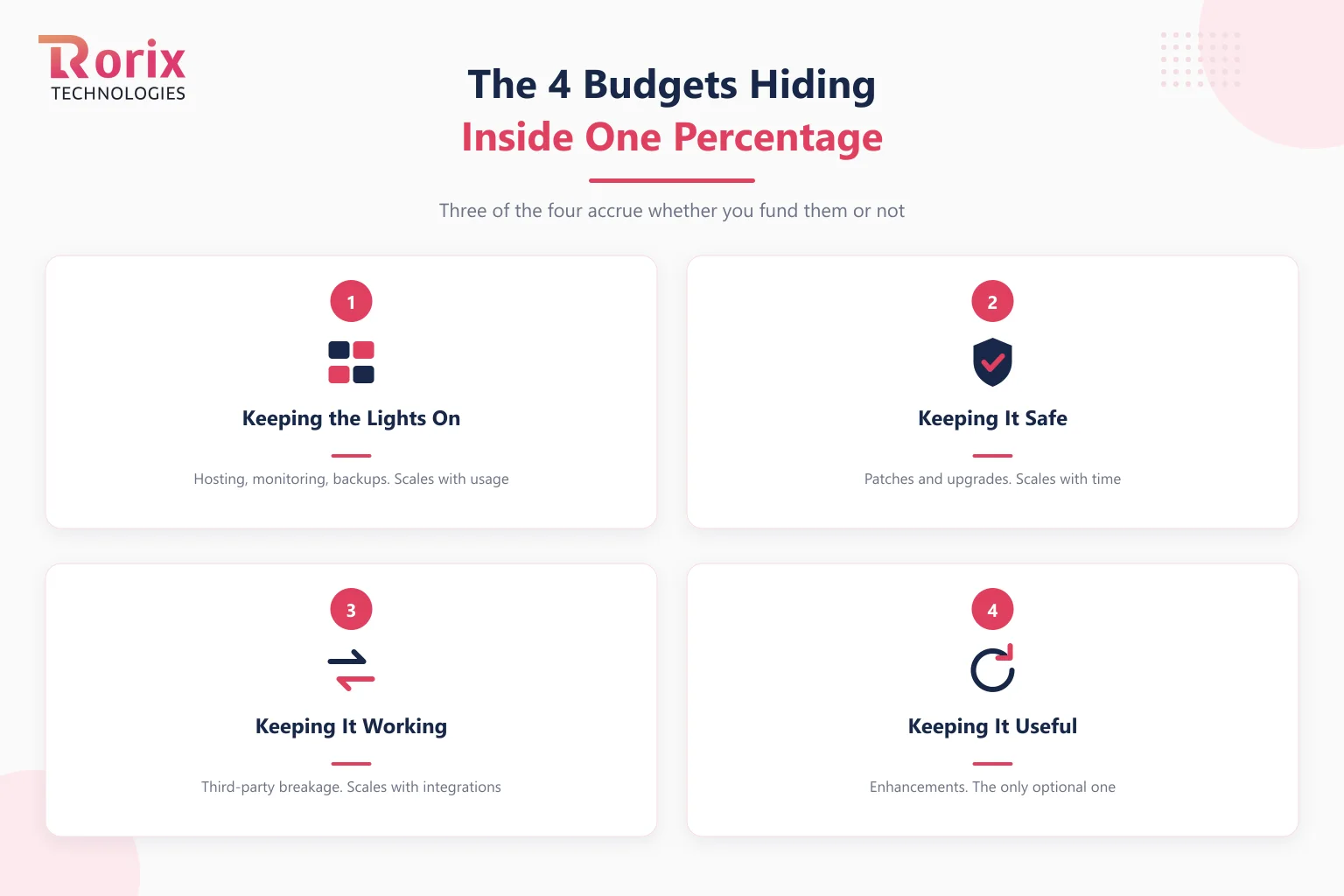
1. Keeping the Lights On
Hosting, storage, monitoring, backups, and whatever it costs to know the system is up. This scales with usage rather than with time, so it grows when you succeed. It is also the most predictable of the four and the easiest to forecast, which is why it is usually the only one people remember.
2. Keeping It Safe
Security patches, dependency updates, and framework or runtime upgrades. This scales with time, not with usage, and it does not stop when you stop developing. A system nobody touches for a year is measurably less safe at the end of that year than at the start, because the world moved and it did not.
3. Keeping It Working
Third-party APIs change, partners deprecate endpoints, browsers update, and certificates expire. This scales with your integration count, which is why an integration-heavy platform sits higher in the band than a self-contained one. Each connection you own is a small standing subscription to someone else's release schedule, and the discipline that limits the damage is the same contract-and-boundary work covered in our API integration strategy guide.
4. Keeping It Useful
Small enhancements, UI adjustments, reports someone needs, and the steady stream of minor changes a living product attracts. This scales with how alive the product is, and it is the only one of the four that is genuinely discretionary.
Only One of the Four Is Optional
This is the part the single percentage hides, and it changes how you should think about deferring.
You can decide not to fund enhancements. Nothing breaks. The product stops improving, which may be exactly the right call for a system in steady state.
You cannot decide not to fund the other three. Hosting bills arrive regardless. Integrations break on someone else's schedule. And security exposure accumulates on a clock you do not control, which the audit data makes uncomfortably clear.
Black Duck's 2025 Open Source Security and Risk Analysis report, based on 1,658 analyses of 965 commercial codebases across 16 industries during 2024, found 86% of commercial codebases contained open source vulnerabilities and 81% contained high- or critical-risk ones. More telling for a maintenance argument: 90% of audited codebases contained open source components more than four years out of date.
Four years out of date is not a decision anybody made. It is what happens when three of the four budgets go unfunded while the fourth gets all the attention. Nobody chose to run vulnerable dependencies; they chose to ship features, repeatedly, and the exposure accrued underneath.
That is the mental model worth taking away: deferring maintenance is not saving money, it is accruing a liability at an interest rate set by your dependencies. The bill arrives as an emergency upgrade, a failed security review, or a modernization project, and it arrives larger than the payments would have been. Framework support windows put a date on it, which is the argument our legacy modernization guide builds on: legacy is a date, not a feeling, and that date is already published.
What Pushes Your Percentage Up or Down
The band is wide because the same build can genuinely cost either end depending on six factors, most of which you influence.
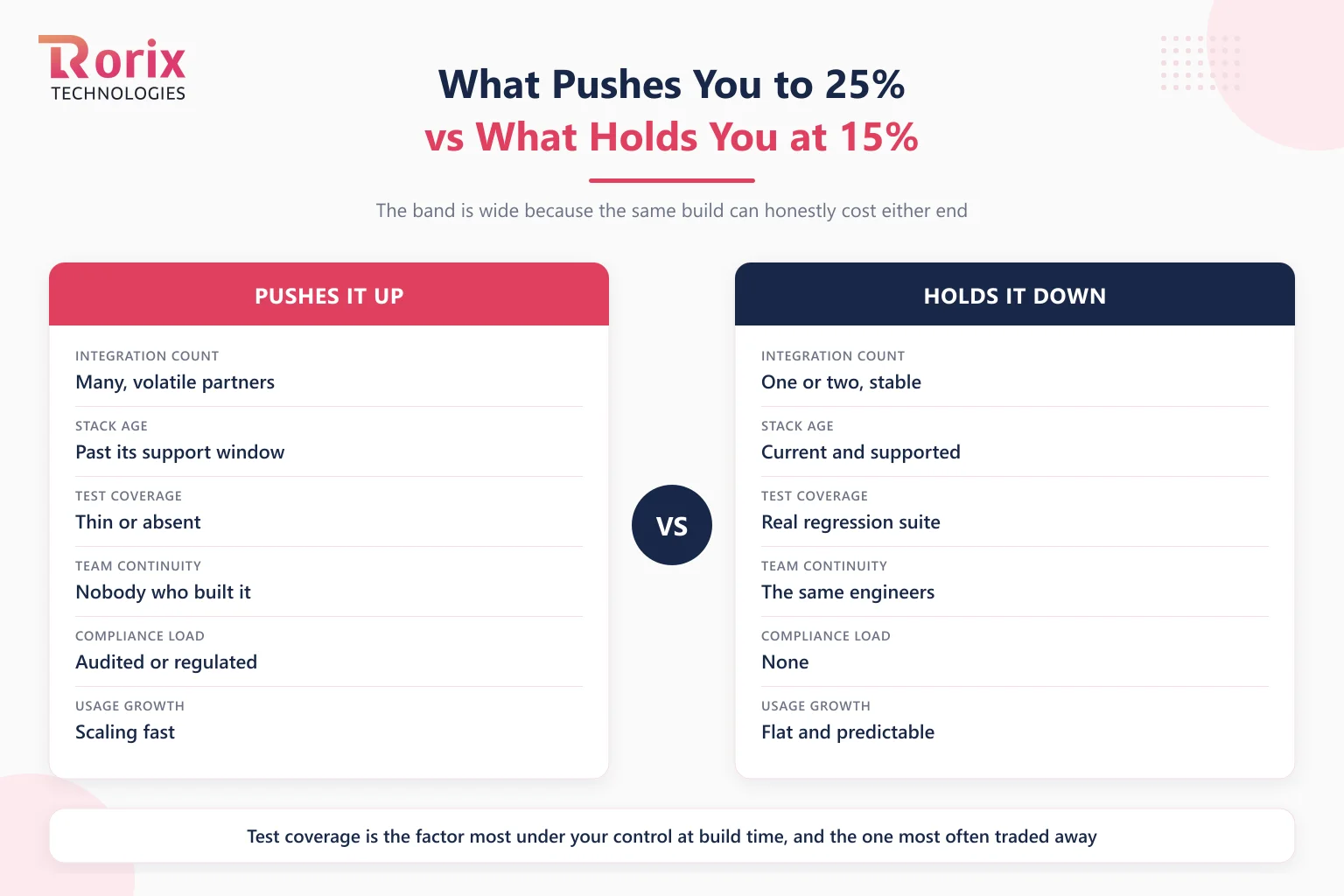
Integration count is the strongest single driver. Every third-party connection is exposure to another company's roadmap.
Stack age compounds quietly. A current, supported framework costs routine upgrade effort. One past its support window costs a project.
Test coverage decides whether a dependency upgrade is an afternoon or a fortnight. This is the factor most under your control at build time and the one most often traded away to hit a launch date.
Team continuity matters more than most budgets admit. The same engineers who built it can patch it quickly; a new team pays a rediscovery cost on every change, which is a real argument for retaining capacity rather than rebuilding it each time.
Compliance load adds audit, evidence, and review cycles to work that would otherwise be routine.
Usage growth raises hosting and surfaces performance work that a smaller load never triggered.
How to Budget Software Maintenance in 6 Steps
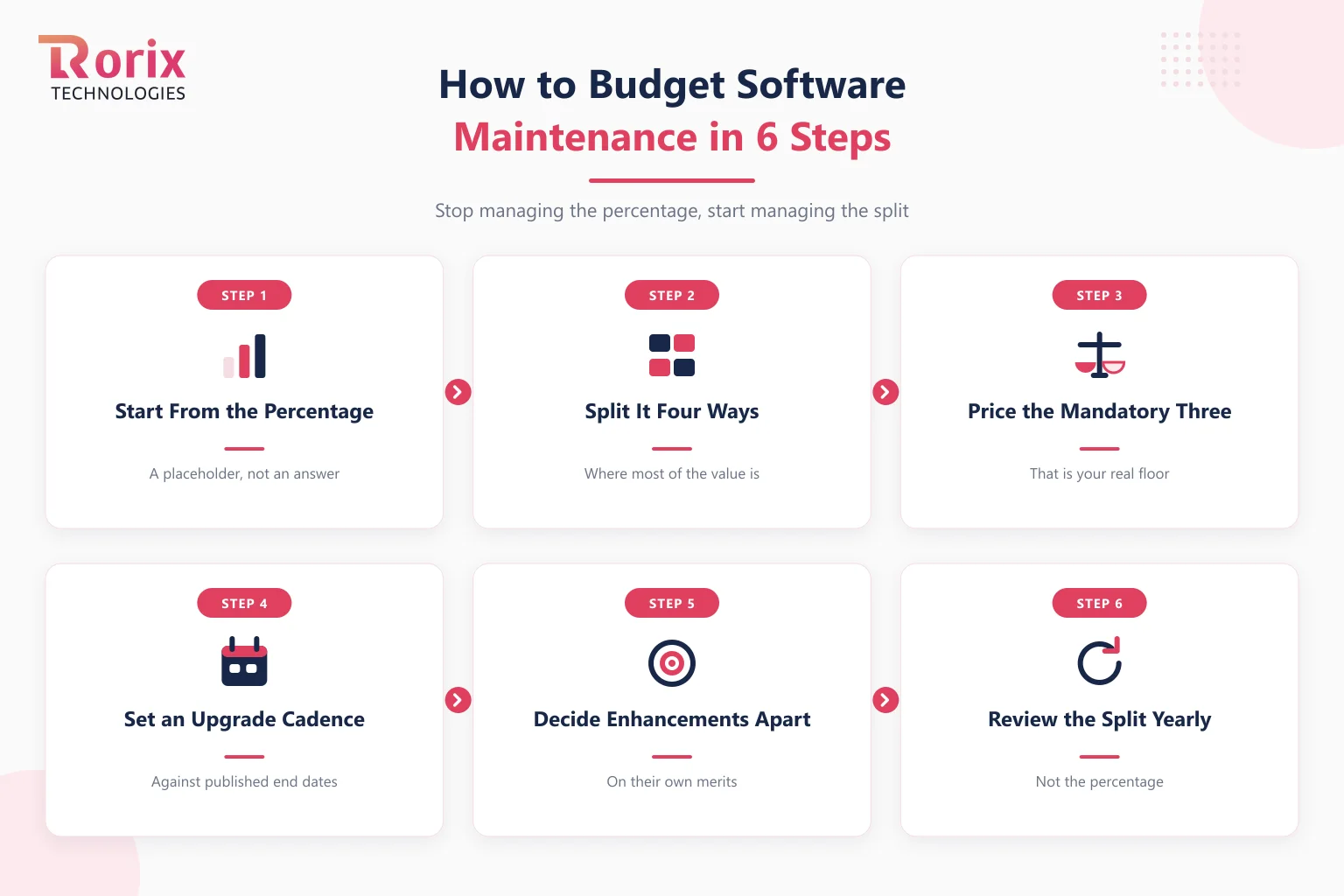
Step 1. Start From the Percentage, but Only as a Placeholder
Take 15% to 25% of build cost as your opening figure. It is the right starting point and the wrong ending point, and treating it as provisional is what makes the next five steps happen.
Step 2. Split It Into the Four Budgets
Assign a number to lights-on, safety, working, and useful. The act of splitting is most of the value, because it usually reveals that the entire figure had been mentally allocated to enhancements.
Step 3. Price the Three That Are Not Optional
Hosting you can quote. Security and dependency work you can estimate from your dependency count and upgrade cadence. Integration repair you can estimate from your integration count and how volatile those partners have been historically. These three are your floor, and the floor exists whether or not it appears in a budget.
Step 4. Set an Upgrade Cadence Against Published Support Dates
Look up the end-of-support dates for your framework, runtime, and database, and schedule upgrade work before them rather than after. This converts an unpredictable emergency into a predictable line item, which is the entire trick.
Step 5. Decide the Enhancement Budget as a Separate Decision
Fund it based on whether the product is still moving, not as a fixed percentage. A system in steady state can legitimately take this to near zero. A product still finding its market should probably not be treating this as maintenance at all, it should be a build budget.
Step 6. Review the Split Annually, Not the Percentage
Your integration count, stack age, and usage all change. Re-running the split once a year catches drift while it is still cheap, and it is a half-day exercise.
What a Maintenance Plan Buys, and What It Does Not
Two kinds of number appear in this guide and they are not measuring the same thing. Saying so plainly matters more than either figure.
The 15% to 25% band is total cost of ownership. It covers hosting, security work, integration repair, enhancements, and the engineering capacity to do all of it. On a $200,000 build that is $30,000 to $50,000 a year.
A maintenance plan is a block of support hours. Ours are Essential Care at $200 per month for 10 hours, covering uptime monitoring, bug fixes, security patches, and third-party API compatibility updates; and Growth Care at $400 per month for 20 hours, adding minor enhancements, UI adjustments, and priority response. Work beyond plan hours bills at $25 per hour, and plans need 15 days notice to start, upgrade, or pause.
Those two figures are an order of magnitude apart because they answer different questions, and the difference is not a discount. Growth Care is $4,800 a year against a $30,000 to $50,000 total cost of ownership. It does not include hosting, which stays with you, and it does not include sustained engineering capacity.
So the honest routing is this. If your system is in steady state and needs a reliable pair of hands for patches, breakage, and small changes, a plan is the right instrument. If your product is still moving and needs continuous capacity, what you actually need is a dedicated developer or team, which starts at $3,500 per month and is a different product. Buying a support plan to cover a roadmap is the most common mismatch we see, and it disappoints everyone.
Every fixed-cost build also includes our Partner Plan at no additional cost: UAT bug fixing, a free support window after launch sized to the project rather than a fixed number of months, and a 5% to 15% discount on major new features scoped during that window based on project size.
Full details are on our pricing page, and the project cost estimator will size the build that the percentage applies to. If you are still weighing whether to own the maintenance at all, our build versus buy framework covers the trade, since a subscription moves this cost onto someone else's balance sheet at the price of control.
Maintenance Is a Payment Schedule, Not a Decision
The 15% to 25% rule is a good first number and a poor second one. Its real value is that it forces the line onto the budget at all, which is where most of the damage is prevented.
Once the system is live, stop managing the percentage and start managing the split. Three of the four budgets inside it accrue whether or not you fund them, so the only genuine choice you have is whether to pay them on a schedule you set or on one your dependencies set for you.
Price the floor, put the upgrade cadence against published support dates, and decide enhancements separately on their own merits. Do that and maintenance stops being the surprise line in year two.
Maintenance is cheapest when the same team that built the system keeps it, which is how full stack development engagements are set up. Want the split run against your system? Talk to our engineers about your stack, your integration count, and your support dates, and we will tell you which end of the band you are honestly at.
Frequently Asked Questions
How much does software maintenance cost per year?
Budget 15% to 25% of the original build cost annually. A $100,000 build carries roughly $15,000 to $25,000 a year, and a $200,000 build roughly $30,000 to $50,000. Systems with many integrations, an aging stack, or thin test coverage sit toward the top of that band.
What does software maintenance actually include?
Four distinct budgets: hosting and monitoring, security patching and dependency upgrades, repairing breakage caused by third-party and platform changes, and small enhancements. The first three are not optional, because hosting bills arrive, integrations break on someone else's schedule, and security exposure accrues on a clock you do not control.
Can we skip maintenance for a year to save money?
You can defer enhancements safely. You cannot defer the other three without accruing a liability. Black Duck's 2025 audit of 965 commercial codebases found 90% contained open source components more than four years out of date and 86% contained known vulnerabilities, which is what deferral looks like in aggregate. The bill returns as an emergency upgrade or a failed security review.
Why is our maintenance cost higher than 15%?
Usually integration count, stack age, or test coverage. Every third-party connection subscribes you to another company's release schedule, a framework past its support window turns routine upgrades into projects, and weak test coverage turns a dependency bump from an afternoon into a fortnight.
What is the difference between a maintenance plan and the 15% to 25% figure?
They measure different things. The percentage is total cost of ownership, including hosting and the engineering capacity to do the work. A maintenance plan is a fixed block of support hours, so Rorix plans at $200 or $400 per month buy 10 or 20 hours and exclude hosting. If you need continuous capacity rather than support hours, a dedicated developer starting at $3,500 per month is the right instrument.
How much does Rorix charge for software maintenance?
Essential Care is $200 per month for 10 hours, covering uptime monitoring, bug fixes, security patches, and third-party API compatibility updates. Growth Care is $400 per month for 20 hours, adding minor enhancements, UI adjustments, and priority response. Work beyond plan hours bills at $25 per hour, and plans need 15 days notice to start, upgrade, or pause.
Is maintenance included after a custom software build?
Every fixed-cost build includes our Partner Plan at no additional cost: UAT bug fixing, a free support window after launch sized to the project, and a 5% to 15% discount on major new features scoped during that window. After that window, clients can continue on an optional monthly maintenance plan.
When does maintenance become a modernization project instead?
When the framework or runtime passes its published end-of-support date, because security patches stop arriving and every new vulnerability becomes permanently unfixed. At that point the work is no longer maintenance at any percentage, and modernization is the honest framing and the honest budget.
Costing a custom build?
A dedicated team of senior engineers with a named technical lead on every engagement. Send us the problem and you get back a scope and a price.
Continue learning
Written by
Renish DadhaniyaFounder & Director, Rorix Technologies
Renish co-founded Rorix Technologies and drives the engineering and delivery culture across the organization. Beyond engineering, he leads the company's sales, finance, and HR operations, building the infrastructure that lets the team focus on shipping quality software. With deep hands-on expertise in architecture and team building, he ensures every project lands on time to the quality standards clients demand.
View full profileRelated articles
Top 16 Enterprise Software Development Companies in 2026
Compare the top 16 enterprise software development companies in 2026. Explore their expertise, timelines, and tips for choosing the right partner.
Read article
Custom CRM Development Cost in 2026: Pricing by Features, Team & Timeline
How much does custom CRM development cost in 2026? See pricing by build tier, features, team size, timeline, data migration, and ongoing maintenance.
Read article
In-House vs Outsourcing Software Development: Cost, Speed, and Control Compared (2026)
Compare in-house vs outsourcing software development on cost, speed, control, risks, and the hybrid model with a practical 2026 decision guide.
Read article