
How to Build a Custom Warehouse Management System: 2026 Guide
Learn how to build a custom warehouse management system: build phases, core modules, tech stack, integrations, indicative cost ranges, and realistic timelines.
On this page42 sections
The decision to build usually arrives the same way. You ran the comparisons, sat through the vendor demos, and concluded that packaged software cannot run your floor without changing how your floor works. If you have not made that call yet, start with our guide to choosing a warehouse management system, because the decision deserves its own process. This guide begins where that one ends.
What comes next is a different kind of problem. Deciding to build is one judgment about your workflows. Building is a sequence of decisions about scope, data, architecture, and order, and the first of those decisions is the one most teams get wrong. This is the work our WMS engineering team does, and the sequence below is drawn from those builds rather than from theory.
They build too much.
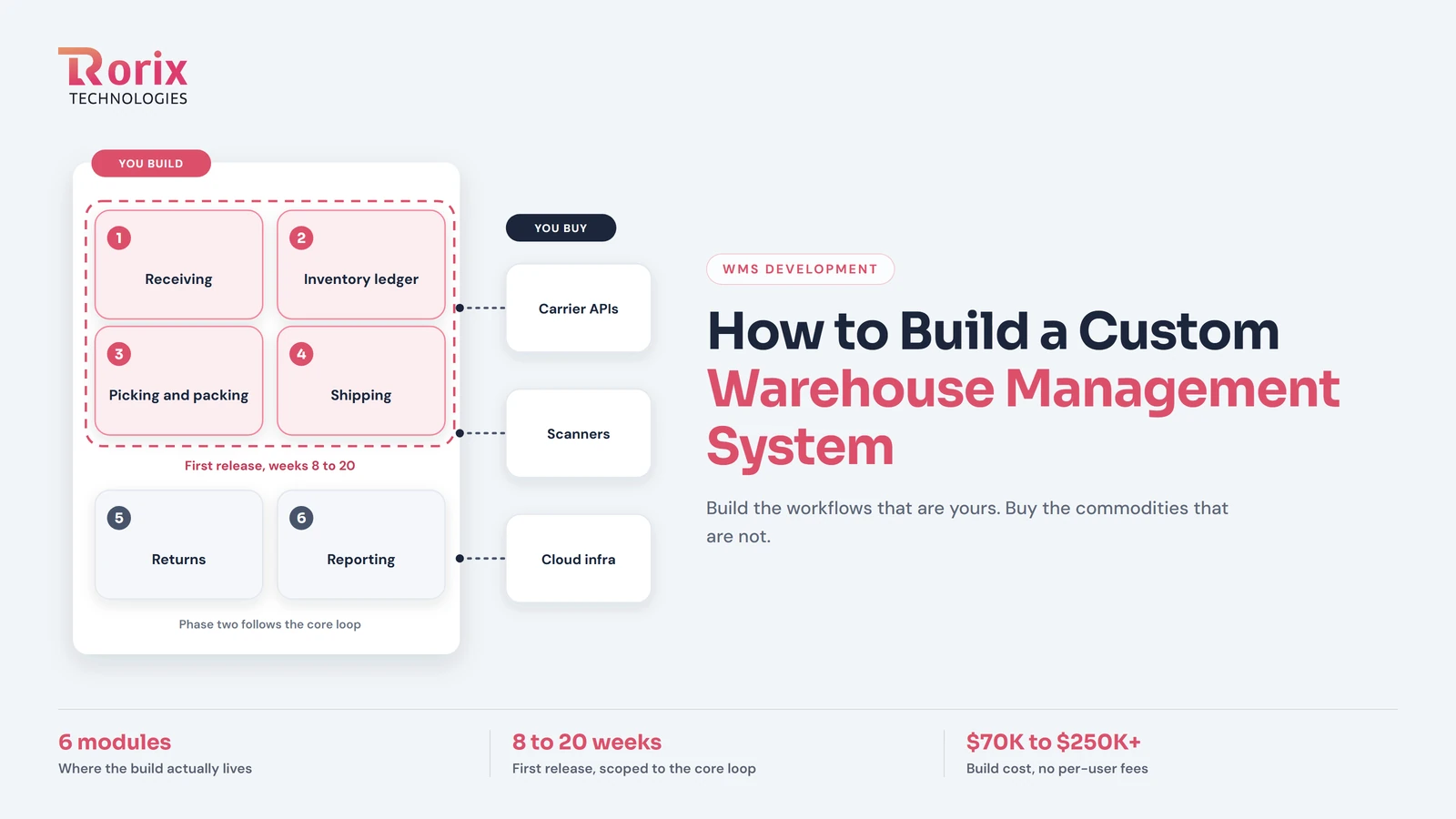
A custom WMS earns its keep in the workflows that make your operation different: how you receive, where stock lives, who picks what and in which order, how a client gets billed. It loses money every time the team rebuilds something the market already sells cheaply, like carrier rate shopping or label printing. The build succeeds or fails on where you draw that boundary, and the pressure to get it right is rising: in Zebra's Warehousing Vision Study, 73% of warehouse decision-makers say they have accelerated or plan to accelerate their modernization timelines.
In this guide, you'll learn:
- The 6 modules a custom WMS is actually made of, and the build order that pays back fastest
- What to buy instead of build, and the test that decides each case
- The tech stack and the 5 architecture decisions that shape everything downstream
- A 7-step build plan from floor mapping to phased go-live
- What a custom WMS costs in 2026 and how long the first release takes
- The situations where building is the wrong call
Quick Answer: What Building a Custom WMS Involves
| Question | Short answer |
|---|---|
| What you build | The 6 modules where your workflow lives: receiving, inventory, picking, packing and shipping, returns, reporting |
| What you buy | Carrier APIs, scanning hardware, cloud infrastructure, and connections to every system you already run |
| First production release | 8 to 20 weeks, phased around the core loop |
| Build cost | $30,000 to $180,000+, depending on scope and integrations |
| Ongoing cost | 15% to 25% of the build cost per year, with no per-user fees |
| The team | 3 to 6 engineers on the build side, one empowered product owner on yours |
| What you own | The code, the data, and the roadmap |
The pattern underneath the whole table: a custom WMS is a focused product, not a platform. The narrower you scope it around your actual operation, the faster it ships and the better it fits.
Build Phases in Order
Durations are indicative.
- Discovery and floor mapping (1 to 2 weeks): Walk every workflow and list every workaround.
- Requirements and data model (1 to 2 weeks): Define locations, SKUs, movements, and the must-have scope.
- Architecture (1 to 2 weeks): Lock the database, real-time layer, and integration approach.
- MVP build (4 to 8 weeks): Build the core loop of receive, store, pick, pack, and ship in 2-week sprints.
- Integrations (1 to 3 weeks, alongside the build): Connect the ERP, sales channels, and carriers.
- Testing and parallel run (1 to 3 weeks): Pilot one zone and reconcile counts against the old system daily.
- Rollout (1 to 2 weeks per zone): Expand zone by zone once the pilot holds.
- Iteration (ongoing): Add returns, billing, and reporting in later sprints.
Some phases overlap, so the first production release usually lands in 8 to 20 weeks.
Key Takeaways: Scope, Cost, and Timeline for a Custom WMS Build
- A custom WMS reduces to six modules, and the first release should cover only the core loop of receive, store, pick, pack, and ship, leaving returns, client billing, forecasting, and analytics for phase two.
- A custom warehouse management system typically costs $30,000 to $180,000+ to build. Stfalcon's WMS cost analysis puts custom builds at $80,000 to $300,000+.
- A phased custom WMS reaches a production-ready first release in 8 to 20 weeks, while Davanti's timeline analysis puts complex single-cutover custom implementations at 6 to 12 months.
- Plan on 15% to 25% of the original build cost per year after launch, with no per-user fees, and a build team of 3 to 6 engineers plus one empowered product owner on your side.
- In Zebra's Warehousing Vision Study, 73% of warehouse decision-makers say they have accelerated or plan to accelerate their modernization timelines.
When a Custom WMS Makes Sense
A custom build earns its cost when these signals show up together:
- Your workflows are your advantage: A packaged WMS needs workarounds for your receiving checks, pick logic, or client billing.
- License fees grow faster than the business: Per-user and per-site pricing climbs every time you add staff or a site.
- Customization quotes keep rising: The packaged system needs heavy custom code before it fits your floor.
- You can own the product: You have an empowered product owner and budget for a focused first release plus yearly upkeep.
If three or more fit, custom WMS development is worth scoping. If fewer fit, start with our build vs buy decision guide.
Core Modules of a Custom WMS
A working WMS reduces to six modules, and knowing them in advance keeps the scope honest. Everything on a vendor's feature list is one of these six wearing different clothes.
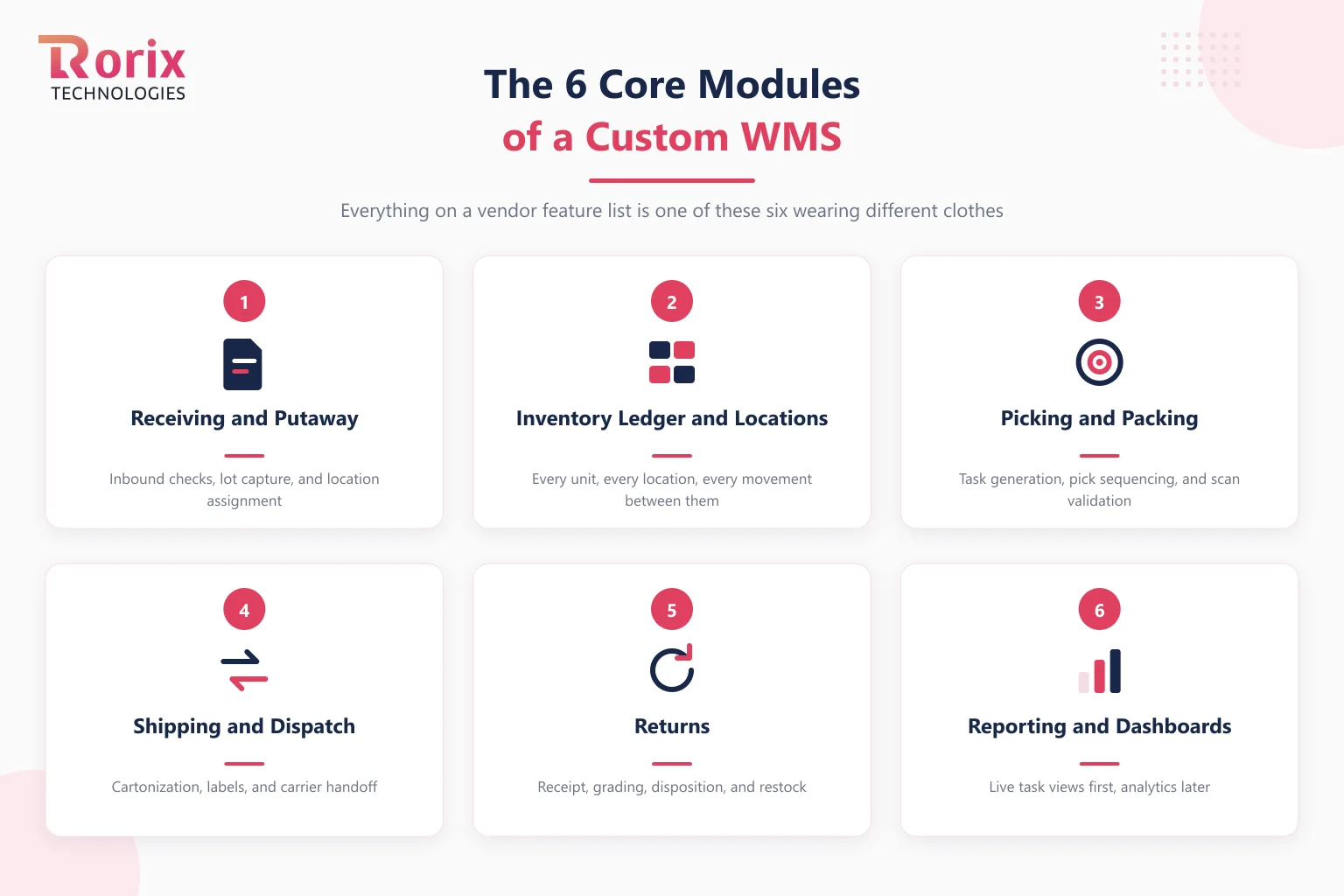
1. Receiving and Putaway
Inbound goods arrive, get checked, and get assigned a location. The custom-worthy part is your checking rules: lot capture, expiry dates, quality holds, or client-specific receiving requirements that packaged systems handle with workarounds.
2. The Inventory Ledger and Locations
This is the heart of the system: a record of every unit, every location, and every movement between them. Build it as a movement history rather than a table of current totals, for reasons the architecture section covers. Get this module right and the other five become straightforward; get it wrong and nothing downstream can be trusted.
3. Picking and Packing
Task generation, pick sequencing, and scan validation. This is usually where the strongest case for custom lives, because picking logic is where operations differ most: wave rules, zone assignments, client priorities, or a flow your industry requires and generic software has never heard of.
4. Shipping and Dispatch
Cartonization, label generation, carrier handoff, and the paperwork your channels demand. Most of this module is orchestration of bought services rather than invention, which is exactly why it comes late in the build order.
5. Returns
Receipt, grading, disposition, and restock. Small module, outsized effect on margin, and safely a phase-two item for most operations.
6. Reporting and Dashboards
Live task views for supervisors, trend views for managers. Build the two or three reports the floor runs on first; resist the analytics suite until the data underneath it has earned trust.
The core features expected of a mid-market WMS map almost one-to-one onto these modules, which makes that list a useful sanity check: if a feature you are scoping does not belong to one of the six, ask why you are building it.
What You Should Buy Instead of Building It
The test for every component is one question: does this make your operation different, or does it just make it run? Build the first kind. Buy the second, because every commodity you rebuild delays the modules that justified the project.
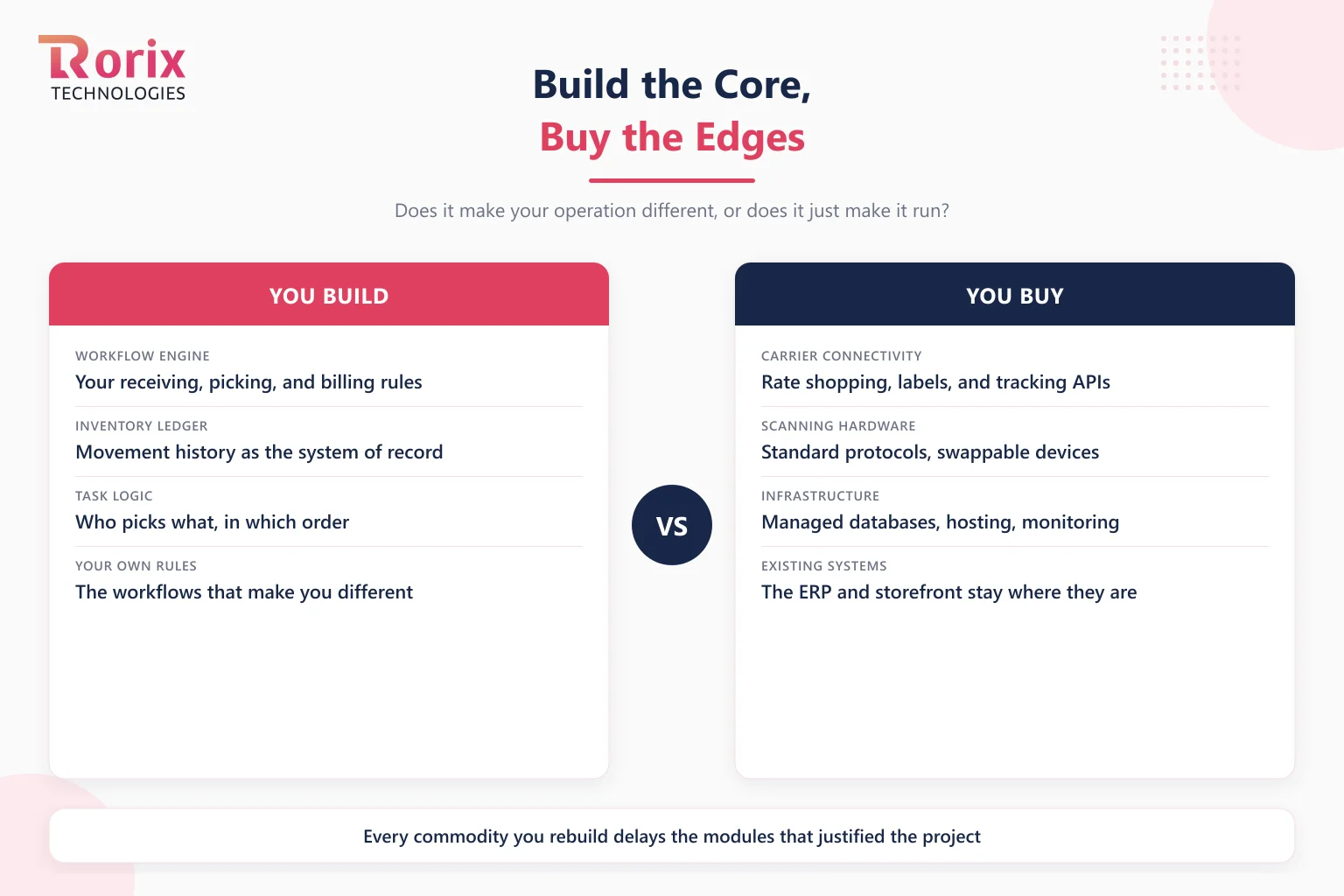
Buy Carrier Connectivity
Rate shopping, label generation, and tracking exist as mature APIs priced per label. Rebuilding them buys you nothing except maintenance against carrier spec changes, and carrier specs change constantly.
Buy Scanning Hardware and Stay Standard
Handheld scanners, label printers, and RFID readers all speak standard protocols. Integration patterns worth using treat hardware as swappable, so a discontinued device never becomes a rewrite.
Buy Infrastructure
Managed databases, hosting, monitoring, and backups are solved problems. Your WMS should run on them, not reimplement them.
Never Rebuild the Systems You Already Run
The ERP keeps accounting, purchasing, and finance. The e-commerce platform keeps the storefront. A custom WMS that tries to absorb its neighbors stops being a focused product and becomes a rewrite of the company. Connect to them instead, through the integration practices that keep each system doing its own job.
What remains after all that buying is the part worth owning: the workflow engine, the inventory ledger, the task logic, and the rules that are yours alone. That remainder is smaller than most first scopes, and that is the point.
Also Read: WMS Requirements Template: How to Write the Document That Picks Your System
Recommended Tech Stack and Architecture
These are common, proven choices for a custom WMS. They are defaults, not the only valid stack.
| Layer | Recommended choice | Why it fits a WMS |
|---|---|---|
| Backend services | Node.js with NestJS, or .NET | Mature frameworks for APIs, background jobs, and queue workers |
| Database | PostgreSQL | Relational and transactional, which suits an inventory ledger |
| Real-time layer | WebSockets | Pushes floor scans to every screen without polling |
| Integration layer | A message queue such as RabbitMQ | Holds ERP and carrier messages safely during downtime |
| Web front end | React | Live supervisor dashboards that update as work moves |
| Mobile scanning app | React Native | One codebase for Android and iOS scanning devices |
| Hosting | Managed cloud services, such as AWS | Managed databases, backups, and monitoring you do not rebuild |
The 5 Architecture Decisions That Shape the Build
Five technical decisions made in week one determine what the system can do in year five. Each has a full guide on this site; here is the short form and the default we ship with.
- Record movements, not totals. An event-sourced inventory model stores every movement and derives stock on hand, which gives you a complete audit trail and makes disputes answerable. A totals-only table cannot tell you how a count went wrong.
- Push updates, do not poll. Floor scans should reach every screen in under a second, which takes a real-time architecture built on WebSockets rather than refresh intervals. Polling systems oversell during peaks.
- Integrate through a queue. The warehouse runs around the clock; your ERP does not. A message queue between the WMS and the ERP absorbs downtime windows on either side without losing a transaction.
- Choose the database for the ledger, not the brochure. Inventory is relational and transactional to its bones. The PostgreSQL vs MongoDB comparison for WMS workloads walks through why we default to PostgreSQL.
- Deploy without stopping the floor. A warehouse system cannot take maintenance windows during operating hours, so zero-downtime deployment is a launch requirement, not an optimization.
None of these five cost much to decide early. All five are expensive to reverse after go-live.
Integrations to Plan For
Map each integration's direction, frequency, and failure handling before the build starts:
- ERP: Orders, purchase receipts, inventory adjustments, and item data. The ERP stays the system of record for finance.
- Ecommerce platforms and marketplaces: Order download, stock level updates, and shipment confirmations back to each channel.
- Shipping carriers: Rate shopping, label generation, and tracking, bought as carrier or multi-carrier APIs.
- Barcode and RFID hardware: Handheld scanners, label printers, and RFID readers on standard protocols.
How to Build a Custom WMS in 7 Steps
The sequence below is the one we run in production engagements. The order matters more than the pace: every step exists to keep the first release small and the feedback loop short.
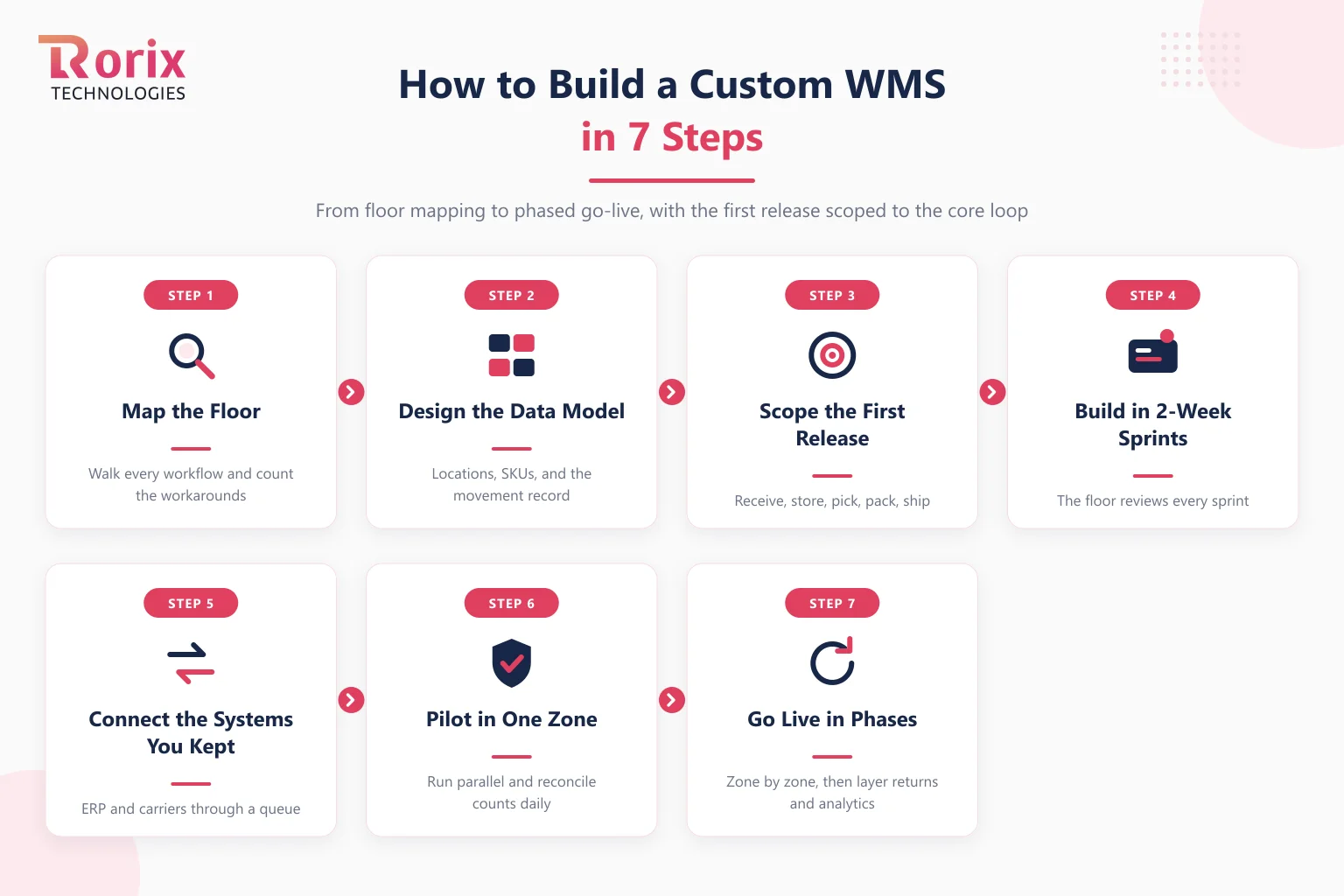
Step 1. Map the Floor Before You Map the Software
Walk every workflow physically, from truck arrival to dispatch, and write down what actually happens rather than what the process document says. Count the workarounds: every spreadsheet, whiteboard, and WhatsApp thread is a requirement the system must absorb. This map is the scope; requirements invented in a conference room are how builds bloat.
Step 2. Design the Data Model Around Movements
Define locations, SKUs, units, and above all the movement record, because every module reads from it. Decide here what a location hierarchy looks like, how lots and serials attach to stock, and which movements carry a reason code. Data-model changes cost ten times more in month six than in week two.
Step 3. Scope the First Release to the Core Loop
The first release is receive, store, pick, pack, ship. Returns, client billing, forecasting, and the analytics suite all wait for phase two, however loudly they are requested. A first release that covers the core loop starts generating accuracy data and floor feedback in weeks; a first release that covers everything ships once, late.
Step 4. Build in 2-Week Sprints With the Floor in the Room
Working software every two weeks, reviewed by the people who will scan with it. Supervisors testing the picking flow in sprint three will find the problem that would have surfaced in month five of a big-bang build. A dedicated product owner on your side keeps decisions moving; builds without one stall on unanswered questions, which is among the most common ways WMS projects fail.
Step 5. Connect the Systems You Kept
Wire the ERP, sales channels, and carriers through the queue boundary decided in the architecture phase. Do this before the pilot, not after, because integration is where hidden assumptions surface: the ERP that batches at midnight, the marketplace that retries webhooks, the carrier API that rate-limits at peak.
Step 6. Pilot in One Zone and Run It in Parallel
Pick one zone, one client, or one product family and run the new system alongside the old one, reconciling counts daily. The parallel run is the only honest test of inventory accuracy, and it turns go-live from a leap into a comparison. Dirty data surfaces here too, while it is still cheap to fix.
Step 7. Go Live in Phases and Layer the Rest
Expand zone by zone, then add the phase-two modules in the order the operation feels their absence, which is usually returns first. If you are replacing an existing system rather than spreadsheets, the legacy WMS migration guide covers the cutover patterns; either way, work from a written WMS implementation checklist so nothing in this phase depends on memory.
Also Read: 15 WMS Implementation Mistakes to Avoid (And How to Fix Them)
Custom WMS Development Cost and Timeline
These are planning ranges, not a quote.
| Item | Range | Notes |
|---|---|---|
| Build cost, phased custom WMS | $30,000 to $180,000+ | Moves with scope, integrations, and automation |
| Build cost, published analysis | $80,000 to $300,000+ | Stfalcon's WMS cost analysis |
| First production release | 8 to 20 weeks | Phased around the core loop |
| Full single-cutover implementation | 6 to 12 months | Davanti's timeline analysis |
| Yearly upkeep after launch | 15% to 25% of the build cost | Hosting, security, and continued development |
What a Custom WMS Costs to Build
A custom warehouse management system typically costs $30,000 to $180,000+ to build. Scope, integrations, automation requirements, and how much of the six-module map the first release covers all move the number. Stfalcon's WMS cost analysis puts custom builds higher, at $80,000 to $300,000+.
After launch, plan on 15% to 25% of the original build cost per year for hosting, security, monitoring, and continued development. What you do not pay is the per-user, per-site subscription drag that makes packaged pricing compound as you grow.
The full line-item picture, including hardware and the costs both paths share, is in our WMS cost breakdown. For an estimate scoped to your own operation, talk to our team.
How Long a Custom WMS Takes to Reach Production
A well-scoped custom WMS reaches a production-ready first release in 8 to 20 weeks when the release is phased around the core loop. Industry benchmarks for full custom implementations run longer: Davanti's timeline analysis puts complex custom implementations at 6 to 12 months, which is what delivering everything in one cutover costs.
The spread between those numbers is the phasing. Steps 3 and 7 exist precisely to put working software on the floor months before the system is finished. What stretches timelines is rarely engineering: it is dirty data nobody reconciled, workflows nobody had agreed on, and decisions that waited a week for a meeting.
When You Should Not Build a WMS
An honest build guide has to include the cases where building is the wrong call, and there are four.
- Your workflows are standard. If packaged software fits how you already work, buy it and go live in weeks.
- Nobody on your side can own the product. A build without an empowered decision-maker stalls, whoever writes the code.
- You need to be live inside six weeks. No responsible custom build hits that; a cloud WMS can.
- The budget is below the floor. If you cannot fund a focused first release plus a year of upkeep, per-user pricing is the rational way to pay. That holds even where the fit is imperfect.
If two or more of those describe you, the build vs buy comparison is the guide you need before this one.
Also Read: How to Evaluate a Warehouse Management Software Development Company
How Rorix Builds Custom WMS Platforms
Rorix Technologies builds custom warehouse management systems as its core work, not as a sideline: 27 projects delivered, a 5.0 rating on Clutch, and a dedicated team of senior engineers that works on a retainer model with 2-week sprints so the same engineers stay accountable long past go-live.
The approach in this guide is the one we run: movement-ledger data models, real-time floor updates, queue-based ERP integration, and phased first releases scoped to the core loop. Two builds show the results. WorkCenter Central, the platform we built for distributor Lorecs, cut manual errors by 80% and sped up order processing by 50%. Driven, a US performance platform for pest control and field service teams, runs on 40+ third-party integrations we connected, the same buy-the-edges boundary at scale. Clients own the code, the database, and the roadmap outright.
If you want to pressure-test your scope before committing to anything, talk to our engineers and bring your floor map.
The Boundary Decides Whether the Build Pays Off
Building a custom WMS is not an engineering feat; it is a scoping discipline. The teams that succeed build the six modules around their own workflows, buy every commodity at the edges, decide the five architecture questions early, and ship the core loop while the analytics suite is still a backlog item.
Draw the boundary well and the system pays for itself in workflow fit and license fees that never arrive. Draw it badly and you spend a year rebuilding software the market already sells. The good news is that the boundary is decided in the first month, on paper, where changing your mind is still free.
When you are ready to scope your build, talk to our experts and we will turn your floor map into a phased plan.
Frequently Asked Questions
How much does it cost to build a custom warehouse management system?
A custom WMS typically costs $30,000 to $180,000+ to build, depending on scope, integrations, and automation requirements. Published market analyses put the same work at $80,000 to $300,000+. After launch, budget 15% to 25% of the build cost per year for hosting, security, and continued development, with no per-user license fees.
How long does it take to build a WMS from scratch?
A phased build reaches a production-ready first release covering receiving, inventory, picking, packing, and shipping in 8 to 20 weeks. Industry benchmarks for complex custom implementations delivered in a single cutover run 6 to 12 months, which is the cost of not phasing the release.
What is the difference between building a custom WMS and customizing an off-the-shelf one?
Configuration changes settings inside a vendor's product; deep customization writes code you maintain on top of a platform you do not control, which combines the costs of both paths. Building custom means you own the code, the data, and the roadmap outright. If a packaged system needs heavy custom development to fit, that is usually the signal you crossed into build territory already.
Do I need to replace my ERP to build a custom WMS?
No, and you should not try. The ERP stays the system of record for finance, purchasing, and accounting, while the WMS owns execution on the floor. The two connect through an integration layer, ideally a message queue, that syncs orders, receipts, and adjustments without either system depending on the other being online.
Should a custom WMS run in the cloud or on-premise?
Many custom WMS builds run on managed cloud infrastructure, which removes server upkeep and scales for peak season. On-premise still fits sites with strict data rules or unreliable internet. Our cloud vs on-premise WMS comparison covers the trade-offs.
Who owns the source code of a custom WMS?
You should. The contract should assign full ownership of the source code, data, and intellectual property to your company. Confirm it in writing before work starts, along with repository access from day one.
What maintenance does a custom WMS need after go-live?
Plan on 15% to 25% of the build cost per year for hosting, security updates, monitoring, and continued development. A small ongoing retainer keeps the same engineers fixing issues and shipping the next modules.
Can we start a custom WMS with an MVP?
Yes, and you should. Start with the core loop of receive, store, pick, pack, and ship, then pilot it in one zone. Add returns, billing, and analytics in later phases once the core loop holds.
Costing a WMS build?
Send us your SKU count and daily order volume. You get back a scope and a number you can take to your CFO.
Continue learning
Written by
Renish DadhaniyaFounder & Director, Rorix Technologies
Renish co-founded Rorix Technologies and drives the engineering and delivery culture across the organization. Beyond engineering, he leads the company's sales, finance, and HR operations, building the infrastructure that lets the team focus on shipping quality software. With deep hands-on expertise in architecture and team building, he ensures every project lands on time to the quality standards clients demand.
View full profileRelated articles
Cold Storage Warehouse Management System: A Complete Guide to Building a Custom WMS for Cold Chain and Pharma
Spoilage you cannot explain, audits you dread, FEFO nobody enforces? Here is what a cold storage WMS has to do, and what building one actually takes.
Read article
How to Evaluate a Warehouse Management Software Development Company: 12 Builders Compared, Costs, and Red Flags
Evaluate a warehouse management software development company with a checklist, cost bands, red flags, and 12 builders compared, from a team that ships WMS.
Read article
AI-Enabled Business Systems: How to Build One That Pays Back
AI-enabled business systems explained: the six layers, where AI pays back by function, a data readiness checklist, six build steps, and the real cost drivers.
Read article