
WCS vs WMS: Which One Is Right For You In 2026
WCS vs WMS explained: what a warehouse control system actually does, the five differences that change your floor, real cost ranges, and which layer you need.
On this page57 sections
How do you know whether your warehouse needs a WMS, a WCS, or both?
That's one of the first questions to answer before investing in warehouse automation.
A warehouse management system (WMS) manages inventory, orders, picking, receiving, and other warehouse operations. A Warehouse Control System (WCS), on the other hand, controls automated equipment such as conveyors, sorters, shuttles, and AS/RS in real time.
The difference is simple: WMS decides what needs to happen. WCS controls how the equipment makes it happen.
Choosing the wrong system can lead to unnecessary costs, integration problems, or gaps in your warehouse operations. The right setup depends on your warehouse size, automation level, order volume, and future plans.
In this guide, you will learn:
- What a warehouse control system actually controls
- WCS vs WMS differences that change your floor
- Whether you need a WCS, a WMS, or both
- What the control layer costs
By the end of this guide, you will know exactly where each system's job ends, which one you need next, and what to budget for it.
WCS vs WMS: The Short Answer
If you have one minute, here is the WCS vs WMS split that matters.
| Question | Answer |
|---|---|
| What does a WMS do? | Manages inventory, orders, and warehouse processes across one site or a network |
| What does a WCS do? | Directs conveyors, sorters, and robots in real time inside one facility |
| Who decides what? | The WMS sets the destination rule, and the WCS executes it on time |
| Can one replace the other? | No, because neither holds the other's data or clock speed |
| Who needs a WCS? | Any warehouse where equipment must decide faster than a person can |
| Where does it come from? | Bundled with equipment, licensed independently, native to your WMS, or custom-built |
Key Takeaways: Where a WCS Ends and a WMS Begins
- A WMS decides what needs to happen on a clock of minutes to hours, while a WCS controls how the equipment makes it happen in milliseconds to seconds, and neither can replace the other because neither holds the other's data or clock speed.
- A capable warehouse control system handles eight jobs, from equipment routing and real-time sortation to exception handling and equipment monitoring, but it holds no inventory truth, manages no orders, and plans no labor.
- A warehouse needs a WCS only once equipment must decide faster than a person can, and an independent, vendor-agnostic WCS usually pays off once a floor runs three or more automation types from different suppliers.
- ControlPoint's WCS pricing guide puts a single automated line at $30,000 to $150,000 and a large multi-zone facility at $500,000 to $2,000,000+, with implementation and integration labor often 20% to 40% on top of software and annual maintenance at 15% to 20% of a perpetual license.
- Rorix cut manual errors by 80% on a Lorecs warehouse build and has 27 projects delivered with a 5.0 Clutch rating across 4 verified reviews.
What Is a Warehouse Control System (WCS)?
A warehouse control system is the software that turns warehouse instructions into machine commands. It sits below your warehouse management system and above the programmable logic controllers that run your material handling equipment.
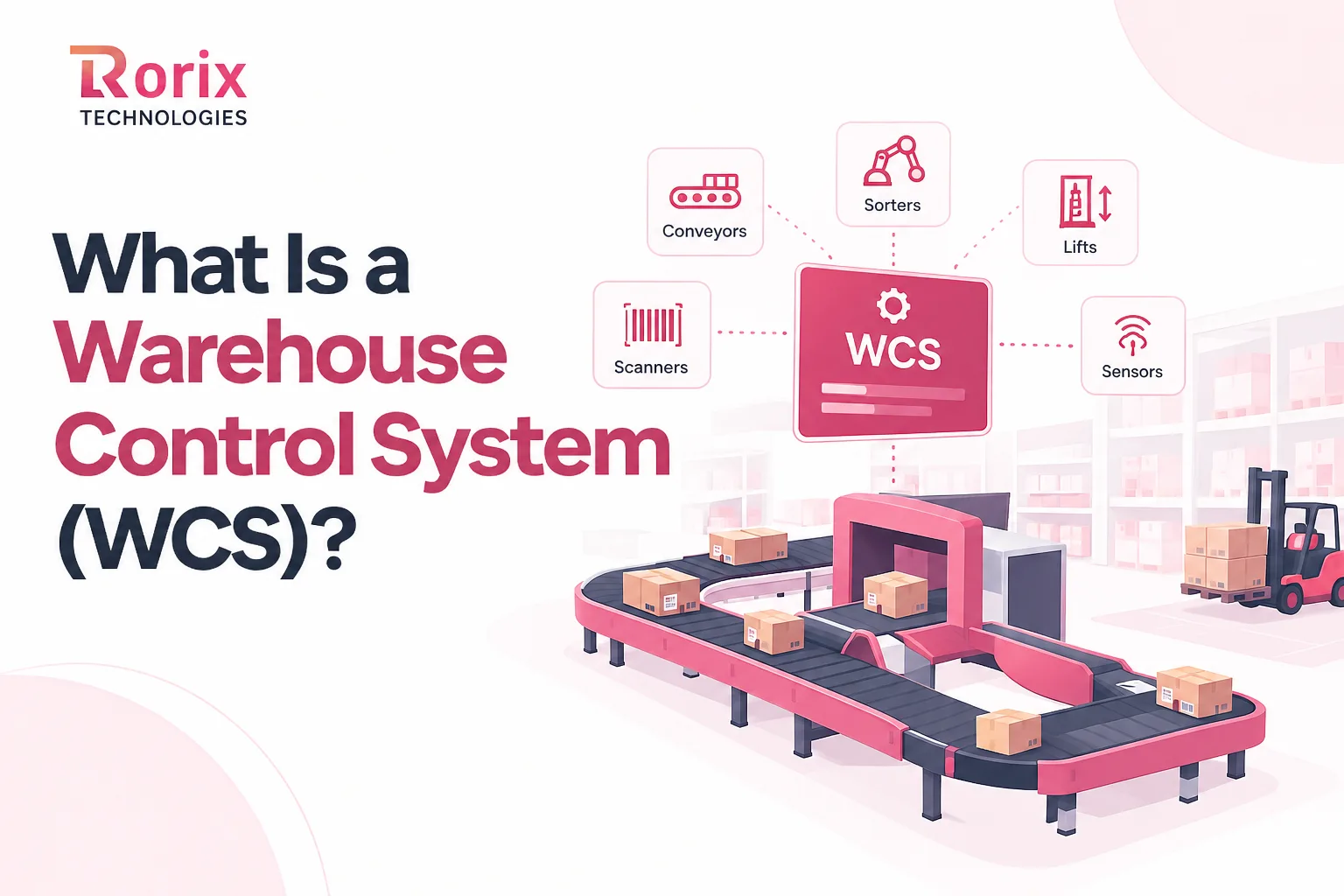
Picture the traffic control room for everything that moves without a person pushing it. Your WMS asks for a carton at dock door 4, and the WCS plans the route, times each transfer, and keeps loads from colliding.
It runs one building, sometimes one automation zone, on a very short clock. It does not know what a SKU costs or who ordered it, and it does not need to.
Core Jobs a WCS Runs on Your Floor
A capable warehouse control system handles these eight jobs:
- Equipment control and routing: Commands conveyors, lifts, cranes, and shuttles, then picks the best path for each tote, carton, or pallet.
- Real-time sortation: Assigns every load to the correct lane, chute, or dock door the moment it is scanned.
- Scanner and sensor processing: Reads fixed scanners, photo-eyes, and RFID portals as loads travel through the line.
- Flow balancing: Meters work into stations and accumulation zones so no area floods while another sits idle.
- In-line weighing and dimensioning: Captures weight and size in motion, then flags loads that fail a tolerance check.
- Print-and-apply labeling: Fires the label at the right point on the carton at the right moment in its travel.
- Exception handling: Reroutes around jams, no-reads, and full lanes, or diverts the load to a recovery lane.
- Equipment monitoring: Reports device status, throughput, and faults so operators see problems as they start.
What a WCS Cannot Do
- Hold inventory truth: It does not maintain stock balances, lot rules, or the value of what it moves.
- Manage orders: It does not receive customer orders, set priority by customer, or talk to your ERP.
- Plan labor: It does not assign manual tasks, schedule shifts, or measure associate productivity.
- See across sites: It has no network view, so a second building needs its own configuration.
- Handle commerce: It does not rate shop carriers, produce invoices, or bill 3PL clients.
What a WMS Does
A warehouse management system is your system of record for everything physical inside the building. It tracks receipts, locations, reservations, picks, and shipments, and it keeps counts honest as goods move.
Your ERP holds the customer and the money. The WMS turns that order into tasks against real bin locations, then reports back what actually happened.
Unlike a control layer, a warehouse management system earns its place in any warehouse. That asymmetry sits underneath the whole WCS vs WMS decision.
Our WES vs WMS guide carries the full function list, and our WMS cost breakdown covers the budget side.
How a WMS and WCS Work Together: From Release to Dispatch
Here's one tote's journey from storage to packing station, and the messages passing between both systems along the way:
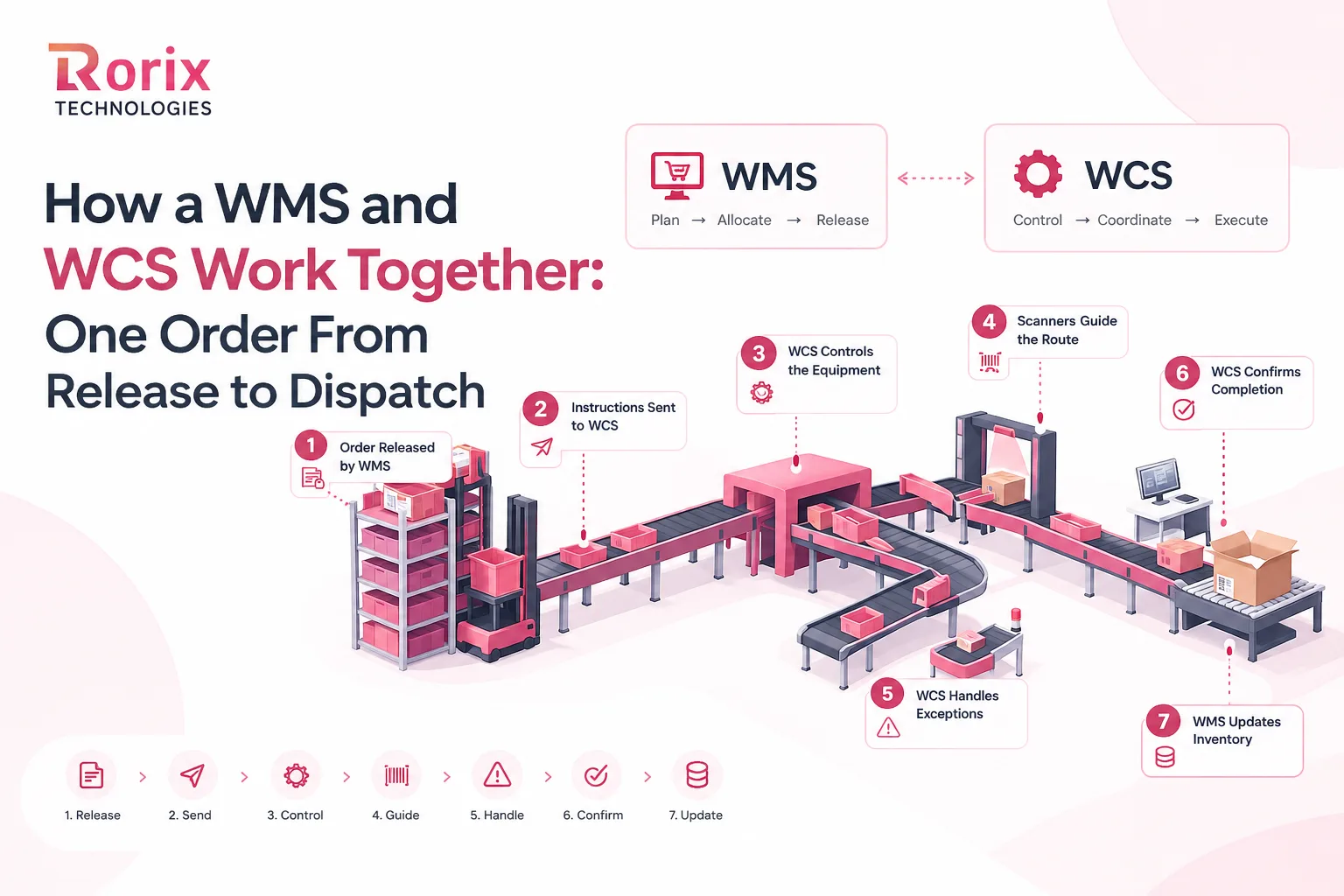
Step 1: The WMS Releases the Order and Builds the Tasks
Everything starts in the WMS. It takes the order from your ERP or sales channel, checks available stock, and reserves specific units from specific locations.
It then creates the tasks that will fulfill the order. In an automated building, that usually means retrieving a tote from storage and pairing it with a pick or pack station.
No machine has moved yet. At this stage, the system is working purely with orders, SKUs, and locations, which is exactly the data it owns.
Step 2: The WMS Sends a Transport Instruction to the WCS
Next, the WMS hands the physical work down. It sends a transport instruction naming the load, its current position, and where it needs to arrive.
A typical message asks for tote 10482 to travel from the storage system to pick station 3. Some setups add a priority flag or a due time so the control layer can sequence competing work.
Notice what the message leaves out. There is nothing about conveyor segments, speeds, or divert points, because those choices belong to the control layer.
Step 3: The WCS Turns One Instruction Into Many Commands
Now the WCS takes over. It breaks that single instruction into a sequence of moves. A typical chain runs from a crane retrieval through a lift transfer, several conveyor segments, and a merge.
Each move becomes a command to a specific PLC, issued in the right order and at the right moment.
Flow control happens here too. If the station queue is already full, the WCS parks the tote in an accumulation zone. That prevents it from flooding the area and stalling everything behind it.
Step 4: Scanners Confirm Position and Trigger Routing
As the tote travels, fixed scanners read it at every decision point. Each read tells the WCS exactly where the load is, so it can confirm the planned route or change it.
This is where the millisecond clock earns its keep. The system must commit to a divert before the load reaches the gate.
Because the destination is already cached from Step 2, the answer comes from local memory. No round trip to the WMS happens while the tote is in motion.
Step 5: The WCS Absorbs Jams, No-Reads, and Full Lanes
Real floors are messy, and this step separates a good control layer from a weak one. When a label will not scan, the WCS sends the load to a recovery lane or recirculates it for a second read.
When a lane fills or a conveyor jams, it reroutes traffic around the blockage and raises an alert for an operator.
Most of this never reaches the WMS. Only exceptions that change the order itself travel up, such as a damaged item that needs a replacement pick.
Step 6: The WCS Confirms Completion Back to the WMS
Once the order is packed, the carton crosses an in-line scale and a print-and-apply station on the way to the sorter. The WCS then reports the outcome upward.
That confirmation typically carries the carton ID, the measured weight and dimensions, the label applied, and the lane the carton left through.
These messages are the handshake that keeps both systems aligned. Without them, your WMS believes work finished that the floor never actually completed.
Step 7: The WMS Updates Inventory and Closes the Order
Finally, the WMS records the pick, reduces stock, marks the order shipped, and pushes status to the ERP and the carrier. Customer service sees the update within seconds.
When this loop runs cleanly, inventory stays accurate while goods are still moving. Our engineering guide to real-time inventory with WebSocket and pub-sub architecture shows how that live picture reaches every screen.
Also Read: Warehouse Picking Methods: Batch, Wave, Zone, and Discrete
WCS vs WMS: The Complete Comparison Table
Vendor pitches blur these two systems constantly, especially where warehouse automation is part of the sale. Use this WCS vs WMS table whenever a demo starts making them sound interchangeable.
| Criterion | WMS (Warehouse Management System) | WCS (Warehouse Control System) |
|---|---|---|
| Core job | Manages inventory, orders, and warehouse processes | Directs automated equipment and material flow |
| Decision level | Business rules and planning | Machine-level control |
| Response time | Minutes to hours | Milliseconds to seconds |
| Scope | One site or a multi-site network | One facility or automation zone |
| Main data | Orders, SKUs, lots, bins, stock balances | Load IDs, scan events, sensor states, device status |
| Connects upward to | ERP, order management, sales channels | WMS or WES |
| Connects downward to | WCS, WES, mobile devices, handheld scanners | PLCs, conveyors, sorters, AS/RS, robot fleets |
| Interfaces used | REST APIs, EDI, message queues, file transfers | OPC UA, EtherNet/IP, PROFINET, Modbus TCP, telegrams |
| Primary users | Managers, supervisors, associates | Controls engineers, maintenance teams, operators |
| Works without automation | Yes | No |
| Typical exceptions | Short picks, damages, inventory variances | Jams, no-reads, full lanes, device faults |
| Change cycle | Rules and workflows change often | Control logic changes rarely and carefully |
| Failure impact | Inaccurate records and wrong allocations | Stopped or congested equipment |
| Right for | Every warehouse that stores and ships goods | Warehouses running meaningful automation |
Which System Should Own Each Function
The boundary is rarely perfect. Some WMS products add equipment messaging, and some control platforms add light inventory logic, so functions start to double up.
Overlap by itself is manageable. The damage comes from unclear ownership, because two systems writing the same data will eventually disagree. Settle this before any interface gets built.
| Function | Best owner | Why |
|---|---|---|
| Inventory balances and allocation | WMS | It is the system of record for stock |
| Order priority and release | WMS, or WES if present | Priority reflects customers and carrier cut-offs |
| Tote and carton routing | WCS | Routing depends on live equipment state |
| Sorter lane assignment | WCS, using WMS destination rules | The WMS sets the rule, and the WCS times it |
| Pick-to-light confirmation | WCS captures, WMS records | The event starts at the device and ends as a stock change |
| Weight and dimension checks | WCS captures, WMS validates | Tolerance rules depend on SKU master data |
| Shipping label content | WMS | Carrier and order details live in the WMS |
| Print-and-apply timing | WCS | Label placement depends on carton position |
| Equipment fault alerts | WCS | Only the control layer sees device state |
WCS vs WMS: 5 Differences That Change How Your Floor Runs
The table gives you the headline view. These five WCS vs WMS differences explain what each one costs you when you get the split wrong.
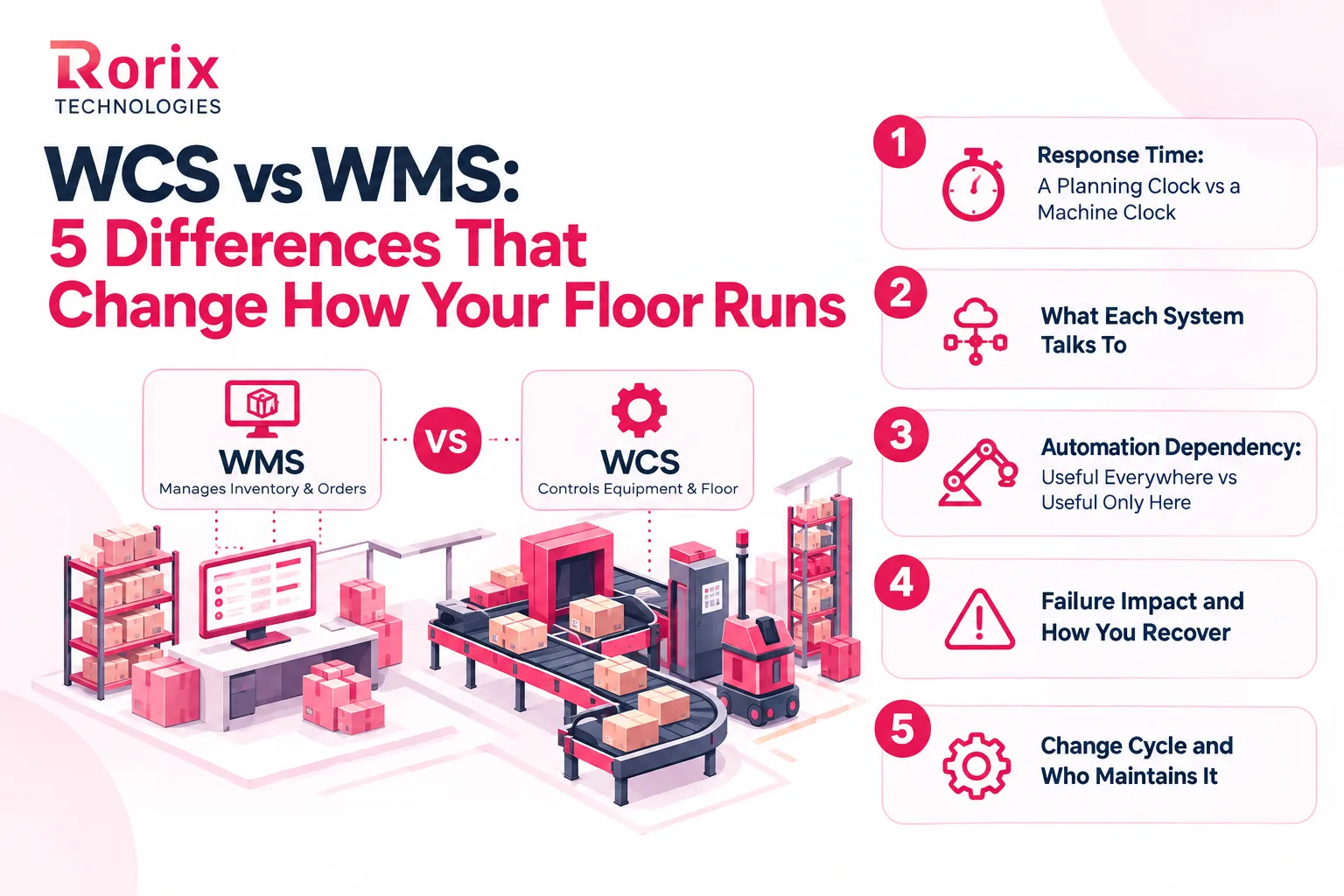
1. Response Time: A Planning Clock vs a Machine Clock
Your WMS runs on a planning clock. It releases waves, batches orders, and updates records as scans arrive, and a delay of several seconds rarely changes any outcome.
Everything tightens inside a WCS. A carton crossing a fast sorter commits to its lane almost instantly, which means a late routing answer physically sends it to the wrong place.
2. What Each System Talks To
On the WMS side, every integration is software-to-software. Your ERP, order management, sales channels, and carriers connect through APIs, EDI, or scheduled file transfers over ordinary networks.
A WCS reaches into the plant instead. It speaks to PLCs, scanners, scales, and material handling equipment from several manufacturers, using protocols most IT teams never touch.
3. Automation Dependency: Useful Everywhere vs Useful Only Here
A WMS pays for itself in almost any building. Even a manual operation running forklifts, carts, and handheld scanners gets accuracy and speed gains from day one.
Strip the warehouse automation away and a control layer has nothing left to do. It only becomes necessary once conveyors, sortation, AS/RS, or robotics need coordinated direction in real time.
4. Failure Impact and How You Recover
A WMS failure shows up in your data. Counts drift, allocations fail, and pickers chase stock that is already promised, though you can usually trace and repair the damage afterward.
Control-layer failures announce themselves immediately. Conveyors stop, totes stack up at merges, and trucks wait at the dock, so redundancy and tested fallback modes stop being optional.
5. Change Cycle and Who Maintains It
WMS rules change all the time. Operations staff adjust picking strategies, slotting logic, and carrier rules, often without engineering help, and mistakes are usually reversible.
Real-time equipment control moves at a different pace. Changes touch live machinery and get tested carefully, so a controls engineer owns them rather than a warehouse supervisor.
Do You Need a WMS, a WCS, or Both?
Your answer to the WCS vs WMS question depends on your warehouse automation footprint, order volume, and growth plans. Use these profiles to place your operation.
1. When a WMS Alone Is Enough
A warehouse management system on its own covers most manual and lightly automated buildings. You probably need nothing more if these describe you:
- Picking is person-driven: Associates work with carts, forklifts, or handheld scanners rather than goods-to-person equipment.
- Conveyors are simple: Any conveyor you run moves goods point to point, with no scanning, diverting, or sortation.
- Accuracy is the main pain: Errors trace back to receiving, putaway, and counting rather than equipment timing.
- Volume stays predictable: Your team hits carrier cut-offs using waves, sensible slotting, and overtime on peak days.
- Automation is still a plan: You want stable processes and clean data in place before equipment arrives.
2. When You Need a WCS
Machine-level control becomes necessary once equipment must decide faster than people can. Look for these signals:
- You run sortation: Cartons or parcels need automatic diverts to lanes, chutes, or dock doors.
- You operate AS/RS or shuttles: Storage and retrieval equipment needs coordinated task sequencing.
- You mix equipment brands: Conveyors, scanners, scales, and robots from different vendors must behave as one line.
- Supervisors feed the automation manually: People decide which loads enter the line, which software should be doing.
- Recirculation keeps climbing: Loads loop the sorter because routing answers arrive too late to use.
3. When You Need Both Working as One Stack
Most growing automated operations end up here. A combined setup makes sense when:
- Manual and automated zones share a building: Some areas pick by hand while others run conveyors, put walls, or robots.
- Order profiles are mixed: Single-line ecommerce orders and multi-line B2B orders flow through the same operation.
- Speed and accuracy both matter: You cannot trade inventory accuracy for throughput, or the reverse.
- Automation arrives in phases: Each new system has to plug into the same inventory and order logic, which keeps the WCS vs WMS boundary stable.
- Customers expect live status: Tracking depends on equipment confirmations reaching the WMS quickly.
4. Can a WMS Replace a WCS?
It can, under narrow conditions. Some WMS platforms include equipment interfaces that drive a simple conveyor, a print-and-apply unit, or a small pick-to-light zone perfectly well.
That holds while device counts stay low and speeds stay modest. Add high-speed sortation, AS/RS, or several equipment brands, and a general-purpose module rarely matches a dedicated control platform.
The reverse is never workable. A warehouse control system cannot replace a WMS, because it carries no model of orders, customers, or inventory value.
5. Which Setup Fits Your Warehouse Type
Your industry shapes the answer as much as your volume does. Here is where common operations usually land:
| Warehouse type | Typical setup | Why |
|---|---|---|
| Ecommerce fulfillment center | WMS plus WCS | Parcel sortation, put walls, and print-and-apply need real-time equipment control |
| 3PL warehouse | WMS first, WCS for automated client zones | Multi-client inventory and billing sit in the WMS |
| Cold storage facility | WMS plus WCS for automated storage | Automated storage cuts the time people spend in the cold |
| Pharmaceutical distributor | WMS plus WCS for sortation and checks | Lot, expiry, and serialization rules stay in the WMS |
| Food and beverage distributor | WMS, adding WCS with case conveyors | FEFO and catch-weight logic belong in the WMS |
| Parcel hub or cross-dock | WCS-heavy with a light host system | Sorting speed matters more than storage depth |
| Retail distribution center | WMS plus WCS | Store replenishment runs on high-volume case sortation |
| Small manual warehouse | WMS only | Nothing on the floor needs machine-level control |
Channel and carrier complexity shapes the first row, which is what our ecommerce fulfillment software builds are designed around. Food operations carry their own constraints, covered in our WMS guide for the food industry.
Also Read: Cloud vs On-Premise WMS: Complete Comparison Guide
Now that you have placed your own operation, let's take a look at where your control layer should actually come from.
Your WCS Options: Bundled, Independent, Native, or Custom
Settling the WCS vs WMS question is only half the work. Where that capability comes from shapes your costs, your flexibility, and your vendor dependency for years afterward.
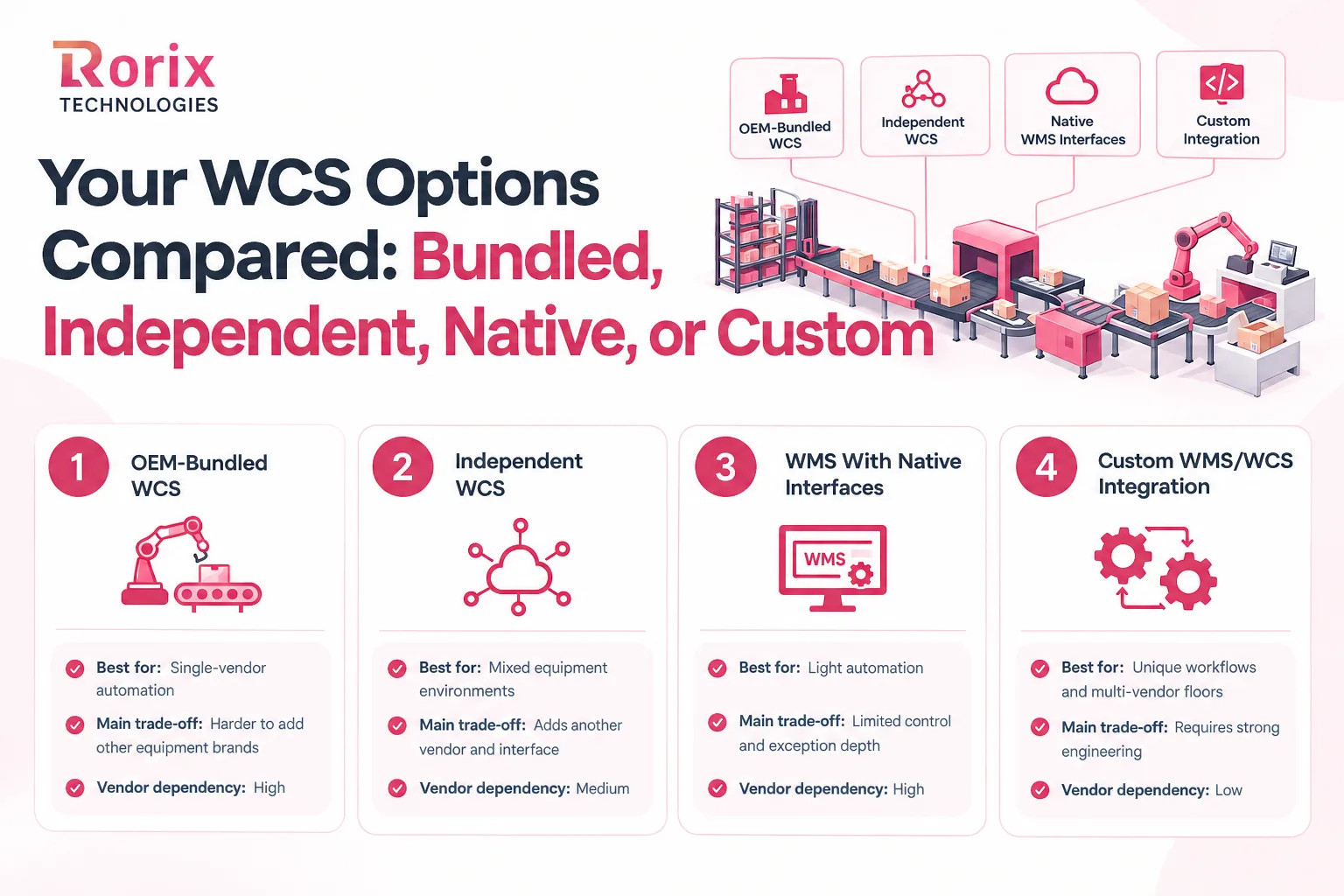
| Option | Best for | Main trade-off | Vendor dependency |
|---|---|---|---|
| OEM-bundled WCS | Greenfield sites using one automation vendor | Hard to extend across other equipment brands | High |
| Independent, vendor-agnostic WCS | Floors mixing several equipment brands | Adds a vendor and another interface to maintain | Medium |
| WMS with native equipment interfaces | Light automation with few devices | Limited speed, sequencing, and exception depth | High, on the WMS vendor |
| Custom control and integration layer | Unusual workflows and multi-vendor floors | Needs a capable engineering partner | Low, because you own the code |
1. OEM-Bundled WCS From the Equipment Vendor
Automation projects have shipped with the manufacturer's own control software for decades. It fits that vendor's equipment precisely, arrives with the install, and keeps early decisions simple for your team.
The real cost surfaces later. When a second equipment brand lands, it usually brings its own control island, and nobody can follow one order across the whole building anymore.
2. Independent, Vendor-Agnostic WCS
A standalone provider controls equipment from many manufacturers through one platform. You get a single view across mixed brands, one alerting model, and one place to tune flow.
In return, you take on another vendor relationship and another interface to support. That trade usually pays off once you run three or more automation types from different suppliers.
3. WMS With Native Equipment Interfaces
Some warehouse management systems speak directly to simple devices, such as short conveyor runs, print-and-apply units, or compact pick-to-light zones. That removes an entire layer and keeps support with one vendor.
Watch the ceiling on these interfaces carefully. They are built for convenience rather than throughput, so they strain once line speed rises, or sortation logic gets complicated.
4. Custom Control and Integration Layer
A custom route builds the coordination logic around your exact floor. It can sit as your own layer above vendor controls, or as deep integration inside your WMS. You own the code and decide how each vendor connects.
This suits operations whose workflows no packaged product matches. Evaluate partners carefully first, using our guide on how to evaluate a warehouse management software development company.
WCS Cost: What the Control Layer Adds to Your Budget
Cost is where the WCS vs WMS conversation turns practical. A warehouse control system is priced around your equipment rather than your headcount, which catches finance teams off guard.
1. How WCS Vendors Price the Software
WCS vendors work with three pricing models. A perpetual license charges a large upfront fee plus annual maintenance, while a subscription charges monthly or yearly by zones or throughput.
The third model bundles the software into the automation project quote. Which one you get often depends on who sells you the equipment rather than on what you ask for.
Four factors move your price above all others. These are the number of equipment zones under control and the diversity of brands and protocols on the floor.
The remaining two are your throughput target and your deployment model. Cloud subscriptions lower the upfront figure, while on-site deployment raises it.
2. Indicative WCS Cost Ranges
Treat these as planning ranges rather than quotes, and expect movement based on scope and equipment count. The ranges come from ControlPoint's warehouse control system pricing guide.
| Scenario | Indicative range | What sits inside it |
|---|---|---|
| Single automated line | $30,000 to $150,000 | One conveyor line with a sorter, base software plus implementation |
| Mid-size site, 2 to 4 equipment brands | $150,000 to $500,000 | Multi-zone sites adding sortation plus pick-to-light or AS/RS |
| Large multi-zone facility | $500,000 to $2,000,000+ | Robotics, AS/RS, and high-throughput sortation across many vendors |
| Implementation and integration labor | Often 20% to 40% on top of software | Commonly underquoted, and quoted separately by some vendors |
| Annual maintenance on a perpetual license | 15% to 20% of the license | Recurring, and often excluded from the first-year figure |
ControlPoint sells a WCS, so the guide is vendor-produced rather than independent research. Use it to sanity check a quote, not to set a budget on its own.
3. Why "Bundled With the Equipment" Does Not Mean Free
Plenty of buyers hear that control software ships with the automation and stop asking about it. The software is still being paid for, and the line item is simply folded into a larger equipment quote.
That matters at renewal and expansion time. Add a sorter later, and you finally discover what the control layer costs as a standalone line. By then you rarely have a comparable quote to check it against.
Ask for a split in the RFP. Request software, implementation, support, and training as separate figures, and confirm in writing what happens when future equipment joins the system.
Four more costs sit outside every software quote:
- Controls engineering: PLC changes, device mapping, and on-site commissioning usually come from the equipment integrator.
- Emulation and acceptance testing: Building a virtual model of the line and proving it takes real engineering hours.
- Interface development: Every message between the WMS and the control layer is designed, built, and regression tested.
- After-hours support: A stopped line at 2 am needs people who read both software logs and machine faults.
Also Read: How to Calculate WMS ROI: Complete Guide
What Reliable WMS WCS Integration Involves
Buying the right control layer is one job. Connecting it to your WMS is another, and it decides whether the automation delivers what the business case promised.
Solid WMS WCS integration comes down to five things:
- Data ownership on paper: Agree which system owns items, inventory, orders, routes, and device states before anyone builds an interface.
- A message contract: List every message crossing the boundary, with its fields, trigger, expected response, and timeout.
- Designed exception paths: Decide in advance where a load goes on a no-read, a jam, or a full lane, and who gets alerted.
- A degraded mode: Define how the WCS keeps routing on cached destinations when the WMS link drops, and how both systems reconcile afterward.
- Emulation and acceptance testing: Build a virtual model of the line, run full order days through it, then prove throughput and sort accuracy on real product.
Our guide to API integration strategy covers the retry, idempotency, and event-versus-direct-call decisions underneath this work.
Now that you have seen what a clean connection takes, let's take a look at the mistakes that break one.
7 Mistakes That Break a WCS and WMS Setup
These failures show up in warehouse automation projects of every size. Each one is specific to the control layer or to WMS WCS integration, and each is avoidable once you know the pattern.
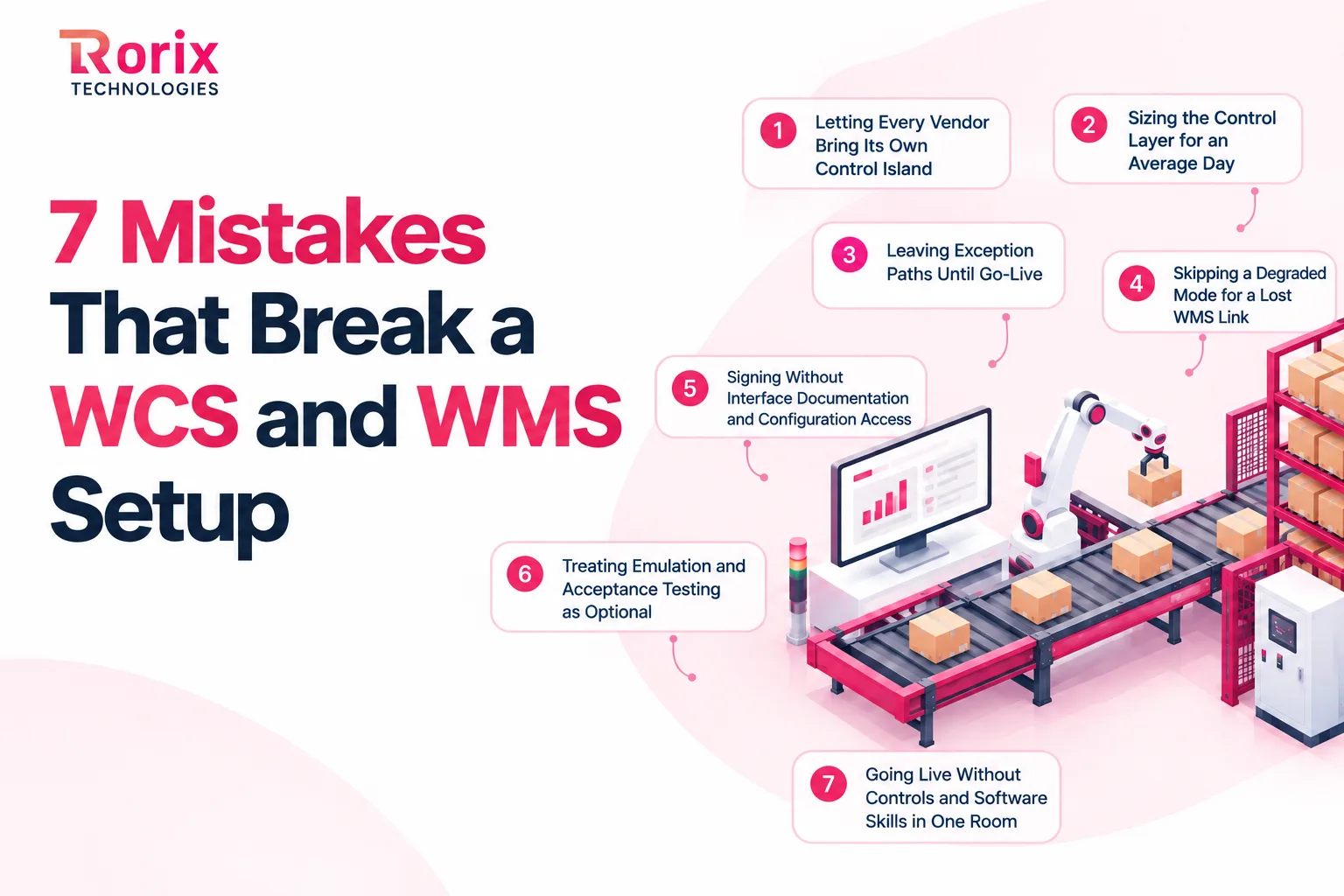
Mistake 1: Letting Every Vendor Bring Its Own Control Island
Each machine that arrives with its own control software adds a screen, an interface, and a support contract. Before long, nobody can trace one order through the building. Set a single control strategy for the site, even when equipment arrives across several years.
Mistake 2: Sizing the Control Layer for an Average Day
A platform that copes on a quiet Tuesday can fall over during peak season. Size message volumes, lane capacity, and server headroom for your busiest day plus the automation already on your roadmap. Replacing control software mid-peak is a risk worth avoiding entirely.
Mistake 3: Leaving Exception Paths Until Go-Live
Happy-path routing is the easy part of any build. Teams that postpone no-read, jam, and full-lane handling discover the gaps with trucks waiting at the dock. Design and test every exception path during the build, not during your first busy week.
Mistake 4: Skipping a Degraded Mode for a Lost WMS Link
Networks drop, servers restart, and upgrades overrun their window. Teams that never test the fallback discover during a live outage that the floor simply halts. Rehearse the degraded mode in acceptance testing, not on a peak Monday.
Mistake 5: Signing Without Interface Documentation and Configuration Access
If one vendor is the only party who understands your routing logic, you cannot add equipment or change suppliers without them. Get interface specifications, configuration access, and ownership terms into the contract. That keeps your stack yours to evolve.
Mistake 6: Treating Emulation and Acceptance Testing as Optional
Emulation and formal acceptance testing get cut first when a project slips. The saving is imaginary, because every defect then surfaces on live equipment at full speed. Protect both in the plan and the budget from the start.
Mistake 7: Going Live Without Controls and Software Skills in One Room
An automated warehouse needs people who read software logs and machine faults together. When that skill sits with two vendors in two time zones, small faults turn into long outages. Train internal staff and agree on escalation paths before cutover.
Why Choose Rorix for Custom WMS and Automation Integration
The link between your warehouse management system and your material handling equipment decides whether automation runs as one system or a set of islands.
Rorix Technologies builds custom software engineered for the domain.
Here's why businesses choose us:
- Warehouse specialists: WMS solutions engineered for your actual floor workflows, not adapted from a template.
- Proven operational impact: Manual errors cut by 80% on a Lorecs warehouse build, using real-time inventory, barcode scanning, and automated workflows.
- Deep integration expertise: 40+ integrations on Driven, a US performance platform we built for pest control and field service teams, connecting the systems that operations depend on.
- Accountable delivery: 27 projects delivered, 2-week sprints, and a 5.0 Clutch rating across 4 verified reviews.
- Retainer model: A dedicated team of senior engineers with a named technical lead, accountable well past go-live.
- Global experience: Solutions delivered for businesses across the US, UK, Canada, Australia, and New Zealand.
Not sure whether your next move is a WMS upgrade, a control layer, or better integration between them? Talk to our experts and get a clear view of the gap in your stack.
Get the Control Layer Right Before You Add Equipment
WCS vs WMS comes down to two jobs. A WMS tells you what you hold and what has to ship. A warehouse control system moves each load to the right place on a machine clock.
Neither one substitutes for the other, so most automated buildings run both. What separates a smooth operation from a stalled one is the quality of the handshake between them.
Sequence the work in the right order. Get inventory accuracy right first, choose one control strategy for the whole site, and design the message contract before hardware arrives.
We hope this guide clarified the WCS vs WMS split and where the control layer fits. You should also know what it takes to connect both systems properly.
Now it is your turn to walk your floor during peak hours and note every routing decision a person is making that software should own.
Once you have that list, connect with our experts, and we will scope the control layer your floor is missing.
Frequently Asked Questions
What is the difference between a WCS and a WMS?
A warehouse management system manages inventory, orders, and warehouse processes over minutes and hours. A warehouse control system handles real-time equipment control. The WCS vs WMS split comes down to one planning the work and the other moving the loads.
Can a warehouse run a WCS without a WMS?
Only in narrow cases, such as a parcel hub that sorts without holding stock. A control layer carries no model of orders or inventory value, so any warehouse storing goods still needs a WMS or similar host system.
Does a small or manual warehouse need a WCS?
Not usually, because there is no warehouse automation for it to control. A well-configured WMS with barcode scanning delivers the accuracy and speed gains that the operation needs first, and automation can follow later.
What equipment does a warehouse control system manage?
A WCS typically drives conveyors, sorters, AS/RS cranes and shuttles, pick-to-light zones, put walls, in-line scales, print-and-apply labelers, and fixed scanners. It reaches this material handling equipment through PLCs and device controllers.
What is the difference between WMS, WCS, and WES?
The WMS owns inventory and orders, the WES sequences work across people and machines, and the WCS controls equipment. Our WES vs WMS guide explains when the middle layer is worth adding.
How much does a warehouse control system cost?
Market ranges run from roughly $30,000 for a single automated line to $500,000 and beyond for large multi-zone sites. Your figure depends on equipment zones, brand diversity, throughput, and deployment model.
Does automation equipment come with its own WCS?
Many manufacturers bundle control software into the equipment quote. That suits a single-vendor site, while mixed brands usually need an independent control platform or a custom integration layer to coordinate everything.
Can a custom WMS integrate with an existing WCS?
Yes, provided the control platform exposes documented interfaces such as APIs, message queues, or defined telegrams. The WMS maps its orders and destination rules onto those messages, so you keep the control layer you already run.
Costing a WMS build?
Send us your SKU count and daily order volume. You get back a scope and a number you can take to your CFO.
Continue learning
Written by
Renish DadhaniyaFounder & Director, Rorix Technologies
Renish co-founded Rorix Technologies and drives the engineering and delivery culture across the organization. Beyond engineering, he leads the company's sales, finance, and HR operations, building the infrastructure that lets the team focus on shipping quality software. With deep hands-on expertise in architecture and team building, he ensures every project lands on time to the quality standards clients demand.
View full profileRelated articles
Warehouse Automation Cost in 2026: Complete Pricing Breakdown Guide
Learn how much warehouse automation costs, from basic scanning to advanced robotics. Explore pricing, software, integration, hidden costs, ROI, and TCO.
Read article
20 Top Warehouse Automation Companies in 2026: Software and Integration Partners Ranked
Compare 20 warehouse automation companies, their software capabilities, costs, integrations, and best-fit use cases to choose the right partner.
Read article
Multi-Channel Order Management: Complete Implementation Guide
How to implement multi-channel order management across Amazon, Shopify, eBay, and retail: integration steps, inventory sync, and automation strategies.
Read article