
Warehouse Management System for Food Industry: Features, Compliance and How to Build One (2026)
Learn how to choose or build a warehouse management system for food industry operations, including features, integrations, costs, and compliance.
On this page70 sections
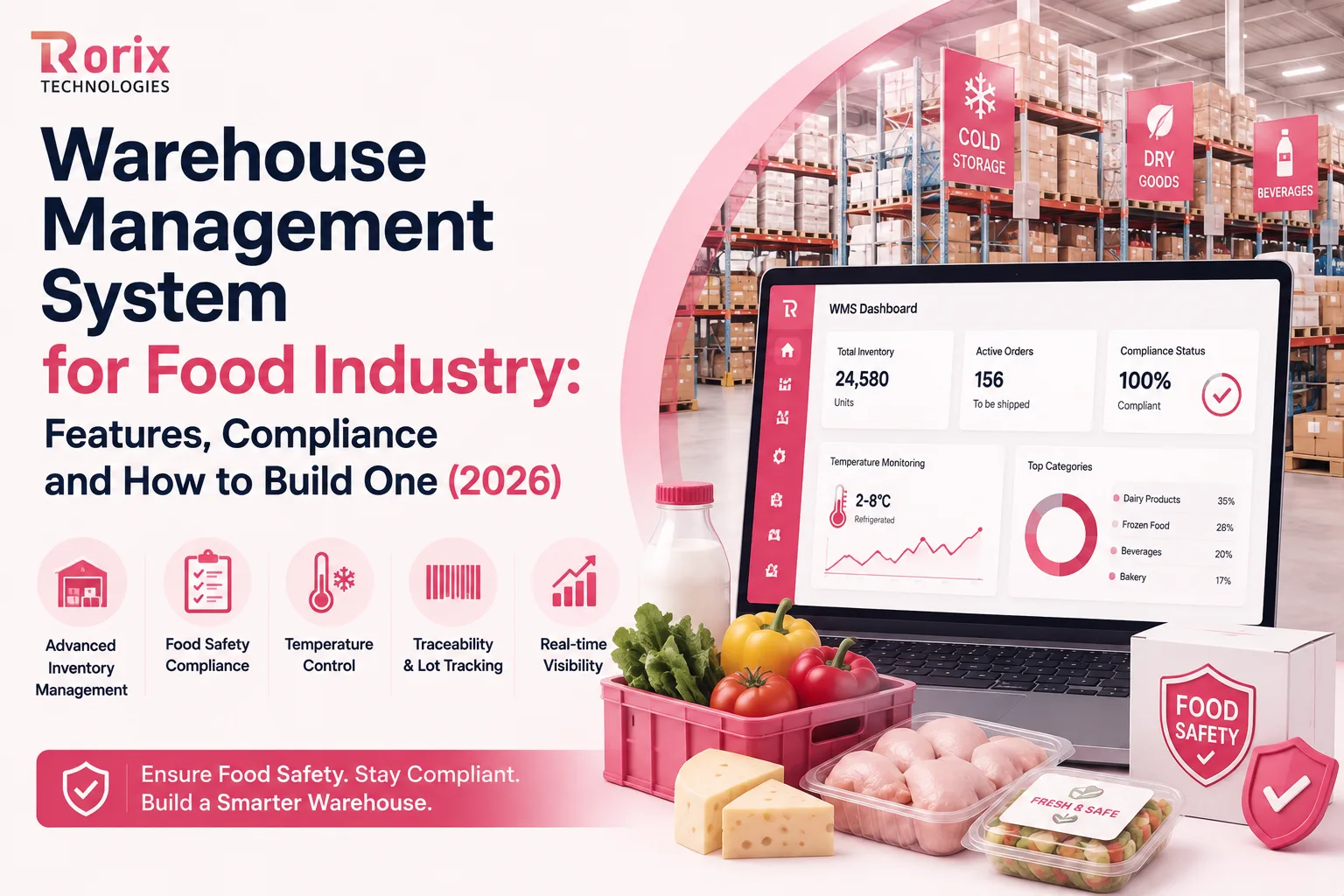
A food warehouse management system needs to do more than track inventory. It should control lot traceability, FEFO, expiry, catch weight, temperature zones, allergens, quality holds, and compliance as part of daily warehouse work.
Food warehouses cannot afford inventory mistakes. One wrong lot, missed expiry date, incorrect weight, or broken temperature record can lead to waste, rejected shipments, compliance issues, or even a costly recall.
But not every WMS is built for the realities of food warehouses. Perishable products, variable weights, strict shelf-life rules, cold-chain requirements, and food safety regulations demand more than basic inventory tracking. Operators generally end up either configuring a platform heavily or commissioning warehouse management software we build around those constraints from the start.
Whether you run a food manufacturer, distributor, cold store, or 3PL, the right system gives your team one clear answer: What do we have, where did it come from, where is it now, and can we safely ship it?
In this guide, we'll cover the essential features, food safety requirements, integrations, costs, and implementation steps to help you choose, configure, or build the right food WMS for your operation.
By the end of this guide, you'll know what a food-grade WMS needs to handle, which features matter most for your operation, and how to choose the right approach for your warehouse.
Key Takeaways: What a Food-Grade WMS Must Enforce
- A food WMS treats expiry as a rule rather than a date: if a customer needs 30 days of shelf life, the system blocks a lot with only 20 days left instead of simply showing a warning.
- Catch weight is where food warehouse systems lose accuracy, because a case marked 10 kg may weigh 9.7 kg, and 100 such cases can show as fully available while the warehouse is actually 30 kg short.
- Congress directed the FDA not to enforce FSMA 204 before July 20, 2028, but the FDA can still request traceability records in an electronic, sortable format within 24 hours during an investigation.
- Buying a cloud WMS typically runs $25,000 to $200,000 in first-year costs for small and mid-size operations, while a custom-built system typically costs $30,000 to $180,000+, with food-specific functionality pushing a site toward the upper end of its tier.
- Rorix has delivered 27 software projects for businesses across the US, UK, Canada, Australia, and New Zealand with a 5.0 Clutch rating, and its food WMS builds leave the client owning the code, data model, and roadmap.
Why Generic WMS and ERP Warehouse Modules Break in Food Operations
Generic WMS and ERP modules can handle basic stock movement, but food warehouses need more. Weight, expiry, temperature, and traceability create rules that standard systems often cannot enforce, a pattern that repeats across every vertical in our industry-specific WMS guide.
1. Fixed Quantities Cannot Handle Variable Weight
Meat, seafood, cheese, and fresh produce are sold by actual weight. A case marked 10 kg may weigh 9.7 kg. If the system tracks only pieces and adjusts weight later, errors can reach billing, delivery, and customer records. This is exactly the kind of gap a food WMS is built to close.
2. Expiry Is a Rule, Not Just a Date
Food warehouses need expiry dates to control picking, not just display them. If a customer needs 30 days of shelf life, the system should block a lot with only 20 days left instead of simply showing a warning.
3. Temperature Zones Need Rules
Chilled, frozen, and ambient products need different storage and movement rules. A food WMS should guide putaway and picking based on the correct zone, helping teams protect product quality and shelf life.
4. Batch Updates Can Break Traceability
Food stock changes throughout the day. If receipts, weights, and adjustments are updated later in batches, important details can be missed. Real-time records keep the movement history clear and make audits easier.
5. Adding Food Features Later Gets Messy
Starting with generic software and adding food features later can create spreadsheets, manual checks, and workarounds. Over time, these make the system harder to manage and can cost more than choosing the right setup from the start.
The table below shows how a food WMS compares against ERP modules and generic WMS.
| Capability | ERP Module | Generic WMS | Food WMS |
|---|---|---|---|
| Inventory | SKU-based | SKU + lot | Lot-based |
| Weight | Fixed | Adjustment | Catch weight |
| Rotation | Basic FIFO | FIFO/FEFO | FEFO, FIFO, customer rules |
| Expiry | Stored | Alerts | Pick blocking |
| Temperature | Basic field | Zone label | Movement rule |
| Allergens | Limited | Notes | Separation rules |
| Traceability | Basic | Movement-based | Full lot history |
| Recall | Slow | Faster | Quick lot trace |
Also Read: Cloud vs On-Premise WMS: Complete Comparison Guide
12 Core Features of a Warehouse Management System for Food Industry
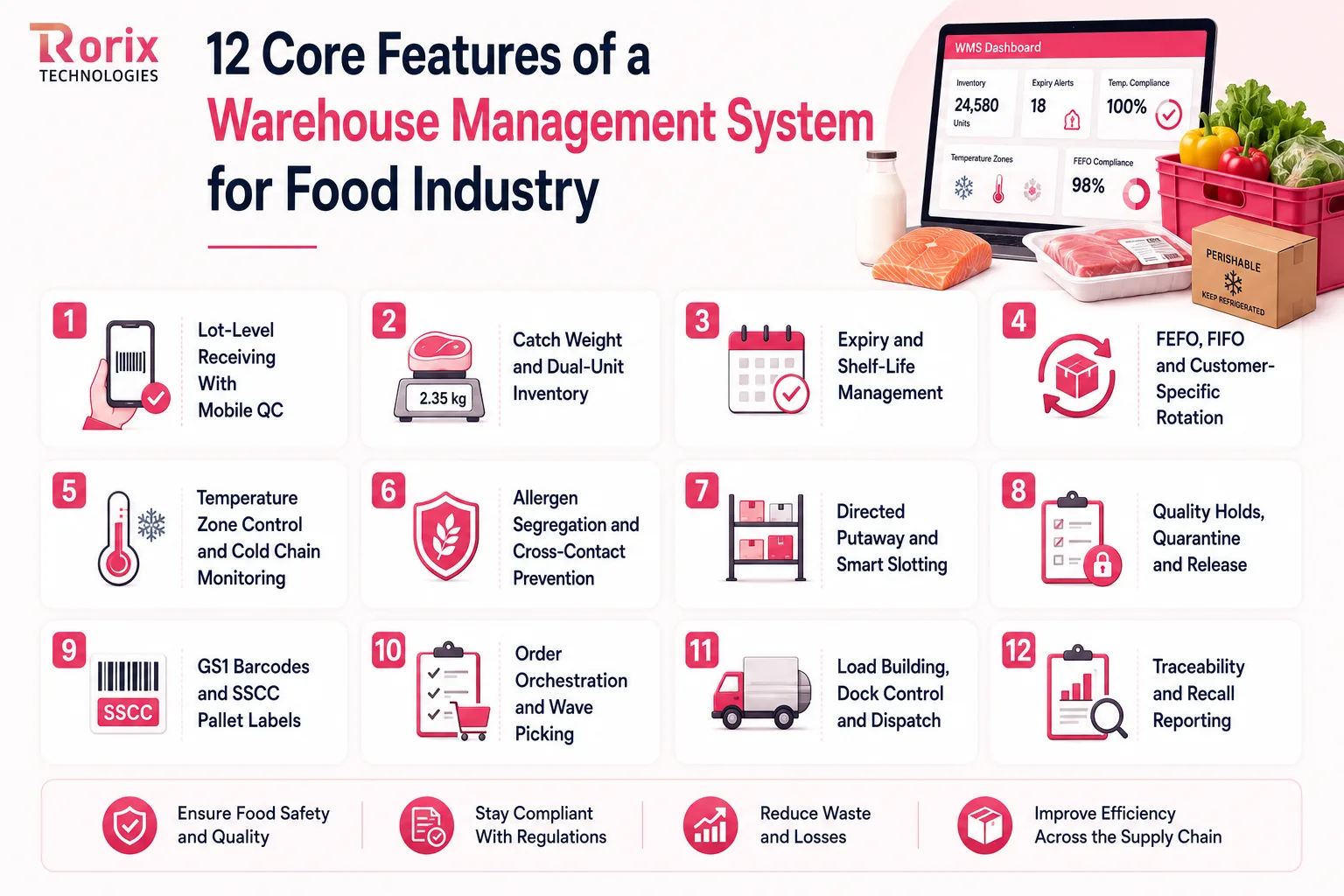
A food WMS must manage lots, expiry dates, temperatures, quality, allergens, picking, loading, and traceability. These 12 features highlight the key capabilities to evaluate for food warehouses, distributors, manufacturers, and 3PLs.
1. Lot-Level Receiving With Mobile QC
Every inbound lot should capture its lot number, receipt date, expiry date, quantity, and temperature at the dock. Mobile scanning lets the team complete QC while receiving and catch supplier discrepancies before the truck leaves.
2. Catch Weight and Dual-Unit Inventory
Food products such as meat, seafood, and cheese often need unit and actual weight tracked together. The WMS should carry both values from receiving through picking and dispatch to reduce billing and inventory errors.
3. Expiry and Shelf-Life Management
The system should capture expiry dates and remaining shelf life at receiving, use them during picking, and trigger near-expiry alerts. This helps teams prioritize short-dated stock, reduce waste, and avoid shipping products that no longer meet customer shelf-life requirements.
4. FEFO, FIFO and Customer-Specific Rotation
Rotation rules should be enforced automatically by SKU, lot, or customer. FEFO helps move products with the earliest expiry first, while FIFO and customer-specific rules handle other inventory requirements without relying on picker judgment.
5. Temperature Zone Control and Cold Chain Monitoring
A food WMS should know whether stock belongs in frozen, chilled, or ambient storage and prevent incorrect putaway. Sensor integration can also record temperatures, alerts, and corrective actions in one audit trail, the same discipline a dedicated cold storage warehouse management system is built around.
6. Allergen Segregation and Cross-Contact Prevention
Allergen information should be stored against the product or lot, not buried in notes. The system can then support segregated storage and picking rules, helping reduce cross-contact risks before an order reaches dispatch.
7. Directed Putaway and Smart Slotting
Putaway should consider product velocity, storage zone, and expiry. Fast-moving or short-dated products can be placed closer to the picking area, reducing travel time and making urgent stock easier to move before it becomes waste.
8. Quality Holds, Quarantine and Release
When stock fails QC or needs investigation, the WMS should immediately place the affected lot on hold or quarantine. It should disappear from available inventory and require an authorized release with a recorded approval.
9. GS1 Barcodes and SSCC Pallet Labels
GS1 barcodes and SSCC pallet labels allow operators to capture product, lot, expiry, quantity, and pallet information through scanning. This improves data accuracy and reduces manual entry across receiving and picking.
10. Order Orchestration and Wave Picking
Orders can be grouped by delivery window, temperature requirements, route, or customer rules and released in controlled waves. Substitution rules can also help teams handle shortages without repeatedly checking with customers.
11. Load Building, Dock Control and Dispatch
The WMS should sequence pallets by delivery stop, temperature zone, and vehicle capacity while guiding the loading team at the dock. Final barcode scanning can verify the right pallets, lots, and orders before the truck leaves, reducing loading and delivery errors.
12. Traceability and Recall Reporting
A lot number should quickly show its receipt, storage location, movements, picks, shipments, and remaining stock. This gives teams a complete product trail for audits, customer queries, and recalls, while helping food 3PLs provide better traceability to their clients.
FEFO vs FIFO: Choosing and Enforcing the Right Rotation Rule
FIFO and FEFO are not interchangeable. The right method depends on the product, expiry risk, and customer shelf-life requirements. A food WMS should support both and apply the right rule at the SKU or lot level.
| Rotation Rule | How It Works | Best For | Key Consideration |
|---|---|---|---|
| FIFO | Oldest received stock is picked first | Canned foods, rice, dry pasta, packaged snacks | Works well when expiry differences are less critical |
| FEFO | Earliest-expiring stock is picked first | Dairy, fresh produce, chilled foods, proteins | Helps reduce expiry-related waste |
| FEFO + Shelf Life | Earliest-expiring lot that meets the requirement is picked | Retail and foodservice orders | Blocks lots that fail minimum shelf-life requirements |
When FIFO Works
FIFO is suitable for products with relatively stable shelf lives, such as canned foods, rice, dry pasta, and packaged snacks. It keeps inventory rotation simple by prioritizing the oldest received stock first.
When FEFO Is Essential
FEFO prioritizes the lot with the earliest expiry, regardless of when it arrived. This makes it critical for dairy, fresh produce, chilled foods, and proteins where expiry dates can vary significantly between lots.
Why Minimum Shelf Life Matters
Some customers require a minimum amount of shelf life at delivery. The WMS should check this requirement during allocation and block lots that fail the threshold, even if they would normally be next in rotation.
Catch Weight: Where Food Warehouse Systems Lose Accuracy
A food shipment can have the right number of cases and still have the wrong weight. That is the challenge with catch weight.
Meat, seafood, cheese, and fresh-cut foods often vary in actual weight. A case marked as 10 kg may weigh 9.7 kg or 10.4 kg. A food WMS needs to track both the number of units and their actual weight throughout the warehouse.
Example:
| Inventory | Expected | Actual |
|---|---|---|
| Cases | 100 | 100 |
| Weight per case | 10 kg | 9.7 kg |
| Total weight | 1,000 kg | 970 kg |
| Difference | 30 kg short |
Without catch-weight tracking, the system may show 100 cases as available even though the warehouse is actually 30 kg short.
Track Units and Weight Together
The WMS should maintain both case quantity and actual weight from receiving through picking, transfers, and dispatch. This gives teams an accurate view of available inventory instead of relying only on piece counts.
Capture Weight During the Workflow
Actual weight should be captured where the work happens, including receiving, picking, transfers, and dispatch. The system can then check weight against order tolerances and flag discrepancies before they reach billing or delivery.
Protect Billing, OTIF, and Inventory Accuracy
Weight errors can affect invoices, order fulfillment, OTIF performance, and stock records. Capturing actual weight throughout the process helps prevent underbilling, short shipments, and inventory discrepancies.
Food Safety Compliance: What Regulators Actually Require From Your WMS
A food WMS should make compliance part of daily warehouse work, not a separate audit exercise. The goal is simple: capture the right records as work happens and make them easy to retrieve when needed.
1. HACCP Needs Clear Control Records
Your WMS should capture receiving temperatures, storage conditions, critical controls, and corrective actions as work happens. Digital records create a clear history of what was checked, when it was checked, and how problems were handled.
2. FDA and USDA Need Reliable Records
Food operations need records that show who did what, when, and where. Capturing data directly during receiving, picking, and storage creates a stronger audit trail than entering information later from paper records or employee memory.
3. BRCGS, SQF, and IFS Need Traceability
Food safety audits can require proof of product traceability, rotation, cleaning, and pest-control activities. Keeping these records connected makes audits faster and reduces the need to collect evidence from multiple systems.
4. UK and EU Rules Require Fast Traceability
Selling into the UK or EU requires businesses to track products one step back and one step forward and support rapid withdrawal when needed. Lot-level allergen data also helps generate accurate product and shipment records.
5. Make Compliance an Automatic Output
The best setup creates compliance records while normal warehouse work happens. If an audit requires manual data collection from several systems, compliance becomes a project. If the WMS can generate the evidence directly, it becomes part of the operation.
This is what separates a true food WMS from a generic platform with a few extra fields.
FSMA 204: What Your Warehouse Needs to Know
FSMA 204 is changing how food businesses manage traceability in the United States. For warehouses, the focus is on capturing the right data, knowing which requirements apply, and being able to retrieve records quickly.
- Know the Current Deadline: The original January 20, 2026 compliance date has changed. Congress directed the FDA not to enforce FSMA 204 before July 20, 2028, following the compliance date extension published in August 2025. The underlying traceability requirements remain unchanged.
- Check If Your Products Are Covered: FSMA 204 applies to foods on the FDA's Food Traceability List, including certain leafy greens, fresh produce, soft cheeses, eggs, seafood, and ready-to-eat foods.
- Track Lot Codes and Key Data: Covered food needs a traceability lot code linked to details such as the product, quantity, dates, location, and reference documents. Your WMS should capture this data as inventory moves.
- Know Which Tracking Events You Own: FSMA 204 defines seven critical tracking events, but warehouses may only handle some of them. Receiving and shipping are common warehouse activities, while processors and repackers may also handle transformation and lot linking.
- Be Ready for a 24-Hour Request: The FDA can request traceability records in an electronic, sortable format within 24 hours during an investigation. Your WMS should make these records easy to retrieve and export without manual spreadsheet work.
Also Read: WMS Implementation Checklist: 50 Steps to Successful Deployment
Recall Readiness: Running a Mock Recall Against Your WMS
A recall tests almost every part of a food WMS at once. The easiest way to find weak points is to run a mock recall before a real one forces you to.
1. Trace Products Back and Forward Quickly
Choose a lot code and ask two questions: where did it come from, and where did it go? Your WMS should show receipts, locations, picks, shipments, and remaining stock from one traceability search.
2. Find the Gaps Before a Real Recall
A mock recall often exposes three problems: broken lot links, missing supporting documents, or incomplete records that are difficult to export. Finding these gaps early gives your team time to fix the process before an actual recall.
3. Put Quality Holds Into the Workflow
A recall also requires fast containment. A quality hold should immediately remove affected stock from available inventory and block picking. Releasing it should require named approval, creating a clear record of who cleared the product.
Buy, Configure or Build: How to Decide
Choosing a food WMS comes down to three routes: buy, configure, or build. The right choice depends on your workflow complexity, integrations, customization needs, and how much control you want.
| Approach | Best For | Advantages | Limitations |
|---|---|---|---|
| Buy | Single sites with standard workflows and manageable SKU ranges | Faster deployment, proven features, lower upfront development effort | Limited customization and dependence on the vendor's roadmap |
| Configure | Businesses that need some workflow changes without full custom development | More flexibility while keeping the core platform | Costs can rise when workarounds, spreadsheets, and custom requests become common |
| Build | Multi-site operations, complex integrations, 3PLs, unusual catch-weight rules, and automation | Full control over workflows, integrations, data model, code, and roadmap | Higher upfront cost, longer development time, and greater ownership responsibility |
If you are shortlisting partners for that route, our guide to warehouse management software development companies covers how to compare them fairly.
Ask These 10 Questions Before You Sign
Ask vendors to show, not tell, during a live demo:
- Rotation: Can FEFO block a non-compliant pick?
- Catch weight: Is actual weight captured during scanning?
- Lot tracking: Which transactions capture lot data?
- Traceability: Can you trace one lot end-to-end?
- Compliance: Can you export a sortable traceability file?
- Allergens: Are allergen rules enforced automatically?
- Temperature: Can wrong-zone putaway be blocked?
- Integration: How does lot data reach advance ship notices?
- Timeline: What does implementation look like week by week?
- Ownership: Who owns the code, data, and future changes?
How to Build a Warehouse Management System for Food Industry Operations: An 8-Phase Path
Building a food WMS is more than developing software. You need to understand the warehouse, define food-specific rules, connect existing systems, and prove that traceability works before going live.
Follow these eight phases to move from an initial idea to a reliable food warehouse system.
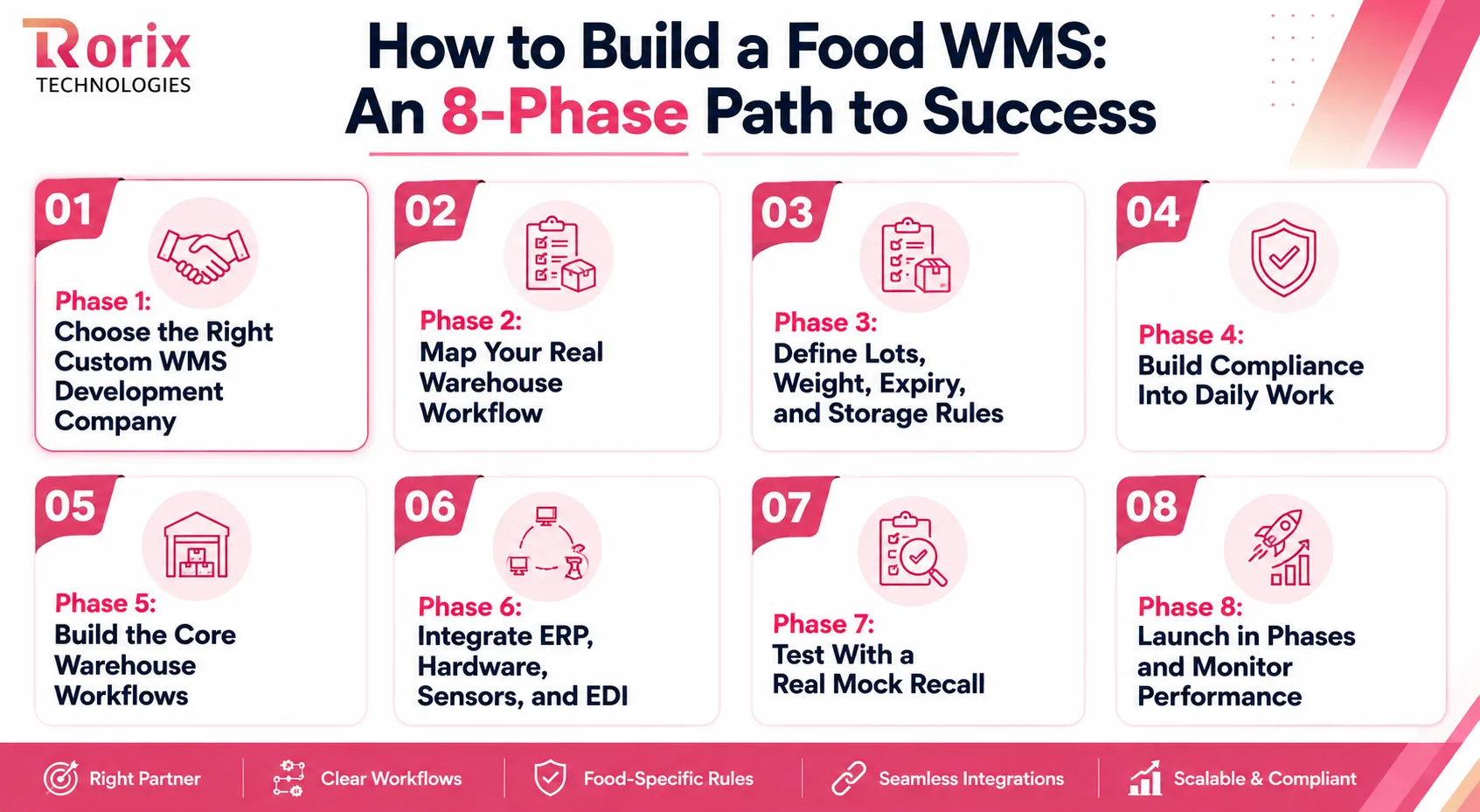
Phase 1: Choose the Right Custom WMS Development Company
The right development partner can make the entire project easier to plan and execute. Look for experience with food warehouse workflows, FEFO, catch weight, lot traceability, temperature controls, ERP integrations, and warehouse automation. Our guide to building a custom warehouse management system covers what the build should own and what you should buy.
Before hiring, ask potential partners to show relevant projects, explain their development process, provide a realistic timeline, and clarify code ownership and post-launch support.
Rorix Technologies helps businesses build custom WMS solutions around their actual warehouse workflows. With experience across complex SaaS platforms and business integrations, Rorix can help define requirements, plan the architecture, connect existing systems, and develop a scalable food WMS.
Phase 2: Map Your Real Warehouse Workflow
Before development starts, see how your warehouse actually works. Follow receiving, putaway, picking, dispatch, and exception handling.
Document manual tasks, spreadsheets, bottlenecks, approval steps, and common errors. These findings become clear requirements for the new system.
Phase 3: Define Lots, Weight, Expiry, and Storage Rules
Decide how the WMS will manage lot numbers, expiry dates, remaining shelf life, catch weight, temperature zones, allergens, and inventory status.
Defining these rules early creates a stronger foundation for workflows, screens, and integrations.
Phase 4: Build Compliance Into Daily Work
Compliance should happen as part of normal warehouse operations. Receiving should capture lot data, picking should follow rotation rules, and dispatch should record shipment details.
If you handle repacking or transformation, the system should also connect input lots to output lots for complete traceability.
Phase 5: Build the Core Warehouse Workflows
Start with receiving, putaway, inventory movements, replenishment, FEFO/FIFO picking, loading, and dispatch.
Test these workflows with real warehouse users before adding advanced analytics or optimization features.
Phase 6: Integrate ERP, Hardware, Sensors, and EDI
Connect the WMS with the systems and equipment your warehouse relies on, including ERP, scanners, scales, label printers, temperature sensors, EDI, production systems, and TMS.
Test each integration in stages to catch data issues early.
Phase 7: Test With a Real Mock Recall
Select a lot and trace it backward to its supplier and forward to every affected order and shipment.
Check whether the system can quickly retrieve locations, quantities, movements, documents, and shipment records. Fix every gap before launch.
Phase 8: Launch in Phases and Monitor Performance
Start with one site, zone, or user group instead of launching everywhere at once. Track inventory accuracy, picking errors, fulfillment, system performance, and user adoption.
Fix what you learn, refine the rollout process, and then expand gradually.
Integrations a Food WMS Cannot Skip
A food WMS needs clean data moving between inventory, production, equipment, orders, and delivery. These six integrations keep warehouse operations connected and reduce manual work.
1. ERP and Finance
Connect the ERP for orders, suppliers, customers, and master data. Send receipts, picks, and shipments back in real time to keep warehouse and financial records aligned.
2. Production and Manufacturing Execution
Connect production batches directly to warehouse inventory and link input lots to output lots. This preserves transformation traceability and prevents product history from breaking after manufacturing.
3. Temperature Sensors and Cold Chain
Connect temperature sensors for continuous monitoring instead of manual checks. Store readings, alerts, deviations, and corrective actions with the affected lot for stronger cold-chain control and audits.
4. Scales, Printers and Handheld Scanners
Connect scales, label printers, and scanners directly to warehouse transactions. Capture actual weight and print lot, expiry, and quantity data automatically to reduce manual entry and scanning errors.
5. EDI, Ship Notices and Retailer Portals
Connect EDI and retailer systems to automatically include current lot data in ASNs, reducing manual work, preventing errors, and helping suppliers meet retailer requirements.
6. Carriers, TMS and Route Planning
Connect the WMS with transport and route planning to share stop sequence, temperature requirements, and load details. This helps teams build organized loads and support on-time, in-temperature delivery.
How Much a Warehouse Management System for the Food Industry Costs to Buy or Build
For small and mid-size operations, buying a cloud WMS typically runs $25,000 to $200,000 in first-year costs, with large multi-site operations reaching $200,000 to $500,000. A custom-built system typically costs $30,000 to $180,000+, depending on warehouse complexity, integrations, features, and customization. Published market analyses place custom WMS builds in a similar band, and our full WMS cost breakdown maps the buy-side tiers by warehouse size and order volume.
Food-specific functionality sits on top of those bands rather than outside them: FEFO, catch weight, allergen controls, and compliance reporting push a site toward the upper end of whichever tier it lands in.
Use the points below to shape the budget, then price the specifics against your own sites, workflows, and systems.
| Cost driver | What increases it | Indicative effect on budget |
|---|---|---|
| Site and zone complexity | Multiple facilities, temperature zones, and workflows | Baseline, rising with each site or zone |
| Food-specific functionality | FEFO, catch weight, expiry, allergens, traceability | Moderate to substantial uplift |
| Integration count | ERP, EDI, production, sensors, scales, automation | Moderate to high, based on integration depth |
| Hardware and automation | Scanners, printers, sensors, conveyors, robotics | Significant, varies by warehouse |
| Data migration | Historical lot, expiry, supplier, and inventory data | Frequently underestimated |
| Custom workflows | Client rules, special picking, approvals, reporting | Moderate to high, based on complexity |
| Buy vs build | Platform licensing vs custom development | Build costs more upfront; buying is faster |
These are planning ranges, not quotes. For a scoped number, get a project cost estimate.
Also Read: How to Calculate WMS ROI: Complete Guide
8 Implementation Mistakes That Cost Food Warehouses the Most
Most food WMS failures come from avoidable implementation mistakes, not missing technology. These eight problems are worth addressing before they become expensive operational issues.
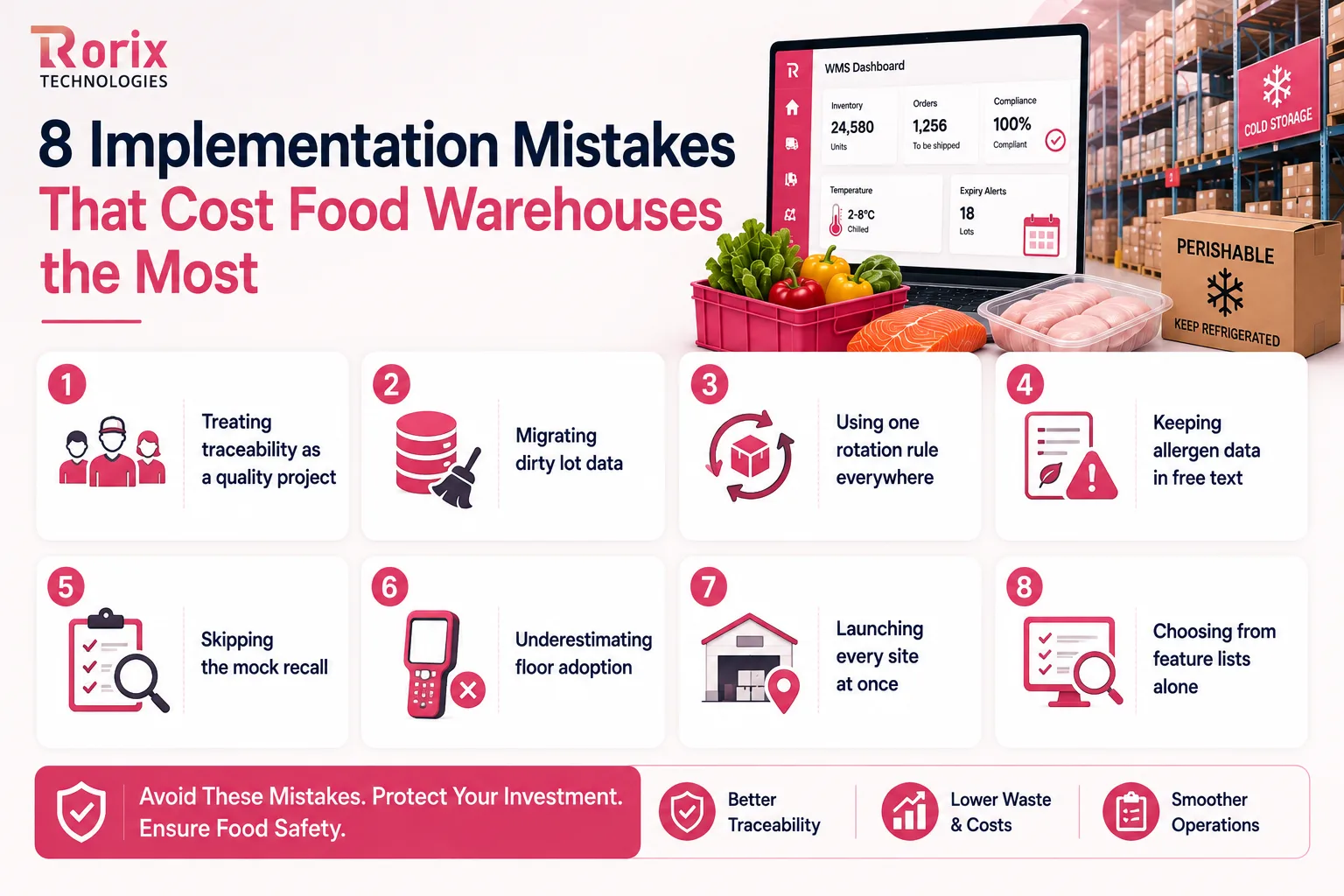
- Treating traceability as a quality project: involve warehouse teams from day one. Receiving and dispatch create the data that makes traceability work.
- Migrating dirty lot data: clean duplicate lot codes, inconsistent dates, and incorrect expiry records before migration. Bad data can destroy trust in the new WMS immediately.
- Using one rotation rule everywhere: configure FIFO, FEFO, and shelf-life rules by SKU. Different products need different rotation logic.
- Keeping allergen data in free text: structure allergen information so the WMS can enforce segregation and picking restrictions instead of relying on workers to read notes.
- Skipping the mock recall: run a full traceback and traceforward drill before go-live. Any missing connection or record should block the launch.
- Underestimating floor adoption: test scanners and mobile workflows with real pickers. Slow screens, too many taps, or unsuitable devices quickly push teams back to paper.
- Launching every site at once: start with one site or zone, fix what you learn, and expand using a tested rollout playbook. This keeps disruption under control.
- Choosing from feature lists alone: ask vendors to demonstrate FEFO, traceability, and allergen controls live using your own warehouse scenarios, not generic slides.
Why Businesses Choose Rorix for Custom Food WMS Development
Building a food WMS takes more than software development. It requires an understanding of warehouse workflows, food traceability, compliance, integrations, and real-world floor operations, before and after go-live.
That is where Rorix Technologies can help. We have delivered 27 software projects for businesses across the US, UK, Canada, Australia, and New Zealand, with a 5.0 Clutch rating.
Why businesses choose Rorix:
- Engineered for the domain: WMS and SaaS platforms built around your workflow, not adapted from a generic template.
- Accountable past go-live: A dedicated team of senior engineers with a named technical lead, working in 2-week sprints and providing continued support.
- Integration depth: 40+ integrations delivered on Driven's field-service performance platform, connecting complex business workflows and systems.
- A verifiable record: 27 projects delivered, 5.0 on Clutch, and long-term client partnerships.
- Full ownership: You keep the code, data model, and roadmap instead of being locked into a vendor's product limitations.
Planning a food warehouse build? Our WMS solutions team can review your warehouse workflows, compliance requirements, integrations, and development scope before you commit to an approach.
Get a Free Consultation and Project Estimate today.
The One Test That Tells You If Your Warehouse System Is Ready
Food warehouses need more than software that simply counts inventory. The right WMS should help you control lots, expiry, FEFO, catch weight, temperature, allergens, traceability, and compliance from receiving to dispatch.
Whether you choose to buy, configure, or build, start with your real workflows and business needs. A well-designed system can improve accuracy, reduce waste, simplify compliance, and make recalls faster.
Before you decide, test one simple thing: Can you trace any lot backward and forward in minutes? If the answer is no, it may be time to rethink your warehouse system.
Planning a food WMS? Contact us to review your workflows, integrations, compliance needs, and development scope, and get a clear plan for your project.
Frequently Asked Questions
What is a warehouse management system for food industry operations?
A food WMS manages receiving, storage, picking, and dispatch while controlling lots, expiry, rotation, temperature, allergens, and traceability across daily warehouse operations.
How is a food WMS different from a standard warehouse system?
A food WMS manages lot-level inventory, catch weight, FEFO, expiry, allergens, and temperature controls, allowing critical warehouse rules to guide or block actions automatically.
What is FEFO and why does it matter?
FEFO (First Expired, First Out) sends the earliest-expiring lot first. It helps reduce waste, protect remaining shelf life, and meet customer rotation requirements across food warehouse operations.
Does a food WMS help with FSMA 204 compliance?
Yes. A food WMS captures lot and traceability data during receiving, shipping, and transformation, making required records easier to maintain, retrieve, and export during regulatory investigations.
What is the FSMA 204 compliance deadline now?
The current FSMA 204 compliance date is July 20, 2028. The enforcement timeline changed, but the underlying traceability requirements remain unchanged for covered food businesses.
Can a food WMS handle catch weight?
Yes. A food WMS can capture actual weight and piece quantity together, apply tolerances, and carry both values through receiving, picking, transfers, and dispatch for greater inventory accuracy.
How much does a food warehouse management system cost?
Buying a cloud WMS typically runs $25,000 to $200,000 in first-year costs for small and mid-size operations, and a custom build costs $30,000 to $180,000+. Actual costs depend on sites, integrations, hardware, automation, users, and customization.
Should we buy or build a custom food WMS?
Buy for standard workflows and faster deployment. Build when you need complex integrations, multi-site workflows, catch weight, custom rules, or automation beyond an existing platform's capabilities.
Costing a WMS build?
Send us your SKU count and daily order volume. You get back a scope and a number you can take to your CFO.
Continue learning
Written by
Renish DadhaniyaFounder & Director, Rorix Technologies
Renish co-founded Rorix Technologies and drives the engineering and delivery culture across the organization. Beyond engineering, he leads the company's sales, finance, and HR operations, building the infrastructure that lets the team focus on shipping quality software. With deep hands-on expertise in architecture and team building, he ensures every project lands on time to the quality standards clients demand.
View full profileRelated articles
Cost of Warehouse Management Software in Pharma: Complete Pricing Breakdown 2026
What does a pharma WMS really cost? Year-one bands by operator profile, what validation and DSCSA add, and the three-year total hiding behind the quote.
Read article
Cold Storage Warehouse Management System: A Complete Guide to Building a Custom WMS for Cold Chain and Pharma
Spoilage you cannot explain, audits you dread, FEFO nobody enforces? Here is what a cold storage WMS has to do, and what building one actually takes.
Read article
AI in HRMS: Where It Pays Back and What the Law Now Expects
AI in HRMS splits in two. Automating paperwork is ordinary software work. Scoring or ranking people is a regulated employment decision, with rules attached.
Read article