
EDI vs API: Which Integration Works Best for Warehouses and 3PLs in 2026?
Compare EDI vs API for warehouses and 3PLs. Explore key differences, EDI transaction sets, integration costs, timelines, and when to use both.
On this page49 sections
Key Takeaways: EDI vs API for Warehouses and 3PLs
- EDI supports partner compliance: Retailers require standardized orders, ASNs (advance ship notices), and invoices, and suppliers that miss them pay chargebacks.
- APIs keep data current: Real-time inventory, ecommerce orders, carrier labels, and tracking work best with API connections.
- Most warehouses need both: Trading partners often dictate the required format, so EDI and APIs must work together.
- Your WMS connects the workflows: Map EDI documents and API data into one shared model for consistent orders and inventory.
- Costs depend on integration needs: EDI costs grow with partner onboarding and document mapping, while APIs require development and ongoing maintenance.
A retailer rejects your shipment because one carton label does not match the EDI file. Meanwhile, your online store keeps selling out-of-stock products because inventory updates run overnight.
That is why the EDI vs API decision matters for businesses using warehouse management software. EDI handles standardized transactions with retail and B2B partners, while APIs support real-time inventory updates, order processing, and system communication.
But choosing the wrong integration approach can lead to chargebacks, manual data entry, and delayed updates. The right choice depends on your trading partners, warehouse workflows, and how quickly your systems need to exchange data.
In this guide, you'll learn:
- 10 EDI transaction sets used by 3PLs
- 8 warehouse workflows where APIs outperform EDI
- 12 key differences between EDI and APIs
- When to use EDI, APIs, or both
- Integration options, costs, and timelines
- A practical 7-step rollout plan
By the end of this guide, you'll know which integration fits each partner and workflow, how to compare implementation options, and how to connect both methods through one WMS without adding unnecessary complexity.
What Is EDI in Warehousing?
Electronic Data Interchange (EDI) lets businesses exchange standardized documents without manual data entry. In warehousing, it connects brands, 3PLs (third-party logistics), retailers, and carriers to exchange shipping orders, shipment confirmations, inventory reports, and invoices.
ANSI X12 is widely used in North America, while UN/EDIFACT is common in Europe and international trade. Documents move through secure channels such as AS2, SFTP, or a value-added network (VAN).
How EDI Works With a WMS
A typical EDI workflow has five steps:
Step 1. Order creation: A brand's ERP creates a warehouse shipping order for 400 units.
Step 2. Translation: EDI software turns it into an X12 940 (or the EDIFACT equivalent).
Step 3. Transmission: The file travels securely through AS2, SFTP, or a VAN.
Step 4. Acknowledgment: The receiving system validates the document and may return an EDI 997 acknowledgment.
Step 5. WMS processing: The order becomes a warehouse task, so staff can pick and ship goods without re-entering data.
EDI is like mailing a formal letter in a strict format that the other office always understands. An API is like a text message that arrives in seconds.
What Is an API in Warehousing?
An application programming interface (API) lets systems exchange data or trigger actions directly. Warehouse APIs commonly use REST over HTTPS with JSON, though some integrations use SOAP or GraphQL.
APIs typically work in two ways: request and response, such as asking a carrier for a shipping rate, and webhooks, which send events like a new paid order as they happen.
API calls are secured using OAuth 2.0 or API keys over encrypted HTTPS. Also, platforms such as Shopify, Amazon, UPS, and NetSuite have different endpoints, data fields, rate limits, and error codes. Each connection may need separate development and maintenance.
10 EDI Transaction Sets Every Warehouse and 3PL Should Know
For 3PLs, EDI integration relies heavily on warehouse-specific transaction sets in the 94x series plus the retail documents around it. Knowing these codes helps teams map documents correctly, track shipments, and keep inventory records accurate.
EDI transaction sets matter most when retail partners require standardized documents.
| Code | Transaction set | Direction | Purpose |
|---|---|---|---|
| 850 | Purchase Order | Retailer to brand | Starts the order process. |
| 940 | Warehouse Shipping Order | Brand to 3PL | Instructs the warehouse what to pick, pack, and ship. |
| 945 | Warehouse Shipping Advice | 3PL to brand | Confirms shipped quantities, cartons, and tracking details. |
| 943 | Warehouse Stock Transfer Shipment Advice | Brand to 3PL | Announces incoming stock. |
| 944 | Warehouse Stock Transfer Receipt Advice | 3PL to brand | Confirms received stock, shortages, or damage. |
| 947 | Warehouse Inventory Adjustment Advice | 3PL to brand | Reports inventory corrections, damage, or stock holds. |
| 846 | Inventory Inquiry/Advice | 3PL to brand or brand to retailer | Shares available inventory by SKU and location. |
| 856 | Ship Notice/Manifest (ASN) | Shipper to retailer | Sends carton-level shipment details before delivery. |
| 810 | Invoice | Brand to retailer | Bills the retailer for shipped goods. |
| 997 | Functional Acknowledgment | Receiver to sender | Confirms document receipt and syntax acceptance. |
Other common EDI transaction sets include 214 for shipment status, 210 for freight invoices, and 753 and 754 for freight routing: the supplier sends a 753 routing request and the retailer replies with a 754. International partners may use EDIFACT messages such as ORDERS, DESADV, INVOIC, and INVRPT.
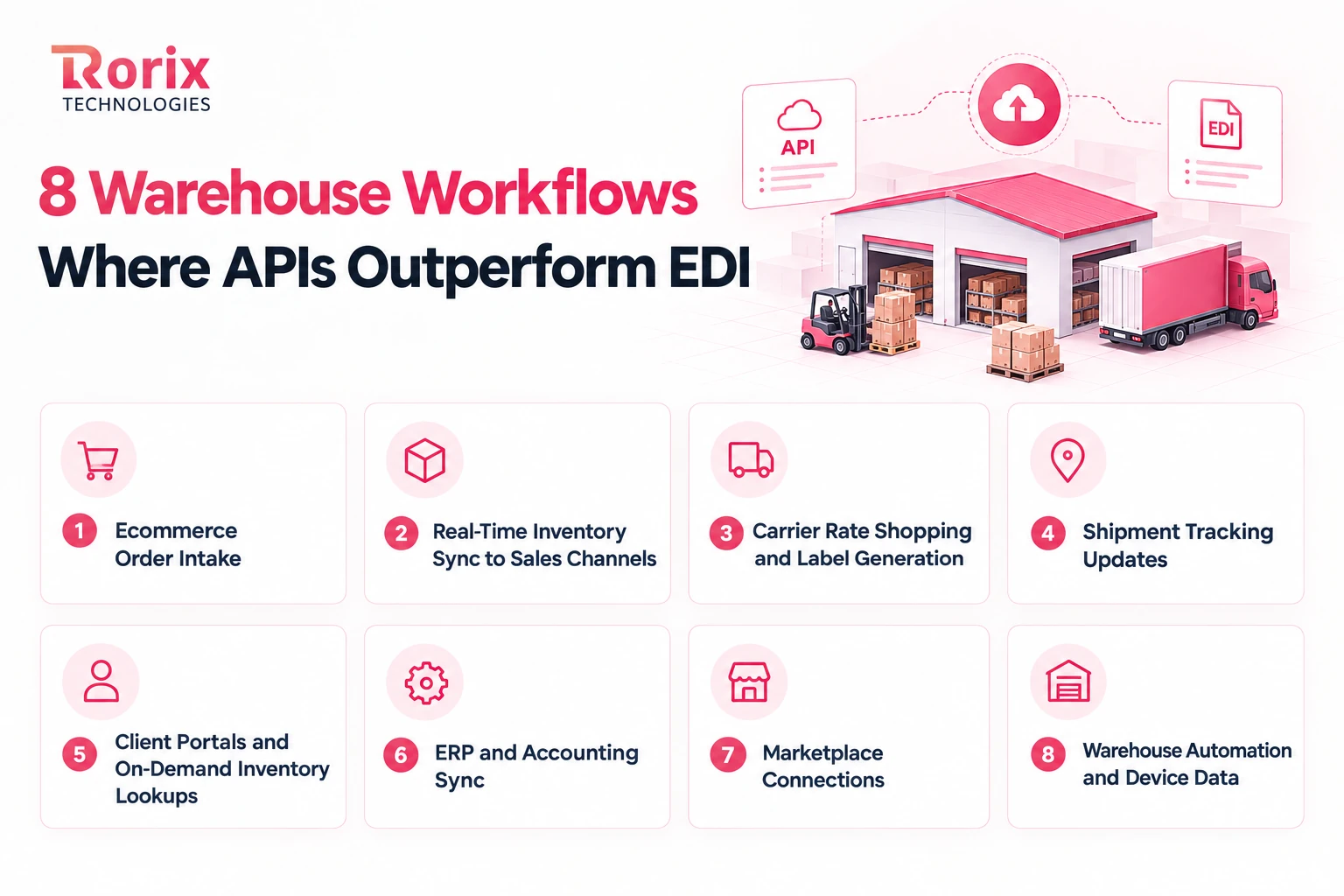
8 Warehouse Workflows Where APIs Outperform EDI
EDI handles standardized business documents, while APIs are better suited to real-time updates and interactive workflows. The right choice depends on how quickly each warehouse process needs data.
1. Ecommerce Order Intake
When customers order through Shopify, WooCommerce, or BigCommerce, webhooks can send orders to your WMS within seconds. This helps warehouse teams process orders faster and meet same-day shipping cutoffs. Waiting for scheduled EDI batches can delay fulfillment and affect delivery times.
2. Real-Time Inventory Sync to Sales Channels
Nightly inventory files can cause overselling when stock changes during the day. APIs update sales channels as inventory changes, helping prevent orders for unavailable products. See real-time inventory with WebSocket and pub-sub architecture for how event-driven updates work.
3. Carrier Rate Shopping and Label Generation
Carrier APIs from UPS, FedEx, and DHL return shipping rates and labels within seconds. Your WMS can compare available services based on cost and delivery commitments. This helps pack stations print labels quickly without waiting for another batch cycle.
4. Shipment Tracking Updates
Carrier APIs and webhooks deliver parcel tracking updates quickly, while truckload and LTL shipments may use EDI 214 status messages. Customers and 3PL clients can see parcel scans in their portals sooner. Supporting both methods helps maintain existing EDI workflows while improving tracking visibility.
5. Client Portals and On-Demand Inventory Lookups
APIs let 3PL clients check current stock and order status through a portal instead of waiting for the next EDI 846 inventory report. This gives clients faster access to SKU-level inventory information. It also reduces routine status requests to account managers and improves warehouse visibility.
6. ERP and Accounting Sync
Platforms such as NetSuite and Microsoft Dynamics 365 Business Central use APIs to exchange orders, item data, and invoices with a WMS. This keeps operational and financial records aligned without relying entirely on scheduled file exchanges. Learn more about WMS integration with ERP.
7. Marketplace Connections
Amazon Selling Partner API and Walmart Marketplace API support marketplace integrations through APIs. However, Walmart retail suppliers may still need EDI for purchase orders and shipment notices. The required method depends on whether you are connecting to a marketplace or fulfilling a retailer's supply-chain requirements.
8. Warehouse Automation and Device Data
Scanners, scales, dimensioners, and mobile robots send operational data to warehouse systems through APIs or messaging. These updates help the WMS respond immediately to scans, measurements, and equipment events. Using real-time communication keeps packing lines moving without waiting for scheduled document exchanges.
Also Read: WMS Software for Ecommerce: Features, Integrations, and How to Build the Right Fit
EDI vs API: 12 Key Differences for Warehouse Operations
Both EDI and APIs exchange data between systems, but they differ in format, timing, costs, and partner requirements. These 12 differences help you choose the right integration for each warehouse workflow.
| Criteria | EDI | API |
|---|---|---|
| Data format | Standardized ANSI X12 or EDIFACT documents | JSON or XML data defined by each platform |
| Unit of exchange | Complete documents, such as orders, ASNs, and invoices | Individual records, requests, or events |
| Timing | Scheduled batches or near-real-time processing | Usually real-time, often within seconds |
| Communication pattern | Sends documents for later processing and acknowledgment | Uses request-response calls or event webhooks |
| Transport | AS2, SFTP, or a value-added network (VAN) | HTTPS |
| Standards | Industry standards with partner-specific rules | Platform-specific endpoints and requirements |
| Delivery confirmation | EDI 997 acknowledgments and AS2 MDN receipts | HTTP status codes and response data |
| Error handling | Some errors surface after processing or through later partner notices | Errors can return immediately, allowing retries or alerts |
| Volume profile | Suited to batches of complete business documents | Suited to frequent, smaller data exchanges, subject to rate limits |
| Partner onboarding | Requires document mapping, testing, and sometimes certification | Requires API-specific development and testing |
| Cost model | Setup, partner, VAN, and sometimes per-document fees | Development, maintenance, and possible usage fees |
| Who requires it | Retailers, distributors, grocery chains, and automotive buyers | Ecommerce platforms, marketplaces, carriers, and SaaS applications |
Two differences matter most in warehouse operations: timing and partner requirements. APIs help keep inventory and orders updated quickly, while EDI supports standardized transactions required by many retail partners.
The choice is not always yours to make, because a retailer's routing guide may require EDI even when an API would suit your workflow better.
Is API Replacing EDI?
No. EDI remains essential for retail and freight transactions, while APIs support faster, real-time data exchange. Most warehouses need both.
Why Retailer Mandates and Chargebacks Keep EDI in Place
Retailers specify required EDI documents, labels, and shipment deadlines in their routing guides. Missing an ASN field or sending it late can trigger chargebacks. EDI keeps these requirements consistent across thousands of suppliers.
Where Warehouse Integration Is Heading
Modern EDI providers offer APIs that connect EDI workflows with a WMS. Event-triggered processing and AI-assisted mapping are also making integrations easier to manage. The future is using both methods together, not replacing one with the other.
Now that you have seen why EDI stays, let us take a look at choosing the right method for each partner and flow.
When to Use EDI, API, or Both in Your Warehouse
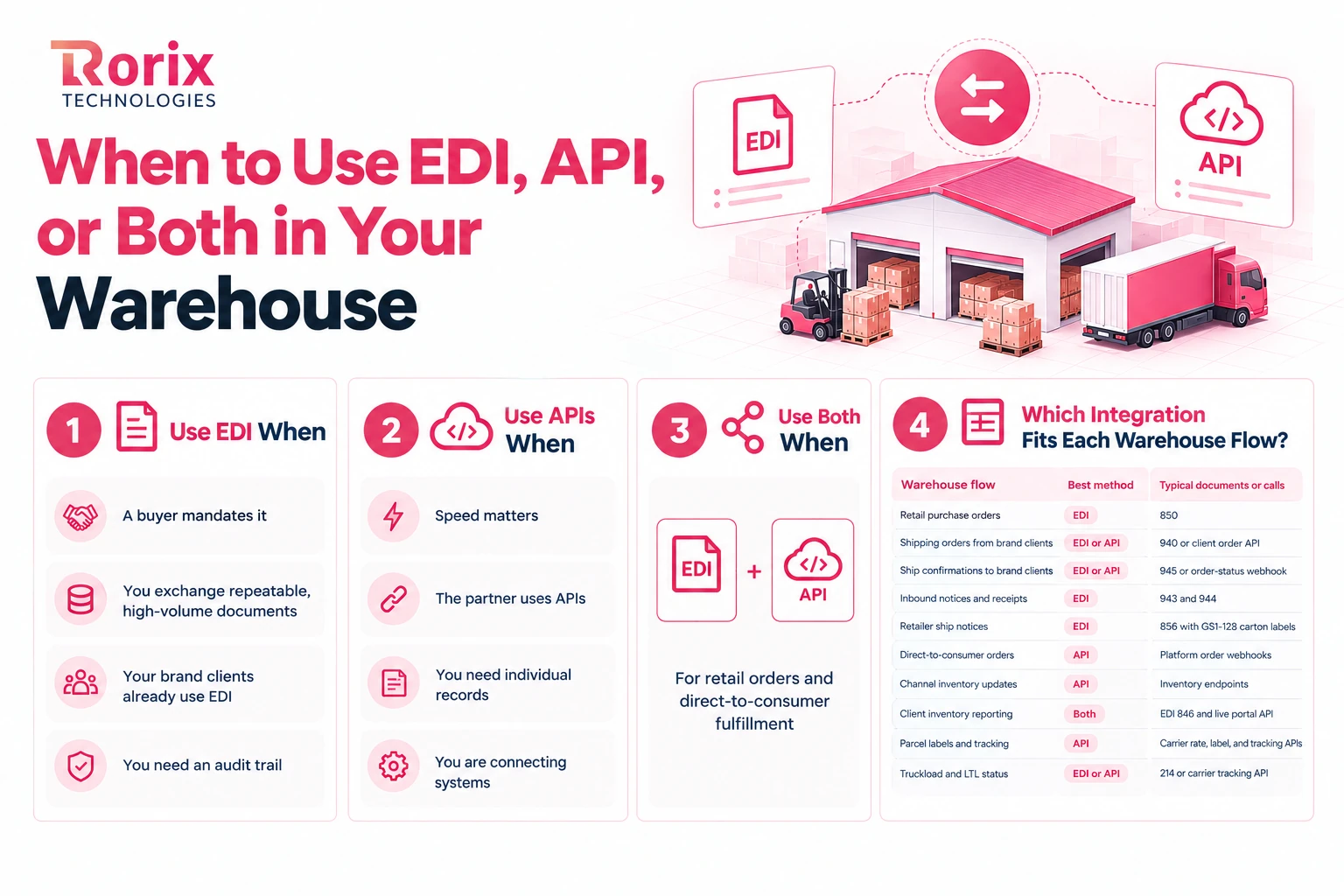
Choose the integration method for each partner and workflow, not for the entire warehouse. Retailer requirements, data speed, and operational needs determine the best fit.
Use EDI When
- A buyer mandates it: Retailers require documents such as 850 purchase orders, 856 ship notices, and 810 invoices.
- You exchange repeatable, high-volume documents: Wholesale orders and replenishment follow standardized formats.
- Your brand clients already use EDI: Many send 940 shipping orders and expect 945 shipment confirmations from their 3PL.
- You need an audit trail: Acknowledgments and delivery receipts support compliance checks and chargeback disputes.
Use APIs When
- Speed matters: Live inventory updates, same-day order processing, and label printing cannot wait for scheduled batches.
- The partner uses APIs: Ecommerce platforms and many parcel carriers provide API-based integrations.
- You need individual records: A client can check one SKU's stock without requesting a complete inventory file.
- You are connecting systems: ERPs, client portals, and warehouse automation commonly use APIs to exchange data.
Use Both When
Use both for warehouses handling retail orders and direct-to-consumer fulfillment. Retail clients can send 940 shipping orders through EDI, while ecommerce orders arrive through API webhooks. Both workflows can feed the same WMS and the same pick queue.
Which Integration Fits Each Warehouse Flow?
| Warehouse flow | Best method | Typical documents or calls |
|---|---|---|
| Retail purchase orders | EDI | 850 |
| Shipping orders from brand clients | EDI or API | 940 or client order API |
| Ship confirmations to brand clients | EDI or API | 945 or order-status webhook |
| Inbound notices and receipts | EDI | 943 and 944 |
| Retailer ship notices | EDI | 856 with GS1-128 carton labels |
| Direct-to-consumer orders | API | Platform order webhooks |
| Channel inventory updates | API | Inventory endpoints |
| Client inventory reporting | Both | EDI 846 and live portal API |
| Parcel labels and tracking | API | Carrier rate, label, and tracking APIs |
| Truckload and LTL status | EDI or API | 214 or carrier tracking API |
Also Read: 3PL Warehouse Management System: Why the Client Is the Unit of Scale
How EDI and APIs Work Together in a Hybrid Warehouse Stack
A hybrid setup lets EDI and APIs work together through one WMS. The goal is to keep orders, inventory, and shipment data consistent, regardless of how each partner sends it.
1. Your WMS as the Translation Hub
Your WMS should use one shared data model for orders, receipts, inventory, and shipments. Integration adapters translate incoming EDI files or API payloads into that model, then format outgoing data for each partner. A message queue helps manage peak volumes and isolate failures; see REST vs message queue patterns for WMS to ERP integration for more detail.
2. Hybrid Patterns That Work in Warehouses
- EDI to API: A brand sends an EDI 940 over AS2, which is translated into data for the WMS order API.
- API to EDI: A carrier API returns the label and tracking number, and the WMS combines them with its own pack and carton records to build an EDI 945 for the brand and an EDI 856 for the retailer.
- API alongside EDI: The WMS sends an EDI 945 shipment confirmation while the client's team checks live order status through a portal API.
3. Example: One Retail Replenishment Order, End to End
- Retailer places an order: The retailer sends an EDI 850 purchase order to the brand.
- Brand releases the order: The brand's ERP sends an EDI 940 shipping order to the 3PL.
- WMS creates tasks: The order maps into the WMS and becomes picking work.
- Team picks and packs: Scanners confirm cartons, and the pack station prints GS1-128 labels.
- Carrier is booked: The WMS requests rates through a carrier API. When the retailer controls freight, an EDI 753 routing request goes to the retailer on the brand's behalf, and the retailer's 754 names the carrier.
- Shipment is confirmed: The WMS sends an EDI 945 to the brand with shipped quantities and tracking details.
- Retailer receives the ASN: The EDI 856 lists carton contents and must match the shipment labels.
- Partners stay informed: Tracking webhooks update the client portal, while the brand sends its EDI 810 invoice to the retailer.
EDI Provider, iPaaS, Connectors, or Custom Layer: How to Connect Your Warehouse
The right integration setup depends on your trading partners, WMS, and workflow complexity. These four approaches help you connect systems without adding unnecessary complexity.
| Approach | How it works | Best for | Watch-outs |
|---|---|---|---|
| Managed EDI provider or VAN | Translates and routes EDI documents, often handling partner onboarding | Warehouses working with many retail partners | Per-document or kilo-character fees, plus limited API coverage |
| Prebuilt WMS connectors | Connects your WMS to common platforms and carriers | Standard workflows using popular platforms | Custom partner requirements may fall outside the template |
| iPaaS or middleware | Manages mappings, workflows, and connectors between systems | Warehouses connecting multiple systems | Extra subscription costs and integration logic to maintain |
| Custom integration layer | Handles custom mapping and validation within or beside your WMS | 3PLs with unique client rules, heavy EDI traffic, or custom WMS needs | Requires ongoing engineering and monitoring |
Many warehouses combine these approaches. A managed EDI provider can handle document transport, while a custom layer maps data into the WMS. This keeps EDI integration costs more predictable while giving your team control over business rules.
EDI vs API Cost and Timeline for Warehouses
Integration costs depend on your trading partners, document requirements, and systems. These typical ranges are per connection, not Rorix quotes, and align with our WMS integration best practices guide.
| Integration | Typical timeline | Indicative cost |
|---|---|---|
| New EDI trading partner (mapping, testing, certification) | 4 to 8 weeks | $20,000 to $50,000 |
| Ecommerce platform API (Shopify, Magento) | 2 to 4 weeks | $5,000 to $20,000 |
| Shipping carrier API | 1 to 2 weeks | $3,000 to $10,000 |
| Middleware or iPaaS setup | 2 to 4 weeks | $10,000 to $30,000 |
If your current WMS cannot support both methods, a custom WMS with built-in EDI and API integration may be a better fit.
A single-site custom WMS with ERP integration from Rorix runs $30,000 to $64,000 over 3 to 4 months, with go-live at 8 to 12 weeks. Multi-site or RFID builds run $80,000 to $180,000+ over 5 to 6+ months.
See our guide on how to build a custom warehouse management system for the key development stages.
What Drives EDI and API Integration Costs?
- Partner count: Each trading partner needs its own rules, mappings, and testing, making onboarding a major EDI cost.
- Document variety: Supporting 940, 945, 943, 944, 846, and 856 costs more than integrating a single order flow.
- Label and ASN compliance: Retailer certification may require several testing rounds before go-live.
- Recurring provider fees: VAN and EDI provider charges can rise with monthly document volume.
- API maintenance: Platform updates, version changes, and rate limits require ongoing engineering.
- Data quality: Incorrect SKUs, units of measure, or location codes can cause failed transactions.
Need an estimate? Use the Project Cost Estimator to assess your integration requirements.
Now that you have seen what integration costs, let us take a look at how to roll it out without disrupting the floor.
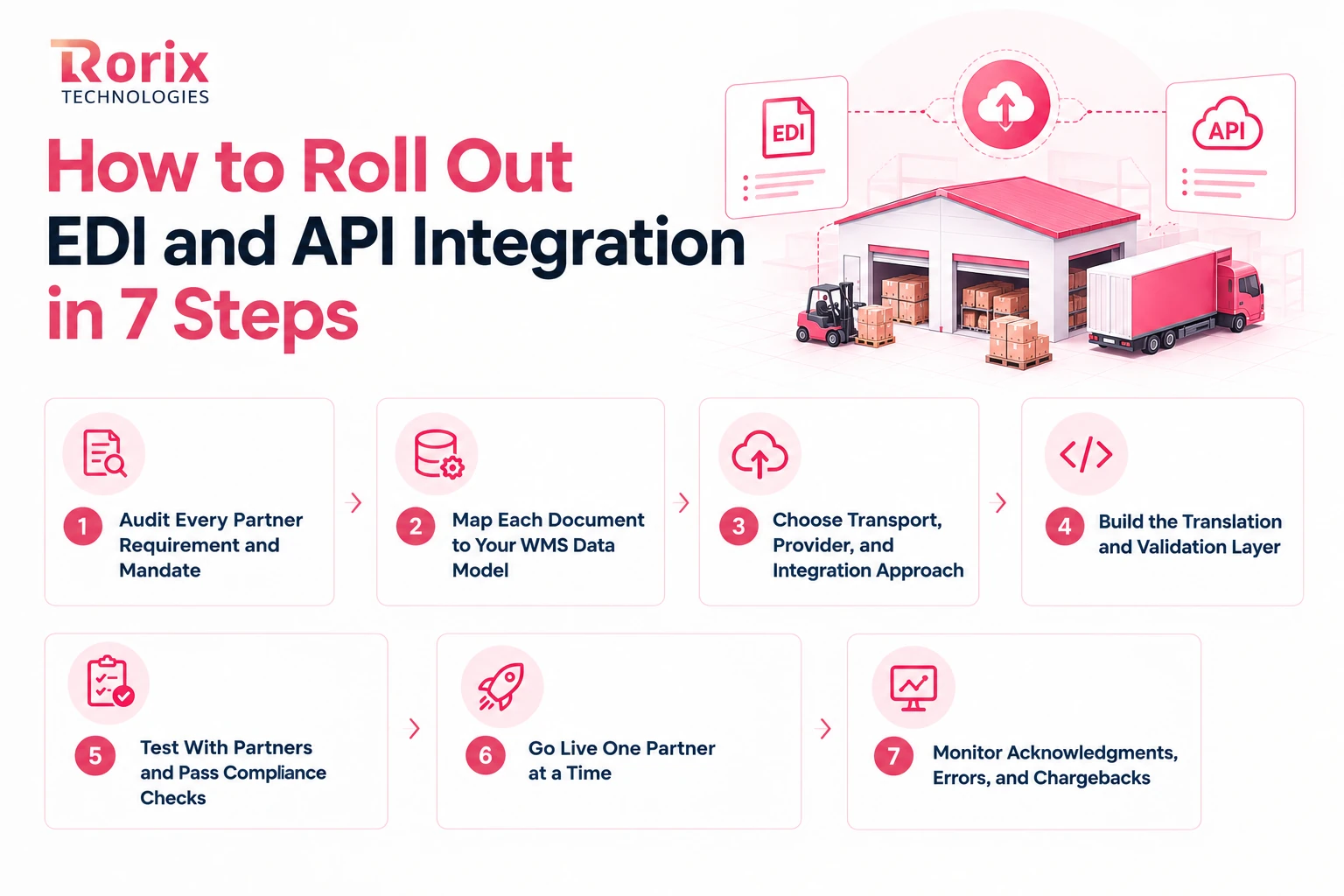
How to Roll Out EDI and API Integration in 7 Steps
Treat integration as an operations project, not just a technical setup. Follow these seven steps to connect systems, meet partner requirements, and avoid warehouse disruptions.
Step 1: Audit Every Partner Requirement and Mandate
List every brand, retailer, carrier, and sales channel your warehouse connects with. Record each partner's required format, documents, and update frequency.
Collect retailer EDI implementation and routing guides early. They define document rules, carton labels, and ASN deadlines that help prevent costly chargebacks.
Step 2: Map Each Document to Your WMS Data Model
Map every EDI document and API payload to the correct order, receipt, and inventory fields in your WMS. For example, an EDI 940 needs accurate ship-to details, item lines, and carrier codes.
Check SKU formats, units of measure, and location codes. Differences between partner systems can cause inventory errors and delays if your mappings do not handle them.
Step 3: Choose Transport, Provider, and Integration Approach
Choose the transport method your partners require, such as AS2, SFTP, or a preferred VAN. Then select a managed EDI provider, prebuilt connectors, iPaaS, or a custom integration layer.
A managed provider can handle EDI transport while a custom mapping layer keeps business rules under your control. Choose the setup that fits your partner requirements, systems, and budget.
Step 4: Build the Translation and Validation Layer
Build adapters that convert incoming EDI documents and API payloads into a shared WMS data model. Map outgoing data to each partner's format and validate it before it reaches warehouse workflows.
Make processing safe for retries and store original files and payloads. This helps your team trace errors and investigate disputed orders.
Step 5: Test With Partners and Pass Compliance Checks
Test each connection using partner sample files before going live. Retailers may require several certification rounds for EDI 856 advance ship notices and carton labels.
Test short shipments, canceled lines, and duplicate orders too. Confirm that the WMS returns the correct EDI 945, EDI 947, or error response.
Step 6: Go Live One Partner at a Time
Start with a partner that has simpler document requirements and a straightforward testing process. Monitor live orders, acknowledgments, inventory updates, and shipment confirmations closely.
Move to the next group only after the first connections work reliably. A phased rollout limits failures and helps prevent warehouse-wide disruptions during peak periods.
Step 7: Monitor Acknowledgments, Errors, and Chargebacks
Track missing or rejected EDI 997 acknowledgments, failed API calls, and new chargebacks every day. Set alerts for missing acknowledgments so silent failures do not leave orders or shipments unprocessed.
Review chargebacks by retailer and reason code each month. Use the findings to improve mappings and validation rules and prevent repeat errors.
Also Read: WMS Implementation Checklist: 50 Steps Plus a Plan Template
Why Choose Rorix Technologies for Warehouse EDI and API Integration?
Connecting a WMS to retailers, carriers, and ecommerce platforms takes more than setting up data exchanges. You need integrations that fit your warehouse workflows, handle partner requirements, and keep orders moving.
Rorix Technologies builds custom warehouse software that connects EDI transactions, APIs, inventory, and order workflows in one system. With 27 projects delivered and a 5.0 Clutch rating across 4 verified reviews, the team focuses on solving practical operational problems, not just connecting systems.
- Fewer manual errors: WorkCenter Central, the platform we built for distributor Lorecs, cut manual errors by 80% and sped up order processing by 50%.
- Integration experience: For Driven, a US performance platform for pest control and field service teams, we connected 40+ third-party integrations, including HubSpot, Twilio, RingCentral, and Google APIs.
- One connected workflow: EDI documents and API updates can feed the same WMS, helping teams keep orders, inventory, and shipment data aligned.
- Clear development progress: Two-week sprints give you regular updates and visibility into what is being built.
- Support beyond launch: Retainer and maintenance plans keep your integrations current as systems and partner rules change. Our founders have been DealSignal's engineering partner for 5+ years, continuing under Rorix.
- Experience across markets: We work with clients in the US, UK, Canada, Australia, and New Zealand, through a dedicated team of senior engineers with a named technical lead.
Need to connect retail EDI, ecommerce APIs, and your warehouse systems without creating more manual work?
Book a Free Consultation to discuss your partner requirements and plan an integration approach that fits your operation.
Conclusion: Build a Warehouse Integration Strategy That Works
The right EDI vs API strategy depends on your trading partners and warehouse workflows. Use EDI for required retail transactions and APIs for real-time inventory, orders, and shipment updates, with both feeding one WMS data model.
Use the transaction examples, cost ranges, and rollout steps in this guide to plan your integration. Start by listing your partners, confirming their requirements, and identifying workflows that still rely on manual entry or overnight updates.
We hope this guide helps you understand when to use EDI, APIs, or both, and how to connect them without adding unnecessary work for your warehouse team.
Still dealing with chargebacks, rekeyed 940s, or outdated inventory? Connect with our experts to plan an integration approach that fits your partners, systems, and operations.
Frequently Asked Questions
What is the main difference between EDI and API?
EDI exchanges standardized business documents, such as orders and invoices. APIs exchange data or events between systems, often in real time.
Can APIs replace EDI for a 3PL?
Usually, no. Many retailers still require EDI, while APIs support ecommerce, carrier services, and client portals. Most 3PLs need both.
Which EDI transactions does a 3PL warehouse need?
Common transactions include 940 (shipping order), 945 (shipping advice), 943 and 944 (inbound stock), 947 (inventory adjustments), and 846 (inventory). Retail fulfillment may also require 850, 856, 810, and 997.
Is EDI real-time?
Traditional EDI often uses scheduled batches, though modern setups can process documents more frequently. APIs are generally better for updates needed within seconds.
Is EDI or API cheaper for a warehouse?
Per connection, an API is usually cheaper. Typical ranges are $3,000 to $10,000 for a carrier API and $5,000 to $20,000 for an ecommerce API, against $20,000 to $50,000 to onboard a new EDI trading partner, and EDI adds recurring VAN or provider fees.
Is EDI more secure than an API?
Both can be secure when configured correctly. EDI commonly uses AS2 or SFTP, while APIs use HTTPS with OAuth 2.0 or API keys.
How long does it take to onboard a new EDI trading partner?
Allow 4 to 8 weeks for mapping, testing, and certification. Strict retailer requirements for ASNs and labels may extend the timeline.
Can a custom WMS handle both EDI and APIs?
Yes. A custom WMS can map EDI documents and API data into one shared data model. A custom WMS from Rorix runs $30,000 to $64,000 for a single site, with go-live at 8 to 12 weeks, and $80,000 to $180,000+ for multi-site builds.
Building this into a live warehouse system?
Bring the constraint you keep hitting and a named engineer will walk the design with you.
Continue learning
Written by
Renish DadhaniyaFounder & Director, Rorix Technologies
Renish co-founded Rorix Technologies and drives the engineering and delivery culture across the organization. Beyond engineering, he leads the company's sales, finance, and HR operations, building the infrastructure that lets the team focus on shipping quality software. With deep hands-on expertise in architecture and team building, he ensures every project lands on time to the quality standards clients demand.
View full profileRelated articles
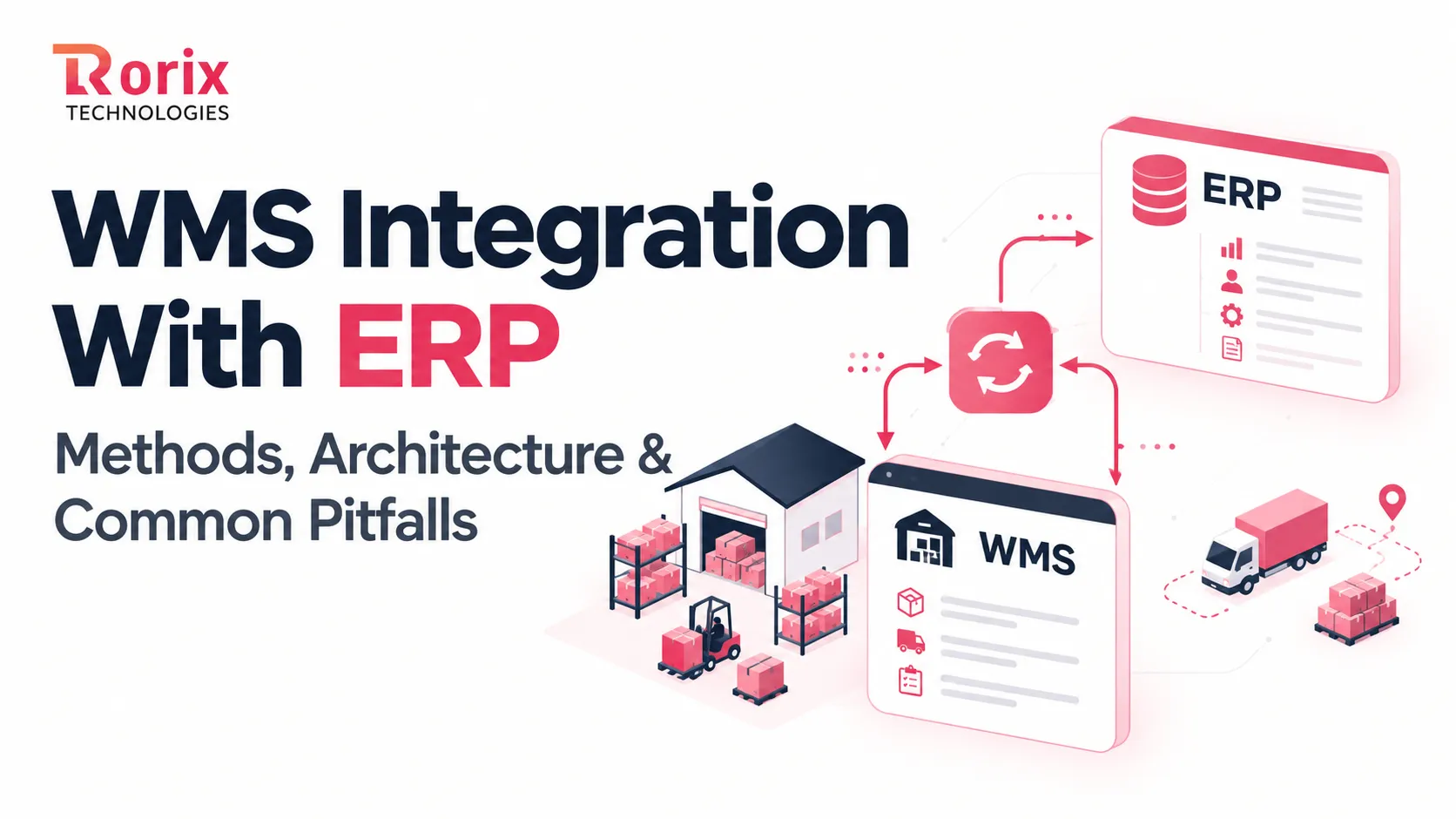
WMS Integration With ERP: Methods, Architecture & Common Pitfalls
Learn how WMS integration with ERP works, with 7 methods, architecture decisions, data flows, an 8-step roadmap, costs, timelines, and common pitfalls to avoid.
Read article
WMS Integration Best Practices: ERP, E-Commerce and TMS
WMS integration best practices for connecting ERP, e-commerce, shipping carriers, and TMS: proven patterns, sync strategies, and common failure points.
Read article
PostgreSQL vs MongoDB for Warehouse Management: A 2026 Comparison from Engineers Who've Used Both
An honest, project-grounded comparison of PostgreSQL and MongoDB for warehouse management systems, from a team that runs both in production.
Read article