
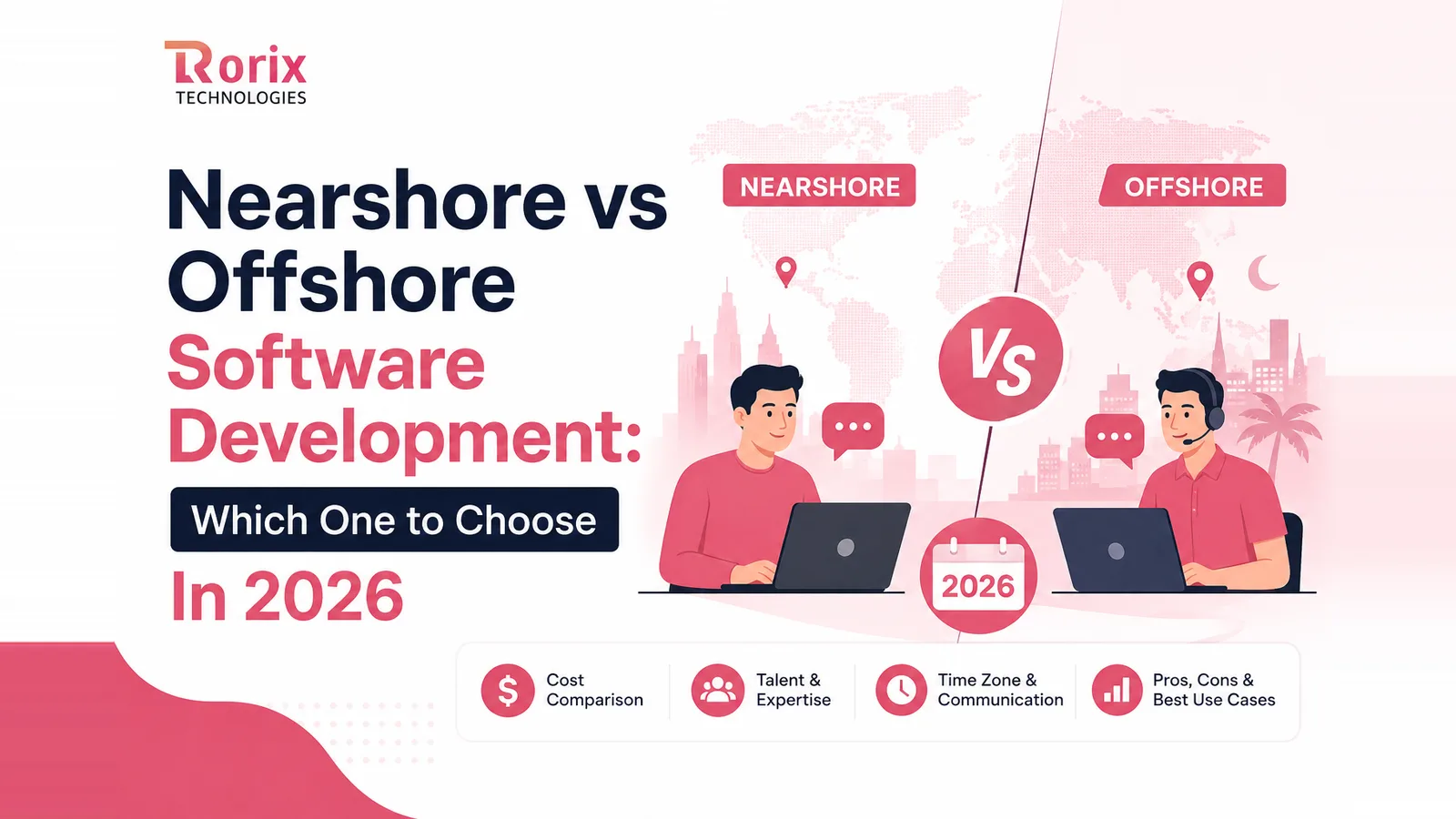
Nearshore vs Offshore Software Development: Which One to Choose In 2026
Three vendors quote the same build and the numbers barely overlap. Compare nearshore vs offshore software development on overlap, total cost and risk.
On this page75 sections
Nearshore buys you four to eight hours of daily overlap at a higher hourly rate. Offshore buys you a lower rate and a deeper talent pool inside a zero to four hour window. Requirements that change every week point nearshore. Scope you can write down points offshore. Geography alone settles nothing.
Here is how that plays out in practice. Three vendors quote the same software project. The highest number comes back at more than triple the lowest, and the requirements document was identical in all three cases. Why such a big difference?
The answer is not always skill. Location, time zone overlap, communication, team structure, and delivery model all move the final cost of custom software development.
Neither model is automatically better. The biggest mistake is choosing one based only on the hourly rate. The team with the lower rate is not automatically the cheaper team, because that gap only survives if it is not spent again on rework, delays, management overhead, and missed deadlines.
The right choice depends on your budget, project complexity, time zone needs, team structure, communication style, and how often your requirements change.
In this guide, you will learn:
- What nearshore and offshore development mean
- 12 key differences between both models
- How nearshore vs offshore costs compare across a full year
- Pros, cons, and best-fit projects for each model
- When a hybrid approach makes sense
- A 7-step framework to choose the right model
- What to check before signing with a development partner
By the end, you will know which model fits your project and how to choose a partner without making the decision on price alone.
Nearshore vs Offshore Software Development at a Glance
Onshore belongs in this table even though almost nobody shortlists all three. It sets the ceiling that makes the other two columns readable.
| Factor | Onshore | Nearshore | Offshore |
|---|---|---|---|
| Time zone overlap | Full | 4 to 8 hours | 0 to 4 hours |
| Indicative hourly rate | Highest, sets the ceiling | Mid, a premium for overlap | Lowest |
| Collaboration style | Real time | Mostly real time | Structured and async |
| Talent pool depth | Narrow and costly | Moderate | Very large |
| Ramp-up speed | Slowest to hire | Fast | Fast |
| Best for | Regulated, on-site work | Evolving product work | Defined, long-running builds |
| Main risk | Budget pressure | Smaller niche talent supply | Coordination and rework |
In short:
- Choose nearshore when requirements shift often and decisions need same-day answers.
- Choose offshore when scope is clear, documentation is strong, and unit cost matters more than instant response.
Key Takeaways: Choosing Between Nearshore and Offshore Delivery
- Nearshore teams share four to eight hours of your working day at a higher hourly rate, while offshore teams share zero to four hours at a lower rate with a deeper talent pool.
- Requirements that change every week point nearshore and scope you can write down points offshore, because geography alone settles nothing.
- In a worked 12-month comparison of a five-person team, a well-run offshore engagement delivers the lowest total of the three outcomes, while a badly run one gives back nearly everything it saved and converges on the nearshore premium.
- Accelerance's 2026 outsourcing rate tracking reports rates edging down year on year across Asia, Central and Eastern Europe, and Latin America, with Latin America falling fastest.
- Rorix Technologies has delivered 27 software projects, holds a 5.0 rating on Clutch across 4 verified reviews, and has kept the same engineers on one B2B sales-intelligence SaaS for over five years.
What Is Nearshore Software Development?
The defining variable is the working calendar, not the passport. A team one or two time zones away shares most of your business day, and that shared day is the thing you are actually paying extra for.
Nearshore software development means hiring a software team in a nearby country, usually with only a few hours of time difference. Both teams can work together during much of the same business day.
For example, a company in New York can work with developers in Bogota, while a London company can work with a team in Krakow. Because their working hours overlap, questions, feedback, and blockers can often be handled the same day.
What Is Offshore Software Development?
Distance changes what has to be written down. It does not, by itself, change what gets built.
Offshore software development means working with a software team in a more distant country, often with a larger time difference. For US and UK companies, common offshore locations include India, Vietnam, the Philippines, and other parts of Asia and Eastern Europe.
The usual reason companies choose offshore development is lower cost. A lower hourly rate can help businesses build larger teams or get more work done within the same budget. Our breakdown of why companies outsource software development covers the other motives that show up in real buying decisions.
Offshore development has also become more structured. Experienced offshore companies now use clear sprint plans, regular updates, code reviews, and dedicated teams to keep projects moving even when working hours do not fully overlap.
How Much Time Zone Overlap Do You Actually Need?
Two to four consistent hours is enough for most engagements when documentation is strong. What matters more than the size of the window is whether it holds. A protected two-hour block that never moves outperforms a scattered six hours that anyone can book over.
Count the decisions in your last three sprints that genuinely needed a live conversation. If that number is small and most work moved through tickets and written reviews, a narrow window costs you nothing. If it is large and the conversations were unplanned, you are buying overlap whether you budgeted for it or not.
The window also has to be real on both sides. A vendor who offers "flexible hours" is describing goodwill, not a schedule. Ask which named engineers are online during your window, and what happens to a blocker raised ten minutes after it closes.
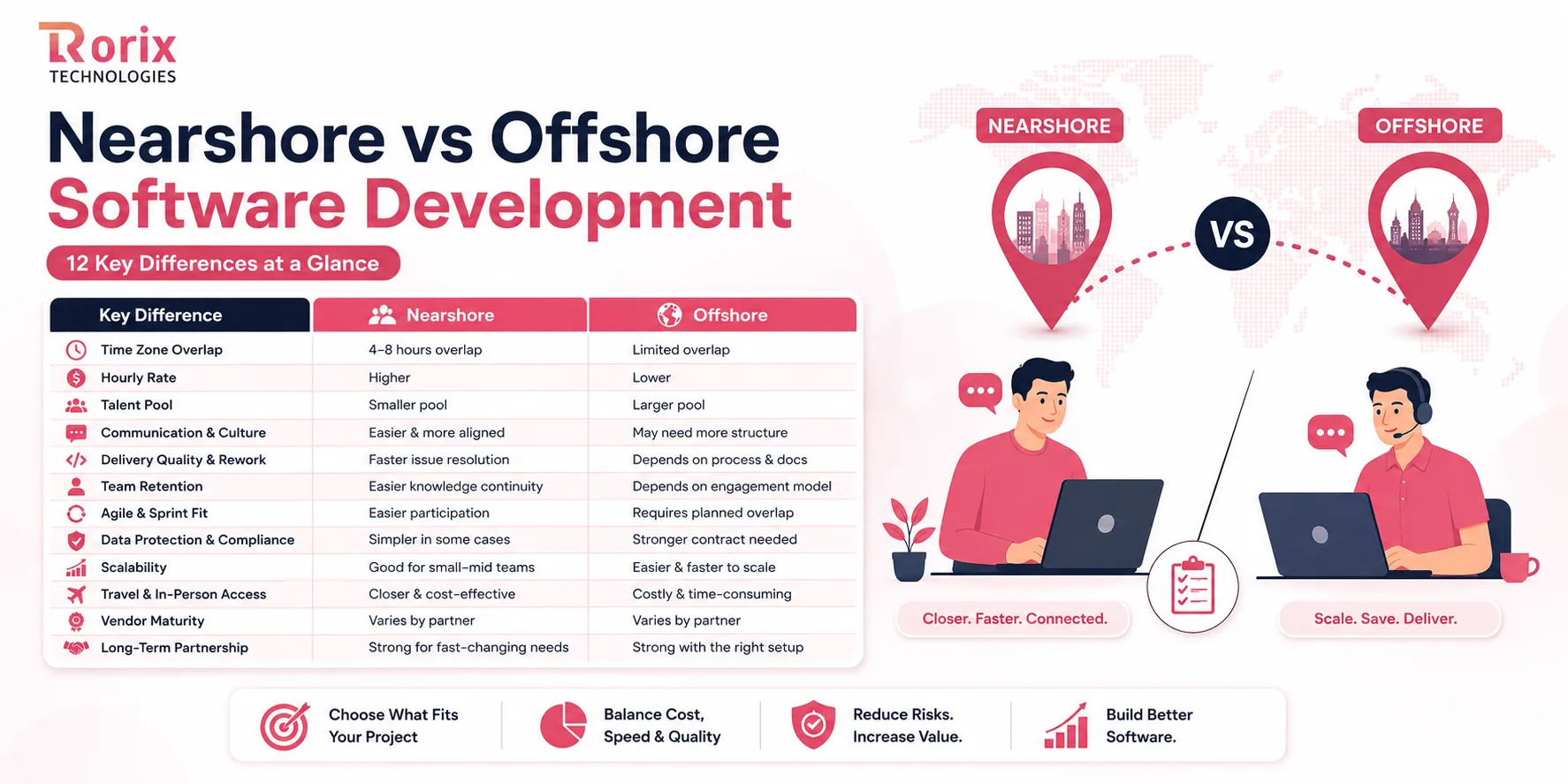
12 Key Differences That Decide Which Model Fits
Most comparisons flatten this into one winner, which is not how the decision plays out. Different projects weigh these dimensions differently, so read the table first and then the detail on the ones that matter to you.
| Dimension | Nearshore | Offshore |
|---|---|---|
| Time zone overlap | 4 to 8 hours | 0 to 4 hours |
| Hourly rate | Moderate | Lowest |
| Talent pool depth | Moderate | Very large |
| Cultural and language fit | Close | Varies by market and vendor |
| Rework rate | Lower when scope shifts | Lower when scope is fixed |
| Engineer retention | Generally strong | Strong on retainers, weak in body shops |
| Agile ceremony fit | Native | Works inside a protected overlap window |
| Compliance alignment | Often shared legal frameworks | Contract-led, needs explicit terms |
| Scaling speed | Fast | Fastest |
| Travel cost | Low | High |
| Process maturity | Varies | Varies widely, vet carefully |
| Long-term viability | Strong for product work | Strong under a retainer model |
1. Time Zone Overlap and Response Time
Nearshore teams work in time zones close to yours, so you may share four to eight working hours each day. If your team has a question in the morning, developers can usually respond and fix the issue during the same day. That suits projects that need frequent discussion and quick decisions.
Offshore teams are usually several time zones away, so you may share only a few working hours. A question sent after the overlap window may not get an answer until the next day. This is not a problem for well-planned work, but it slows projects where decisions and feedback are needed constantly.
2. Hourly Rate and Total Cost of Delivery
Nearshore teams usually charge more than offshore teams because you get more overlapping working hours and easier real-time communication. The higher rate can be worthwhile when faster feedback helps your team avoid delays and rework.
Offshore teams generally offer lower hourly rates, which makes them attractive when keeping development costs low is a priority. However, the hourly rate is only part of the cost. Poor communication, extra management, delays, and rework all eat into the savings, as our full breakdown of the cost of outsourcing software development sets out line by line.
3. Talent Pool Depth and Niche Specialization
Nearshore regions offer a good supply of skilled developers, but the talent pool is often smaller than in major offshore markets. That can make it harder to find people with rare technical skills, specific certifications, or experience in a particular industry.
Offshore markets usually provide access to a much larger pool of developers. This makes it easier to find specialized skills, build larger teams, and add developers when needed. For projects that require several different technologies, offshore offers more options.
4. Communication Style and Cultural Fit
Nearshore teams often share similar working hours and may have more familiar business and communication practices. Meetings, feedback, and day-to-day discussions get easier, and small issues can be explained quickly instead of going through long written messages.
Offshore teams may work with different communication styles, depending on the country and vendor. This does not mean communication will be poor, but you may need clearer processes. Regular meetings, written requirements, and an experienced project manager make the difference.
5. Delivery Quality and Rework Rate
Nearshore teams can identify misunderstandings quickly because both sides are available at similar times. If a developer misreads a requirement, you can discuss it immediately instead of discovering the problem several days later. That reduces rework, especially on projects where requirements change often.
Offshore teams deliver equally high-quality software when they have strong engineering practices. The bigger challenge is the time it takes to surface a misunderstanding. Clear requirements, detailed documentation, code reviews, and testing are what keep rework under control.
6. Team Retention and Engineer Continuity
Nearshore teams build strong knowledge of your product when the same developers stay with the project. Working closely with your team, they gradually understand your business, users, and technical requirements without needing everything explained again.
Offshore teams offer the same continuity through a dedicated development team or long-term retainer. The deciding factor is not location but whether the vendor keeps the same people involved. Frequent developer changes lead to repeated onboarding and lost product knowledge.
7. Agile Ceremony and Sprint Cadence Fit
Nearshore teams can join daily standups, sprint planning, sprint reviews, and retrospectives easily because both teams have more overlapping working hours. Priorities, progress, and mid-sprint changes all get discussed live.
Offshore teams follow Agile successfully too, but meetings need to be planned around the available overlap window. Work outside that window depends more on clear tickets, acceptance criteria, documentation, and written updates. A well-organized process keeps the sprint moving even when teams are not online together.
8. Data Protection, IP Ownership and Compliance
Nearshore teams can make some legal and compliance discussions easier when the countries involved have similar regulations or legal frameworks. That simplifies certain conversations around data protection, contracts, and audits, although you still need to check the specific laws that apply to your project.
Offshore teams work with sensitive data and meet strict compliance requirements every day. The difference is that you need to be more precise in the contract. Define IP ownership, data storage, access controls, security responsibilities, and data transfer requirements before development begins.
9. Scalability and Time to Staff a Team
Nearshore providers can build a development team quickly, especially when you need a small or mid-sized team. Finding developers with highly specialized skills may take longer if the region has a smaller talent pool.
Offshore providers usually have access to a much larger developer pool. That makes it easier to add several engineers, find specialized skills, or expand the team as the project grows. Offshore is particularly useful when you need to scale development quickly.
10. Travel Cost and In-Person Access
Nearshore teams are easier to visit because they are closer to your business. Flights are shorter and less expensive, which makes face-to-face meetings practical for project kickoffs, discovery workshops, planning sessions, or important reviews.
Offshore teams are much farther away, so travel takes more time and costs more. Most offshore projects therefore operate remotely, and that works well when the vendor has strong communication, regular video meetings, and clear reporting.
11. Vendor Maturity and Process Discipline
Nearshore does not automatically mean better quality or stronger processes. A nearby vendor can still have weak project management or poor engineering practices. Check how they handle requirements, testing, code reviews, releases, documentation, and communication before you choose.
Offshore vendors also range from highly professional to poorly managed. The best partners have clear processes for planning, development, testing, security, and delivery. Do not choose a vendor simply because the price is low. Look at how they actually manage and deliver projects, using the criteria in our guide to choosing a custom software development company.
12. Long-Term Partnership Viability
Nearshore teams are a strong choice for products that need regular communication, frequent feedback, and ongoing changes. Shared working hours make it easier for both teams to stay closely involved as the product develops.
Offshore teams become reliable long-term partners when the engagement is structured properly. A dedicated team or retainer model keeps the same engineers on your product for years. Over time, their growing knowledge of your system reduces communication effort and improves delivery speed.
Also Read: 25 Best Offshore Software Development Companies
What Each Model Actually Costs Over a Full Year
Cost is where most buyers start and where most of them get misled. The rate card is real, and it is also incomplete. How incomplete depends far less on the region than on how the engagement is run, which is the same pattern our guide to custom software development cost traces across project sizes.
1. What Sets the Rate in Each Region
Which label a region carries depends on where you are buying from, and that alone reshuffles the shortlist. A Central European team is offshore to a US buyer and nearshore to a UK one, at the same rate.
| Region | Model for a US buyer | Where it sits on rate |
|---|---|---|
| United States and Canada | Onshore | Highest, sets the ceiling |
| Western Europe | Onshore for EU buyers | High, close to the ceiling |
| Latin America | Nearshore | Mid, priced for overlap |
| Central and Eastern Europe | Offshore for US, nearshore for UK | Mid, widest spread by country |
| South Asia | Offshore | Lowest, deepest supply |
| Southeast Asia | Offshore | Low, close to South Asia |
Rates are not static either. Accelerance's 2026 outsourcing rate tracking reports rates edging down year on year across Asia, Central and Eastern Europe, and Latin America, with Latin America falling fastest. A rate card you collected eighteen months ago is a historical document.
Where you land inside a region depends on three things. Seniority mix moves it most, followed by domain complexity, and then by how much delivery management the partner carries for you.
Watch for a quote that sits well below everything else you have been shown for the same region. A rate under local market pay usually signals junior staffing, a rotating bench, or scope that has been quietly trimmed.
2. Which Roles Carry the Weight in a Team Budget
Team composition moves your budget more than the headline rate, because seniority mix is what you are really buying. A team of five juniors and a team of three seniors can cost the same and deliver very differently. Offshore prices every line below nearshore, so the split between these lines matters more than the model you picked.
| Role | Where it sits in the team budget | What the line actually buys |
|---|---|---|
| Junior developer | The lowest line | Cheap per hour, expensive per feature without senior review |
| Mid-level developer | The baseline every quote is built on | The bulk of routine delivery |
| Senior developer | Materially above the baseline | Judgment on the decisions that are costly to reverse |
| QA engineer | Below the baseline | Frequently underestimated, cut first and paid for later |
| DevOps engineer | Near senior | Release safety, often part-time and shared |
| Technical lead or architect | The highest engineering line | The architecture your whole cost model rests on |
| Project manager | The most variable line of all | Sometimes bundled, sometimes billed, never actually free |
Both models are measured against the same baseline. The US Bureau of Labor Statistics publishes the median annual wage for software developers in the United States, and that figure carries benefits, tooling, recruitment, and idle capacity on top of it. Any outsourced quote is being compared against that fully loaded number, not against the salary line alone.
3. The Costs That Never Appear on the Invoice
Four costs sit outside the rate card and decide whether your savings survive the engagement. They are predictable, which means you can budget for them instead of being surprised by them.
- Coordination overhead: Your senior people spend hours bridging gaps, and that time carries a real salary cost
- Rework from misread scope: A feature built against a misunderstood spec costs the build plus the rebuild
- Attrition and re-onboarding: Every engineer replaced mid-project restarts context on your codebase
- Ramp-up before productivity: Nobody ships at full speed in week one, and complex domains take longer
Nearshore reduces the first two through shared hours. Offshore reduces all four through retainer structures, protected overlap windows, and disciplined documentation. That is why this decision is settled by operating model rather than postcode.
4. Total Cost of Engagement: A Worked 12-Month Comparison
Here is the comparison almost nobody publishes. The scenario is a five-person team running for twelve months on the same product scope, with three delivery outcomes set side by side.
| Line item | Nearshore | Offshore, run well | Offshore, run badly |
|---|---|---|---|
| Base engineering cost | The highest of the three | Materially lower | Identical to the column beside it |
| Your internal PM and lead time | Lowest, shared hours absorb it | Moderate and plannable | Severe, your seniors close every gap |
| Rework from misaligned scope | Contained by same-day correction | Contained by documentation | The largest line on the page |
| Attrition and re-onboarding | Low on a stable team | Low on a retainer | High in a body-shop model |
| Travel and onsite time | Low | Higher, and never the deciding line | Higher, and never the deciding line |
| Effective 12-month cost | A predictable premium | The lowest total of the three | Converges back on the premium |
Read the two offshore columns against each other rather than against nearshore. They start from an identical base engineering cost and end in completely different places. The badly run one gives back nearly everything it saved and lands close to the premium option, having spent the year generating rework instead of software.
That is the whole argument in one table. The rate card was the same in both offshore columns, so the rate card was not what decided the outcome.
Want a figure for your actual scope rather than a market range? Use our project cost estimator to scope your build against a real team composition.
How AI-Assisted Delivery Changes the Calculation
Several nearshore vendors now argue that AI coding tools have permanently tilted this decision their way. The argument deserves a serious look, and it also deserves a correction.
What Actually Changed in the Delivery Model
AI tools now handle many routine development tasks, such as writing basic code, creating tests, and generating boilerplate. Developers build faster as a result, but human judgment still governs architecture, code review, security, and the call on whether AI-generated code is safe to ship.
Why Review Latency Now Costs More Than Rate Savings
AI-generated code can look correct while still containing mistakes, so the bottleneck moves from writing code to reviewing it. Where review sits inside a wide overlap window, a flawed generation gets caught the same hour. Where it sits outside one, the same flaw waits for the next working window, and anything built on top of it waits too.
That is a scheduling problem rather than a geography problem. A protected overlap window with a named senior reviewer inside it closes the gap regardless of the distance involved, which is exactly how disciplined offshore teams already run code review.
What to Ask a Partner About Their AI Delivery Process
What matters is how the development partner uses and reviews AI-generated work. Ask who checks AI-generated code, where human approval is required, and whether the vendor tells you when AI tools are used. Clear answers show a controlled and responsible AI development process. Vague ones show that nobody owns the question.
Nearshore Software Development: Pros, Cons and Best-Fit Scenarios
Nearshore is the premium option here, so the real question is whether your work uses what you are paying extra for.
Pros of Nearshore Software Development
- Shared working hours by default: Real-time collaboration is the normal state, not something you engineer around with process
- Faster feedback loops: Pull requests, design questions, and blockers resolve within the same day rather than across it
- Lower friction on ambiguity: Half-formed requirements get clarified in conversation before they turn into wasted sprints
- Easier in-person access: Short flights make kickoffs, discovery workshops, and quarterly reviews genuinely practical
- Simpler compliance conversations: Related legal frameworks often shorten the work on data protection and IP
Cons of Nearshore Software Development
- Higher rates than offshore: Expect to pay noticeably more per hour for equivalent seniority
- Narrower talent supply: Rare stacks and specialist domain skills can take longer to source
- Limited options in some regions: Buyers in Asia-Pacific have far fewer genuine nearshore choices
- Rising competition for talent: Strong demand in popular hubs keeps pushing senior rates upward
- No advantage on defined work: For fixed-scope, well-documented builds, you pay a premium you never use
When Nearshore Is the Right Call
Nearshore works best when requirements change often and your team needs quick answers. It fits early-stage products, fast-moving projects, and teams that need more hands-on technical support than a written spec can carry.
Offshore Software Development: Pros, Cons and Best-Fit Scenarios
Offshore carries the budget advantage, and it asks for process discipline in return.
Pros of Offshore Software Development
- Strongest budget efficiency: The same budget buys a materially larger team or a materially longer runway
- Deepest talent availability: Specialist and niche skills are easier to source and faster to add
- Proven scale: Growing from three engineers to ten rarely stalls on supply
- Extended delivery window: Work progresses outside your hours when handoffs are properly structured
- Mature retainer partnerships: Established offshore firms sustain multi-year engagements with stable teams
Cons of Offshore Software Development
- Narrow overlap window: Decisions outside that window wait, which slows anything genuinely ambiguous
- Higher documentation burden: Written clarity stops being nice to have and becomes load-bearing
- Costly travel: Long flights make in-person sessions rare and expensive to arrange
- Wide vendor quality spread: The gap between the best and worst offshore firms is larger than in any other model
- Punishes weak process: Poor requirements and unclear ownership cost far more here than they do nearshore
When Offshore Is the Right Call
Offshore works best when the project has clear requirements and can be planned in detail. It fits feature development, platform work, data projects, maintenance, and long-term development with a stable team.
Which Model Fits Your Project Type?
The abstract argument stays unresolved forever. Held against a specific type of build, it usually resolves in a sentence.
| Project type | Usually better fit | Deciding factor |
|---|---|---|
| SaaS platform and MVP | Either, with strong overlap | Speed of product decisions |
| Warehouse and inventory systems | Offshore on retainer | Domain depth over instant response |
| HRMS and internal systems | Offshore | Stable, documentable requirements |
| Legacy modernization | Offshore | Sustained effort and system knowledge |
| Mobile and cross-platform apps | Either | Design iteration frequency |
| Data and integration work | Offshore | Highly specifiable scope |
| QA and maintenance | Offshore | Repeatable, low-ambiguity work |
1. SaaS Platforms and MVP Builds
SaaS and MVP projects change quickly, so fast communication and regular feedback matter more here than anywhere else. Both models work, but weight your shortlist toward proven SaaS development experience in APIs, subscriptions, and multi-tenant architecture.
2. Warehouse, Inventory and Fulfillment Systems
Warehouse and inventory software needs real industry knowledge because the workflows are genuinely complex. Choose a team that already understands inventory, picking, barcodes, and fulfillment rather than one that will bill you for learning them, which is the case we make for domain-built WMS solutions.
3. HRMS and Internal Business Systems
HRMS and internal systems usually have clear workflows for payroll, leave, approvals, and employee management. Because those requirements document cleanly, offshore development is a cost-effective choice, and our HRMS implementation guide shows how much of that scope can be settled before a single sprint starts.
4. Legacy Modernization and Migration
Modernization takes time and requires developers to understand the existing system before changing it. Offshore works well for this when you have a stable team that stays involved for the long term, which is the model behind our legacy application modernization work.
5. Mobile and Cross-Platform Apps
Mobile apps benefit from nearshore development when the project needs frequent design changes and quick feedback. For clearly defined app features, either model works as long as the team has strong mobile app development and testing skills.
6. Data, Reporting and Integration Work
Data and integration projects usually have clear requirements: APIs, data formats, and workflows. That makes offshore development a good option, especially when the project involves many integrations and needs a larger technical team.
7. QA, Maintenance and Support Workloads
QA, maintenance, and support work follow clear processes and repeatable tasks. Offshore development fits because these workloads need consistent execution more than frequent real-time discussion.
Also Read: How to Hire a Dedicated Development Team
The Hybrid Model: Running Nearshore and Offshore Together
You do not always have to choose. A hybrid model gives you faster collaboration where the work is ambiguous and lower-cost development where it is planned.
1. How the Split Usually Works
Nearshore teams handle product decisions, architecture, client communication, and work that changes often. Offshore teams focus on feature development, testing, and other well-defined technical work. One product owner manages both to keep everyone aligned.
2. When Hybrid Is Worth the Coordination Cost
Hybrid makes sense when your development team is large enough to support two groups. It works especially well when some work needs regular discussion while other tasks can be planned and handed over cleanly.
3. When Hybrid Backfires
Hybrid delivery creates problems when responsibilities are unclear. If both teams assume the other is handling a task, gaps and integration issues appear later. Using two vendors simply to avoid choosing one model adds management work without giving you a real benefit.
How to Choose Between Nearshore and Offshore: A 7-Step Framework
Work through these seven steps in order and the answer usually becomes obvious by step four. Each one is designed to be completed in a single working session.
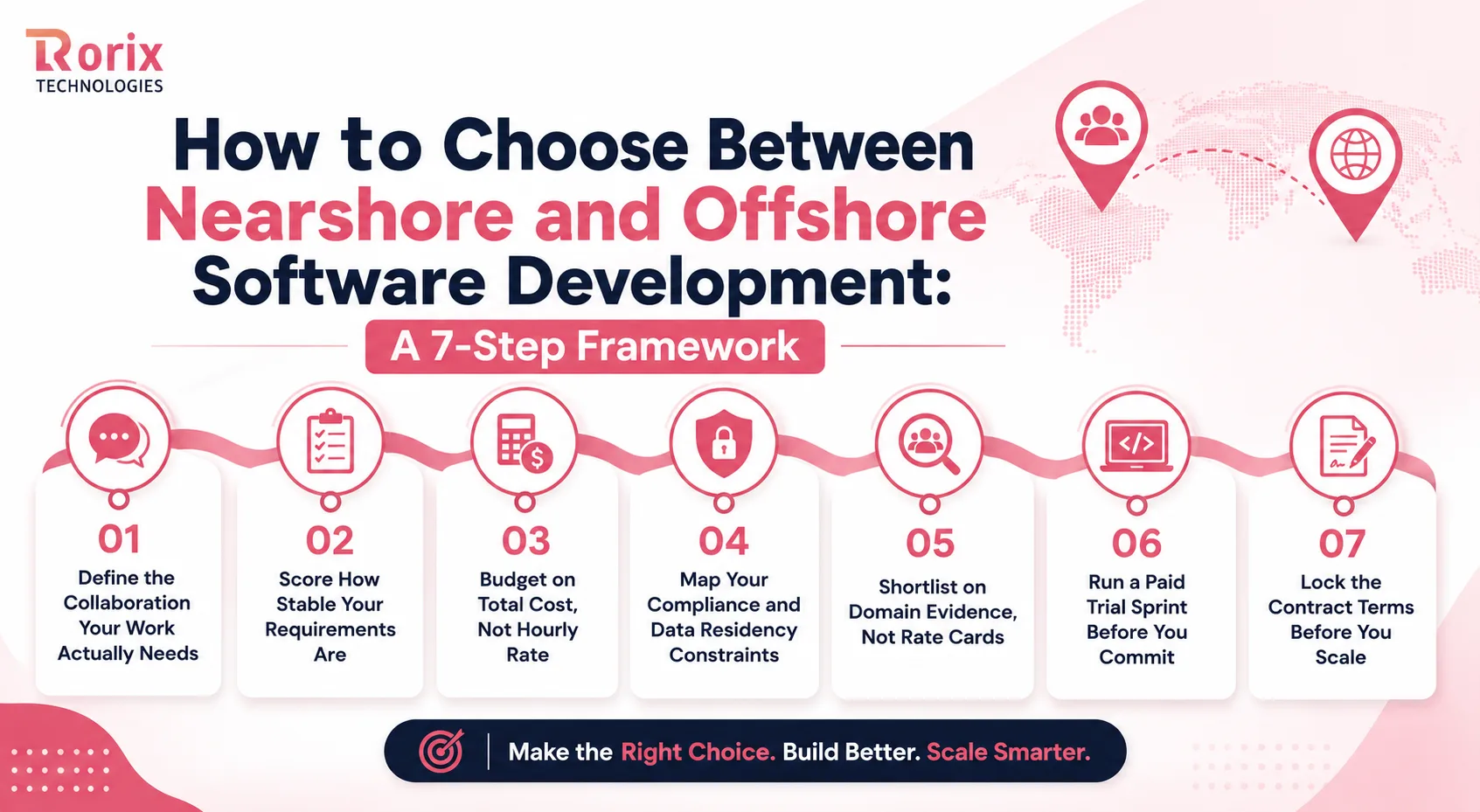
Step 1: Define the Collaboration Your Work Actually Needs
Start by looking at how your team already operates, not at how you would like it to look. Open your last three sprints and count how many decisions needed a live conversation to unblock them.
If that number is high and the conversations were unplanned, you need broad overlap. If most work moved through tickets and written reviews, a two to four hour window will serve you perfectly well.
Be honest in this step, because everything downstream depends on it. Teams that overestimate their documentation discipline are the ones that struggle offshore, and the fix is process rather than geography.
Step 2: Score How Stable Your Requirements Are
Take your next quarter of planned work and sort each item into two buckets. One holds work you could hand to a stranger with a written spec, and the other holds work that still needs discovery.
Now check the ratio between them. Mostly specifiable work points clearly to offshore, while a heavy discovery load points to nearshore or to a hybrid split along that exact line.
This is also the moment to fix what you can control. Tightening specs on the second bucket often changes your answer, and it improves delivery in either model.
Step 3: Budget on Total Cost, Not Hourly Rate
Build your budget the way the worked comparison above was built. Take the base engineering cost, then add your own management hours, an allowance for rework, and a line for ramp-up.
Hold a real rework allowance rather than an optimistic one, and size it against your own history with new partners rather than against the vendor's confidence. A first engagement with an unproven team deserves a larger allowance than a renewal with a team that already knows your codebase.
Run this model for both options before you shortlist anyone. Bringing a total-cost view into vendor conversations also improves the quality of the answers you get back.
Step 4: Map Your Compliance and Data Residency Constraints
List every regulation touching your data, including GDPR, HIPAA, sector rules, and any client contracts restricting where data can be processed. Some of these will eliminate regions outright.
Then check what your own customers have committed to. Enterprise clients frequently impose data-location requirements that flow straight through to your development partner.
Do this before you shortlist rather than during contracting. Discovering a residency restriction after choosing a vendor is an expensive way to learn it.
Step 5: Shortlist on Domain Evidence, Not Rate Cards
Ask each vendor for systems they have shipped in your specific domain, not their general portfolio. A team that has built warehouse software understands wave picking, and a team that has not will bill you for learning it.
Request references from engagements that ran beyond a year, because short projects hide the problems that matter. Long relationships reveal how a partner behaves when something goes wrong.
Rank your shortlist on domain evidence first, delivery process second, and rate third. Reversing that order is the single most common mistake in this entire decision.
Step 6: Run a Paid Trial Sprint Before You Commit
Never sign a long engagement without seeing the team ship something real. Scope a two-week sprint around a genuine feature with clear acceptance criteria and pay for it properly.
Watch how they handle the parts you deliberately left slightly unclear. Do they ask early, or do they build the wrong thing and reveal it at the demo? That signal predicts more than any case study.
Also watch response times against your actual working hours. A trial sprint tells you whether the overlap window works in practice or only on paper.
Step 7: Lock the Contract Terms Before You Scale
Settle IP transfer, data handling, security obligations, and exit terms while your leverage is highest, which is before the team is embedded. These conversations get much harder six months in.
Insist on named engineers with a notice period for replacements, since continuity is what protects your cost model. A partner confident in their retention agrees to this without hesitation, which is why dedicated development teams are contracted around people rather than headcount.
Then start small and scale on evidence. Two engineers who ship reliably are a far better foundation than six who arrived before anyone proved the model works.
Contract, IP Ownership and Data Protection Checklist
The model you picked only holds if the paperwork protects it. Five clauses carry most of that weight.
1. Source Code and IP Transfer
Make sure the contract states that you own the source code, documentation, and other work created for your project. Confirm that all developers and subcontractors have transferred their rights to the vendor so there are no ownership gaps.
2. NDA, Confidentiality and Subcontracting
Use an NDA to protect your business information, customer data, and project details. Ask whether the vendor uses subcontractors and require your written approval before they involve any outside team.
3. Data Residency, GDPR and Sector Rules
Define where your data will be stored and processed, and check whether the vendor meets the regulations that apply to you, such as GDPR. Avoid using real customer or production data in development and use anonymized or test data instead.
4. Security, Access Control and Audit Rights
Set clear rules for who can access your systems and how access is removed when someone leaves the project. Require basic security measures such as two-factor authentication, secure devices, and the right to review the vendor's security practices.
5. Exit Terms and Knowledge Transfer
Agree on how the project will be handed over if the partnership ends. Set notice periods, documentation requirements, and knowledge transfer steps so you can continue the project without major disruption.
Also Read: What Is IT Staff Augmentation?
What to Check Before Hiring a Development Partner
Choosing the right partner matters more than choosing nearshore or offshore. A strong development company delivers in either model, while a weak one creates problems regardless of location.
10 Questions to Ask Before You Sign
- Who will work on my project, and what is their experience level?
- Have you built software in my industry and technology stack?
- How long do your clients usually work with you?
- How often do developers stay on long-term projects?
- How many hours will your team work with my team each day?
- Who reviews the code, and how do you test the software?
- What do you do when you disagree with a requirement?
- How do you review and manage AI-generated code?
- Who owns the source code and other project work?
- What happens to my project if we end the partnership?
7 Red Flags That Predict a Failed Engagement
- Instant estimates: A price arriving before anyone understands your problem means the number is fiction
- Senior pitch, junior delivery: Experts on the sales call who vanish once the contract is signed
- No pushback: A partner who agrees with every requirement will agree with the wrong ones too
- Vague ownership terms: Hesitation on IP transfer or exit clauses signals trouble ahead
- Headcount as the pitch: Talking about team size instead of delivery process and outcomes
- No long references: Only short engagements on offer, because long ones expose real behavior
- Rate-led positioning: Leading with price rather than domain evidence usually means there is no domain evidence
Why Rorix Technologies Works Like an In-House Team, Not a Distant Vendor
Most of the failure patterns above share one root cause, which is a partner who supplies capacity and then disappears from the engagement. We built our delivery model around the opposite behavior.
Rorix Technologies has delivered 27 software projects for operators in the US, UK, Canada, Australia, and New Zealand. We hold a 5.0 rating on Clutch across 4 verified reviews, and we work on retainer rather than project handoff.
- Engineered for the domain: WMS, HRMS, and SaaS platforms built from the workflow up, never adapted from a template
- Two-week sprints with full visibility: You set priorities each sprint and see every task in progress
- A dedicated team of senior engineers, not a rotating bench: The same engineers stay on your product, so context compounds
- Proven long-term partnership: A B2B sales-intelligence SaaS has worked with the same Rorix engineers for over five years
- Real integration depth: 40+ vendor integrations delivered on Driven's field-service performance platform
- Measurable operational impact: Up to 80% fewer picking errors through real-time inventory and barcode workflows
- Accountable past go-live: We stay embedded after launch and keep suggesting improvements each sprint
Need a development team that works like your in-house team? Book a free consultation and get a project estimate to see how a retainer team would fit your roadmap.
Choose the Operating Model, Not the Postcode
The lowest hourly rate answers a question nobody should be asking. What decides this is which model fits your project, your team, your budget, and the way you already work.
Nearshore earns its premium when communication is constant, overlap is wide, and feedback arrives daily. Offshore earns its discount when requirements are clear, cost efficiency matters, and your team can hold a structured process. Split the work across both when different parts of your roadmap genuinely need different treatment.
The worked model above is the part worth keeping. A badly run offshore year converges back on what a nearshore year costs, and the difference between those two outcomes was never the rate card. It was who owned the architecture, whether the same engineers stayed, and whether anyone protected the overlap window.
So price the engagement, not the hour. Then test the partner on a real feature before you scale. When you are ready to scope it properly, connect with our experts to map your build to the right model, team composition, and delivery structure.
Frequently Asked Questions
What is the main difference between nearshore vs offshore software development?
Time zone overlap is the core difference. Nearshore teams share four to eight hours of your working day, which enables real-time collaboration. Offshore teams typically share zero to four hours and rely on structured written handoffs.
Is offshore software development cheaper than nearshore?
On hourly rates, yes, consistently, for equivalent seniority. On total cost the answer depends on how the engagement is run: coordination overhead, rework from misread scope, and re-onboarding after attrition all close the gap. A well-run offshore engagement keeps a clear advantage, and a badly run one gives most of it back.
Which model is better for a SaaS product with evolving requirements?
Either model works when you protect a real overlap window and keep one decision owner. Prioritize a partner with proven multi-tenant architecture and subscription billing experience over a matching time zone.
How much time zone overlap do you actually need?
Two to four consistent hours is enough for most engagements when documentation is strong. What matters is that the window stays fixed and protected, since scattered availability performs worse than a shorter reliable one.
Does offshore development mean lower code quality?
Quality has no reliable link to distance. It tracks the vendor's engineering standards, review process, and testing discipline instead. Excellent and weak teams exist in every region, so vet the process instead of the postcode.
Can you use nearshore and offshore teams on the same product?
Yes, and many companies do exactly that. Product-facing work sits nearshore while execution-heavy work sits offshore, but the split only works with one product owner coordinating both groups.
Who owns the source code and IP when you outsource development?
You should own it from the moment code is written rather than on final payment. Require written IP assignment covering every contributor, including any subcontractors the vendor engages.
How do you test a partner before committing to a long engagement?
Run a paid two-week sprint on a real feature with clear acceptance criteria. Watch how they handle deliberately unclear requirements, since asking early rather than building the wrong thing is the strongest signal available.
Need engineers who stay?
Dedicated developers at $3,500 per developer per month, working your backlog on 2-week sprints with a named technical lead.
Continue learning
Written by
Renish DadhaniyaFounder & Director, Rorix Technologies
Renish co-founded Rorix Technologies and drives the engineering and delivery culture across the organization. Beyond engineering, he leads the company's sales, finance, and HR operations, building the infrastructure that lets the team focus on shipping quality software. With deep hands-on expertise in architecture and team building, he ensures every project lands on time to the quality standards clients demand.
View full profileRelated articles
Staff Augmentation vs Dedicated Team: Which Model Fits Your Roadmap?
You added the engineers and delivery still slipped. Compare staff augmentation vs dedicated team on delivery ownership, management load and continuity.
Read article
25 Best Offshore Software Development Companies in 2026 (and How to Pick the Right One)
Compare 25 of the best offshore software development companies in 2026, with regional rates, engagement models, and a practical 7-step guide to picking one.
Read article
NestJS vs Express: Which Node.js Framework Fits Your Backend?
NestJS runs on Express by default, so this is not a performance contest. It is a decision about where your backend structure comes from, and who maintains it.
Read article