
Bespoke Software Development for Startups: Everything You Need to Know (2026)
Learn how bespoke software development for startups works, including costs, tech stacks, IP ownership, and how to choose the right development partner.
On this page65 sections
Bespoke software development for startups works best when you build only what makes your business different and use existing tools for everything else. Start with a focused MVP, validate demand, choose the right tech stack and development partner, protect your IP, and budget against your runway, not just the development quote.
A startup can have a great product and still struggle because its software cannot keep up.
Spreadsheets, disconnected SaaS tools, and manual workarounds may work in the early days. But as customers and operations grow, they create delays, errors, and unnecessary costs.
That is where bespoke software comes in. Instead of forcing your business to adapt to a pre-built platform, you can build software around your workflows, data, integrations, and growth plans. Many founders start exploring custom software development services when existing tools become more of a limitation than a solution.
But custom software is a major investment. The challenge is knowing what to build, what to buy, and when to make the move.
In this guide, you'll discover:
- What bespoke software development for startups actually means
- When to build, buy, or integrate
- How to scope an MVP without wasting your runway
- Development costs, timelines, and team models
- How to choose the right development partner
- Common mistakes, ownership terms, and post-launch considerations
By the end, you'll know whether bespoke software is right for your startup, what it can cost, and how to build it without spending your budget on features you don't need.
Key Takeaways: What a Startup Should Build, Buy, and Budget
- Build only the features that make the product different, and buy or integrate the commodity layer, such as authentication, payments, email, maps, analytics, file storage, and search.
- A startup MVP or validation build typically costs $10,000 to $25,000 and takes 6 to 10 weeks, covering one core workflow, basic authentication, and 1-2 integrations.
- The average project reported on Clutch runs about $132,000, and a mid-complexity platform with multi-tenancy, reporting, and mobile runs $90,000 to $250,000 over 5 to 9 months.
- Annual maintenance can typically add 15% to 25% of the original build cost, so budget against the runway rather than the development quote alone.
- Score the 10-point readiness check before committing, and prepare more if the score is below 7 or the budget cannot handle at least 2x the expected build time.
What Bespoke Software Development Actually Means for a Startup
Bespoke software development for startups means building software around your business, workflows, data, and goals. Instead of changing your processes to fit a ready-made tool, the software is built to fit you.
1. Bespoke, Custom, and Tailor-Made Mean the Same Thing
These terms all mean software built specifically for one business. The wording may differ, but the basic approach is the same.
2. What Bespoke Software Is Not
Configured SaaS, no-code tools, and white-label products are not truly bespoke. You can customize them, but the vendor still controls the platform, pricing, and core technology.
3. Why Ownership Matters
With bespoke software, your startup can own the code and control how it evolves. You can also move to another development team when needed.
Why Startups Build Bespoke Instead of Buying
Founders usually choose custom software when existing tools start limiting the business. When configuration cannot keep up with their workflows, integrations, or growth, a bespoke build becomes a practical option.
- Workflow fit: Off-the-shelf tools follow someone else's processes. Custom software fits your workflow, so your team does not have to work around the tool.
- Owned intellectual property: You own the source code and technology behind the product. This gives your startup control and creates a valuable, transferable asset.
- Data control: You control how your data is structured, stored, accessed, and managed. This becomes more important as your customers and operations grow.
- Integration depth: Custom software can connect with the systems your business relies on. You are not limited by a platform's available connectors or integration depth.
- Unit economics at scale: SaaS costs can rise quickly as users increase. A custom build can make more financial sense when your business reaches significant scale.
- Security shaped to your needs: You can build security around your data, risks, and customer requirements. This gives you more control than standard platform settings.
- Differentiated experience: Custom interfaces can be designed around your users and competitive advantage. You are not giving customers the same experience as every competitor.
- Independence from a roadmap: You decide what gets built and improved next. There is no waiting for vendor features or unwanted platform changes.
Bespoke vs Off-the-Shelf: A Decision Matrix for Founders
The right choice depends on what your startup actually needs. Bespoke software gives you more control, while off-the-shelf software usually wins on speed and upfront cost.
| Factor | Bespoke | Off-the-Shelf | Best For |
|---|---|---|---|
| Roadmap | You control it | Vendor controls it | Bespoke |
| Launch speed | Weeks to months | Often same day | Off-the-shelf |
| Upfront cost | Higher | Lower | Off-the-shelf |
| Long-term cost | Build + upkeep | Fees grow with usage | Bespoke at scale |
| Workflow | Built around you | You adapt to it | Bespoke |
| Integrations | Highly flexible | Depends on connectors | Bespoke |
| Scalability | Built for your growth | Vendor-dependent | Bespoke |
| Security | Built around your needs | Standard controls | Bespoke for specific needs |
| IP ownership | You own the code | Vendor owns the platform | Bespoke |
| Data control | Full control | Depends on the vendor | Bespoke |
| Delivery risk | Scope and timeline risks | Already available | Off-the-shelf |
| Technical resources | Team needed | Less expertise needed | Off-the-shelf |
The Build, Buy, or Integrate Split: What to Build Custom and What Never to Build
The smartest bespoke build is not about building everything yourself. It is about knowing where custom development adds real value and where buying or integrating is the better move. Our build vs buy decision framework scores the same call against your constraints in more depth.
1. Start With the Moat Test
Before building a feature, ask: Does it make our product different? If customers would not care whether you built it or bought it, it is probably a commodity.
Build features that use your unique workflow, business knowledge, or data. Buy or integrate everything else.
2. What You Should Not Build
Some features are simply not worth building from scratch:
| Need | Better Choice |
|---|---|
| Authentication & SSO | Managed identity provider |
| Payments & billing | Established billing platform |
| Email & SMS | Messaging provider |
| Maps & geocoding | Mapping API |
| Product analytics | Analytics platform |
| File storage | Object storage + CDN |
| Search | Hosted search service |
These tools already solve complex problems around security, reliability, scaling, and maintenance. Use them and save your engineering time for what matters.
3. What You Should Build
Build the parts your competitors cannot easily copy. Your core workflow should reflect how your business solves customer problems. Your data model should also be designed around your processes, reporting needs, automation, and future product plans.
That is where custom development can create a real competitive advantage.
4. Integrations Need More Attention
An integration is rarely just "connecting two systems." It can involve authentication, API limits, data mapping, retries, failures, and ongoing API changes.
Count integrations when estimating your budget. More integrations often mean more maintenance and more potential failure points.
Also Read: How to Hire a Dedicated Development Team
Are You Ready to Build? A 10-Point Readiness Check
Custom software does not fail only because of bad development. It can fail because the problem is unclear, demand is weak, or the team is not ready.
Before starting, score each point below. Give 1 point for every "yes." If you score below 7, prepare more before committing to the build.
- Problem clarity: Can you clearly explain the problem, user, and current workaround?
- Real demand: Are people already paying to solve this problem?
- Software advantage: Is your product itself the competitive advantage?
- Enough runway: Can your budget handle at least 2x the expected build time?
- Clear decision-maker: Is one person responsible for scope and key decisions?
- Ready data: Do you know where your data is and whether it needs cleaning?
- Integration list: Have you identified every system the software must connect with?
- Regulatory needs: Do you know the rules that apply to your data and industry?
- Success metric: Do you know what the first release needs to improve?
- Ready to improve: Do you have resources for updates after launch?
What to Do If You Score Low
Don't rush into a bespoke build just because you have an idea. Test the workflow first with existing tools, spreadsheets, or a simple MVP. If users adopt it and the demand is real, you will have stronger proof before investing heavily.
If capacity is the problem, build in phases. Start with the most important workflow, prove the value, then expand.
7 Key Stages Of The Bespoke Software Development Process
A good software development company takes care of the technical work while you focus on business goals, feedback, and decisions. Here is what to expect from the idea to launch.
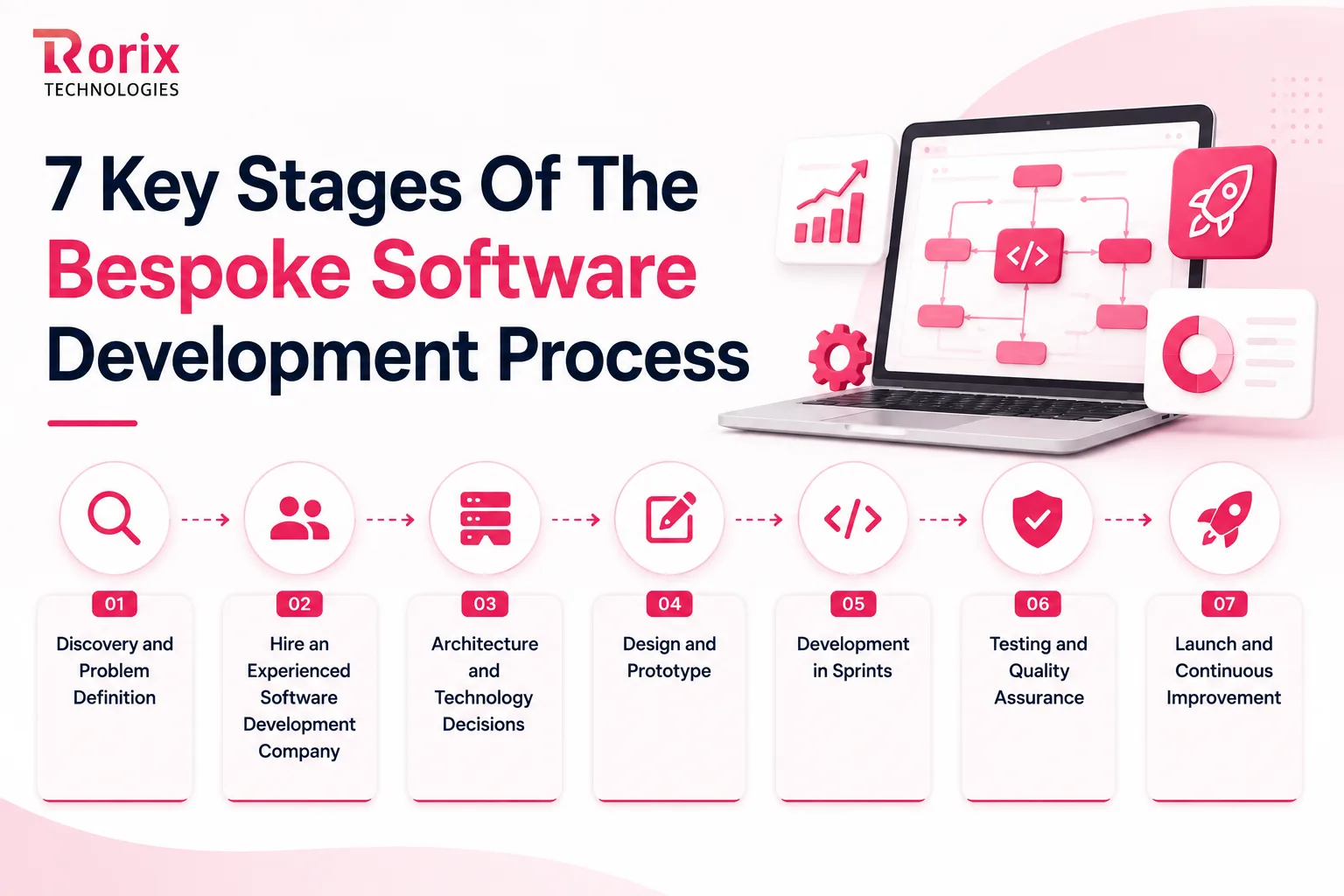
Stage 1. Discovery and Problem Definition
The team understands your business, users, goals, and current workflow, then turns them into clear requirements. You get a prioritized scope, user flows, risks, and an estimated timeline.
Typical time: 1-3 weeks.
Stage 2. Hire an Experienced Software Development Company
Choose a partner with proven startup experience, relevant technology skills, similar projects, and strong communication. Check their portfolio, development process, pricing, and post-launch support before you commit.
Typical time: 1-2 weeks.
Stage 3. Architecture and Technology Decisions
Your development partner selects the right tech stack, database, hosting, security, and integration approach. They should explain these choices in simple terms and show how the architecture can support future growth.
Typical time: 3 days-1 week.
Stage 4. Design and Prototype
The team creates wireframes and a clickable prototype so you can experience the product before coding begins. Test the main flows early and fix confusing areas while changes are still quick and affordable.
Typical time: 2-4 weeks.
Stage 5. Development in Sprints
Developers build the product in short sprints, usually two weeks each. You review working software regularly while the team handles coding and integrations. Keep the backlog focused and avoid adding new features mid-sprint.
Typical MVP timeline: 6-10 weeks.
Stage 6. Testing and Quality Assurance
The team tests functionality, security, performance, permissions, integrations, and critical user flows throughout development. A final QA cycle catches remaining issues before customers encounter them.
Typical final QA: 1-2 weeks.
Stage 7. Launch and Continuous Improvement
The company manages deployment, data migration, monitoring, and handover during launch. After release, analytics and user feedback guide the next improvements. Keep shipping, fixing, and improving based on real usage.
Also Read: Nearshore vs Offshore Software Development
Choosing a Tech Stack Without Locking Yourself In
The right tech stack should be reliable, scalable, and easy to maintain. Avoid trendy choices and focus on technology your team can support as the product grows.
1. Language and Framework
Choose a proven, widely used technology with a strong developer community. It makes hiring easier, gives you access to mature tools, and reduces long-term dependency on one developer or vendor.
2. Database
A relational database works well for most startup products because business data is usually connected. Choose another model only when your product has a clear technical need. Changing databases after launch can be expensive.
3. Hosting and Infrastructure
Start with managed cloud services instead of building complex infrastructure too early. They reduce maintenance and let you scale when traffic grows. Build for your current needs, not traffic you might get someday.
4. Multi-Tenancy for SaaS
For SaaS products, decide tenant isolation early. Shared databases, separate schemas, and separate databases offer different cost and security trade-offs. Choose based on customer, security, and compliance requirements.
5. Mobile: Native, Cross-Platform, or Web First?
A responsive web app is often enough for an early B2B product. If mobile is essential, cross-platform development can support iOS and Android from one codebase. Choose native when deep hardware access or advanced offline features are required.
Simple rule: Choose technology that works well today and leaves enough room to grow tomorrow.
Now that you have the build decisions settled, let us look at who is going to do the work.
Team Models: In-House vs Freelancers vs a Dedicated Partner
The right team model affects cost, speed, flexibility, and risk more than the hourly rate. Choose based on how much ownership and support your product needs.
| Factor | In-house | Freelancers | Dedicated partner |
|---|---|---|---|
| Start time | 2-4 months | Days | 1-3 weeks |
| Cost | Salaries + overhead | Hourly | Retainer or milestones |
| Accountability | High | Split | One team |
| Team coverage | Limited to hires | Varies | Full team |
| Scaling | Slow | Fast | Flexible |
| Management | High | Highest | Low |
| Best for | Mature products | Small tasks | MVP to scale |
When Each Model Fits
- In-house: Best when your product is core to the business, and you can support a long-term engineering team.
- Freelancers: Good for focused tasks such as integrations, fixes, or migrations.
- Dedicated partner: Ideal when you need design, development, QA, and delivery from one accountable dedicated development team without managing multiple people.
Retainer, Fixed-Price, or Time-and-Materials?
- Fixed-price: Best when the scope is clear and unlikely to change.
- Monthly retainer: Gives you flexibility to change priorities as the product evolves.
- Time-and-materials: Works well when requirements are still changing, and reporting is transparent.
- Best practice: Tie payments to clear, measurable deliverables.
Why the Team Model Matters More Than the Rate
- A lower hourly rate does not always mean a lower total cost.
- A cheaper team may require more supervision and create more rework.
- An experienced team may deliver faster with fewer mistakes.
- Compare cost per shipped feature, quality, speed, and management effort, not just hourly rates.
What Bespoke Software Development Costs for a Startup
Cost is one of the biggest concerns for startups. The final price depends on features, complexity, integrations, team size, and location. The table below gives a practical starting range, on the same scale as our custom software development cost guide; for context, the average project reported on Clutch runs about $132,000.
| Scope | Typical Cost | Timeline | What's Included |
|---|---|---|---|
| MVP or validation build | $10,000 to $25,000 | 6 to 10 weeks | One core workflow, basic authentication, 1-2 integrations |
| Simple business application | $20,000 to $90,000 | 3 to 6 months | Roles, dashboards, billing, a few integrations |
| Mid-complexity platform | $90,000 to $250,000 | 5 to 9 months | Multi-tenancy, reporting, mobile, deeper integrations |
| Complex or regulated platform | $250,000 to $500,000+ | 9 to 18+ months | Compliance, security, audit trails, data pipelines |
Regional Rate Differences
Where your development team is based also affects the budget. However, a lower hourly rate does not always mean a lower project cost. Experience, delivery speed, and rework matter just as much. Accelerance's 2026 rate trends report benchmarks how these regional rates move by seniority.
| Region | Typical Hourly Rate |
|---|---|
| North America and Western Europe | $80 to $180+ |
| Eastern and Central Europe | $30 to $85 |
| Latin America | $30 to $75 |
| South and Southeast Asia, including India | $20 to $55 |
A senior team at $50/hour that delivers in 12 weeks can be more cost-effective than a $30/hour team that takes 30 weeks and requires significant rework.
What Drives the Cost?
- Feature complexity: More complex features require more development and testing.
- Integrations: Each integration adds setup, authentication, testing, and maintenance.
- Team seniority: Experienced developers usually cost more but can reduce rework and delivery time.
- Design: Custom UI/UX and user testing can increase the overall cost.
- Security: Advanced security, access controls, and compliance requirements add development work.
- Data migration: Cleaning, mapping, and moving existing data can significantly increase costs.
Build vs. Buy: Compare the Long-Term Cost
A subscription may cost less at first, but expenses can rise as your users grow. Custom software needs more upfront investment but gives you greater control over the product and long-term costs.
Before deciding, compare the three-year cost, including licenses, development, maintenance, hosting, and expected growth. If your usage stays small, an off-the-shelf tool may still be the better choice.
Don't Forget Hidden Costs
- Maintenance: Plan for ongoing bug fixes, updates, and security patches.
- Hosting: Cloud infrastructure and storage costs continue after launch.
- Third-party services: APIs, payment tools, analytics, and other services may add recurring costs.
- Scope changes: New features or changing requirements can increase the budget.
- Internal time: Your team's time for reviews, decisions, testing, and feedback also has a cost.
- Unexpected work: Complex integrations, data migration, or unclear requirements can create extra expenses.
- Maintenance budget: Annual maintenance can typically add 15% to 25% of the original build cost; our software maintenance cost guide breaks down where that budget goes.
Our breakdown of software development outsourcing costs shows how the same brief produces very different quotes, line by line.
7 Ways to Cut Build Cost Without Cutting Quality
Cutting costs does not mean cutting corners. The best savings come from better scope, smarter tools, and efficient teams. These seven changes can lower development costs while protecting product quality.
- Cut scope before cutting rates: Remove features you do not need at launch. A focused MVP saves more than simply choosing cheaper developers.
- Rent the commodity layer: Use existing tools for authentication, billing, email, search, and analytics instead of building them yourself.
- Launch one platform first: Start with the web, validate the product, and add mobile later. Building both together increases development and testing costs.
- Choose a small senior team: Experienced developers can deliver faster with less coordination and rework than a larger mixed-skill team.
- Reuse before rebuilding: Use proven components, libraries, boilerplate, and development patterns to avoid unnecessary work.
- Use offshore delivery strategically: Lower rates work best when the team has clear communication, documentation, and agreed working-hour overlap.
- Avoid premature scaling: Build for your expected growth, not imaginary traffic. Scale infrastructure when real usage requires it.
Who Owns the Code: Intellectual Property, Contracts, and Exit Terms
Before starting a bespoke build, settle ownership in writing. Your contract should clearly cover the code, designs, documentation, data, and handover so there are no surprises later.
1. Clauses to Insist On
Include full IP assignment, repository access, confidentiality, data handling, and subcontractor terms in the contract. Also define the handoff process and avoid proprietary tools that could make you dependent on the development partner.
2. What Technical Due Diligence Checks
Investors and buyers may review your code before funding or acquisition. They look for clean code, documentation, testing, architecture, and license compliance. Unclear ownership or third-party rights can create problems and reduce confidence in the product.
3. Apply the Two-Week Exit Test
Ask whether a new development team could take over the product within two weeks. If everything depends on your current vendor, you have a risk. Keep the repository, documentation, deployment details, and environment setup accessible to your business.
Also Read: SaaS Development Agency Comparison
How to Choose a Bespoke Software Development Partner
Your development partner affects your cost, timeline, quality, and long-term growth. Look beyond price and focus on their ability to deliver and support your product. Our guide to choosing a custom software development company covers the vetting process in depth.
What to Look for in a Partner
- Relevant experience: Check their startup and industry experience.
- Strong team: Confirm who will actually work on your project.
- Clear communication: Look for a simple and transparent process.
- Quality assurance: Make sure testing is part of the development process.
- IP ownership: Confirm that the code and deliverables belong to you.
- Practical advice: A good partner should challenge unnecessary features and suggest simpler solutions.
Questions to Ask Before Signing
- Who will work on my project?
- Have you built similar products?
- How do you handle scope changes?
- How do you manage testing and security?
- Who owns the source code?
- What documentation will I receive?
- What support is available after launch?
- How much time will you need from my team?
- Which features should we buy instead of build?
Red Flags to Avoid
- Very low quotes with unclear scope
- Fixed pricing before proper discovery
- Senior salespeople but junior developers
- Unclear IP ownership
- Weak testing
- No post-launch support plan
- Promises without discussing risks
Compare Partners, Not Just Prices
- Shortlist at least three development companies.
- Give each company the same requirements and project brief.
- Compare their experience, team, process, timeline, scope, support, and total cost.
- Focus on overall value instead of choosing the cheapest quote.
- Choose a partner that works like an extension of your team, not just a coding vendor.
8 Mistakes That Kill Startup Software Builds
Most startup software failures come from a few avoidable decisions. Knowing these mistakes early can protect your budget, timeline, and product quality.
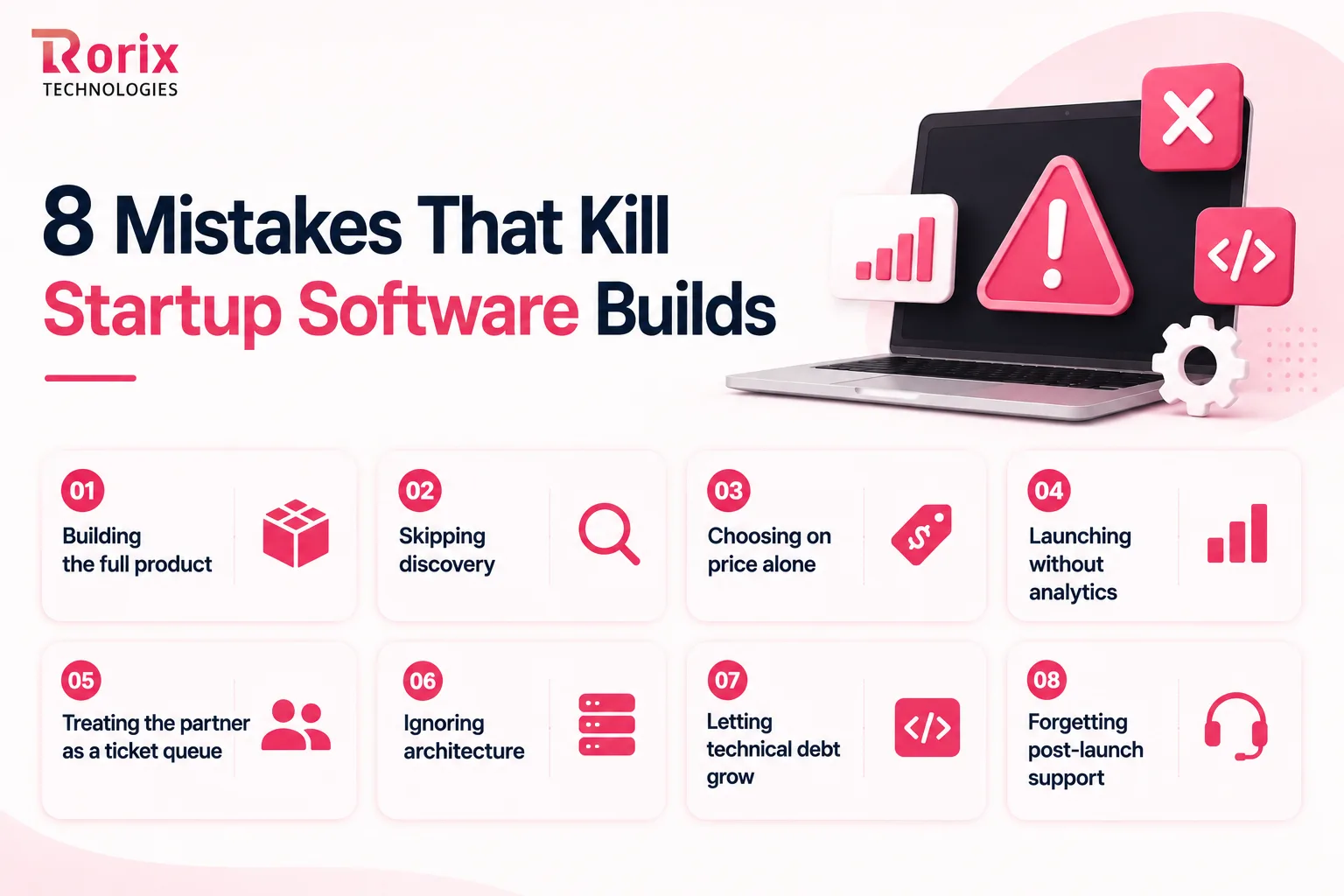
- Building the full product: Trying to build your three-year vision at launch burns runway. Start with an MVP that solves the core problem.
- Skipping discovery: Saving time upfront can create weeks of rework later. Define the workflow and requirements before development starts.
- Choosing on price alone: A cheap quote may exclude testing, documentation, or support. Compare the complete scope and value, not just the rate.
- Launching without analytics: Without usage data, you are guessing what customers need. Set up event tracking before launch.
- Treating the partner as a ticket queue: Developers need to understand the business goal, not just receive feature requests. Give them context so they can identify better solutions.
- Ignoring architecture: Decisions around data, integrations, security, and tenancy become expensive to change later. Set the foundation early.
- Letting technical debt grow: Shortcuts are sometimes necessary, but document them and plan when they will be fixed. Hidden debt becomes expensive later.
- Forgetting post-launch support: Bugs, user feedback, and new requirements start immediately after launch. Reserve time and budget for maintenance and improvements.
After Go-Live: The First Six Months
Launch is only the beginning. The first six months show whether your product becomes a growth asset or a maintenance burden. Track usage, fix problems, and improve based on real customer feedback.
1. What to Measure in the First 30 Days
Track activation, errors, slow processes, and repeated support issues during the first month. If users struggle with the core workflow, fix those problems before adding new features. Let real usage data guide your next priorities.
2. Keep a Consistent Maintenance Cycle
Continue with two-week release cycles after launch. Balance new features with bug fixes, security updates, and technical maintenance. Regular improvements keep the product stable and cost less than stopping development and restarting later.
3. Know When to Scale the Team
Scale when validated work consistently exceeds team capacity, not because the roadmap looks long. If customer needs are still unclear, adding developers can increase development output without improving product direction or solving the right problems.
4. Keep Documentation Updated
Maintain architecture notes, setup instructions, integration details, and failure runbooks alongside the code. Update them whenever the product changes. Good documentation makes maintenance, onboarding, troubleshooting, and future team handovers much easier.
5. When to Bring Development In-House
Consider an internal team when your product is stable, growing, and has a predictable roadmap. A hybrid model can also work well, keeping product knowledge in-house while a development partner provides additional engineering capacity when needed.
Why Startups Choose Rorix Technologies for Bespoke Software Development
Great startup software needs more than developers. It needs a team that understands your business, moves quickly, and stays accountable after launch.
That is where Rorix Technologies stands out. We have delivered 27 software projects across the US, UK, Canada, and Australia, with a 5.0 Clutch rating.
Why startups work with Rorix:
- Built for your workflow: WMS, HRMS, and SaaS products designed around your business, not templates.
- Dedicated expertise: A dedicated team of senior engineers, a named technical lead, and 2-week sprints that feel like an in-house team.
- Integration-ready: 40+ integrations delivered across complex SaaS environments, including mobile apps from a single React Native codebase.
- Built for long-term growth: Proven through 5+ year partnerships, not just short-term projects.
- MVP-focused: We prioritize the shortest credible path to your first paying customer instead of overbuilding.
- Accountable after launch: The same team can maintain, improve, and scale your product as your business grows.
Ready to Build Your Custom Software?
Rorix Technologies can help you define the right scope, choose the right technology, and build a product that is ready to grow with your business.
Book a free consultation and get a project estimate for your custom software project today.
Build What Makes You Different, Buy the Rest
Bespoke software can help startups build a product that fits their workflows, customers, and growth goals. But building custom software does not mean building everything from scratch.
Start with a focused MVP, validate demand, use existing tools for common needs, and choose technology that can grow with your business. Set a clear budget, protect your IP, and work with a development partner you can trust beyond launch.
The goal is simple: build what gives your startup an advantage, avoid unnecessary costs, and create software that can grow with your business.
If you want expert input on your scope, budget, or architecture, connect with our experts and find the shortest practical path from your idea to a working product.
Frequently Asked Questions
What is bespoke software development for startups?
It means building software from scratch around your specific workflows, data, and business needs. You own the source code, roadmap, and intellectual property instead of depending on a fixed third-party product.
How much does bespoke software cost for a startup?
A lean validation build can start around $10,000, and most MVPs run $10,000 to $25,000. Mid-complexity platforms run $90,000 to $250,000, and complex or regulated builds can exceed $250,000, depending mainly on features and integrations.
How long does it take to build bespoke software?
A lean build, which covers most MVPs, can take 6 to 10 weeks. Complex integrations, compliance requirements, and larger scopes can extend the timeline.
Should a startup build custom software or use off-the-shelf tools?
Build custom where software gives you a competitive advantage. Use existing tools for common needs such as accounting, payroll, email marketing, and customer support.
Who owns the source code when a startup outsources development?
You should own it if the contract clearly states full IP assignment. Ensure you have repository access from the start and that the vendor does not retain unnecessary rights to your code.
What is the difference between an MVP and a full custom build?
An MVP proves the core idea with real users using only the essential features. A full build adds more functionality, integrations, polish, and scalability after the core product has been validated.
Is bespoke software secure enough for a regulated startup?
Yes, when security is designed from the beginning. Your product should include appropriate encryption, access controls, audit logs, compliance requirements, and data protection based on your industry.
When should a startup move development in-house?
Consider moving in-house when the product is stable, the roadmap is predictable, and your runway supports full-time engineering costs. A hybrid model can also combine internal product knowledge with external development capacity.
Costing a custom build?
A dedicated team of senior engineers with a named technical lead on every engagement. Send us the problem and you get back a scope and a price.
Continue learning
Written by
Renish DadhaniyaFounder & Director, Rorix Technologies
Renish co-founded Rorix Technologies and drives the engineering and delivery culture across the organization. Beyond engineering, he leads the company's sales, finance, and HR operations, building the infrastructure that lets the team focus on shipping quality software. With deep hands-on expertise in architecture and team building, he ensures every project lands on time to the quality standards clients demand.
View full profileRelated articles
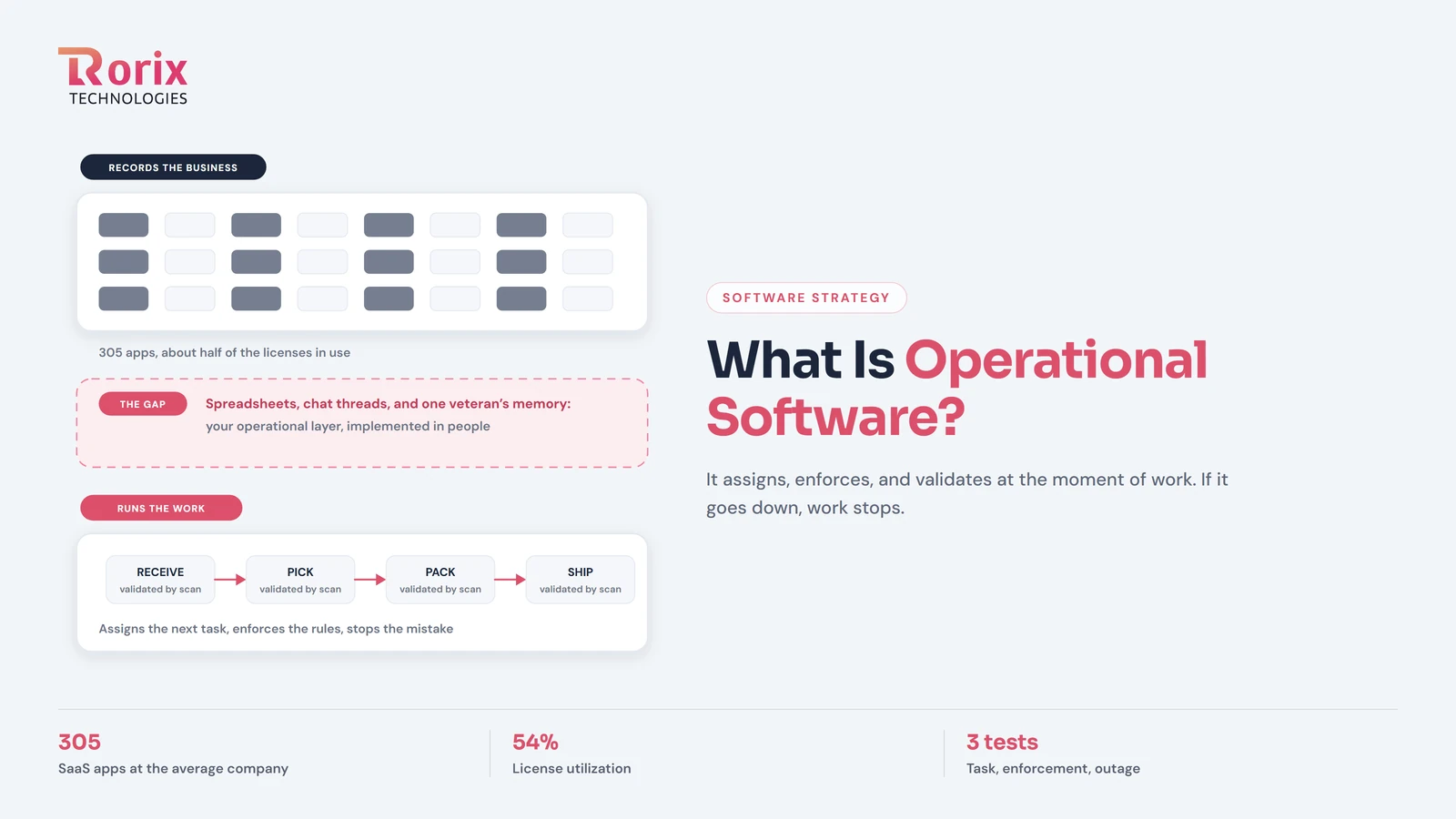
What Is Operational Software? The Layer That Runs the Work
Operational software executes the work itself: it assigns tasks, enforces rules, and validates as work happens. How it differs from record-keeping tools.
Read article
15 Best Small Software Development Companies for Startups in 2026
Compare the best software development companies for startups in 2026. See team size, engagement model, and fit for MVP, SaaS, and product builds.
Read article
SaaS Development Cost in 2026: Pricing by Stage, Features and Team
Explore SaaS development cost in 2026, with pricing by product stage, features, team, and timeline, plus hidden expenses and ways to save money.
Read article