
SaaS Product Development: The Complete Guide From Idea to Launch (2026)
Planning a SaaS build? The 10-phase process from validating demand to pricing, tenancy, and launch, with realistic timelines, cost bands, and metrics.
On this page78 sections
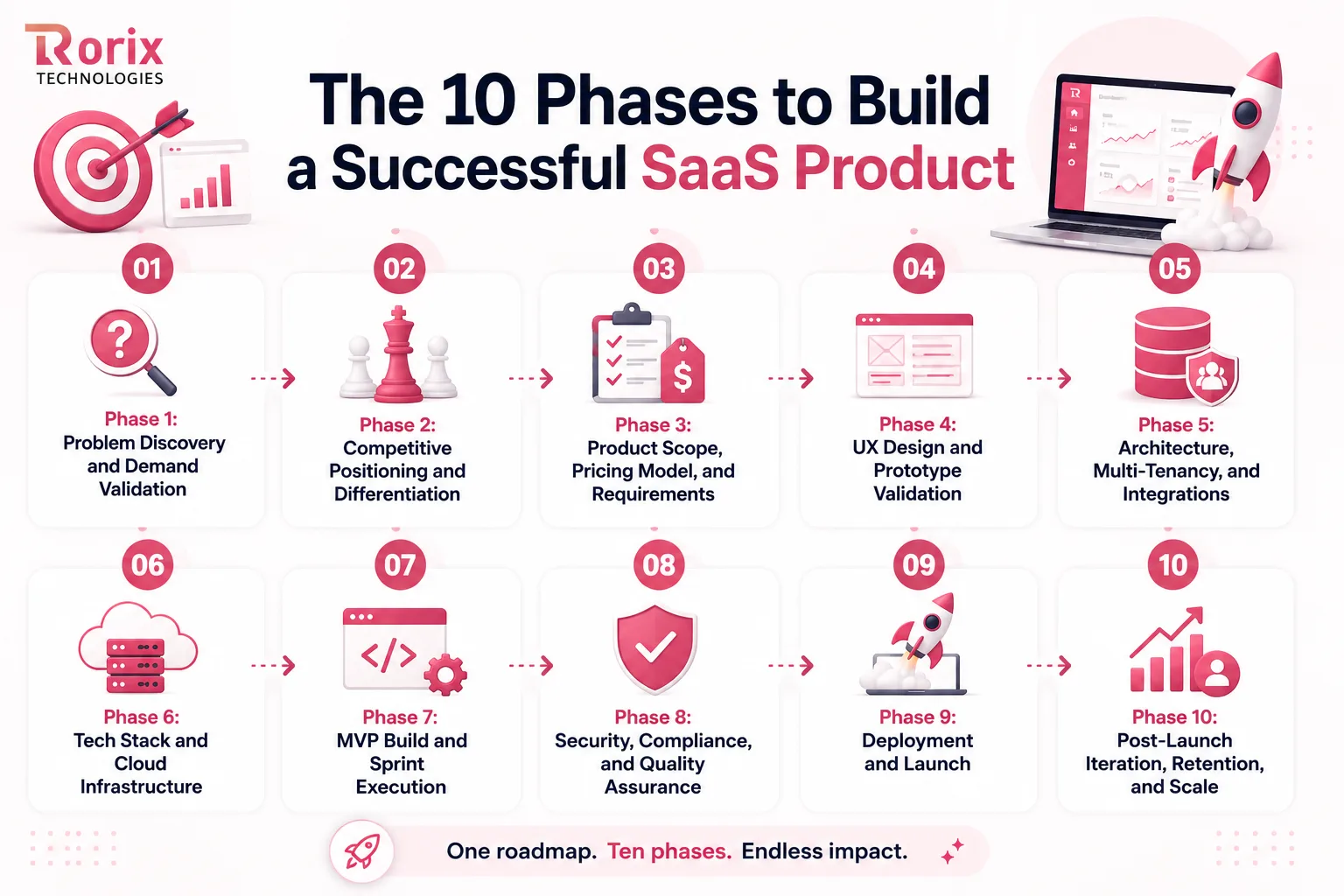
Building a SaaS product runs through ten phases: validate demand, position against competitors, set scope and pricing together, design for the roles who will use it, choose a tenancy model, pick a stack, build the MVP in sprints, secure and test it, launch with a rollback path, then iterate on retention. Most of the risk sits in the first five.
The pitch version is shorter: have an idea, build the software, launch it, sign customers. What it leaves out is every decision that costs nothing this month and a rebuild next quarter. Before any code exists, you need to know whether people want the product, what to build first, how you will charge for it, how one customer's data stays separate from another's, and what happens to all of that when usage grows.
Get those right and the build moves faster with fewer reversals. Get them wrong and you spend months reworking a product that already has paying users on it. That is why SaaS product development starts with a plan rather than an idea.
In this guide, you'll learn:
- What building a SaaS product involves, and how it differs from traditional software
- The 10 phases, from demand validation through post-launch scale
- Realistic timelines for a prototype, an MVP, version one, and an enterprise platform
- What the build costs and which decisions actually move the number
- In-house team vs freelancers vs a dedicated product team
- The activation, retention, and revenue metrics worth tracking after launch
- The 5 mistakes that kill SaaS builds, and the moment each one is cheap to fix
Key Takeaways: The Five Decisions That Shape a SaaS Build
- Demand validation is the cheapest insurance you can buy. Four weeks of interviews and a smoke test before four months of engineering is the trade that saves most failed builds.
- Pricing is an architecture decision, not a marketing one. What you meter, gate, and bill decides what your data model and billing layer must carry from day one.
- Tenancy comes before the first sprint. Adding isolation later touches your schema, your queries, and your permissions at the same time.
- A production MVP is one complete outcome, not a thin version of everything. That is roughly 6 to 10 weeks with auth, roles, tenancy, and working billing included.
- Launch is an operational event. Onboarding, billing, support, documentation, monitoring, and a rehearsed rollback all have to be ready on the same day the product is.
What Building a SaaS Product Actually Involves
Two things separate this from a project build. You own the running system, and the customer can leave at the end of any billing cycle. Everything else follows from those two facts.
A SaaS product serves many customers on shared infrastructure, ships changes continuously, and has to earn its subscription every month. The work starts before the first line of code, with understanding the customer, and it does not stop at launch. Every decision in between should answer one question: does this help users get value, and does it give them a reason to stay?
SaaS Product Development vs Traditional Software Development
| Aspect | SaaS product development | Traditional software development |
|---|---|---|
| Release rhythm | Continuous delivery, small and frequent | Versioned releases, months apart |
| Tenancy | Multi-tenant by default | One install per customer |
| Revenue | Recurring subscription | One-time license or project fee |
| Customer risk | Churn happens instantly | Switching is slow and costly |
| Feedback loop | Live telemetry shapes the roadmap | Feedback arrives between versions |
| Who runs it | You host, patch, and scale it | The customer's IT team owns it |
| Definition of done | Never final, always improving | Complete at release |
If you are still deciding whether to build at all, the build vs buy decision framework is the better first read. This guide assumes that decision is already made.
The SaaS Product Development Process: 10 Phases From Idea to Launch
Good code is the easy half. These ten phases cover the decisions around it, from proving somebody wants the product to keeping the customers who sign up for it.
Phase 1: Problem Discovery and Demand Validation
Validated demand is the best insurance you can buy at the start of the SaaS development lifecycle. Skip it and you can spend a year building something nobody funds.
This phase has one job: prove that a specific group of people has a painful, recurring problem they already spend money trying to solve.
Run 20 Customer Discovery Interviews
Start with at least 20 people who face the problem regularly. Ask how they handle it today, which tools they use, where the workflow breaks, what they have already tried, and what the problem costs them in time, money, or credibility.
Keep the conversation on their current experience, not your solution. When the same pain surfaces repeatedly without prompting, you have evidence of a real problem. If people describe it as a minor inconvenience, keep investigating before turning it into a product.
Test Willingness to Pay With a Smoke Test
Interviews reveal what people say. A smoke test shows what they will act on. Build a simple landing page around the outcome you intend to deliver, and ask for a commitment that costs something.
A paid pilot, a deposit, a card capture, or a booked onboarding call is a far stronger signal than an email signup. Add a clickable prototype and watch prospects use it, because that is where their expectations and your assumptions separate.
Measure Product-Market Fit Before Scaling
Once early users have something to use, measure fit instead of guessing at it. The widely used benchmark asks how users would feel if they could no longer use the product. Sean Ellis derived it from surveying close to a hundred startups, and First Round Review's account of how Superhuman used it is the clearest published write-up of the method.
If fewer than 40% say they would be very disappointed, you have not found fit yet. Keep iterating on the core workflow instead of adding surface area. Run the same survey on a schedule and compare results over time, because the trend tells you more than any single score.
Phase 2: Competitive Positioning and Differentiation
Thousands of vendors compete in every serious SaaS category. Positioning decides whether your build reads as a genuine alternative or as an also-ran with a shorter feature list.
Do the work now, because it determines what you cut from scope in the next phase.
Audit What Competing Products Actually Do
Sign up for the top five competitors and use each product properly for at least a week. Marketing pages tell you what a company wants to be known for. Onboarding, empty states, pricing pages, integrations, and support documentation tell you how the product really works.
Look for what they prioritize, who they target, what they charge for, and where customers get pushed into workarounds. Those gaps are more useful than any feature list.
Four Ways to Differentiate in a Crowded Category
You do not need a new category to win. You need one axis where you are clearly better for a specific buyer.
- Go deep on one vertical: Build for a single industry workflow instead of a generic use case, so your defaults match how that buyer already works.
- Own the integration surface: Connect to the tools your buyer already runs, because a product that fits their stack replaces a workaround instead of adding one.
- Serve a neglected segment: Larger vendors walk away from smaller accounts and unusual requirements, and those gaps are frequently profitable.
- Compete on time to value: If your onboarding delivers a real outcome in an afternoon, you win deals against products that need a six-week implementation.
Pick one axis and commit to it. Products that try to win on all four end up unclear on every one of them.
Phase 3: Product Scope, Pricing Model, and Requirements
Here is the call most guides get wrong. They treat pricing as a marketing topic for later, when pricing is a scoping decision that dictates your architecture.
Your pricing model determines what you meter, what you gate, and what your billing layer has to track from day one. Decide it now, while changing it still costs nothing.
Scope the Smallest Version That Proves One Outcome
Your first release should solve one complete problem for one specific user, not cover several workflows partially or lean on placeholder screens. Define one clear customer outcome and build only toward it.
Everything else waits for a later release. That is the whole discipline, and it is the same test that separates a real MVP from a small version of the full product.
Choose Your Pricing Model Before Your Architecture
Each pricing model forces different infrastructure into the product. Choosing late means retrofitting a billing stack after launch, which is one of the most expensive refactors in SaaS.
| Pricing model | What the product must support | Where teams get caught |
|---|---|---|
| Flat subscription | Plan records, renewals, proration | Very little expansion revenue later |
| Per seat | Seat counts, invites, mid-cycle changes | Shared logins and stale seats |
| Usage based | Event-level metering, aggregation, rating | Metering added late forces a rebuild |
| Tiered plans | Feature flags per plan, self-serve upgrades | Gating logic scattered through the codebase |
| Freemium | Usage limits, abuse controls, upgrade triggers | Free-tier infrastructure cost outruns revenue |
Most B2B products land on tiered plans with a usage component. That combination gives you a predictable base and room for accounts to grow without a sales call.
Build the Billing Infrastructure Your Pricing Model Forces
Three components carry almost every SaaS billing setup. Get them in early and later pricing experiments become configuration rather than engineering.
- Real-time metering: Record billable events as they happen, not in a month-end batch job, so usage and invoices never disagree.
- A billing integration: Connect a provider such as Stripe or Chargebee to that metering layer, and let webhooks drive subscription state inside your product.
- Self-serve plan logic: Let customers upgrade, downgrade, and add seats without a human, because manual plan changes stop scaling almost immediately.
Treat billing as a core domain, not a bolt-on. On our own SaaS engagements, the database schema and the billing webhooks are designed together, before feature work begins.
Write Down the Requirements That Are Specific to SaaS
A generic requirements document misses the things that break SaaS products. Your specification needs a section a project-based build never has.
- Tenancy and data isolation: How customers share infrastructure and exactly where their data is separated.
- Self-service provisioning: How a new account, workspace, and first user get created without support involvement.
- Roles and permissions: Which actions each role can perform, including admin, billing, and read-only access.
- Audit logging: What gets recorded, who can see it, and how long it is retained.
- Compliance obligations: Which standards apply to your buyers and which controls they require.
- Integration requirements: Which external systems must connect, in which direction, and at what frequency.
- Performance thresholds: Expected concurrency, response times, and acceptable degradation under load.
Keep the document short and specific. Its purpose is removing ambiguity, not producing paperwork.
Prioritize With MoSCoW or RICE Instead of Opinion
Feature creep raises SaaS costs quietly, through small additions that each look harmless. Use a framework such as MoSCoW or RICE to rank features by necessity, impact, reach, confidence, and effort.
The framework matters less than applying it consistently. A shared prioritization standard keeps decisions tied to value instead of seniority or personal preference.
Phase 4: UX Design and Prototype Validation
Decisions made in Figma cost a few hours to change. The same decisions made after development starts cost sprints.
This phase protects both budget and adoption, so treat it as engineering work rather than decoration.
Design for Roles, Not One Generic User
A SaaS product usually serves several roles with different goals. Admins manage access, team leads track performance, and daily users need to finish a task quickly.
Give each role a focused experience instead of one crowded dashboard. Support tenant-level settings so customers can adjust terms, fields, and defaults without you maintaining separate interface versions.
Make Onboarding Part of the Product Architecture
Onboarding exists to get users to value quickly, not to give them a tour. Define three to five activation events, design the shortest path to each, and track where people drop off.
Introduce features progressively rather than all at once. A focused first-run flow lifts activation, and activation is the metric everything downstream depends on.
Test the Prototype Before Writing Code
Build a clickable prototype of the core workflow and put it in front of five to ten real users before development starts. Watch where they hesitate, take the wrong path, or misread the interface.
Fix those issues and test again. Two prototype iterations regularly save weeks of rework once the code exists.
Phase 5: Architecture, Multi-Tenancy, and Integrations
This is the phase that sets your product's ceiling. The decisions here determine how far you can scale, which customers you can serve, and how expensive future changes become.
The goal is not the most sophisticated architecture. It is the foundation that supports your commercial and technical needs without buying complexity you cannot staff.
Choose the Right Tenant Isolation Model
Multi-tenant architecture defines a SaaS product more than any other single decision. The AWS Well-Architected SaaS Lens describes three patterns, and each carries different cost and customer-fit implications.
| Model | How data is separated | Cost to operate | Best fit |
|---|---|---|---|
| Silo | Dedicated resources per customer, often a database each | Highest | Regulated buyers and data residency requirements |
| Bridge | Mixed: some components siloed, the rest pooled, commonly a shared database with a schema per tenant | Middle | Mid-market accounts that want visible isolation |
| Pool | Shared tables secured by row-level access rules | Lowest | Self-serve and SMB tiers at volume |
Whichever model you choose, data partitioning, tenant-aware access control, and zero-downtime migrations have to be designed from the beginning.
Map Your Tenancy Model to Your Commercial Tiers
Tenancy is also a pricing decision. Pooled infrastructure keeps self-serve and mid-market plans affordable to run, while dedicated environments become the answer for enterprise accounts with compliance or data-residency requirements.
Design that flexibility in from the start, so moving one customer to a higher isolation level stays a configuration change instead of a rebuild.
Build API-First and Version From the Start
An API-first approach exposes every core capability through a documented API before the interface is built around it. Postman's 2025 State of the API report found 82% of organizations have adopted some level of API-first practice, which makes it a baseline expectation rather than an advanced move.
Version endpoints from the first release and publish deprecation timelines, because customers will not upgrade on your schedule. Secure them with OAuth 2.0 authorization, short-lived tokens, and tenant-level rate limits so one account cannot degrade another.
Plan Integration Architecture Before the Integrations Arrive
Integrations are rarely optional in B2B SaaS, and they multiply faster than teams expect. Every external system brings its own rate limits, outages, and schema changes, so direct calls scattered through the codebase turn into permanent maintenance.
Put a gateway or middleware layer between your product and external systems, then use queues, caching, and retries to absorb failures. We learned this on Driven, a field-service performance platform with 40+ integrations including HubSpot, Twilio, RingCentral, and Google APIs: the integrations that are queued, retried, and observable survive, and the synchronous hopeful ones do not. The reasoning is set out in full in our API integration strategy guide.
Decide How Real-Time Your Product Needs to Be
Real-time updates add infrastructure and operational cost, so decide based on the workflow instead of making everything live by default. When shared state changes while several people are watching it, push-based updates earn their keep: inventory, order status, collaborative editing.
For everything else, on-demand refresh is usually enough. Make the call early, because real-time behavior is expensive to retrofit. Our breakdown of WebSocket and pub-sub architecture for real-time inventory shows what that infrastructure actually costs to run.
Phase 6: Tech Stack and Cloud Infrastructure
Your stack should be boring, well documented, and hireable. Novelty is a liability when you need to fix production at 2 am or replace an engineer next quarter.
Optimize for the next thousand users, not the next million. You can revisit these choices once real usage shows you where the pressure is.
Pick a Stack That Carries You to a Thousand Users
| Layer | Practical choices | Why it holds up |
|---|---|---|
| Frontend | React, Angular, Vue | Large talent pools and long support cycles |
| Backend | Node.js, Python with Django or FastAPI, Go | Mature ecosystems and strong API tooling |
| Database | PostgreSQL | Row-level security and schema flexibility suit tenancy work |
| Cache and queues | Redis, RabbitMQ, or Kafka | Absorbs integration spikes and background jobs |
| Infrastructure | AWS, Azure, or Google Cloud with Terraform | Reproducible, reviewable environments |
| Delivery | Docker with CI/CD pipelines | Safe, frequent releases without manual steps |
PostgreSQL deserves a special mention for SaaS work. Row-level security gives you a clean way to enforce tenant boundaries inside the database rather than trusting application code alone. On the backend side, our notes on Node.js for enterprise backends cover where that choice holds and where it strains.
Choose Your Cloud Provider and Region Strategy
Pick one primary cloud provider and learn it properly before spreading across platforms. Running two providers early usually doubles the operational work without adding much value. Choose regions based on where your customers are, because latency and data residency both show up in enterprise deals.
Define infrastructure as code from the first environment. Reproducible environments make disaster recovery, staging consistency, and new-engineer onboarding far less painful later.
Know Where Teams Over-Engineer and What It Costs
Premature complexity is the most common self-inflicted delay in an early SaaS product. The CNCF 2025 Annual Cloud Native Survey reports 82% of container users now run Kubernetes in production, which says a great deal about mature platform teams and very little about what a pre-revenue product needs.
For most pre-scale products, a modular monolith on managed infrastructure is simpler and cheaper to run. Extract services later, when a measurable bottleneck justifies the complexity.
Phase 7: MVP Build and Sprint Execution
Decisions are written down and the architecture is agreed. From here, SaaS MVP development is a question of rhythm, visibility, and discipline.
The teams that ship reliably are not the ones with the best engineers. They are the ones with the shortest loop between a user signal and a shipped change.
Ship a Demonstrable Increment Every Two Weeks
Run two-week sprints so something meaningful is demonstrable every fortnight. Compare each increment against the original user outcome, and change the plan when the work stops moving users toward it.
Keep the backlog visible to the founder or client throughout, so progress, priorities, and problems all sit in the same place. That visibility is the difference between a status report and a working relationship, and it is why our software development process puts the board in the client's hands from sprint one.
Set Up CI/CD, Environments, and Release Safety
Set up CI/CD in week one, with local, staging, and production environments that stay consistent with each other. Every push should build, run tests, and report failures quickly.
Add feature flags early so unfinished work can merge safely, ship to selected tenants, and roll back without another deployment.
Write API Contracts Before Implementation
Define the frontend and backend contract before development starts, so both sides can work in parallel without constant coordination. Keep the agreed schema in the repository and review every change to it.
Clear contracts stop integration work from becoming guesswork, and they catch the silent changes that break a release two sprints later.
Instrument Activation From the First Release
Add analytics before the first user arrives, and track the activation events you defined during design. Every backlog item should answer two questions: what user behavior should change, and how will you measure it?
If a feature has no clear user outcome and no measurable signal, it is worth asking whether it belongs on the roadmap at all.
Phase 8: Security, Compliance, and Quality Assurance
Security and compliance are not enterprise add-ons you bolt on before a big deal. They are baseline requirements for any product holding another company's data, and quality sits in the same bracket: a buggy release costs you the exact customers you worked hardest to win.
Put These Security Controls in Sprint One
Some controls take a day now and a quarter later. These belong in your earliest sprints rather than a hardening phase.
- Role-based access control: Enforce permissions server-side on every request, never in the interface alone.
- Encryption everywhere: Protect data at rest and in transit by default, not as a configurable option.
- Tenant-aware authorization: Check tenant ownership on every query so no request can cross an account boundary.
- Audit logging: Record who did what and when, because enterprise buyers ask for it in procurement.
- Secrets management: Keep credentials out of the repository and rotate them on a schedule.
- Automated security checks: Run dependency and static analysis scans inside the pipeline on every commit.
Each of these is a day of work early and a quarter of work after launch. That gap is the entire argument for doing them now.
Know What Enterprise Buyers Ask For
SOC 2, GDPR, and HIPAA are the standards enterprise buyers raise most often. You do not need certification before your first customer, but the product should be built so certification stays possible, with real logging, access control, and disciplined data handling from day one.
Ask your first 10 prospects which standards their security teams require, and put those requirements on the roadmap. The alternative is discovering them in procurement, at the point where they block revenue.
Cover Five Testing Layers, Not One
Quality assurance for SaaS is layered because the failure modes are layered. One test suite cannot protect a product that ships weekly.
- Unit tests: Cover business logic on every commit so regressions surface within minutes.
- Integration tests: Confirm services and third-party connections behave together, not only in isolation.
- End-to-end tests: Protect the critical user journeys where a break stops revenue.
- Load tests: Simulate two to three times your forecast peak before launch, not after.
- Security tests: Probe authentication, authorization, and tenant boundaries deliberately.
Manual testing still has a place for new features without stable acceptance criteria. Anything tested by hand more than three times deserves automation.
Run a Real Beta Before Public Launch
Invite 50 to 100 users who closely match your target customer, ideally drawn from your waitlist, your interviews, or prototype testing.
Set clear feedback expectations and watch behavior alongside opinions. Drop-off points, time spent on a workflow, and repeated errors usually tell you more than the survey responses do.
Phase 9: Deployment and Launch
Launch is an operational event, not a marketing moment. Everything around the product has to be ready on the same day the product is.
Get it right and early momentum compounds. Get it wrong and you burn goodwill that took months to earn.
Deploy With Zero Downtime and a Rollback Path
Keep the product available during releases with blue-green deployment. Deploy to the inactive environment, test it there, then switch traffic while the previous version stays warm. When something breaks, you roll back in seconds instead of turning a small release problem into an outage.
Set Up Observability, SLOs, and Alerting
Put centralized logging and tracing in place before launch, so an incident is something you investigate rather than guess at. Define SLOs for availability, latency, and error rates that reflect the customer experience, then alert against those targets and give every alert an owner. An alert without a response plan is just noise.
Launch Product-Led, Not Loud
A strong SaaS launch sells the product's value, not launch-day noise. Self-serve onboarding, in-app guidance, and a trial that reaches a real outcome do more for conversion than a coordinated announcement.
Start with a soft launch, watch activation and support volume, fix what surfaces, then expand. Keep sales, marketing, and support describing the same promise, because mismatched expectations produce churn in the first month.
Work Through the Launch Readiness Checklist
Most launch problems are process problems. This list covers the items teams forget when engineering finishes late.
- Onboarding path tested: A new customer can sign up, reach first value, and invite a colleague without help.
- Billing verified end to end: Signup, upgrade, downgrade, failed payment, and refund all behave correctly.
- Support workflow live: Channels, response targets, and an escalation path exist and are staffed.
- Documentation published: Setup guides, API docs, and answers to your ten most common questions.
- Security pack ready: Data handling summary, access controls, and a subprocessor list for procurement teams.
- Monitoring and alerting confirmed: Dashboards are live and someone owns the pager.
- Rollback rehearsed: The team has practiced reversing a release, not just documented it.
Walk the list a week before launch, not the morning of. Anything unchecked either gets fixed or gets a named owner and a date.
Phase 10: Post-Launch Iteration, Retention, and Scale
Launch is where you finally get real data. Everything before it was informed guessing.
The work now shifts from building the right thing to keeping the right customers, and the two require different instincts.
Close the Loop Between User Signals and the Backlog
Feedback arrives from support, sales, surveys, and analytics, and the hard part is turning it into roadmap decisions. Bring every source into one workflow and review it on a fixed cadence. Analytics tell you where users struggle, conversations tell you why, and you need both to choose correctly.
Attack Voluntary and Involuntary Churn Separately
Voluntary churn usually points at weak activation, onboarding, or product value, so the fix is helping customers reach outcomes faster. Involuntary churn comes from failed payments and is recoverable without touching the product at all, through dunning, card updates, and a frictionless payment recovery flow. Teams that report one blended churn number tend to work on the wrong half.
Scale Infrastructure Only When Data Demands It
Scale on real signals: slower response times, rising utilization, support tickets about performance. Growth projections are not signals. Start with query optimization, indexing, and caching, then move to horizontal scaling, load balancing, and autoscaling before you consider sharding or multi-region.
Manage Technical Debt Before It Becomes a Risk
Shortcuts are normal. Unmanaged shortcuts become expensive once nobody remembers what was deferred. Keep a visible debt register, allocate part of every sprint to the critical entries, and handle dependency updates and security patches before they turn into incidents. Budgeting for that upkeep is part of the real cost of ownership, which our guide to what software maintenance costs breaks down year by year.
How Long It Takes to Build a SaaS Product
Timelines move with scope, integration count, and compliance load. The ranges below reflect a focused team working on a clearly defined product.
Phase-by-Phase Timeline for a SaaS MVP
| Phase | Focus | Typical duration |
|---|---|---|
| Discovery and validation | Interviews, competitor audit, demand test | 2 to 4 weeks |
| Scope, pricing, and requirements | Feature cut, pricing model, specification | 1 to 2 weeks |
| UX and prototype | Flows, wireframes, usability testing | 2 to 3 weeks |
| Architecture and setup | Tenancy, API contracts, infrastructure, CI/CD | 2 to 3 weeks |
| Core build | Primary workflow, auth, roles, billing, integrations | 6 to 10 weeks |
| Security, QA, and beta | Controls, test layers, closed beta | 2 to 3 weeks |
| Launch | Deployment, onboarding, monitoring | 1 to 2 weeks |
Those phases overlap in practice, which is why a production MVP lands around 6 to 10 weeks rather than the six months the rows add up to.
How MVP, Version One, and Enterprise Timelines Compare
| Product tier | What it delivers | Realistic timeline |
|---|---|---|
| Clickable prototype | Validates demand and workflow, no real backend | 4 to 8 weeks |
| Production MVP | One core workflow, auth, billing | 6 to 10 weeks |
| Market-ready version one | Multi-tenant, integrations, admin tooling, analytics | 6 to 9 months |
| Enterprise-ready platform | SSO, audit trails, compliance evidence, high availability | 9 to 18 months |
If your MVP timeline stretches past a year, the scope is too broad. That is almost always a prioritization problem rather than an engineering one.
What It Costs to Build a SaaS Product
Cost follows scope, integrations, and compliance far more closely than it follows hourly rates. Two teams quoting the same product usually differ because they scoped two different products.
Build Cost by Product Tier
| Product tier | Indicative build cost |
|---|---|
| Clickable prototype | Below the MVP band, scoped as design and prototype work rather than a build |
| Production MVP | $10,000 to $25,000 |
| Market-ready version one | $90,000 to $250,000 |
| Enterprise-ready platform | $250,000 to $500,000+ |
A SaaS MVP tends to sit in the upper half of that MVP band, because tenancy, billing, and the first integrations all land in the first release. Once the product outgrows a single workflow, you are in version-one territory and the next band applies.
These are planning bands rather than quotes, and they track the same scale as our custom software development cost guide. That scale is anchored in published market data: the average project reported on Clutch runs about $132,000, and GoodFirms' cost survey puts most small and mid-sized builds between $30,000 and $100,000. For a number scoped to your own feature list, the project cost estimator is faster than a proposal cycle.
What Actually Drives the Number
- Integration count: Every external system needs building, testing, and long-term maintenance, and this line grows faster than most budgets expect.
- Compliance load: Audit trails, access controls, and evidence collection add engineering work well beyond the certification fee.
- Tenancy model: Siloed instances cost more to build and considerably more to operate than a pooled architecture.
- Billing complexity: Usage-based and hybrid pricing require metering infrastructure that flat subscriptions never need.
- Design depth: Multiple roles, configurable tenants, and accessibility standards all expand the design and build effort.
- Team composition: Senior engineers cost more per hour and frequently cost less per outcome, because they avoid the rework.
Who Builds It: In-House Team, Freelancers, or a Dedicated Product Team
The delivery model shapes your cost, your speed, and how much product knowledge you keep. There is no universally right answer, only a right fit for your stage.
Comparing the Three Delivery Models
| Factor | In-house team | Freelancers | Dedicated product team |
|---|---|---|---|
| Speed to start | Slow, hiring takes months | Fast to engage | Fast, team already formed |
| Cost profile | High fixed salaries and overhead | Low rate, variable output | Predictable monthly retainer |
| SaaS architecture depth | Depends entirely on who you hire | Rarely present | Expected as standard |
| Accountability | Fully internal | Fragmented across individuals | Single accountable team |
| Continuity after launch | Strong while retention holds | Weak once the contract ends | Strong under an ongoing retainer |
| Best suited to | Long-term core product with funding | Small, well-defined tasks | Idea to launch and beyond |
Many funded SaaS products start with the third model, on a monthly team retainer, and hire in-house later, once the product has a shape worth defending. Our guide to when a dedicated development team makes sense covers where that model stops fitting, and the comparison of SaaS development agencies covers how to evaluate one properly.
What to Verify Before You Sign
Before choosing a SaaS development partner, check these three things. Each is cheap to confirm now and expensive to discover later. For a shortlist to check them against, see our comparison of top SaaS development companies.
- Production experience: Ask whether they have built and launched products on your stack, not whether they know it.
- Timezone overlap: Make sure their working hours overlap yours enough for real-time decisions, not just handoffs.
- Code ownership: Confirm in writing that you own the source code and project assets on delivery.
Our longer checklist for choosing a custom software development company covers the rest, including the questions that surface how a team behaves when a sprint goes wrong. If you are weighing delivery locations as well as models, the nearshore vs offshore comparison sets out the tradeoffs, and our list of offshore software development companies shows how the market is structured.
The SaaS Metrics That Tell You It Is Working
Vanity numbers feel good and decide nothing. These are the metrics that tell you whether the product, the pricing, and the onboarding are actually working.
Activation and Retention Metrics You Track From Day One
| Metric | What it answers | When to start tracking |
|---|---|---|
| Activation rate | Do new users reach first value | First release |
| Time to first value | How quickly they get there | First release |
| Feature adoption | Which capabilities earn their build cost | After beta |
| Gross churn | How many customers leave each month | From month two |
Watch activation before anything else. If new users never reach first value, no amount of acquisition spend will repair the churn rate later.
Revenue and Efficiency Metrics That Tell You the Business Works
| Metric | What it answers | When to start tracking |
|---|---|---|
| Involuntary churn | Revenue lost to failed payments | As soon as billing is live |
| Net revenue retention | Whether existing accounts grow over time | From month six |
| CAC payback | How long to recover acquisition spend | After the first paid cohort |
| MRR growth | Whether recurring revenue compounds | After the first paid cohort |
Review these monthly against a written hypothesis. A metric nobody discusses in a meeting changes nothing about the product.
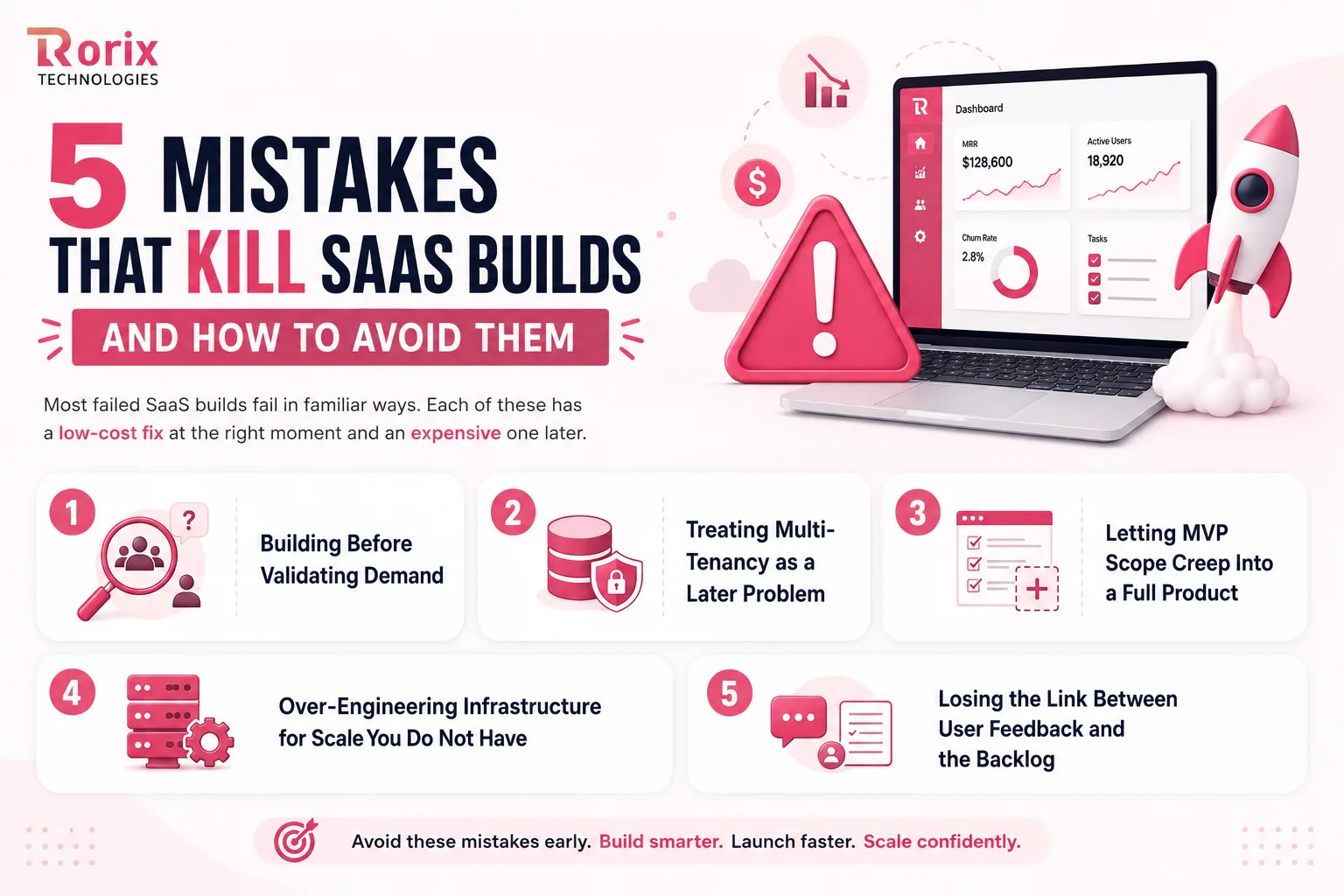
5 Mistakes That Kill SaaS Builds and How to Avoid Them
Most failed SaaS builds fail in familiar ways. Each of these has a low-cost fix at the right moment and an expensive one later.
Mistake 1. Building Before Validating Demand
Teams fall in love with a solution and skip the uncomfortable conversations that would test it. A year later they have a polished product and an empty pipeline. Spend four weeks on interviews and a smoke test before you spend four months on engineering.
Mistake 2. Treating Multi-Tenancy as a Later Problem
Tenancy feels like an implementation detail until an enterprise buyer asks how their data is isolated. Adding it afterwards touches your schema, your queries, and your permissions at the same time. Design the tenancy model before the first sprint, even if you launch fully pooled.
Mistake 3. Letting MVP Scope Creep Into a Full Product
Every added feature looks reasonable on its own, which is exactly why scope creep is hard to see. The result is a later launch and delayed feedback, which is the one thing an MVP exists to buy. Hold every request against your one-sentence outcome and move the rest to a named later release.
Mistake 4. Over-Engineering Infrastructure for Scale You Do Not Have
Microservices, multi-region deployment, and custom authentication all feel responsible and mostly buy complexity. They slow the team, widen the attack surface, and raise the run rate with no user benefit. Ship a modular monolith on managed infrastructure, then extract services when one component measurably breaks.
Mistake 5. Losing the Link Between User Feedback and the Backlog
Insight gathered in calls, tickets, and demos dies in the tool where it was captured. Six months later the team re-argues a question those calls already answered. Give feedback one destination, review it on a fixed cadence, and tie it directly to sprint planning.
Why Teams Bring a SaaS Build to Rorix Technologies
Most SaaS builds do not fail on code quality. They fail because architecture, tenancy, and billing decisions were postponed, and because the team that shipped version one left before version two.
Rorix Technologies has delivered 27 software projects for companies across the US, UK, Canada, Australia, and New Zealand, with a 5.0 rating on Clutch across 4 verified reviews. We design your multi-tenancy model, data isolation strategy, API contract, and integration points before the first sprint.
Here is what that looks like in practice:
- Engineered for the domain: WMS, HRMS, and SaaS platforms built from the workflow up, never adapted from a template.
- Named people, not a bench: A dedicated team of senior engineers with a named technical lead on every engagement.
- Accountable past go-live: Retainer model with 2-week sprints and full task visibility, which is why clients describe us as an in-house team.
- Proven continuity: A B2B sales-intelligence SaaS has worked with the same Rorix engineers for over five years.
- Integration depth: 40+ vendor integrations on Driven's field-service performance platform, with iOS and Android from a single React Native codebase.
- Full stack coverage: End-to-end engineering services across web, mobile, API, and cloud under one accountable team.
Ready to build your SaaS product? Book a free consultation and turn your SaaS idea into a scalable product.
What to Settle Before the First Sprint
The phases in this guide are ordered by how expensive each decision becomes when you defer it. Demand, positioning, scope, pricing, and tenancy all cost days now. Every one of them costs sprints after launch, when there are customers on the other side of the change.
Settle those five first, keep the first release to one complete outcome, and instrument it well enough that the product tells you what to build next. After launch, activation and retention decide whether the rest was worth building, and the teams watching those two numbers weekly are the ones still shipping a year later.
When you are ready to scope it, talk to our engineers about your architecture, timeline, and budget.
Frequently Asked Questions
What is SaaS product development?
SaaS product development is the process of validating, designing, building, launching, and continuously improving cloud-hosted software that customers access by subscription. It differs from traditional development because the product is multi-tenant, ships continuously, and depends on retention rather than one-time sales.
How long does it take to build a SaaS product?
A clickable prototype takes 4 to 8 weeks, and a production MVP typically takes 6 to 10 weeks. A market-ready version one takes 6 to 9 months, while an enterprise-ready platform with compliance and SSO can take 9 to 18 months.
How much does SaaS product development cost?
A production MVP generally falls between $10,000 and $25,000, and a market-ready version one between $90,000 and $250,000, on the same scale as our custom software development cost guide. Integration count, compliance requirements, tenancy model, and billing complexity move the number far more than hourly rates do. Budget separately for the monthly run rate after launch.
How is SaaS development different from traditional software development?
SaaS products are multi-tenant, hosted and maintained by the provider, and released continuously rather than in versions. Customers can churn at the end of any billing cycle, so retention, onboarding, and uptime become engineering concerns rather than purely commercial ones.
Should I use multi-tenant or single-tenant architecture?
Pooled multi-tenancy suits self-serve and mid-market tiers because it keeps operating costs low. Single-tenant or siloed instances suit regulated buyers with data residency or isolation requirements. Design the data layer up front so offering both later stays a configuration change rather than a rebuild.
What should a SaaS MVP include?
An MVP should deliver one complete outcome for one user type, plus authentication, roles, tenancy, and working billing. Anything that does not serve that outcome belongs in a later release, because scope creep at this stage delays feedback and inflates cost. Our guide to what to cut from an MVP works through the line between the two.
Shipping a B2B SaaS product?
We ship SaaS MVPs in 12 weeks on 2-week sprints. Send us your product brief and we will scope the first release.
Continue learning
Written by
Renish DadhaniyaFounder & Director, Rorix Technologies
Renish co-founded Rorix Technologies and drives the engineering and delivery culture across the organization. Beyond engineering, he leads the company's sales, finance, and HR operations, building the infrastructure that lets the team focus on shipping quality software. With deep hands-on expertise in architecture and team building, he ensures every project lands on time to the quality standards clients demand.
View full profileRelated articles
15 Top SaaS Development Companies in 2026
Compare 15 top SaaS development companies in 2026, including pricing, services, timelines, strengths, and tips to choose the right SaaS partner.
Read article
SaaS Development Agency Comparison: How to Evaluate and Choose a Partner in 2026
How to compare SaaS development agencies: what to evaluate, the questions to ask, generalist vs dedicated SaaS teams, and the hiring mistakes that cost most.
Read article
How to Build an MVP: What to Cut, and What You Cannot
How to build an MVP: the test that separates a real MVP from a small product, what you can safely cut, what you cannot, plus honest timeline and cost.
Read article